
The 7-Day Estimate Follow-Up Ladder for Home Service Businesses
Use this seven-day estimate follow-up workflow, message framework, and CRMX build checklist to turn an unanswered quote into a clear next step.

The estimate went out. The customer said they would look it over. Then the conversation disappeared.
That is not always rejection. It is often an unfinished decision with no clear owner and no agreed next step.
The practical fix is a short estimate follow-up ladder: four useful touches across seven days, each designed to uncover the question, make a reply easy, and route the customer toward a decision without turning your team into professional chasers.
The canonical Five Fortune Engines framework treats post-appointment follow-up as its own system. It recommends building the next contact into the process instead of hoping a salesperson remembers. This article turns that principle into a specific CRMX workflow for home-service estimates.
The tactic: follow the decision, not the document
Most bad estimate follow-up sounds like this:
Just checking in to see if you had a chance to review the estimate.
The message asks the customer to do all the work. They must remember the details, decide what is holding them back, and invent the next step.
A useful message does something different. It gives context, asks one answerable question, and offers a route forward.
Use the C.L.E.A.R. framework for every touch:
| Element | What it does | Example |
|---|---|---|
| C — Context | Names the project or estimate | “I sent the estimate for the upstairs HVAC replacement.” |
| L — Lower the pressure | Explains why you are writing | “I want to make the options easy to compare.” |
| E — Easy question | Asks for one simple reply | “Is your main question scope, timing, or budget?” |
| A — Answer path | Offers help in the customer's preferred format | “I can explain it here or on a 10-minute call.” |
| R — Route forward | Gives the next decision | “Should we keep this open, revisit later, or close it?” |
You do not need all five parts in every message. You need the message to do all five jobs across the sequence.
The seven-day workflow
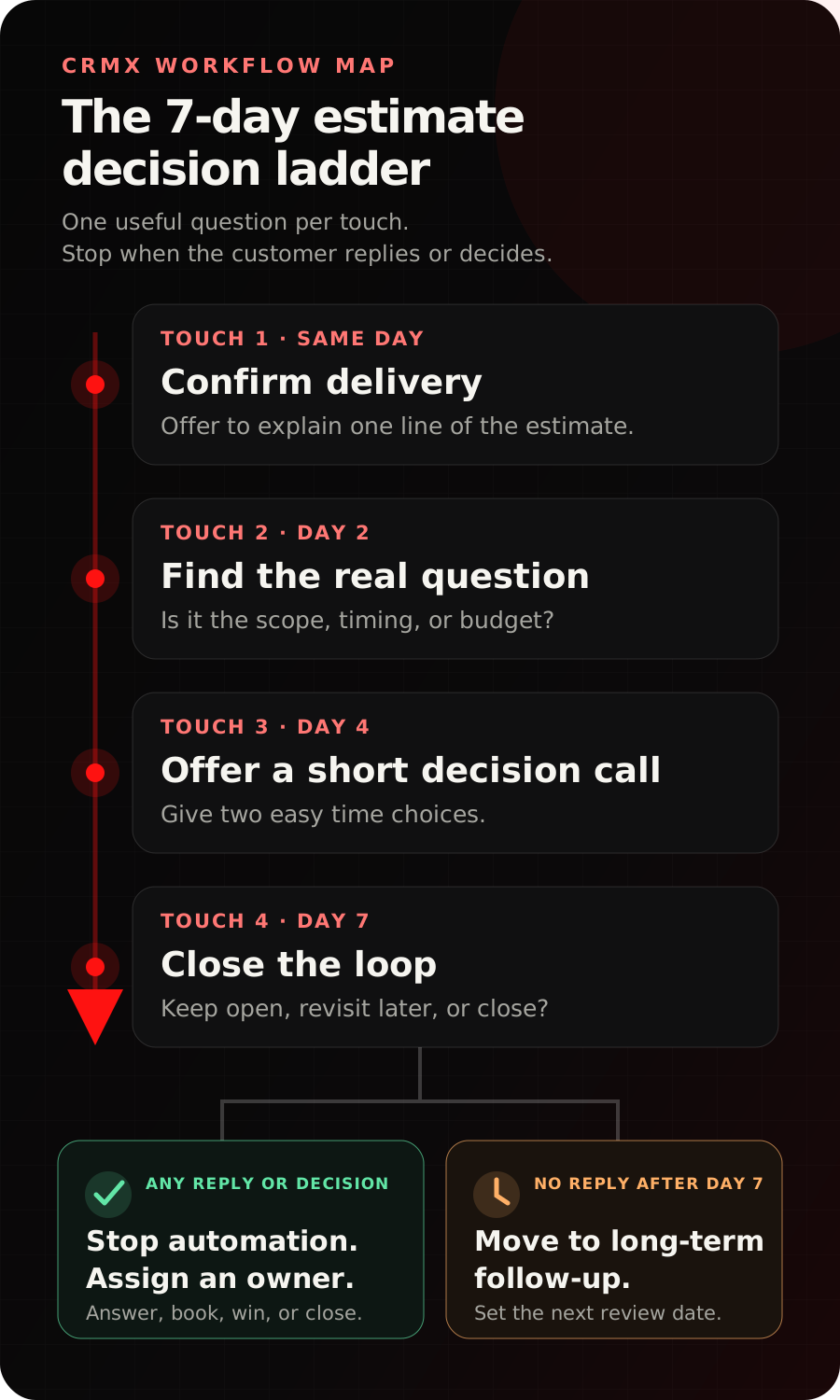
Touch 1: confirm delivery on the same day
Send this after the estimate has been delivered and the customer has had enough time to open it.
Hi [First Name], I sent the estimate for [project]. I want to make sure the options are easy to compare. Is there one line you would like me to explain?
The job is not to close the sale by text. The job is to find the question while the visit and project are still familiar.
If the customer replies, stop the timed sequence. Answer from approved information or hand the conversation to the person who prepared the estimate.
Touch 2: make the hidden question easy to name on day two
People often avoid replying because they cannot summarize what is holding them back. Give them a small menu.
Quick question about the [project] estimate: is the main thing you are weighing the scope, the timing, or the budget? Reply with any one of those and I’ll point you to the useful part.
This is more useful than “following up” because it helps the customer identify the decision they are actually making.
Touch 3: offer a short decision call on day four
Some questions are too detailed for a text thread. Offer a bounded conversation with two choices.
I can walk through the estimate with you in about 10 minutes and make sure the next step is clear. Would [time option one] or [time option two] be easier?
Connect the booking to the correct CRMX calendar. Call it something specific, such as Estimate Decision Call, so the team and customer know what the appointment is for.
Touch 4: close the loop on day seven
The last message should create a clean outcome, not fake urgency.
I do not want to keep chasing you about the [project] estimate. Should I keep it open, circle back later, or close it for now? Any answer is helpful.
This gives the customer three low-friction replies and gives your pipeline a truthful next state.
If they say later, ask when. Record that date and move the opportunity into long-term follow-up. If they say close it, stop the workflow and record the outcome. If they want to proceed, move them into the business's normal acceptance and scheduling process.
Build it in CRMX step by step
This workflow should make ownership visible. It should not hide a customer reply inside more automation.
1. Create the decision stages
Use a small set of pipeline stages that describe what is true now:
- Estimate Delivered — the customer has the estimate and the seven-day ladder is active.
- Question Open — the customer replied and a person or trained AI employee owns the answer.
- Decision Call Booked — a short review is on the calendar.
- Won — the customer accepted and the next operational process begins.
- Lost — the customer declined or the business closed the opportunity.
- Long-Term Follow-Up — the project is still possible, but not on the seven-day clock.
Do not create a stage for every message. Stages should describe the customer decision, not the automation history.
2. Choose one reliable starting event
The simplest starting event is the opportunity entering Estimate Delivered. Train the estimator or office team to move the record only after the estimate has actually been sent.
That one move should enroll the contact in the ladder and record the date. If your current estimate process is inconsistent, fix that handoff before adding more messages.
3. Add the four touches and waits
Build the sequence in order:
- Same-day confirmation message.
- Wait until the next approved contact window or until the customer replies.
- Day-two decision question.
- Wait until day four or until the customer replies.
- Day-four decision-call invitation.
- Wait until day seven or until the customer replies.
- Day-seven close-the-loop message.
- Move a non-responsive opportunity to Long-Term Follow-Up and create a clear next review date.
Use the customer's established conversation channel. Keep each message focused on one job, and test every merge field before activation.
4. Add the stop conditions before turning it on
The ladder should stop immediately when any of these becomes true:
- the customer replies;
- the opportunity moves to Question Open, Decision Call Booked, Won, or Lost;
- the customer asks not to be contacted;
- a team member takes manual ownership;
- the project is no longer valid or the estimate must be rebuilt.
Without stop conditions, a helpful workflow becomes an embarrassing one.
5. Decide what the AI employee may own
A trained CRMX AI employee can help with approved questions, appointment booking, and conversation handoff. Give it bright lines:
- It may explain only approved service and process information.
- It may offer only the calendar and appointment type assigned to this workflow.
- It may not invent availability, scope, discounts, guarantees, or technical conclusions.
- It must route estimate changes, complaints, unusual site conditions, and unclear answers to a human.
The human handoff should include the original request, estimate type, messages already sent, the customer's reply, and the recommended next action.
Example 1: HVAC replacement estimate
A homeowner receives two replacement options after an in-home visit. The first message confirms delivery and offers to explain one line. On day two, the customer replies “budget.”
At that moment, the timed ladder stops. The conversation moves to Question Open, and the assigned team member receives this summary:
- project: upstairs system replacement;
- estimate: two approved equipment options;
- customer question: budget;
- owner: comfort advisor;
- next action: answer the approved payment/process question or book an Estimate Decision Call.
The workflow did not push a discount. It found the decision and gave it an owner.
Example 2: roofing estimate
A homeowner receives an estimate with repair and replacement paths. They do not reply to the same-day message or the day-two question. On day four, the workflow offers a short review call with two time options.
The customer books. CRMX moves the opportunity to Decision Call Booked, stops the remaining touch, and keeps the appointment and conversation attached to the same lead journey.
The estimator opens the call knowing the customer wants clarity, not a repeat of the full sales presentation.
The same tactic for a coach or consultant
Replace Estimate Delivered with Proposal Delivered. Replace the project details with the agreed outcome, scope, and start window. The sequence stays the same: confirm, surface the real question, offer a short decision call, and close the loop cleanly.
For audience-specific examples, explore the CRMX paths for home-service businesses and coaches and consultants.
Copy-and-build checklist
Before activating the ladder, verify every item:
- Verify the customer received the correct estimate.
- Confirm Estimate Delivered has one accountable owner.
- Make sure each message names the project clearly.
- Keep each touch to one primary question.
- Stop the remaining timed messages when the customer replies.
- Stop the workflow for won, lost, booked, and manual-ownership states.
- Check that the decision-call calendar has correct availability and confirmation details.
- Limit AI answers to approved knowledge.
- Route estimate changes and exceptions to a human.
- Test merge fields with a non-customer record.
- Review desktop and mobile messages for clarity.
- Move a no-response outcome to a dated long-term follow-up state.
CRMX connects the pipeline, conversations, calendars, and workflow layer so the estimate can keep moving without losing human control. If you want the broader strategy around this tactic, read the four-phase follow-up framework.
Frequently asked questions
How often should I follow up after sending an estimate?
Use a short sequence with a defined end. This ladder uses four touches across seven days, but the right contact windows depend on the project, what the customer agreed to, and how your team works. The important rule is that every touch has a different job and the sequence stops when the customer replies.
Should every follow-up be automated?
No. Automate the predictable timing and routing. Give a person ownership when the customer asks a question, requests a change, raises a complaint, or needs judgment that is not in the approved knowledge base.
What if the customer is not ready after seven days?
Ask when a future check-in would be useful, record the date, and move the opportunity to long-term follow-up. Do not keep the short decision sequence running indefinitely.
Can an AI employee handle estimate questions?
It can handle the questions you have deliberately trained and approved, then route everything else with context. The estimate itself, technical judgment, exceptions, and promises remain within the boundaries you set.
Put one estimate path to work
Start with one estimate type, one pipeline, one owner, and these four touches. Test the happy path, a customer reply, a booked call, a decline, an opt-out request, and a handoff before expanding it.
If you want to hear how a trained AI employee handles a real conversation, audition Guy live. If you want CRMX to map and build the complete path with you, explore done-for-you implementation services.