
Client Onboarding Automation for Coaches: The CRMX HANDOFF Map
Build a client onboarding automation that moves coaching and consulting buyers from a completed sale to a clear kickoff, owned next steps, and visible progress.

The sale is complete. The prospect said yes. Everyone feels momentum.
Then the new client receives three disconnected emails, cannot find the intake form, books the wrong calendar, repeats the same story to delivery, and wonders whether the confident sales experience was real.
That is not an email problem. It is a handoff problem.
A useful client onboarding automation should do more than send a welcome message. It should convert a sales outcome into a prepared client, a prepared team, and one visible next action. That is the job of the CRMX HANDOFF Map.
The canonical Five Fortune Engines framework connects attention, lead capture, follow-up, conversion, customer advocacy, and automation as one operating system. This article applies all six engines to the first post-sale moment for coaches and consultants: the move from “closed” to “ready to begin.”
Client onboarding starts before the welcome email
The public promise sets an expectation. The capture path stores the buyer's context. Follow-up keeps the decision moving. Conversion confirms that the right person chose the right offer.
Onboarding should inherit all of that information.
If delivery starts from a blank page, the business discards the work performed by its Attention, Lead Capture, Follow-Up, and Conversion engines. If the handoff is clean, onboarding becomes the first working proof of the Raving Fan Engine. Automation then protects that experience without asking the team to remember every repeated step.
The practical rule is simple:
Automate the repeatable path. Assign the relationship. Escalate the exceptions.
That keeps the system useful without pretending every new client has the same needs.
Where coaching and consulting onboarding breaks
Most onboarding leaks sit between systems, people, or states:
- Sales marks the deal complete, but delivery does not know what was promised.
- The welcome message sends, but nobody owns the missing intake.
- The client receives a kickoff calendar before prerequisites are complete.
- A reply arrives in the shared inbox, but the timed workflow keeps sending reminders.
- The kickoff happens, but the pipeline still says “new client.”
- The program begins, but nobody records the moment the client is genuinely onboarded.
Adding more messages can make this worse. The better move is to define the state changes first, then let CRMX workflows, conversations, pipelines, calendars, forms, and reporting support those states.
The CRMX HANDOFF Map
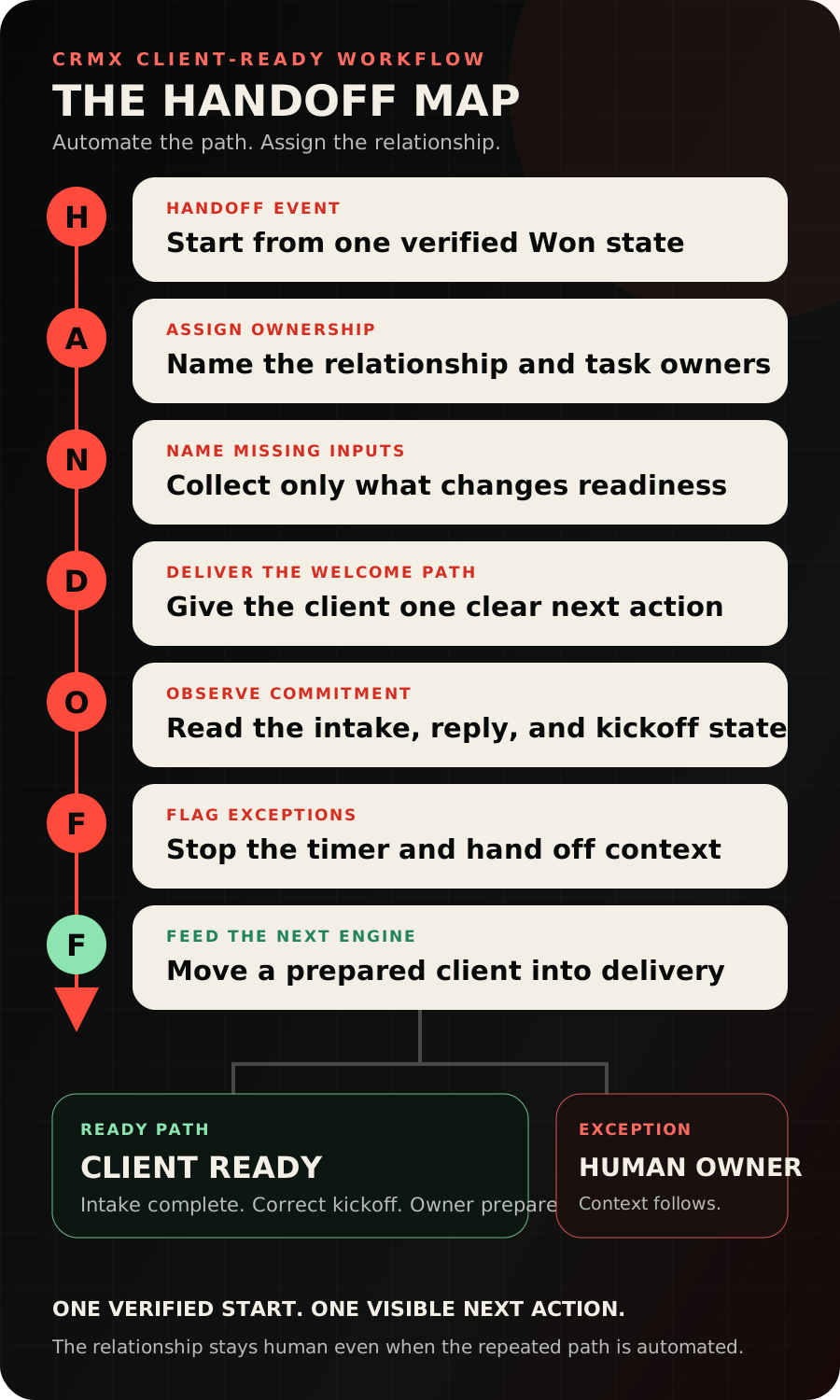
| Letter | Operating decision | Visible output |
|---|---|---|
| H — Handoff event | What verified event begins onboarding? | One approved start state |
| A — Assign ownership | Who owns the relationship and who owns the next task? | Named client owner and due action |
| N — Name the missing inputs | What must be known before delivery can begin? | Short readiness record |
| D — Deliver the welcome path | What does the client need now, in what order? | One clear welcome and intake path |
| O — Observe commitment signals | Has the client completed the required next step? | Completed, waiting, or exception state |
| F — Flag exceptions | What requires a person's judgment? | Contextual human handoff |
| F — Feed the next engine | What closes onboarding and begins delivery or advocacy? | Client-ready milestone and next owner |
The map is deliberately sequential. A calendar link should not race ahead of an incomplete handoff. A reminder should not continue after a client replies with a real question. A completion tag should not substitute for a verified state.
H: use one verified handoff event
Choose the event that proves onboarding is allowed to begin.
For many coaching and consulting businesses, that is the opportunity moving to Won after the team verifies the agreement and required commercial step. The current Opportunity Status Changed workflow documentation supports filtering a workflow around a move to Won and a specific pipeline.
Do not let a form view, proposal send, verbal maybe, or calendar booking start client onboarding by accident. Those events may deserve follow-up, but they do not all mean the same thing.
Record at least:
- offer or engagement purchased
- salesperson or source owner
- delivery owner
- agreed first outcome
- important promise or scope note
- verified onboarding start date
The purpose is continuity, not bureaucracy.
A: assign the relationship and the next action
One person should own the client relationship. A task or workflow can own a repeated action, but the relationship still needs a person.
Use the contact record and opportunity to make ownership visible. Then use an internal alert only when the recipient has something specific to do. The current internal notification workflow documentation supports alerts to selected users, roles, or teams.
A useful internal handoff looks like this:
New client: [name]. Offer: [program]. First outcome: [outcome]. Owner: [person]. Intake due: [date]. Open exception: [none or summary].
That is more actionable than “New sale!”
N: name only the inputs that change readiness
An intake form is not a place to store every question the business has ever asked.
Collect the minimum information needed to prepare delivery. For a coach, that may include the primary goal, current constraint, starting benchmark, preferred communication channel, and relevant stakeholders. For a consultant, it may include project owner, decision makers, access dependencies, existing assets, and the first decision the engagement must produce.
Build the form or onboarding page inside the same customer journey when practical, so the record, conversation, pipeline, and next action stay connected. The CRMX platform brings forms, conversations, records, calendars, pipelines, workflows, and reporting into one operating system.
If a question does not change preparation, routing, ownership, or the next meeting, move it to the moment when it becomes useful.
D: deliver one welcome path
The welcome message should answer four questions:
- What happens now?
- What does the client need to complete?
- Who owns the relationship?
- Where should questions go?
Use one primary call to action. If intake must come before kickoff, do not give the kickoff calendar equal visual weight in the first message. When intake is complete, reveal or send the correct calendar for that offer.
This is where CRMX websites and funnels can become part of delivery, not just acquisition. A focused onboarding page can hold the welcome video, intake form, preparation checklist, and next-step explanation without scattering the client across unrelated documents.
O: observe commitment signals, not message volume
The workflow needs to recognize what the client actually did.
Useful signals include:
- intake submitted
- kickoff booked
- kickoff confirmed
- kickoff attended
- client replied
- prerequisite still missing at the agreed checkpoint
The Appointment Status workflow trigger can distinguish calendar states such as new, confirmed, canceled, showed, and no-show. Use those states to route the next action, not to manufacture a success metric.
Measure movement through the handoff. Do not celebrate three reminder emails as if the client were ready.
F: flag exceptions with context
Automated onboarding should stop or branch when judgment enters the conversation.
Examples include a scope question, access problem, schedule conflict, buyer's remorse, additional stakeholder, refund request, accessibility need, or a reply that changes the plan. The current Customer Replied trigger documentation supports starting a workflow from a contact reply and filtering or routing that signal.
Guy can acknowledge a straightforward question, collect missing context one question at a time, and route the conversation. Guy should not reinterpret the offer, change scope, make a commercial promise, or decide a sensitive exception. Train the AI employee on the approved onboarding role and the exact human handoff boundaries.
F: feed delivery and the Raving Fan Engine
Onboarding is complete when the client is ready for the first real delivery milestone, not when the welcome email sends.
Define one explicit completion state such as Client Ready. Reaching it should hand ownership to delivery, preserve the onboarding summary, and set the next customer-facing expectation.
The experience after the sale is where the Raving Fan Engine begins. A client who feels known, prepared, and guided does not need a spectacular gift to see evidence of care. The handoff itself is part of the product.
Later, the same record can support progress reviews, renewals, testimonial requests, referrals, and re-engagement. Do not automate those requests into the onboarding sequence. Feed a clean customer state into the next appropriate system.
Build the workflow in CRMX
1. Create customer-state pipeline stages
Use stages that describe reality:
- Won — Awaiting Handoff
- Welcome Sent
- Intake Incomplete
- Intake Complete
- Kickoff Booked
- Exception — Human Owner
- Client Ready
The stage is not the task list. It is the clearest answer to “Where is this client now?”
2. Build one onboarding workflow per real path
Start with one offer or engagement type. A group coaching program, one-to-one coaching engagement, and custom consulting project may share components, but they should not be forced through the same calendar, intake, or owner logic.
3. Add stop conditions before reminders
Every timed step needs an exit. Stop or redirect when the intake arrives, the client books, the client replies, a person takes ownership, or the opportunity is corrected.
4. Connect conversations to ownership
Keep replies visible in the shared conversation history. Decide who watches new-client replies, how Guy may help, and how long an unanswered exception can sit before an internal alert is created.
5. Test the handoff with a record you can safely inspect
Run the happy path and the uncomfortable paths: duplicate Won event, missing owner, wrong calendar, incomplete intake, client reply, cancellation, no-show, and manual human takeover.
Automation is ready only when the exits work.
Use case 1: a business coach's group program
A business coach sells a twelve-week group program through a strategy call.
When the opportunity is verified as Won, CRMX assigns the program success owner and sends one welcome page. The page asks for the client's growth target, current bottleneck, starting baseline, and preferred communication channel.
When the intake is complete, the client receives the cohort kickoff calendar and preparation note. If intake is still missing at the checkpoint, the workflow sends one answerable reminder. If the client replies with a fit, billing, or schedule concern, the reminder path stops and the success owner receives the context.
The client reaches Client Ready only when intake is complete and the correct kickoff is booked. Delivery begins with the sales context already attached.
Use case 2: a consultant's custom engagement
A strategy consultant sells a custom engagement involving a founder, an operations lead, and a marketing lead.
The Won event creates the onboarding path, but the intake is different. It captures the executive sponsor, working team, current assets, access dependencies, decision deadline, and first workshop outcome.
The consultant remains the relationship owner. An operations coordinator owns document and access collection. Guy can answer approved logistics questions and route anything that changes scope or stakeholders.
The kickoff calendar appears only after the required stakeholder and dependency fields are complete. An unresolved access issue moves the client to Exception — Human Owner instead of allowing polite reminders to continue indefinitely.
The onboarding readiness decision aid
| State | What CRMX should do | Owner |
|---|---|---|
| Required inputs complete; correct kickoff booked | Move to Client Ready and send preparation | Delivery owner |
| Required input missing; no reply yet | Send the next approved reminder | Workflow |
| Client asks a routine logistics question | Guy answers from approved knowledge or collects one missing fact | Guy |
| Scope, payment, stakeholder, access, or sensitive concern appears | Stop timed reminders and hand off the conversation | Named human |
| Wrong offer, calendar, or owner detected | Correct the record before continuing | Operations owner |
The decision aid prevents automation from confusing silence with consent or activity with readiness.
Copy-ready onboarding messages
Welcome
Welcome, [first name]. Your next step is to complete [intake name] here: [link]. It should help us prepare [specific first milestone]. [Owner name] owns your experience, and you can reply here with any question.
Incomplete intake reminder
Hi [first name], your [intake name] is the remaining step before we prepare your kickoff. Would you like the link again, or is there a question we should answer first?
Human handoff acknowledgment
Thanks for explaining that. I am handing this to [owner name] with the context you shared so you do not have to repeat it. They will continue with you here.
Keep the copy specific to the actual offer. Do not promise response times, access, outcomes, or scope that the business has not approved.
Measure the handoff, not just the sale
Google Analytics currently distinguishes lead-generation events such as generate_lead, qualify_lead, working_lead, and close_convert_lead in its recommended event guidance. That supports a useful measurement principle: a converted lead and a prepared client are different milestones.
Inside CRMX, review counts and time-in-state for:
- Won — Awaiting Handoff
- intake complete
- kickoff booked
- kickoff showed
- Client Ready
- open human exceptions
Use stable contact and opportunity records when reconciling the journey. Do not label a page view, anonymous event, or message send as an onboarded client.
The HANDOFF build checklist
- Choose one verified event that starts onboarding.
- Assign a relationship owner and an action owner.
- Preserve the offer, promised first outcome, and handoff notes.
- Ask only for inputs that change readiness or delivery.
- Give the welcome message one primary next step.
- Use the correct calendar for the purchased offer.
- Define Client Ready as a real, inspectable state.
- Add exits for intake completion, booking, replies, and human takeover.
- Train Guy on approved logistics, one-question-at-a-time intake, and escalation boundaries.
- Test duplicate triggers, missing ownership, wrong routes, cancellations, no-shows, and exceptions.
- Review time-in-state and unresolved exceptions after launch.
- Feed the completed handoff into delivery, then the appropriate Raving Fan path.
Turn the sale into a confident beginning
The best onboarding automation is almost invisible to the client. They know what to do, who owns the relationship, and what happens next. The team receives the context it needs. Exceptions reach a person before the system becomes awkward.
Explore how CRMX supports coaches and consultants, see the connected platform behind the handoff, or audition Guy live to hear how a trained AI employee can acknowledge, collect, and route the next client question.
Sources and further reading
- HighLevel Support: Opportunity Status Changed workflow trigger
- HighLevel Support: Customer Replied workflow trigger
- HighLevel Support: Internal Notification workflow action
- HighLevel Support: Appointment Status workflow trigger
- Google Analytics: Recommended events
- CRMX for Coaches and Consultants
- CRMX Platform
- CRMX AI Employees