
After-Hours Lead Response for Home Services: The CRMX NIGHT Shift
Build a CRMX after-hours lead-response system that acknowledges the inquiry, protects service boundaries, and proves the next owner or booking.
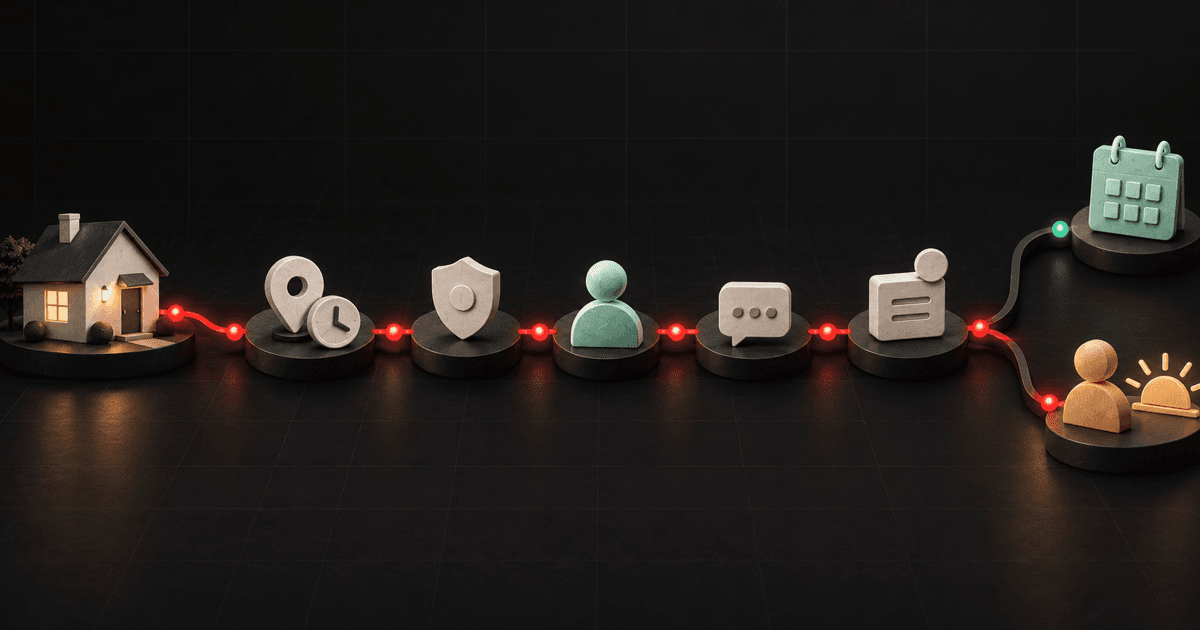
An after-hours lead-response system should do five things before the office opens again: record what created the inquiry, apply the business's approved urgency boundaries, send one useful response, route the right next step, and make the unresolved owner visible.
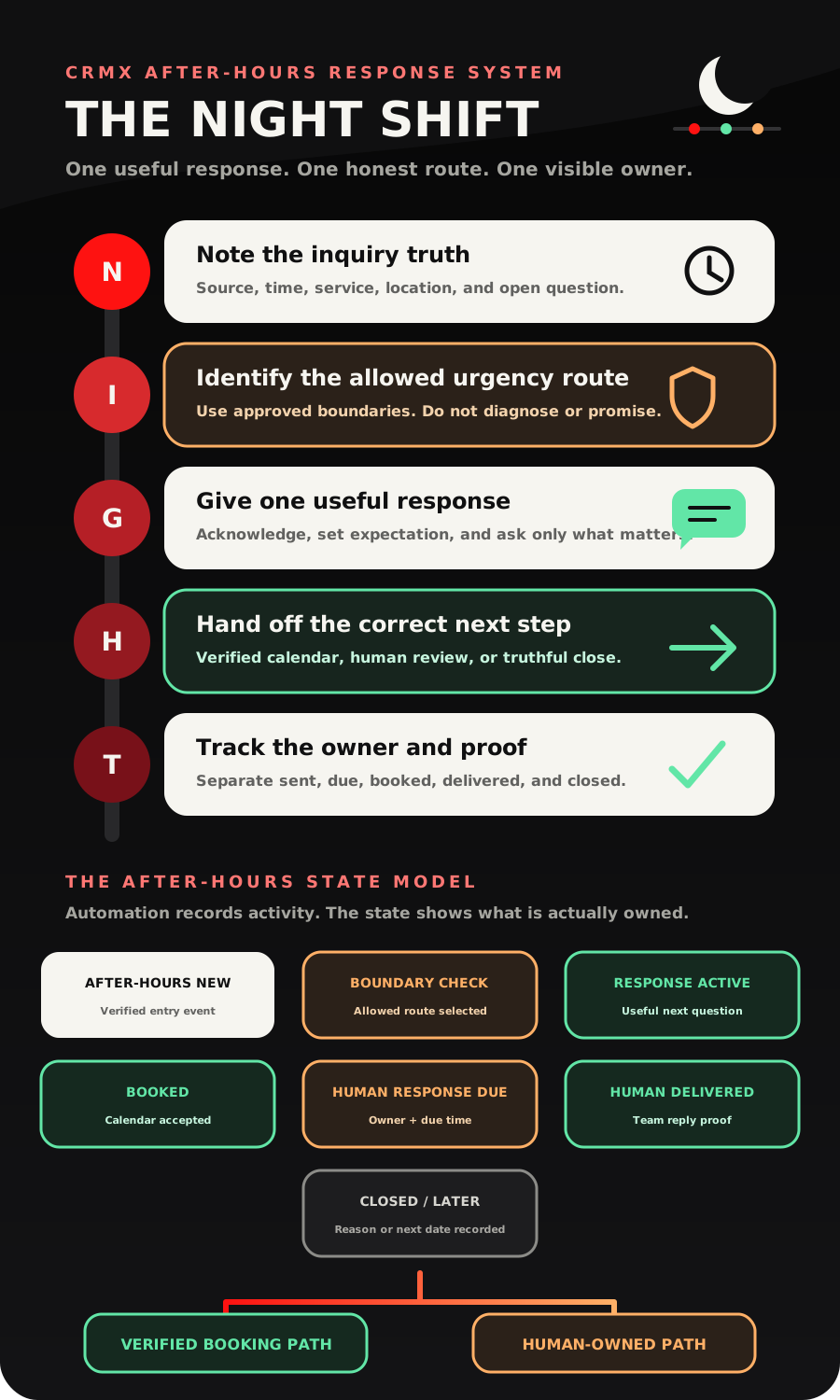
That is the CRMX NIGHT Shift: Note the inquiry truth, Identify the allowed urgency route, Give one useful response, Hand off the correct next step, Track the owner and proof.
The objective is not to make a home-service business sound open when it is not. The objective is to keep a real inquiry from becoming an orphaned message while avoiding false availability, unsupported diagnoses, invented prices, and promises the morning team cannot keep.
Brent Attaway's Five Fortune Engines connects relevant attention, permission-based lead capture, useful follow-up, a prepared conversion path, a designed customer experience, and process-first automation. NIGHT applies those engines at an inconvenient but valuable moment: the prospect raised a hand, the normal team is unavailable, and the system still needs to create one honest next step.
The tactic: respond without pretending the whole business is awake
Google's current Local Services guidance says message and booking leads give customers more ways to reach a provider, including nights and weekends when the phone may not be answered. It also lists responsiveness to inquiries and requests as one input in ad ranking.
That does not mean every inquiry needs an automated sales pitch or an instant appointment.
After-hours response has three separate jobs:
- Protect the context. Keep the source, time, service, location, original words, and campaign promise attached to the contact.
- Reduce uncertainty. Tell the person what the business can do now and what will happen next.
- Create ownership. End in a verified booking, a named human-response state, a truthful close, or a later path with a real date.
The weak version says, "Thanks. Someone will get back to you."
The useful version says, "We received your HVAC service request at 9:42 PM. I can ask two questions now, show you the approved booking options if this request fits that calendar, or send the full context to the on-call coordinator for review."
That is a small but important change. It replaces a dead-end acknowledgment with a bounded operating path.
Define the after-hours response contract first
Before building workflows, answer five questions for each entry source.
What event proves the inquiry exists?
Use a verified event: the selected form was submitted, the customer sent a message, or another approved source created the contact and conversation.
Do not treat a page view, button hover, partial form, ringing phone, or internal notification as a completed inquiry unless the source system explicitly proves it.
The official Form Submitted documentation supports starting a workflow from a selected form. Google's lead-form guidance also recommends routing submissions into a CRM when rapid follow-up matters. Use the event to start an owned process, not merely to send a thank-you message.
What counts as after hours?
Write the real schedule for the source and service line:
- office hours;
- dispatch or on-call hours;
- holidays and exceptions;
- business timezone;
- service-area timezone when different;
- channels allowed to continue overnight;
- the time the morning team must review the queue.
After hours is a business rule, not a universal clock value. An HVAC company may have an on-call service path that a remodeling company does not. A roofing estimate request may wait until the next office window while an approved service issue routes to a different owner.
What may Guy do now?
A trained CRMX AI employee such as Guy may:
- acknowledge the actual inquiry;
- repeat approved business and service information;
- ask a small set of approved questions;
- collect missing contact, service, and location details;
- offer a tested calendar when the route is eligible;
- preserve the conversation for a person;
- explain the approved next-response expectation.
Guy should not diagnose equipment or property conditions, decide that a situation is safe, invent availability, quote an unapproved price, promise a crew, approve a warranty claim, resolve a complaint, or mark a human handoff complete.
What changes the route?
Choose only the facts that create a different next step. A practical first set is:
- requested service;
- service address or area;
- preferred timing;
- whether the request matches an approved urgent-response boundary;
- whether the person wants to book, ask a question, or wait for a person.
Every extra question adds friction. If an answer does not change the route, the owner, the message, or the next step, collect it later.
What evidence closes the step?
Define completion separately for every branch:
- Booked: the intended calendar accepted the appointment.
- Human Response Due: the correct person, context, and due time are visible.
- Human Response Delivered: a person sent the response through the approved conversation path or recorded equivalent proof.
- Closed: the reason is recorded, such as outside service area, duplicate, invalid, declined, or no further contact.
- Later: the reason and next date are real, not a vague promise to circle back.
The CRMX NIGHT Shift
N - Note the inquiry truth
Start the record with the source event and the customer's own words.
The minimum after-hours intake card should contain:
- contact name and reachable channel;
- inquiry source and timestamp;
- requested service;
- service address or area;
- the one answer that changes the route;
- current owner or queue;
- current state;
- next action and due time.
Preserve the source promise too. If the ad offered an inspection, do not answer as if the person requested a same-night repair. If the website form promised a morning response, do not rewrite that expectation as immediate dispatch.
For a selected CRMX website or funnel form, use the exact form filter. If several forms serve different service lines, keep them distinct until the first version is tested. One giant workflow that guesses the context from a contact tag is harder to audit than three small source-specific entry paths.
State after this step: After-Hours New.
I - Identify the allowed urgency route
Urgency needs boundaries before automation.
Use a small decision aid.
Approved urgent escalation
- The inquiry matches the business's written escalation criteria.
- CRMX sends only the approved acknowledgment and instructions.
- The named on-call or escalation owner receives the full context.
- Guy does not diagnose, minimize, or confirm safety.
Normal service and eligible to book
- The service and area are supported.
- The booking path is configured for this request.
- The selected calendar represents real availability.
- Guy may collect the required details and offer that calendar.
Normal service but human review required
- The request is supported, but scope, price, availability, access, parts, warranty, or another exception needs a person.
- CRMX acknowledges the request and creates the morning brief.
- The automation does not manufacture a slot or answer.
Outside service area or unsupported request
- The boundary is verified from approved business rules.
- CRMX gives a truthful, respectful response.
- The record closes with the actual reason unless a person must review an exception.
Unclear
- The answer is missing, contradictory, sensitive, or outside Guy's training.
- CRMX asks one approved clarification or moves directly to human review.
Unclearis not an excuse to keep the bot talking indefinitely.
State after this step: Boundary Check followed by one named route.
G - Give one useful response
The first response should contain three things:
- what CRMX received;
- what can happen now;
- what the person should do next.
The official Conversation AI setup guide documents training, business context, goals, supported channels, modes, qualification logic, booking actions, and other response behavior. Use those controls to train a narrow role. Do not turn a generic bot loose on every service, exception, and promise.
A practical opening is:
Hi [First Name], this is Guy with [Business Name]. I received your [Service] request after our office closed. I can ask two quick questions now and, if the request fits our approved booking path, help with the next available option. If it needs a person, I will keep the details together for [Team or Owner] to review by [Approved Response Expectation].
If the prospect replies, that is new context. The official Customer Replied trigger can start a workflow from a reply and can be filtered by supported details such as channel, tag, intent, phrase, or originating workflow.
Use the reply to change the operating state. Do not let a single keyword make a service, safety, price, or scheduling decision.
State after this step: Response Active, Human Response Due, or a truthful close.
H - Hand off the correct next step
There are two strong after-hours outcomes: a verified next event or an owned human response.
Verified booking path
The official Appointment Booking in Conversation AI guide documents a configured bot gathering required details, offering available slots, and booking on a selected calendar.
Use that only when:
- the service and area fit the tested route;
- the calendar is the correct one;
- the slot represents a real appointment type;
- required booking questions are complete;
- no unresolved exception requires a person;
- the confirmation and downstream reminder path are ready.
A booking is evidence that the calendar accepted an appointment. It is not proof of diagnosis, final price, crew arrival, parts availability, job completion, or customer suitability.
Once the appointment exists, exit NIGHT and enter the separate appointment reminder system.
Human-owned path
When a person needs to decide, create one compact brief:
- who contacted the business;
- when and from where;
- what they requested in their own words;
- answers Guy collected;
- why the route stopped;
- the current state;
- who owns the response;
- when the response is due;
- a direct link to the conversation or record.
The official Internal Notification documentation supports alerting selected users, roles, or teams. Send the alert after the correct owner or queue is known. An alert that says only "New lead" creates more searching at the exact moment the workflow should reduce it.
State after this step: Booked or Human Response Due.
T - Track the owner and proof
Do not use message activity as a substitute for outcome state.
The current Wait action documentation supports time, date, schedule, appointment, reply, team-user reply, action, condition, and advance-window waits. Use that capability to create a morning-review checkpoint and a timeout path if the assigned person has not responded.
The official User Replied trigger distinguishes a delivered message sent by a team user from CRMX Conversations from workflow and Conversation AI messages. That distinction lets the system keep two honest states:
- Human Response Due: the work has an owner and deadline.
- Human Response Delivered: the person sent the response through the measured path.
Assignment is not delivery. A notification is not delivery. A task is not delivery. A green workflow execution is not delivery.
When the human response arrives, record the next state: booked, needs another decision, closed, or later with a date. Do not leave the inquiry permanently labeled New Lead after the team has already acted.
The seven after-hours operating states
After-Hours New
- Evidence: a verified entry event and contact context exist.
- CRMX action: create or update the record and begin the bounded path.
- Owner: the after-hours queue until the route is known.
Boundary Check
- Evidence: the service, area, timing, and route-changing answer are being evaluated against approved rules.
- CRMX action: ask only the minimum approved questions.
- Owner: Guy for bounded collection; a person for exceptions.
Response Active
- Evidence: CRMX sent the approved acknowledgment and the conversation is still within Guy's defined role.
- CRMX action: preserve replies, apply stop rules, and advance only on supported answers.
- Owner: the configured AI employee with a named human fallback.
Booked
- Evidence: the intended calendar accepted the appointment.
- CRMX action: exit NIGHT and enter the booking-confirmation and show-up path.
- Owner: the appointment owner or service team.
Human Response Due
- Evidence: the correct person, context, due time, and reason for handoff are visible.
- CRMX action: alert the owner, wait for proof, and escalate if the approved timer expires.
- Owner: the assigned person, not the workflow.
Human Response Delivered
- Evidence: a person sent the response through the approved measured path or recorded equivalent proof.
- CRMX action: stop incompatible automation and record the next state.
- Owner: the responder until the next event is assigned.
Closed or Later
- Evidence: a reason or future date exists.
- CRMX action: stop the current path and preserve the reason, next date, or suppression state.
- Owner: none for a final close; the named future owner for a later path.
Build the NIGHT Shift in CRMX
1. Start with one source and one service line
Choose one form, chat entry, or approved message source. Choose one service line with clear area, booking, urgency, and ownership rules.
Do not combine emergency service, maintenance, estimates, warranty requests, financing questions, and long projects in the first workflow.
2. Create the minimum fields and states
Use only the data required to route and prove the next step:
- Inquiry source
- Inquiry received time
- Requested service
- Service area or address
- After-hours route
- After-hours owner
- Human response due time
- Human response state
- Appointment state
- Close reason or next review date
Keep job-specific or opportunity-specific facts on the correct record when one contact can have several properties or requests.
3. Train Guy for one bounded role
In the AI employee instructions, define:
- the approved opening;
- the exact services and areas Guy may recognize;
- the questions Guy may ask;
- the facts Guy may repeat;
- the calendar routes Guy may offer;
- the words and situations that require a person;
- what Guy must never diagnose, promise, price, approve, or close;
- the final message for every route.
Give Guy a short job with strong edges. More knowledge is not a substitute for clearer authority.
4. Build separate entry, reply, booking, and handoff workflows
Keep the first version modular:
- Entry workflow: records the source and time, marks
After-Hours New, and sends the approved first response. - Reply workflow: preserves the customer's words, updates the state, and routes the next question or handoff.
- Booking workflow: confirms the verified appointment and exits to the separate reminder path.
- Human-response workflow: creates the brief, assigns the owner, starts the due timer, records delivery, and escalates only under the approved rule.
- Close or later workflow: records the reason, next date, or stop state and prevents incompatible messages.
This architecture keeps the CRMX platform roles clear: websites and funnels capture the request, Conversations preserves the thread, workflows move the state, pipelines expose ownership, calendars prove the booking, and reporting shows where the handoff stalls.
5. Write the morning queue before launch
The office-opening view should answer:
- Which after-hours inquiries are still unresolved?
- Which ones booked?
- Which ones require a person?
- Who owns each response?
- Which due time has passed?
- What did the customer actually say?
- Which route closed, and why?
If the team must open five screens to reconstruct the story, the handoff is not ready.
Use case 1: a late-night HVAC service request
At 9:42 PM, a homeowner submits an HVAC service form.
CRMX records the exact form, timestamp, contact, address, and the customer's description. Guy acknowledges that the office is closed, asks the approved service-area and route questions, and avoids diagnosing the system.
The request does not match the business's approved urgent escalation boundary. It does match a tested diagnostic-visit calendar. Guy offers the real available options, the homeowner chooses a slot, and CRMX marks the state Booked.
The contact exits NIGHT and enters the appointment-confirmation path. The morning team sees the original words, answers, and booking rather than a bare calendar event.
If the homeowner had described a condition outside Guy's authority, the system would have stopped the booking path, repeated the business's approved safety or escalation language, and moved the conversation to Human Response Due.
Use case 2: an evening roofing inspection inquiry
At 7:18 PM, a homeowner sends a chat message after noticing damage from an afternoon storm.
The roofing company does not promise same-night inspection. Guy captures the address, confirms that the request is for an inspection, and asks the one approved question that separates a normal estimate path from human review.
The response needs a person because the customer also asks whether a specific repair will be covered. CRMX does not answer the coverage question. It sends an honest acknowledgment, keeps the original message and collected details together, assigns the estimator queue, and sets the approved morning response time.
At opening, the estimator replies from CRMX Conversations. The User Replied event moves the state from Human Response Due to Human Response Delivered. The estimator then offers the correct inspection path.
The system proves more than "an automation ran." It proves where the conversation went, who owned it, and whether the person responded.
Copy-ready after-hours messages
First acknowledgment
Hi [First Name], this is Guy with [Business Name]. I received your [Service] request after our office closed. I can ask [Number] quick questions now and help with the approved next step. If it needs a person, I will keep the details together for [Team or Owner] to review by [Approved Response Expectation].
Verified booking path
Based on the details you shared, I can help with the available [Appointment Type] options on our [Calendar Name] calendar. These times confirm the appointment window only. [Team or Owner] will confirm any scope, price, equipment, or job-specific details that require review.
Human-review path
Thanks for the context. I am not going to guess about [Open Question]. I have kept your request and answers together for [Team or Owner]. They are due to review this conversation by [Approved Response Expectation].
Outside-service-area response
Thanks for checking with [Business Name]. The address you shared is outside our current service area for [Service]. I do not want to promise an appointment we cannot support. I have recorded the request as outside area and stopped the booking path.
Morning handoff brief
AFTER-HOURS RESPONSE DUE
Contact: [Name and Preferred Channel]
Source and time: [Source] at [Timestamp]
Request: [Customer's Words]
Captured context: [Service, Area, Timing, Route-Changing Answer]
Current state: [State]
Why human review is required: [Reason]
Owner and due time: [Owner] by [Time]
Conversation: [Record Link]
Measure the handoff, not just the send
Track counts and rates from verified states:
- after-hours inquiries by source and service;
- inquiries that received the approved first response;
- contacts who replied;
- eligible inquiries that booked;
- conversations routed to human review;
- human responses due;
- human responses delivered through the measured path;
- overdue human responses;
- outside-area, invalid, duplicate, declined, and no-further-contact closes;
- inquiries moved into a dated later path;
- morning queue age by owner.
Do not treat a sent message, internal alert, created task, workflow completion, or AI response as a booked job or resolved conversation.
The useful operating question is:
Of the after-hours inquiries that needed a person, how many received a verified human response within the business's approved expectation?
That exposes ownership drift without inventing a revenue claim.
NIGHT Shift launch checklist
Business rules
- Define the actual hours, holidays, timezones, and on-call exceptions.
- Approve the service-area, service-fit, booking, urgency, escalation, close, and later rules.
- Name a human owner and backup for every route that can stop Guy.
- Approve every customer-facing message and response expectation.
CRMX build
- Filter every entry workflow to the exact approved source.
- Store source, timestamp, request, route, owner, due time, and state on the correct record.
- Train Guy on the approved knowledge, questions, calendars, and stop rules.
- Keep the reply, booking, human-response, and close paths separate.
- Stop incompatible workflows when the customer replies, books, reaches a person, declines, or closes.
- Expose the morning queue in the pipeline or reporting view the team actually uses.
QA scenarios
- Test an eligible booking request.
- Test an unsupported service.
- Test an outside-area request.
- Test an unclear reply.
- Test an approved urgent-escalation phrase.
- Test a direct request for a person.
- Test a price, warranty, coverage, complaint, access, and safety question.
- Test no customer reply.
- Test no human reply before the due time.
- Test a human reply from CRMX Conversations.
- Test a duplicate submission and a customer with two active requests.
- Test the office-opening queue on mobile and desktop.
Reopen the exact contact, conversation, workflow execution, appointment, opportunity, owner, state, and customer-facing message. A green workflow canvas is not proof that the lead was handled.
Put the after-hours path inside the whole Revenue Flywheel
NIGHT is one initial-contact system. It should hand cleanly into qualification, booking, show-up, conversion, long-term follow-up, and the post-sale experience.
Use the CRMX Revenue Flywheel to map that complete path. If the service-fit questions are still unclear, start with the home-service lead qualification system. If the broader Days 0-10 relay is missing, use the home-service lead follow-up framework.
When you are ready to see the conversation itself, audition Guy live. Then bring one real after-hours entry source, one service line, and one human handoff rule to a CRMX strategy demo so the workflow can be designed around how your business actually operates.
Sources and further reading
- Google Local Services Help: About ad rankings
- Google Ads Help: Best practices for lead form assets
- Official Support: Form Submitted workflow trigger
- Official Support: Create and set up a Conversation AI bot
- Official Support: Appointment Booking in Conversation AI
- Official Support: Customer Replied workflow trigger
- Official Support: Workflow Wait action
- Official Support: Internal Notification workflow action
- Official Support: User Replied workflow trigger