
Maintenance Agreement Renewal Workflow: The CRMX KEEP Loop
Build a CRMX maintenance agreement renewal workflow that opens from a verified end date, routes questions to a person, and records the real outcome.
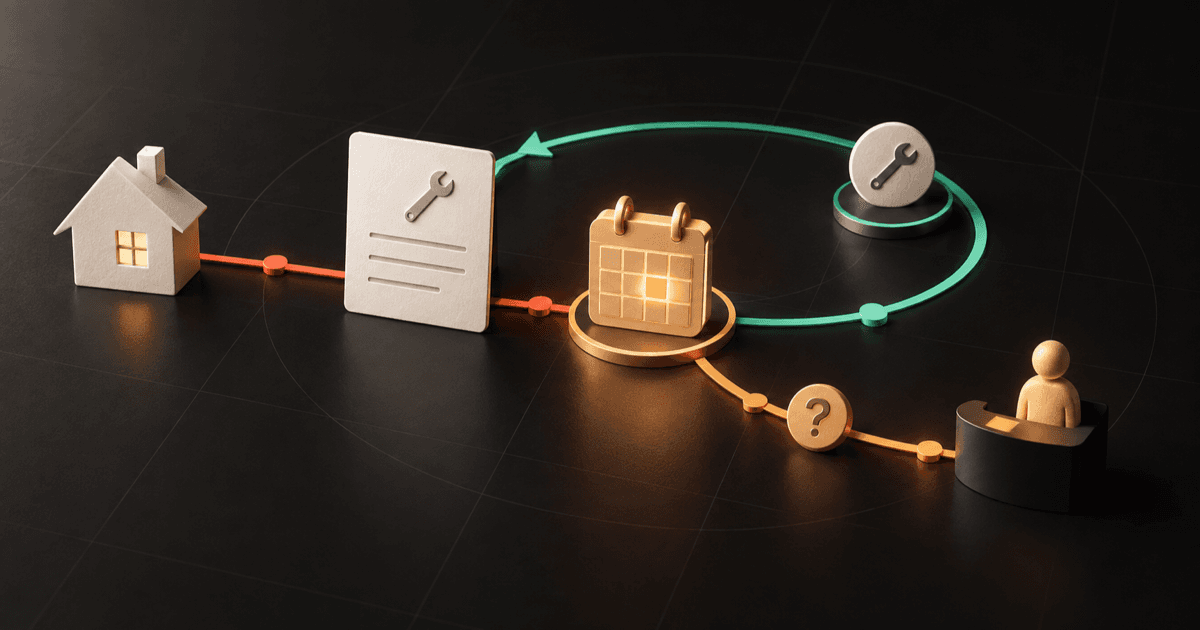
A maintenance agreement renewal workflow should do four things well: start from the correct agreement and end date, open a useful renewal conversation before expiration, send every question or exception to a person, and record what actually happened.
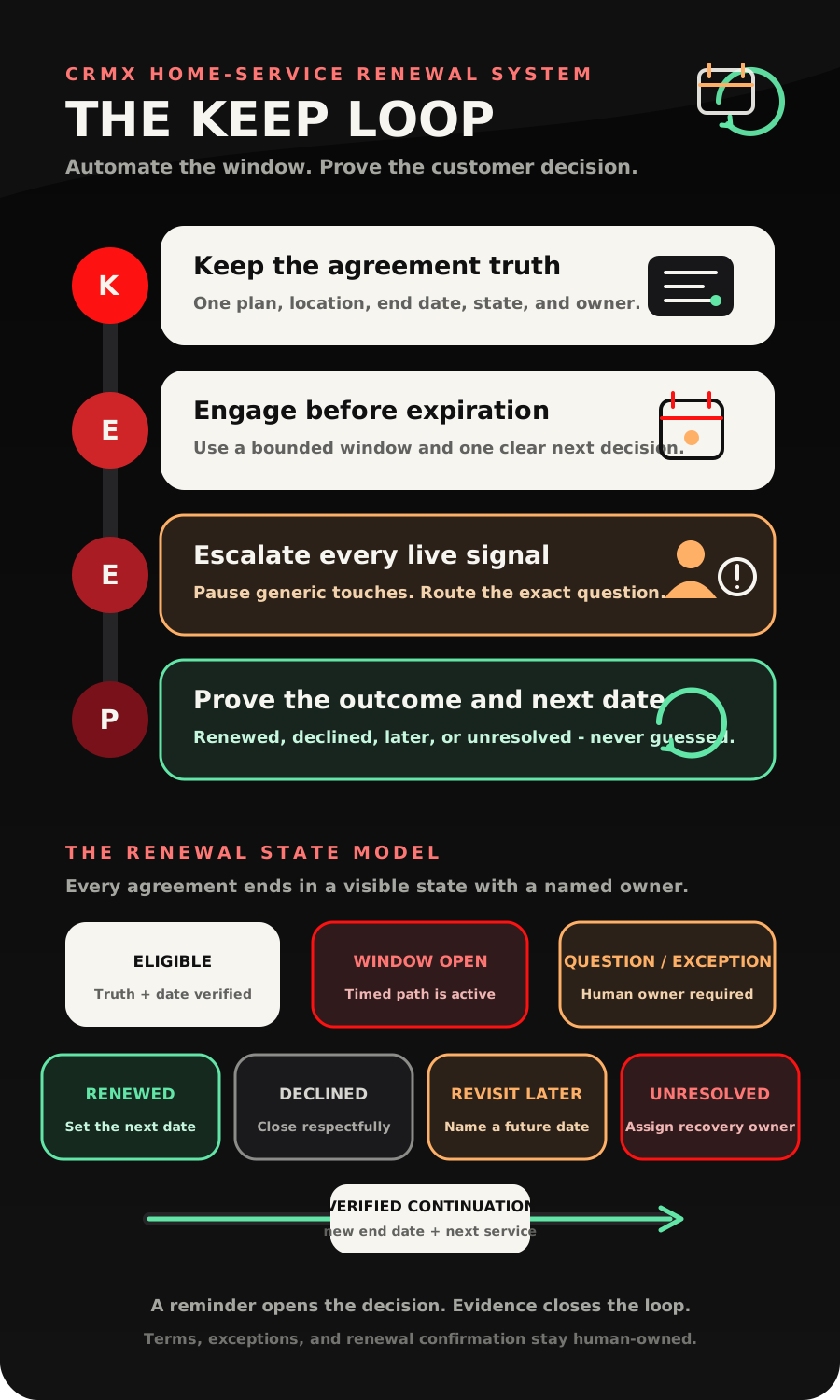
That is the CRMX KEEP Loop: Keep the agreement truth, Engage before expiration, Escalate every live signal, Prove the outcome and next date.
The workflow does not decide contract terms, assume the customer renewed, or turn an unanswered reminder into consent. It handles the repeatable timing and routing so the team can protect the customer relationship and make the real decision visible.
Brent Attaway's Five Fortune Engines connects earned attention, structured lead capture, useful follow-up, repeatable conversion, post-sale care, and automation. KEEP applies those engines after the first sale. It treats renewal as a customer-care process with a clear state and owner, not as one more promotion sent to the entire database.
The strategy: renew one agreement, not one contact
The easiest renewal automation to build is also the most dangerous one: add a tag to a customer, wait until a date, and send a generic message.
That model breaks as soon as one customer has:
- two service locations;
- more than one covered system;
- different plan levels or agreement dates;
- a billing contact who is not the service contact;
- an open service issue;
- a question about what is included;
- a prior request to pause or use another channel.
The customer is not the renewable object. The agreement is.
Before CRMX sends anything, the workflow should be able to identify the exact maintenance or service agreement, its location, the system or service it covers, its current end date, its current state, and the person who owns the next decision.
This is what separates renewal follow-up from the existing seasonal service reminder workflow. A seasonal reminder asks when the next useful service should happen. A renewal workflow asks what should happen to a defined agreement approaching a real end date. Those dates may be related, but they do not mean the same thing.
The CRMX KEEP Loop
K - Keep the agreement truth
Start with a small agreement data contract the team can maintain honestly.
At minimum, keep:
- Agreement ID or Name: the specific plan being followed;
- Customer: the person or company responsible for the decision;
- Service Location: the property the agreement applies to;
- Covered System or Service: HVAC system, plumbing plan, pest-control service, or another defined scope;
- Agreement End Date: the verified date that opens the renewal window;
- Renewal State: the current operating state, not a vague tag;
- Renewal Owner: the person responsible for questions and exceptions;
- Next Action: what should happen next and who owns it;
- Next Action Date: when that step becomes due;
- Approved Communication Path: the channel and sender the business has approved for this relationship.
Use contact fields only for durable person-level facts. If the same customer can have several locations or agreements, keep agreement-specific facts on the intended opportunity, custom record, or other approved agreement record. Do not overwrite one plan's end date with another because the contact record was easier to reach.
The official Update Contact Field documentation confirms that workflows can change supported standard and custom contact fields. That capability does not make contact fields the right home for every fact. The data model must still match the business reality.
When the business already manages each renewal as an opportunity, the Update Opportunity action can change supported details on the existing opportunity when the correct record is in context. The documentation also makes the important boundary clear: a non-opportunity trigger may need an explicit record lookup, and updating an opportunity does not create a duplicate one.
Use that boundary as a QA question: Which exact agreement will this workflow update when one customer has two active plans? If the answer is not deterministic, stop before publishing.
E - Engage before expiration
The renewal window should begin from a verified agreement end date, not from the day someone remembers to run a list.
The official Custom Date Reminder documentation says a workflow can begin before, on, or after a supported date field. It also explains that the supported fields depend on the workflow object. That makes the record design part of the automation design.
A simple starting cadence is:
- 30 days before expiration: confirm the agreement and offer a clear path to review or renew.
- 14 days before expiration: ask one useful decision question and make a reply easy.
- 3 days before expiration: send a final approved reminder, then route the record according to the real response or no-response rule.
This is an operating example, not a universal communication standard. A business may need a different window because of agreement terms, customer expectations, channel permissions, team capacity, or the service itself.
Each message should have one job.
- The first message identifies the agreement and the relevant date.
- The second message makes the next decision easy to state.
- The third message explains the next approved step without fake urgency.
The current Wait action documentation supports fixed waits, date-based waits, reply waits, user-reply waits, and condition-based waits. It also requires an explicit choice for date waits that encounter a date already in the past.
Do not accept the default path without thinking. Decide what CRMX should do when:
- the end date is missing;
- the end date changed after enrollment;
- the date is already past;
- the agreement is no longer eligible;
- the customer renewed through another path;
- the customer declined;
- a person already took over the conversation;
- the agreement has an unresolved service issue.
The correct answer is often to stop the generic path and create owned review, not to send the next scheduled message anyway.
E - Escalate every live signal
A live customer reply changes the state of the renewal.
The Customer Replied trigger can start a workflow when a contact responds and can be narrowed through supported filters. Use that event to stop the timed message path, preserve the conversation, and route the exact context.
Do not treat every reply as a clean yes or no. Home-service renewal replies often contain questions such as:
- Is the second system included?
- Can the service address change?
- What happened to the open repair?
- Can we renew later?
- Who should be listed on the agreement?
- Did the plan or visit schedule change?
Those questions need a person with approved information.
CRMX can send a concise acknowledgment and prepare the handoff. The official Internal Notification documentation confirms that workflows can alert selected internal users, roles, or teams through supported channels. The alert is internal evidence that the right person was notified. It is not evidence that the customer received an answer.
A useful renewal handoff contains:
- agreement and service location;
- end date and current renewal state;
- exact customer reply or question;
- known service issue or exception;
- approved terms or information already shared;
- assigned human owner;
- response due time;
- the customer-facing next action.
Once a person takes over, pause generic renewal messages. The customer should not receive a scripted reminder while a team member is handling a question in the same conversation.
P - Prove the outcome and next date
The renewal loop is not complete when a message is sent, a link is clicked, a task is created, or the customer writes "sounds good."
It is complete when the business has the evidence it requires for one of the approved outcomes:
- Renewed: the renewal is verified through the business's approved source, the new end date is recorded, and the next service or customer-care step has an owner;
- Declined: the decision and date are recorded, the renewal path stops, and any allowed future relationship path is explicit;
- Revisit Later: the reason, responsible owner, and specific future date are recorded;
- Expired Unresolved: the agreement passed its end date without a verified outcome, a recovery owner is assigned, and the record does not pretend coverage or renewal continues;
- Question or Exception: the timed path remains paused until a person resolves the issue and records the next state.
A workflow execution proves that CRMX ran a configured step. A notification proves that an alert was created. A pipeline move proves that a record changed. None of those facts alone proves that the customer renewed.
When renewal is verified, write the new end date and the next useful service or customer-care date. That is how KEEP becomes a loop rather than a one-time reminder campaign.
The KEEP state-and-owner decision aid
Eligible
- What must be true: The correct agreement, location, end date, customer, and owner are verified.
- CRMX action: Admit the record to the renewal window.
- Human owner: The renewal owner audits exceptions.
Renewal Window Open
- What must be true: The approved timing and channel rules are satisfied.
- CRMX action: Send the approved touch and wait for a reply or the next date.
- Human owner: The renewal owner monitors failures.
Question or Exception
- What must be true: A reply, dispute, service issue, or terms question exists.
- CRMX action: Pause generic touches and send the exact internal context.
- Human owner: The named service or renewal owner responds.
Renewed
- What must be true: The business's required proof exists.
- CRMX action: Record the new state, date, and next service path.
- Human owner: An authorized person confirms completion.
Declined
- What must be true: The customer decision is recorded.
- CRMX action: Stop renewal automation and close respectfully.
- Human owner: The owner confirms any allowed future path.
Revisit Later
- What must be true: A legitimate later decision date exists.
- CRMX action: Store the date and suppress the current path.
- Human owner: The owner agrees on the future checkpoint.
Expired Unresolved
- What must be true: The end date passed without a verified decision.
- CRMX action: Stop assumptions, flag the record, and assign recovery.
- Human owner: The renewal owner decides the next honest contact.
The state model prevents a common reporting error: counting everyone who entered the workflow as a renewal opportunity and everyone who clicked as renewed. Measure the states you can prove.
What Guy should and should not handle
A trained CRMX AI employee such as Guy can make the renewal experience faster and easier without acting like a contract administrator.
Guy may:
- identify the business and the specific agreement in the approved context;
- send an approved renewal reminder;
- ask whether the customer wants to renew, decline, ask a question, or choose a later review date;
- collect a preferred callback or appointment time;
- answer approved logistical questions;
- share an approved calendar;
- acknowledge a live reply;
- prepare the renewal handoff and notify the owner;
- stop the generic path when a person takes over.
Guy should hand off when:
- the customer asks what the agreement legally includes;
- price, terms, discounts, payment, or coverage are disputed or changing;
- the customer reports an unresolved service problem;
- the service location, equipment, plan, or decision-maker is unclear;
- the customer requests an exception, cancellation, refund, credit, or waiver;
- more than one agreement could match the customer;
- renewal proof is missing;
- tone or context calls for a person.
Guy can keep the conversation moving. A person remains responsible for terms, exceptions, and final renewal proof.
Two concrete home-service use cases
Use case 1: an HVAC maintenance agreement
An HVAC company has one homeowner with two systems at the same address. Only the downstairs system is covered by the agreement approaching expiration.
CRMX opens the renewal window 30 days before the verified end date. The first message identifies the maintenance agreement and service location without claiming that both systems are included.
The homeowner replies, "Does this cover the upstairs unit too?"
That reply moves the agreement to Question or Exception. Guy acknowledges the question, stops the remaining generic messages, and prepares a handoff with the exact agreement, property, covered system, end date, and reply. The renewal owner reviews the approved plan information and answers.
The customer chooses the correct option. After the business verifies renewal through its approved process, CRMX records Renewed, the new agreement end date, and the next maintenance-service checkpoint.
The workflow handled timing, acknowledgment, routing, and record visibility. A person handled scope and confirmation.
Use case 2: a pest-control service plan with two properties
A customer has quarterly pest-control plans for a primary home and a rental property. The rental property's agreement is approaching expiration, but the customer recently sold that property.
CRMX starts from the rental property's specific agreement record. The customer replies that the property was sold and asks whether the primary-home plan will continue.
The rental agreement moves to Question or Exception rather than Renewed or Declined. The office verifies which property was sold, confirms that the primary-home plan is a separate record, and closes only the rental-property renewal path.
The final states are visible:
- rental property: Declined with the recorded reason;
- primary home: unchanged and still active;
- customer relationship: preserved without mixing two agreements.
That separation is the difference between a useful renewal system and a contact-level blast.
Copy-ready renewal messages
30-day renewal-window message
Hi [First Name], this is [Business Name]. Your [Agreement Name] for [Service Location] is scheduled to reach its current end date on [Agreement End Date]. Would you like to review renewal, ask a question, or choose a time for our team to call?
14-day decision message
Hi [First Name], I am following up on the [Agreement Name] for [Service Location]. Which next step is most useful: renew, ask a question, review later, or decline?
Automated question acknowledgment
Thanks for the question. I paused the standard reminders and sent your note about [Confirmed Topic] to [Owner or Team]. They will follow up by [Approved Response Window].
Human renewal confirmation
Your [Agreement Name] renewal has been confirmed through [Approved Verification Method]. The new agreement end date is [New End Date], and the next service step is [Next Service Step].
Decline or later confirmation
I recorded your decision to [decline / review this again on Date] for [Agreement Name] at [Service Location]. [Any Approved Next Step].
These are operating templates, not universal legal, billing, consent, channel, frequency, or contract language. Use only the facts, sender, timing, and terms approved for the business and relationship.
Build the renewal workflow in CRMX
1. Define the agreement boundary
Write what counts as one renewable agreement, where its authoritative end date comes from, and which proof the business requires before a state becomes Renewed.
2. Choose the correct record
Decide whether agreement facts belong on an opportunity, a custom record, or another approved record. Use contact fields only for facts that remain true across every service location and agreement.
3. Create the minimum field set
Create or map agreement identity, service location, covered system or service, end date, renewal state, renewal owner, next action, next action date, and verified renewal date. Define who can change each field.
4. Build the seven states
Use Eligible, Renewal Window Open, Question or Exception, Renewed, Declined, Revisit Later, and Expired Unresolved. Define entry and exit evidence for each state.
5. Start from the verified date
Use Custom Date Reminder against the supported agreement end-date field. Exclude missing, invalid, already renewed, declined, ineligible, disputed, or human-owned records.
6. Add bounded messages and waits
Build the approved 30-day, 14-day, and 3-day path or the cadence the business selected. Give every wait a timeout and every past-date condition an intentional branch.
7. Make replies interrupt the timer
Use Customer Replied and the approved human-takeover rule to stop generic messages, preserve the reply, and create an internal handoff with the correct agreement context.
8. Separate questions from decisions
Do not let phrase matching or AI classification finalize terms, exceptions, decline, or renewal. Use automation to route; use authorized evidence to close.
9. Record the outcome before the next loop
When renewal is verified, update the correct agreement state and end date, then create the next service or customer-care checkpoint. When the customer declines or chooses later, record that state and stop the current path.
10. Test every state with test-only records
Test one agreement, multiple agreements for one contact, a changed end date, a missing date, a customer reply, a team reply, a service issue, a renewal, a decline, a later date, and an expired unresolved record. Reopen the exact records to verify the final state. Review the conversation, workflow history, owner notification, pipeline or custom record, reporting view, and mobile experience.
Measure the renewal system without inventing success
Track operating evidence:
- eligible agreements with valid dates and owners;
- agreements entering the renewal window;
- messages sent, delivered, failed, replied to, or timed out;
- replies requiring a human answer;
- human response time after a renewal question;
- records in each renewal state;
- renewed agreements with the required proof and new end date;
- declined and revisit-later reasons;
- expired-unresolved agreements without an owner;
- records with conflicting locations, dates, plans, or states;
- renewals missing a next service or customer-care step.
Use CRMX workflows, conversations, pipelines, calendars, reporting, and AI employees to find the operating leak. If dates are missing, fix the agreement handoff. If replies wait without an answer, fix ownership. If records say Renewed without proof, fix the completion gate. If renewed agreements have no next date, fix the return path.
Renewal rate, retained revenue, service utilization, and customer satisfaction require their own verified inputs. Do not infer them from message activity.
The KEEP launch checklist
- Every record points to one specific agreement.
- The service location and covered system or service are visible.
- The agreement end date comes from an approved source.
- The renewal state has one documented meaning.
- The renewal owner is named before customer-facing automation begins.
- Missing and past dates have explicit branches.
- The cadence is approved for the business and customer relationship.
- Every live reply pauses the generic message path.
- Questions and exceptions route with the exact agreement context.
- Guy's approved knowledge and handoff boundaries are documented.
- Renewed requires the business's approved proof.
- Declined, later, and unresolved states stop false continuation.
- A verified renewal writes the new end date and next service step.
- Multiple agreements for one contact have been tested.
- Desktop and mobile conversations, forms, calendars, and record views have been checked.
- Reporting distinguishes sent, replied, human-resolved, renewed, declined, later, and unresolved.
Frequently asked questions
How early should a maintenance agreement renewal workflow start?
Start early enough to make a useful decision without manufacturing urgency. Thirty, 14, and three days before expiration is a practical test cadence, but the correct timing depends on the agreement, service, customer expectations, approved channels, and team response capacity.
Should CRMX automatically renew the agreement?
The KEEP workflow is designed to open, route, and record the renewal process. It should not mark an agreement renewed until the business has the proof required by its approved commercial and operational process.
What if one customer has several service agreements?
Use a record model that keeps each agreement, location, covered service, end date, state, and owner separate. A single contact-level renewal tag is not enough when more than one agreement can exist.
What should happen when the customer does not reply?
Follow the approved no-response rule, then move the agreement to Expired Unresolved or another truthful state with a named owner. Do not infer renewal, decline, continued coverage, or customer intent from silence.
Can Guy answer renewal questions?
Guy can answer approved logistical questions and collect a preferred next step. He should hand off questions about terms, price, payment, coverage, service disputes, exceptions, or ambiguous agreements.
Is this the same as a seasonal service reminder?
No. A seasonal reminder schedules a useful service event. A renewal workflow manages the decision around a defined agreement end date. A verified renewal can create the next service reminder, but the two processes need separate states and evidence.
Make every renewal decision visible
The strongest maintenance agreement renewal workflow is not the one that sends the most reminders. It is the one that knows which agreement is being renewed, makes the next decision easy, puts live questions in human hands, and records an outcome the business can prove.
That is long-term follow-up doing its real job inside the CRMX Revenue Flywheel: carrying post-sale care forward until the customer has a clear next step.
If you want CRMX to map your agreement records, renewal states, Guy handoffs, workflows, conversations, calendars, and reporting into one testable system, request a live CRMX strategy demo.
Sources and further reading
- Official Support: Custom Date Reminder workflow trigger
- Official Support: Wait workflow action
- Official Support: Customer Replied workflow trigger
- Official Support: Internal Notification workflow action
- Official Support: Update Opportunity workflow action
- Official Support: Update Contact Field workflow action