
Seasonal Service Reminders for Home Services: The CRMX SEASON Loop
Build a CRMX seasonal service reminder workflow that starts from a verified job, uses a real next-service date, and stops on replies or bookings.
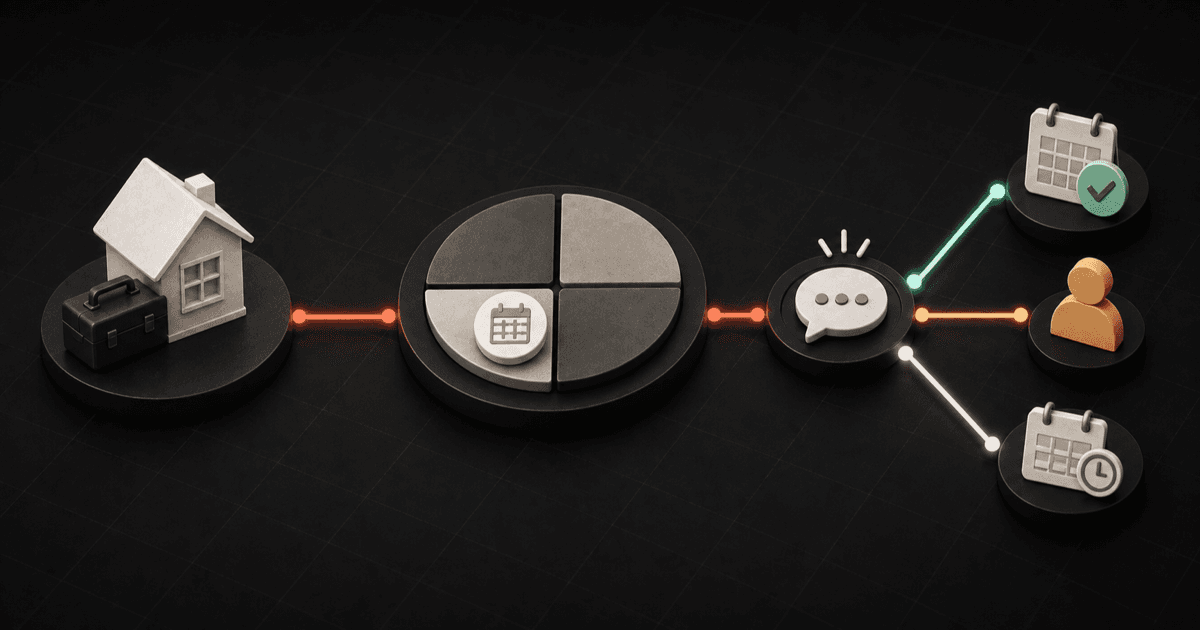
A useful seasonal service reminder does not begin with the season. It begins with the last completed job.
Before CRMX sends anything, the record should show what service was completed, whether the customer is eligible for another visit, which service comes next, when that next conversation becomes useful, and who owns a reply.
That is the difference between a customer-care system and a generic blast to everyone tagged “customer.”
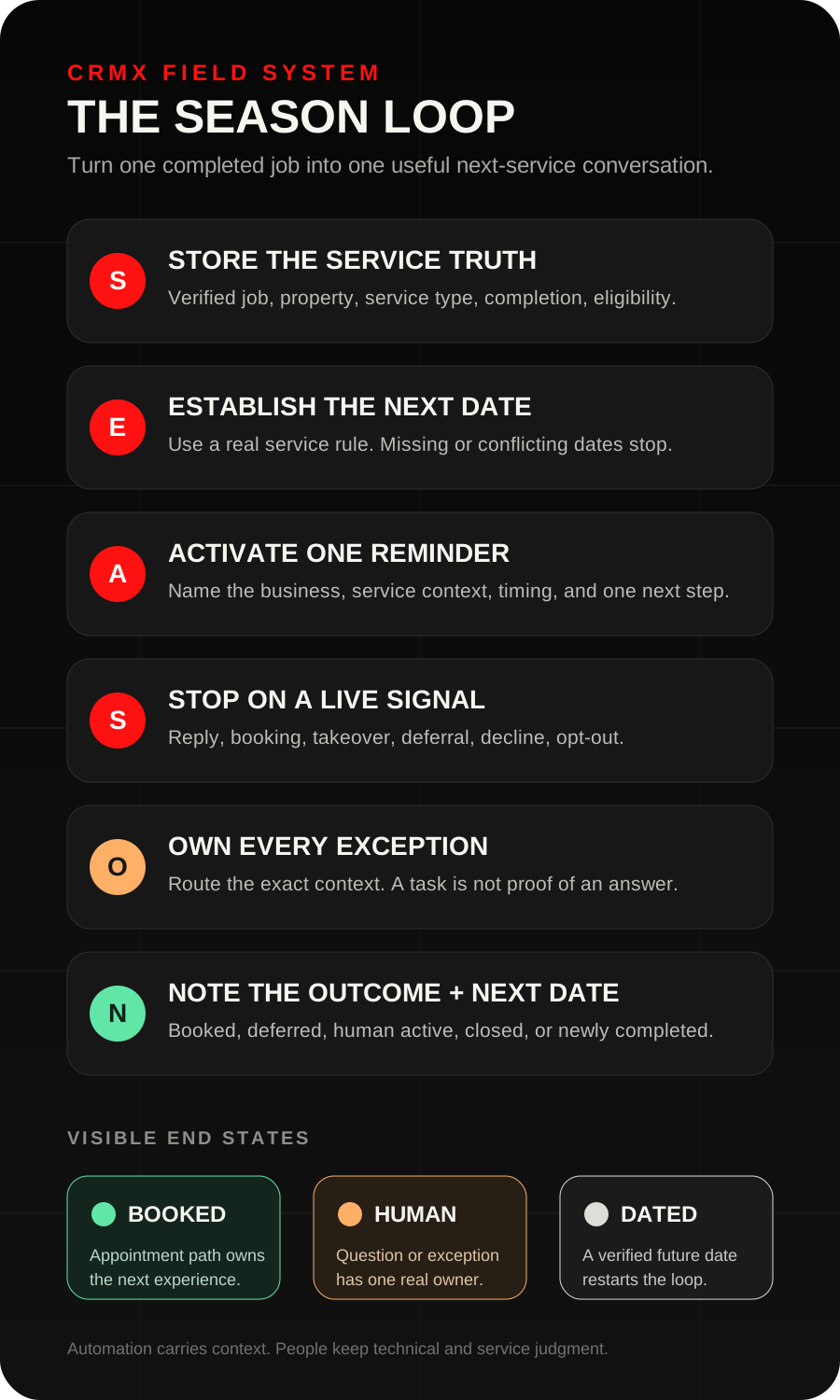
The CRMX SEASON Loop turns the strategy into six moves: Store the service truth, Establish the next useful date, Activate one relevant reminder, Stop on a live signal, Own every exception, Note the outcome and next date.
Brent Attaway's Five Fortune Engines treats follow-up as more than the first few messages after a lead arrives. Long-term follow-up and the Raving Fan Engine keep the relationship cared for after delivery. The Automation Engine makes a defined checklist consistent while people keep the work that requires judgment.
The tactic: schedule the next useful conversation while the current job is still known
Seasonal follow-up usually breaks because the next service date never becomes structured data.
The technician finishes the work. The office closes the job. Someone assumes the customer will remember to call. Months later, the team exports a customer list and sends a broad promotion based on the calendar rather than the actual service history.
Instead, make the next-service decision part of job closeout:
- Verify that the promised service is complete.
- Decide whether another seasonal service is relevant.
- Record the next service type and date from the business's real operating rules.
- Name the person or team who owns questions and exceptions.
- Let CRMX wait until that date becomes useful.
- End the reminder path as soon as the customer replies, books, defers, opts out, or becomes ineligible.
The workflow does not decide whether a furnace, roof, irrigation system, electrical panel, or property needs service. It carries forward a decision the business has already made from verified context.
The CRMX SEASON Loop
S - Store the service truth
Start from a verified completion event.
One practical trigger is a move into a defined completed-service pipeline stage. The current Pipeline Stage Changed documentation confirms that a workflow can begin when an opportunity moves between stages and can be filtered to the intended pipeline and stage.
That event is only as trustworthy as the business rule behind it. If Job Complete sometimes means “technician left,” sometimes means “invoice sent,” and sometimes means “customer confirmed the work,” the automation is starting from an unstable fact.
Define completion before using it:
- the correct service opportunity is in context;
- required job notes are present;
- any open service issue has an owner;
- the service type is recorded;
- the last completed-service date is known;
- the record is eligible for a future reminder.
Keep immediate post-job work in its own system. The CRMX CLOSE Loop handles completion checks, unresolved service, and an honest review invitation. SEASON begins only when the future service path is ready to be dated.
E - Establish the next useful date
Do not let a workflow guess the interval.
Use the service company's approved process to set a real Next Service Due date. That date may come from the completed service, the service plan, the property, the equipment, the local operating season, or a date the customer requested. If those inputs conflict, route the record for human review.
A practical CRMX field set is:
- Last Completed Service: the verified completion date;
- Next Service Type: the specific future service, not “follow up”;
- Next Service Due: the date that makes the next conversation useful;
- Seasonal Reminder State: Not Eligible, Date Missing, Reminder Scheduled, Reply Active, Booked, Deferred, or Closed;
- Service Address or Property ID: the property the reminder concerns;
- Service Owner: the person or team responsible for a live conversation;
- Eligibility Note: a short explanation when the path is paused or rejected.
The current Update Contact Field documentation confirms that a workflow can write standard or custom contact fields, use static or dynamic values, and clear supported custom fields. It also makes an important boundary visible: the field must already exist, and the value must match the field type.
Use contact fields when the value belongs to the ongoing customer relationship. Use opportunity fields when it belongs to one specific job or service cycle. If one contact can own several properties or service systems, do not force several next-service dates into one ambiguous contact field. Use the data structure that keeps each property and service cycle distinct.
Apply this date-quality gate before enrollment:
- Verified date: Continue to Reminder Scheduled.
- Date missing: Create an internal review item. Do not guess.
- Service type missing: Route to the closeout owner.
- Open service recovery: Keep the seasonal reminder paused.
- Customer not eligible: Mark Not Eligible and record why.
- Conflicting dates: Route to a person before any customer message.
A - Activate one relevant reminder
CRMX can wait on the date instead of making the team search the database every season.
The official Custom Date Reminder documentation says the trigger can begin before, on, or after a selected supported date field. It also says an empty selected date field does not activate the trigger.
That is why the date-quality gate matters. No date should mean no automated reminder, not “send the spring campaign anyway.”
Start with one reminder at one useful time. The exact lead time belongs to the business. A service that needs route planning or specialized availability may need a different window from a routine visit with many open slots.
The first message should do four things:
- identify the business;
- name the relevant prior or upcoming service context;
- explain why the message is arriving now;
- offer one clear next step.
For example:
Hi [First Name], this is [Business Name]. We completed your [Last Service Type] service for [Service Address] and noted that [Next Service Type] may be useful around this time. Would you like the scheduling link, or would you rather talk with the service team?
Do not write as if the business has inspected the property today. Do not imply an emergency, expiring safety condition, or guaranteed need unless a qualified person has verified it.
If the business uses email as well, make it useful rather than repetitive. Explain what the visit covers, what information the customer should have ready, and how to ask a question. A second channel should add clarity, not repeat pressure.
S - Stop on a live signal
The timed path should stop as soon as the customer's state changes.
Use explicit exits:
- customer replies;
- customer books the intended appointment;
- a team member takes over;
- the customer asks for a later date;
- the customer declines;
- the contact opts out of the channel;
- the business discovers the record is no longer eligible.
The Customer Replied trigger can begin a workflow when a contact responds and can be filtered by channel, phrase, tag, intent type, or the workflow that received the reply. Use that event to set Reply Active, notify the owner, and interrupt the generic reminder sequence.
Do not let an intent label make the final decision. “Not now,” “already handled,” “wrong property,” “what does this include?” and “the system is making a noise” all require different handling. A reply is a signal to read the conversation.
The Customer Booked Appointment trigger can detect a customer booking through an online scheduling path and can be filtered to the relevant calendar or calendar group. Use that verified event to mark Booked and end SEASON.
After booking, hand the customer to the separate CRMX ARRIVE appointment reminder plan. Do not keep sending “ready to schedule?” messages after an appointment exists.
O - Own every exception
Automation should make ownership clearer, not make ambiguity disappear from view.
Give each exception an owner and a response expectation:
- Technical question: service coordinator or qualified technician;
- Pricing or scope question: approved office or sales owner;
- Scheduling exception: dispatcher or calendar owner;
- Open service concern: service-recovery owner;
- Wrong property or customer: data owner;
- Unclear reply: named human reviewer.
A trained CRMX AI employee such as Guy can acknowledge the message, gather approved details, offer an approved scheduling path, and hand the conversation to the right person. Guy should not diagnose equipment, invent a service interval, promise a repair, change pricing, approve an exception, or decide that a customer is safe to ignore.
Use a short handoff brief:
- customer and property;
- last completed service;
- next service type and date;
- exact customer reply;
- what Guy already acknowledged;
- requested action;
- owner and due state.
An internal notification or task is not proof that the customer received a human answer. Keep the record in Reply Active until the owner completes the real response or records a new outcome.
N - Note the outcome and next date
Every seasonal reminder should end in a visible state.
- Booked: store the appointment and end the seasonal path.
- Deferred: store the customer-approved future date and reason.
- Human Conversation Active: keep one owner and pause timed messages.
- Closed: record the reason and stop the path.
- No response: end the short reminder sequence and decide whether a later, lower-frequency path is justified.
- Service completed again: write the new last-service truth and establish the next useful date.
This last step is what makes SEASON a loop instead of a campaign. The next cycle begins from a newly verified service event, not from the date somebody typed last year and forgot to review.
The seven-state operating model
Keep the state model small enough that the team can use it consistently.
Not Eligible
The customer, property, service, or channel should not enter the reminder path. Record the reason.
Date Missing
Future service may be relevant, but the business has not established a trustworthy date. This is internal work, not permission to send.
Reminder Scheduled
The service type, date, owner, and eligibility have passed the quality gate.
Reply Active
The customer answered. Timed reminders pause while a person or bounded AI employee handles the conversation.
Booked
A verified appointment exists in the intended calendar. Appointment preparation now belongs to the show-up system.
Deferred
The customer or owner selected a real future date. Replace the old date and keep the reason.
Closed
The customer declined, the service is no longer relevant, the property changed, the record is invalid, or the business chose another documented exit.
Two concrete home-service use cases
Use case 1: HVAC tune-up after a completed visit
An HVAC company completes a visit and verifies the correct job is closed. The office confirms whether a future tune-up is relevant, stores the next service type, and sets Next Service Due from its real service process.
Before that date, CRMX sends one contextual reminder. The homeowner replies that the property has been sold.
The reply moves the record to Reply Active, stops the reminder sequence, and assigns the data update to the office. Guy can acknowledge the message and collect the effective date, but a person decides how to update the property and customer records. The old seasonal path closes without sending a booking prompt to the wrong homeowner.
Use case 2: irrigation startup or winterization
An irrigation company finishes a property-specific visit and records the next seasonal service date chosen for that property. CRMX waits until the approved reminder window and asks whether the customer wants to schedule or talk with the service team.
The customer books through the intended calendar. The booked event marks the seasonal path Booked, stops the scheduling reminder, and hands the appointment to the normal confirmation and preparation workflow.
If the customer instead asks whether a repair is needed, the path moves to Reply Active and routes the exact message to the service owner. The automation does not turn a question into a diagnosis or appointment.
What Guy should and should not handle
Guy can help when his role is narrow and trained.
Guy may:
- identify the business and reason for the reminder;
- confirm the stored service context without inventing missing facts;
- answer approved logistical questions;
- collect the property, preferred timing, and contact details;
- share the approved calendar;
- book within approved calendar and service rules;
- acknowledge a question and prepare the handoff brief.
Guy should hand off when:
- the customer asks for technical advice or diagnosis;
- service eligibility or the next date is uncertain;
- the customer raises an unresolved concern;
- pricing, warranty, refund, scope, or exception judgment is required;
- the property or customer record conflicts with the conversation;
- the requested time is outside approved scheduling rules.
That boundary keeps the AI employee useful without pretending that conversational speed replaces service expertise.
Build the workflow in CRMX
1. Define completion and eligibility
Write the exact rule for Job Complete and the exact conditions that make a record eligible for a seasonal reminder.
2. Create the fields
Create the service-history, next-service, reminder-state, property, owner, and eligibility fields required by the SEASON Loop.
3. Build the closeout workflow
From the verified completion event, write the last-service context. Set Date Missing until a valid next-service date and type exist. Never convert a missing date into a default seasonal campaign.
4. Build the date-triggered workflow
Use Custom Date Reminder against the supported Next Service Due date. Filter to eligible records and the intended service type.
5. Add the first message
Reference the customer, property, prior service, future service, and one next step. Keep technical claims out of the template.
6. Build the reply exit
Use Customer Replied to set Reply Active, pause the timed path, and route the exact conversation to its owner.
7. Build the booking exit
Use Customer Booked Appointment filtered to the correct calendar. Mark Booked, end the seasonal reminder, and begin the separate appointment-preparation path.
8. Build deferral and closure
Give the team a simple way to store a new date, decline reason, ineligibility reason, or closed outcome.
9. Close the loop after the next service
When the new job is truly complete, replace the last-service truth and establish the next date from the current service cycle.
Measure the system without pretending a send is a result
Track operating evidence by state:
- eligible completed services;
- records missing a next-service date;
- reminders activated;
- messages delivered or failed by channel;
- customer replies;
- human conversations completed;
- appointments booked in the intended calendar;
- deferrals with a new date;
- closed and ineligible reasons;
- repeat services completed;
- records that finished without a visible outcome.
A workflow execution proves that CRMX ran a configured step. It does not prove that the data was correct, the message was useful, a person answered, or a job was completed.
Use CRMX reporting and pipeline tools to find the leak. If many records stay in Date Missing, fix closeout. If replies wait without an owner, fix handoff. If bookings occur but reminders continue, fix the stop logic. If the same question repeats, improve the approved knowledge or route it earlier.
Launch checklist
- The completed-service event has one documented meaning.
- The correct contact, property, opportunity, and service are in context.
- The next-service type is explicit.
- The next-service date is verified, not guessed.
- Empty and conflicting dates route to internal review.
- Open service-recovery records do not receive a seasonal booking prompt.
- The reminder identifies the business and service context.
- The message makes no unverified technical or urgency claim.
- Every customer reply pauses the timed path.
- Guy's knowledge and handoff boundaries are approved.
- The human owner and due state are visible.
- A verified booking stops scheduling outreach.
- Deferral writes a new date and reason.
- Decline, opt-out, ineligibility, and invalid-record exits are tested.
- The next completed service replaces the old service truth.
- A test contact has passed every state on desktop and mobile.
Frequently asked questions
Should every past customer receive a seasonal reminder?
No. Enroll only records with a verified service, a relevant next service, a trustworthy date, an eligible customer and property, and an owner for replies.
Can CRMX choose the next service date?
The workflow can store and act on a date. The business must define where the correct date comes from. Do not let automation infer a technical service interval from silence or a generic tag.
How many reminders should the workflow send?
Start with one relevant reminder and explicit exits. Add another touch only after reviewing delivery, replies, bookings, complaints, opt-outs, and unresolved conversations. More messages are not a substitute for better service context.
What happens when the customer asks a technical question?
Stop the timed path, preserve the exact message, and route it to the qualified owner. Guy may acknowledge and collect approved details, but should not diagnose equipment or recommend work outside his training.
What if the customer says “later”?
Ask for or confirm a real future date, write it to the record, set Deferred, and end the current reminder path. “Later” without a date is not a scheduled follow-up.
Is this the same as an appointment reminder workflow?
No. SEASON helps an eligible past customer decide whether to schedule the next service. Once the customer books, the ARRIVE plan owns confirmation, preparation, replies, changes, and show-up.
Make the next service part of the current service
The best time to prepare a seasonal reminder is not when the weather changes. It is while the completed job, property, service type, customer preference, and next owner are still known.
Store the truth. Set the date. Send one relevant reminder. Stop when the customer acts. Give every exception an owner. Write the outcome back.
That is how a home-service business connects the Raving Fan and Automation engines inside the CRMX Revenue Flywheel: the customer does not receive a random campaign. The customer receives a useful next step based on a service the business can actually see.
Explore how CRMX supports home-service businesses, see the broader CRMX platform, or review CRMX implementation services. If you want to see how Guy can acknowledge a seasonal reminder reply, gather approved details, book within your rules, and hand exceptions to your team, audition Guy in a live CRMX demo.