
Post-Job Review Request Workflow: The CRMX CLOSE Loop
Build a post-job CRMX workflow that catches unfinished service, gives every reply an owner, and sends every eligible customer the same honest review request.
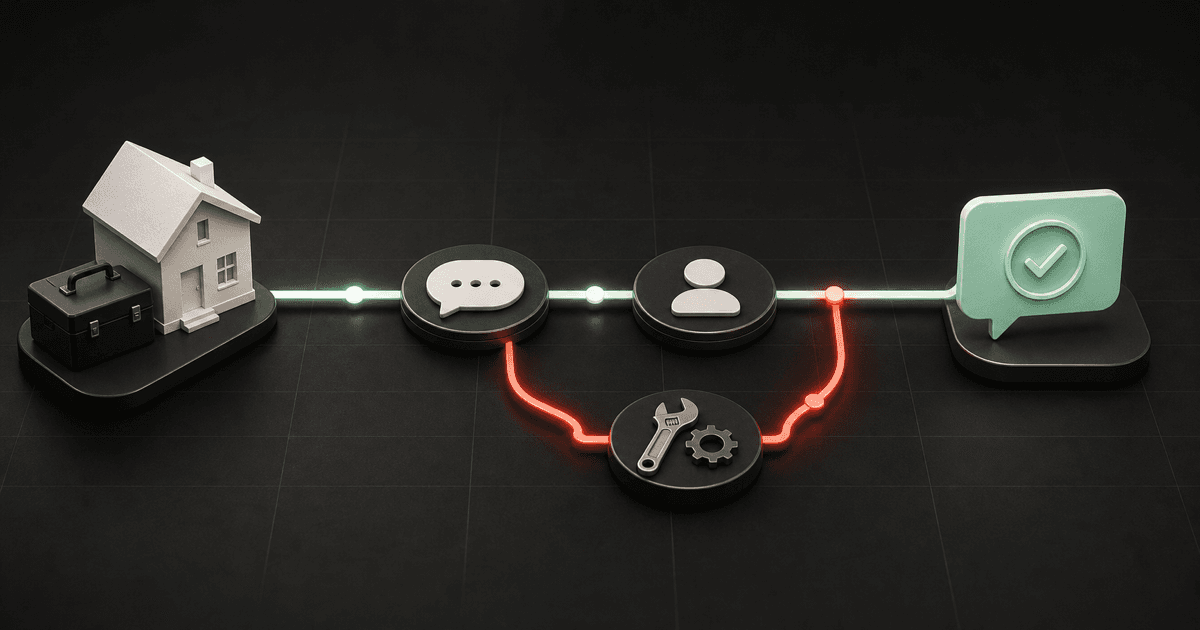
The best time to discover that a home-service job still feels unfinished is before the relationship goes quiet.
That is the job of a post-job review request workflow: confirm completion, catch anything unresolved, give the reply to a real owner, and then invite every eligible customer to share an honest review.
Brent Attaway's Five Fortune Engines treats the experience after the sale as a system. The Raving Fan Engine earns feedback through a deliberate customer experience, while the Automation Engine makes a defined process consistent. The useful order is experience first, automation second.
The CRMX implementation is the CLOSE Loop: Complete, Listen, Own, Solve, Extend.
The tactic: close the service loop before chasing the review
A review request should not be the first sign that the office remembered the customer after the crew left.
Use one short completion checkpoint first:
Hi [First Name]—[Business Name] here. Before we close out your [service] visit, did we complete everything we promised? Reply YES, or tell us what still needs attention.
That message has one job: reveal whether the job is truly ready to close.
- If the customer confirms completion, continue to the neutral review invitation.
- If the customer does not reply within the defined wait, continue to the same invitation.
- If the customer reports an issue or sends an unclear reply, pause the timed path, assign a person, and open a service-recovery task.
- When the open item is resolved and the service lifecycle is closed, continue to the same neutral invitation—even if the customer's final feedback remains mixed or negative.
The review request is not a prize for a positive answer. It is the final step for every eligible customer after the service lifecycle has no unresolved item.
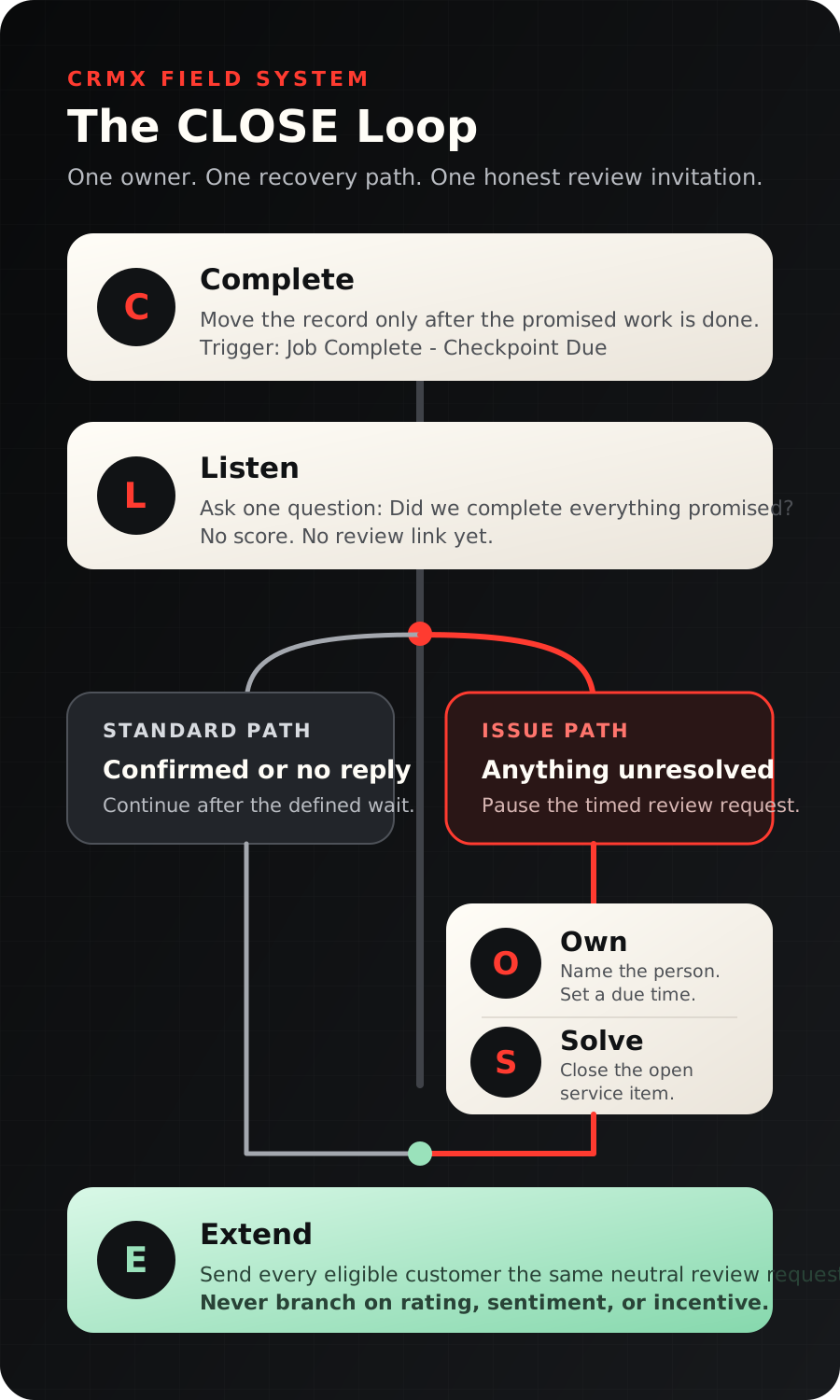
The CRMX CLOSE Loop
C — Complete the work in the system
Choose one event that means the field work is done and the post-job process may begin. A practical trigger is moving the opportunity to Job Complete — Checkpoint Due.
Do not let an invoice, appointment time, or crew departure imply completion if the team has not verified the agreed work. One accountable person should make the stage move.
Official pipeline-stage workflow documentation confirms that the automation can begin when an opportunity moves to a selected stage and can be limited to the correct pipeline.
L — Listen with one answerable question
Send the completion checkpoint through the customer's established conversation channel. Name the service so the message does not feel like a generic survey.
Do not ask for a 1-to-10 score. A score is easy to automate, but using it to decide who receives a public review link creates a review gate. Ask whether the promised work is complete instead.
O — Own every reply
A response should create ownership, not another unattended inbox item.
The documented Customer Replied trigger can react when the customer responds. Use it to notify the assigned owner, create the correct task, and make the conversation visible to the office.
Route unclear replies to a person. Do not let a simple keyword rule decide whether “mostly,” “not sure,” or “the work is done, but…” counts as satisfaction.
If a trained CRMX AI employee helps with reply triage, limit its job to acknowledging the message, collecting approved details, and handing the conversation to the named owner. It should not promise refunds, schedule exceptions, technical fixes, or review outcomes.
S — Solve the open item
Move the opportunity to Service Recovery Open and assign a due time the team can actually meet. The first response can be simple:
Thank you for telling us. [Owner Name] is reviewing this now and will contact you by [real time]. We will keep the item open until there is a clear next step.
CRMX workflows support documented internal notifications, but the alert is only useful when it names an owner and a deadline.
Record the issue, agreed next step, appointment if required, and final resolution in the shared customer history. When the owner marks the recovery item complete, the record rejoins the standard closeout path.
E — Extend one neutral review invitation
Send the same invitation to every eligible customer—confirmed, non-responsive, or recovered—once the job has no unresolved service item.
Thanks for choosing [Business Name]. If you would like to share an honest review of your experience, you can do that here: [Review Link]. Your feedback helps future customers know what to expect.
Google's current Business Profile guidance permits businesses to ask customers for reviews through a direct link and says honest, balanced reviews are useful. Its Maps content policy prohibits selectively soliciting positive reviews, discouraging negative reviews, and offering incentives for reviews.
That gives this workflow a clear boundary:
- do not send the public link only after a high private score;
- do not offer a discount, gift, contest entry, or other benefit for a review;
- do not ask the customer to change or remove a negative review in exchange for resolution;
- do not write review language for the customer;
- do use the same neutral request for everyone in the same completed lifecycle state.
Build the workflow in CRMX step by step
1. Create four operational stages
Use stages that describe the customer's current state:
- Job Complete — Checkpoint Due
- Service Recovery Open
- Review Invited
- Post-Job Closed
If the business already has a fulfillment pipeline, add these stages there. Do not create a separate pipeline unless the handoff genuinely needs separate ownership or reporting.
2. Start with the completion stage
Create a workflow with Pipeline Stage Changed as the trigger. Filter it to the fulfillment pipeline and the Job Complete — Checkpoint Due stage.
Add guardrails before the first message:
- confirm the opportunity has a customer and an assigned owner;
- confirm the service name or job type used in the message;
- exclude test records, canceled work, and opt-out states;
- prevent duplicate entry if a stage is changed twice by mistake.
3. Send the completion checkpoint
Wait long enough for the field team to finish its notes, then send the checkpoint during an approved contact window. The exact delay should match the service and your team's availability; do not invite a reply when nobody can own it.
Use one question. Avoid asking for a rating, referral, additional sale, and public review in the same message.
4. Wait for a reply without guessing at sentiment
Create a reply path and a timeout path.
- Customer replies: notify the owner and place the conversation in a human review queue. The owner marks Confirmed Complete or opens Service Recovery after reading the actual message.
- No reply by the end of the defined wait: continue to the neutral review request. No response is not treated as praise; it simply means no open issue was reported through this checkpoint.
Use a short timeout the team can monitor consistently. This example uses 24 hours as an operating window, not a universal performance claim.
5. Make recovery a real owned process
When the owner identifies an issue:
- stop the scheduled review request;
- move the opportunity to Service Recovery Open;
- acknowledge the message;
- create the task and assign its owner;
- record the promised contact time;
- document the next step and any return visit;
- mark the recovery item complete only after the team has closed the loop with the customer.
This is where automation should support the person, not impersonate judgment.
6. Configure the neutral review request
The official Review Request action supports automated review invitations, while the current message-settings guide documents SMS and email templates, review links, timing, and retry controls.
In CRMX:
- open Reputation and confirm the correct public review destination;
- create one plain-language request template;
- include the configured review link;
- use the Send Review Request action after the standard closeout path and after recovery completion;
- move the opportunity to Review Invited;
- stop any repeat request when the link is clicked or the customer opts out;
- keep retries off until one complete request has been tested and reviewed.
7. Test every exit before activation
Use non-customer records to test:
- confirmed complete;
- no reply;
- clear service issue;
- ambiguous reply;
- recovery resolved;
- opt-out request;
- duplicate stage change;
- missing owner;
- broken review link;
- mobile and desktop message rendering.
The workflow is not ready because the happy path works. It is ready when the issue path, ownership path, and stop conditions work too.
Example 1: HVAC maintenance visit
A technician finishes seasonal maintenance and the office moves the opportunity to Job Complete — Checkpoint Due. The customer receives the completion question later that day and replies that the system still makes a rattling sound.
The review request stops. CRMX alerts the service coordinator, creates an owned task, and moves the record to Service Recovery Open. The coordinator reviews the technician's notes, arranges the correct next step, and keeps the conversation in the same customer history.
After the return item is closed, the customer receives the same neutral review invitation used for every other completed maintenance visit. The workflow did not hide the review link because a concern existed; it completed the service lifecycle first.
Example 2: residential cleaning service
A recurring cleaning visit is marked complete. The customer receives the checkpoint and does not reply within the 24-hour operating window.
CRMX sends the neutral review invitation and moves the opportunity to Review Invited. If the customer later reports an overlooked room, the team still opens service recovery and owns the issue. A sent review request never replaces customer care.
For a coach or consultant, the same pattern can begin after a completed workshop, assessment, or delivery milestone: confirm that the promised deliverable is complete, own unresolved feedback, and invite every eligible client to share an honest review.
Copy-ready message set
Completion checkpoint
Hi [First Name]—[Business Name] here. Before we close out your [service] visit, did we complete everything we promised? Reply YES, or tell us what still needs attention.
Issue acknowledgment
Thank you for telling us. [Owner Name] is reviewing this now and will contact you by [real time]. We will keep the item open until there is a clear next step.
Neutral review invitation
Thanks for choosing [Business Name]. If you would like to share an honest review of your experience, you can do that here: [Review Link]. Your feedback helps future customers know what to expect.
Replace every bracketed field and test it. Never leave an automated promise such as [real time] to guesswork.
The CLOSE Loop implementation checklist
- One stage clearly means the field work is complete.
- One role is accountable for moving the job into that stage.
- The checkpoint names the actual service.
- The checkpoint asks one completion question, not for a rating.
- Every customer reply reaches a named owner.
- Ambiguous replies receive human review.
- Service-recovery tasks include an owner and realistic due time.
- The public review request pauses while an issue remains open.
- Recovered customers return to the same review-request path.
- Non-responsive customers receive the same neutral invitation after the defined wait.
- No rating, sentiment, incentive, or positive answer controls access to the review link.
- Opt-outs, duplicate enrollment, and human takeover stop incompatible automation.
- The review destination and merge fields are tested on mobile and desktop.
- Every test uses a safe, non-customer record before activation.
Frequently asked questions
Is the completion checkpoint itself review gating?
Not when it is used to find unfinished work and every eligible customer later receives the same neutral review invitation. It becomes a gate when a business uses a rating or sentiment branch to ask only happy customers for a public review.
Should the workflow wait until every complaint is resolved?
Pause the timed review request while the service item is open. Give the issue a real owner and next step. When the service lifecycle is closed, send the same neutral invitation regardless of whether the customer's feedback was positive, negative, or mixed.
Can an AI employee decide whether the customer is happy?
Do not make that the default job. A trained AI employee can acknowledge a reply, gather approved details, and hand off the conversation. Human review is safer for ambiguous language, technical complaints, refunds, exceptions, and service-recovery promises.
How many review-request reminders should we send?
Start with one. Confirm the link, timing, sender, opt-out behavior, and customer experience before adding any retry. More messages do not fix a weak closeout process.
Make completion visible
The CLOSE Loop is small on purpose: one trigger, one question, one owner, one recovery path, and one neutral review invitation.
Connect it to the broader CRMX platform, see how CRMX supports home-service businesses, or follow the earlier customer journey with the seven-day estimate follow-up workflow. If you want the complete process mapped and built with your team, explore CRMX implementation services.
To hear how a trained AI employee handles a live conversation and hands important moments to a person, audition Guy.
Sources and further reading
- Google Maps policy: Prohibited and restricted content
- Google Business Profile Help: Tips to get more reviews
- HighLevel Support: Pipeline Stage Changed workflow trigger
- HighLevel Support: Customer Replied workflow trigger
- HighLevel Support: Internal Notification workflow action
- HighLevel Support: Review Request workflow action
- HighLevel Support: Customize review request messages