
Home Service Job Status Updates: The CRMX TRACK Loop
Build a CRMX job-status update workflow that sends verified milestone messages, routes every reply, and keeps the next owner and date visible.
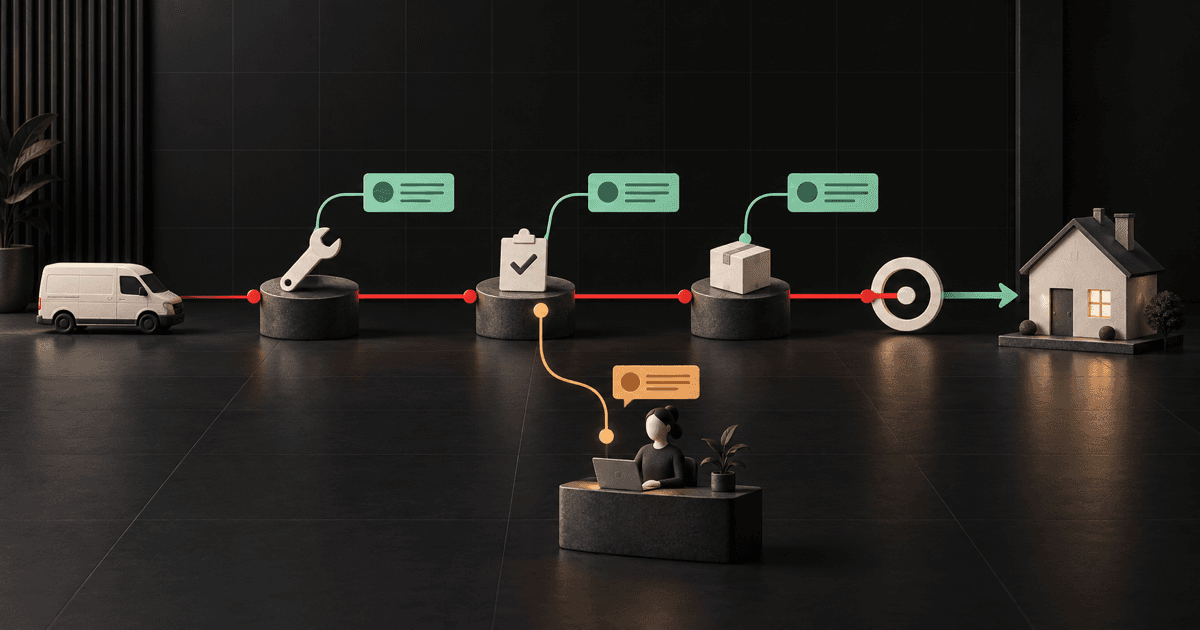
A home-service job-status update workflow should send a customer one verified fact, explain what that fact means, and name the next checkpoint. If the customer replies or the work changes, the timed path should pause and a real person should own the response.
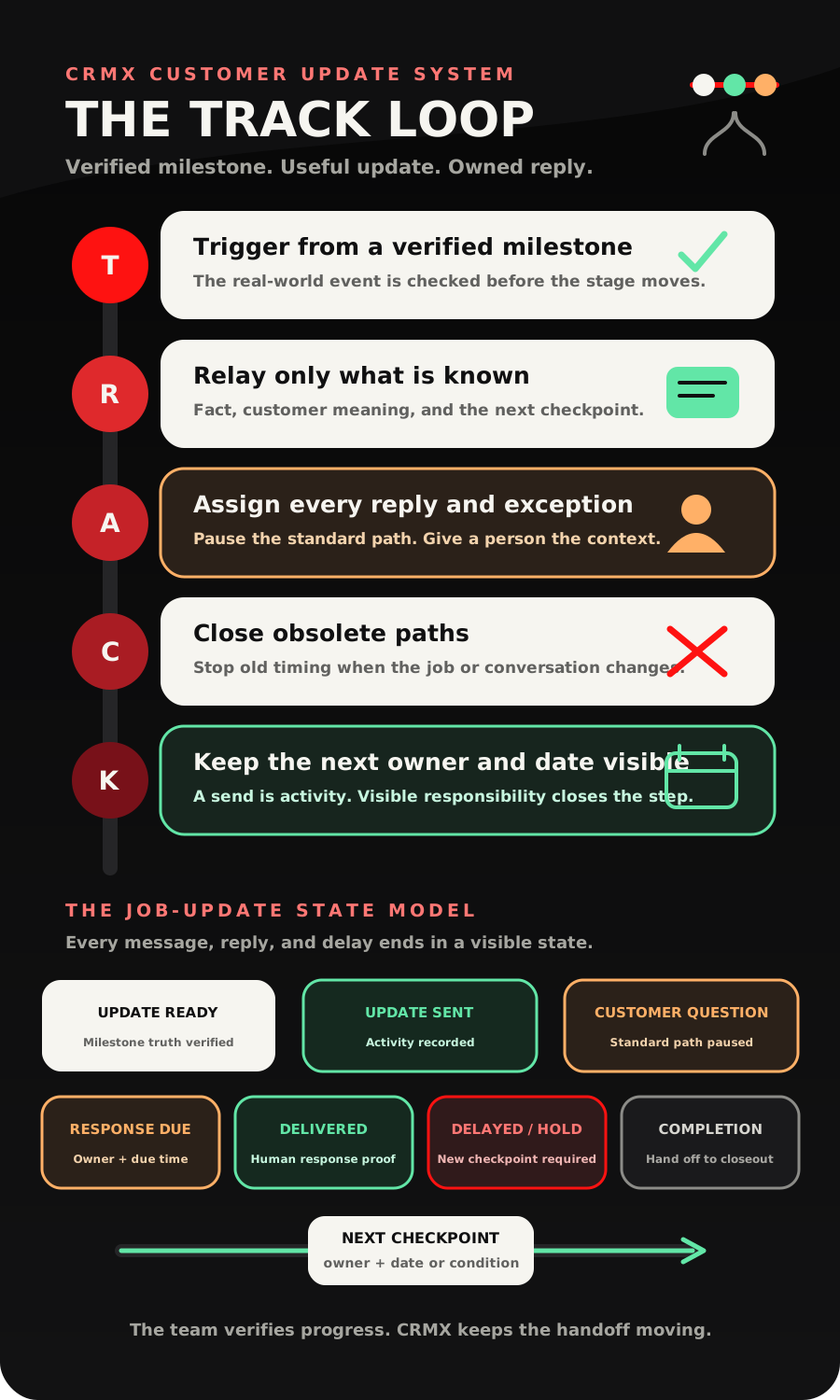
That is the CRMX TRACK Loop: Trigger from a verified milestone, Relay only what is known, Assign every reply and exception, Close obsolete paths, Keep the next owner and update date visible.
This is not a promise generator. It is a practical way to keep customers informed while roofing, HVAC, plumbing, solar, remodeling, and other home-service work moves through real delivery milestones.
Brent Attaway's Five Fortune Engines treats follow-up as useful movement toward one next step, customer care as a repeatable system, and automation as the layer that handles consistent work after the process is defined. TRACK applies those ideas after the sale: the team verifies the progress; CRMX delivers the approved update and makes the next handoff visible.
The tactic: update from milestones, not from the calendar
The weak version of customer communication is a recurring message that says, "Just checking in."
The useful version begins when something true changes:
- materials are confirmed;
- the work window is verified;
- the crew has started the approved scope;
- an inspection or customer decision is now required;
- a delay or hold has been confirmed;
- the job is ready for its completion handoff.
Each event should produce an update only after the business can support it. A pipeline move may start the automation, but the move itself is not proof that materials arrived, a permit cleared, a crew completed work, or a customer approved a change.
Choose one accountable source for every milestone. That may be a project coordinator, service manager, field team process, or approved connected system. If the source cannot verify the event, the record is not ready for an automated customer message.
This separates customer updates from internal job tracking. Internal tracking answers, "Where is the work?" The customer update answers three different questions:
- What changed that you can verify?
- What does it mean for the customer?
- When or how will the customer hear from you next?
The CRMX TRACK Loop
T - Trigger from a verified milestone
Use a small delivery pipeline with stages your team can define and prove. Avoid vague stages such as In Progress when that label could mean five different things.
A first version might use:
- Work Accepted
- Materials or Equipment Confirmed
- Schedule Verified
- Work Started
- Customer Decision Needed
- Delayed or On Hold
- Completion Handoff Ready
These are recommended operating states, not built-in CRMX defaults. Adapt them to one service line and one real delivery process.
The official Pipeline Stage Changed documentation confirms that a workflow can begin when an opportunity enters a selected stage and can be narrowed to the intended pipeline, stage, status, or assigned user. It also notes that moving an opportunity back to a prior stage can trigger the workflow again when the filters match.
That repeat behavior matters. Build a duplicate guard before the first message. A stage correction should not send a second "work started" update unless the business deliberately approves it.
Before the stage move, require the operator to confirm:
- the correct customer and job are in context;
- the milestone happened in the real world;
- the customer-facing wording is still accurate;
- no open exception blocks the update;
- the next checkpoint or owner is known;
- the customer has not already received this milestone update for this job.
R - Relay only what is known
Every update should use the same three-part message contract:
- Verified fact: the milestone the team can prove.
- Customer meaning: what changes, or does not change, for the customer.
- Next checkpoint: the next confirmed action, owner, or update date.
For example:
Hi [First Name], [Business Name] update: your [Job or Service] has reached [Verified Milestone]. [What This Means]. Your next update will come from [Owner or Team] by [Next Update Date or Condition]. Reply here if you have a question.
Do not insert an exact start date, delivery date, inspection result, approval, or completion promise unless the source record and the team can support it.
The official Send SMS action documentation confirms that a workflow can send personalized text messages and includes a test-number step. Use that test before activation. A successful workflow step proves the configured action ran; it does not prove the customer received, read, understood, or agreed with the update.
If one contact can have several active jobs, be especially careful with personalization. The current custom-field documentation says field availability depends on the object and field type. Do not let a single contact field for Current Job Status overwrite the truth for another property or project. Keep job-specific truth on the correct opportunity or approved job record, or require a person to review the message before it goes out.
A - Assign every reply and exception
A customer reply changes the work from a broadcast to a conversation.
The Customer Replied trigger can begin a workflow when a contact responds and can be narrowed with supported filters such as channel, phrase, tag, intent, or originating workflow. Use that event to pause the next generic update, preserve the message, and route the context.
Do not rely on a keyword alone to decide whether a reply is safe. These all need a person:
- "That date does not work."
- "Did the scope change?"
- "The crew has not arrived."
- "There is damage I need to discuss."
- "Who approved this?"
- "Call me before anything else happens."
- a frustrated, urgent, sensitive, unclear, or unrelated reply.
CRMX can acknowledge the message without pretending it is resolved:
Thanks for telling us. I have paused the standard update path and sent your message to [Owner or Team]. They will review the job record and respond through this conversation by [Approved Response Expectation].
The official Internal Notification and Add Task documentation supports alerting selected team members and creating an assigned task with a due interval. Those actions prove that CRMX created the assignment. They do not prove that a person answered the customer.
For stronger handoff evidence, the documented User Replied trigger can react after a delivered message is sent by a team member from Conversations. Automated workflow and Conversation AI messages do not fire that trigger. Use the distinction to separate Human Response Due from Human Response Delivered.
C - Close obsolete paths
Customer communication becomes confusing when an old milestone sequence keeps running after the job changed.
Close or pause the current path when:
- the customer asks a question;
- a person takes over the conversation;
- the job moves backward for correction;
- the work enters a verified delay or hold;
- a new date replaces the old one;
- the customer or service address no longer matches the record;
- the job reaches completion handoff;
- another workflow now owns the next communication.
The Remove from Workflow action can remove a contact from the current, another selected, or a broader set of workflows. Use the narrowest tested scope. Removing someone from every workflow may also stop unrelated communication the business still needs.
If a stage needs to change after the reply is reviewed, the Update Opportunity action can update supported details on an existing opportunity. The documentation makes an important context boundary clear: the intended opportunity must already be in context or be explicitly found first. A contact-level reply does not automatically prove which of several jobs should move.
K - Keep the next owner and update date visible
An update is not complete because a message was sent. It is complete when the next responsibility is visible.
For each active job, keep:
- the current verified milestone;
- the last customer update date;
- the next update date or event;
- the current update owner;
- any open exception;
- the human-response state;
- the workflow currently responsible for the next message;
- the completion-handoff state.
The next checkpoint may be a date, but it can also be a condition: after the customer approves the revised scope, when equipment receipt is confirmed, or after the coordinator verifies the installation window.
Do not invent a calendar date just to fill a field. A truthful condition is more useful than a precise promise the team cannot keep.
The TRACK job-update state model
Update Ready
- Evidence: the correct job and milestone are verified; no blocking exception exists.
- CRMX action: admit the opportunity to the intended milestone workflow.
- Owner: the project or service coordinator verifies the source.
Update Sent
- Evidence: the approved workflow step executed for the correct customer and job.
- CRMX action: record the activity and wait for the next event or reply.
- Owner: the update owner monitors failures and incorrect context.
Customer Question
- Evidence: the customer replied or another live issue entered the conversation.
- CRMX action: pause the standard path, preserve the message, and create the owned handoff.
- Owner: the named human reviews the actual words and job record.
Human Response Due
- Evidence: an owner, task, and response expectation exist.
- CRMX action: notify or escalate according to the approved rule.
- Owner: the assigned team member remains responsible; the notification is not the response.
Human Response Delivered
- Evidence: a person sent the customer a delivered message or recorded the approved resolution evidence.
- CRMX action: update the communication state and choose the correct next path.
- Owner: the human responder confirms whether the job may re-enter normal updates.
Delayed or On Hold
- Evidence: the team verified the delay, hold, or missing dependency.
- CRMX action: stop obsolete timing, send the approved truth, and set the next honest checkpoint.
- Owner: the person authorized to explain the delay and next action.
Completion Handoff
- Evidence: the business's required completion checkpoint is ready.
- CRMX action: stop delivery-stage updates and enter the separate closeout process.
- Owner: the service or project owner confirms the handoff.
This is where TRACK connects to the existing post-job review request workflow. TRACK keeps the customer informed during delivery. The CLOSE Loop confirms completion, catches unresolved service, and handles the neutral review invitation. Keep those responsibilities separate.
Build the job-status update workflow in CRMX
1. Start with one service line
Choose one process with a small number of meaningful milestones. Do not combine emergency service, maintenance, replacements, warranty work, and long projects into the first build.
Document the milestone source, approving role, customer meaning, approved message, blocking exceptions, next checkpoint, and exit rule for each stage.
2. Build a message contract before automation
Write every update with the same three parts: verified fact, customer meaning, next checkpoint.
Delete anything that sounds like a promise the record cannot prove. Avoid filler such as "everything is moving along" when the system does not show what moved.
3. Define the record model
Choose where job truth lives. If the opportunity represents the job, name it so the team can distinguish the customer, service location, and scope. If the business uses another approved job record, verify how that record enters the workflow before launch.
Decide how multiple jobs for one contact are handled. If the answer is unclear, require human review instead of sending automatically.
4. Build the milestone workflow
For each selected stage:
- trigger only from the intended pipeline and stage;
- check duplicate-send and blocking-exception rules;
- verify that the correct record is in context;
- send the approved update;
- record the update state;
- name the next owner and checkpoint;
- end or wait without drifting into another job's sequence.
5. Build the reply-and-exception workflow
Use the customer-reply event to:
- identify the related update workflow;
- pause or remove the specific timed path;
- acknowledge receipt without claiming resolution;
- notify the correct person;
- create the assigned task when appropriate;
- move the communication state to Human Response Due;
- detect the delivered team response or explicit resolution state;
- decide whether normal milestone updates may resume.
6. Give the AI employee a narrow role
A trained CRMX AI employee such as Guy may identify the customer, acknowledge an incoming reply, collect one approved clarification, restate a verified milestone, offer an approved scheduling path, and prepare the human handoff.
Guy should hand off when the customer raises scope, price, payment, damage, safety, legal, warranty, cancellation, access, approval, complaint, emergency, or any unclear service issue. Guy should never invent job progress, diagnose field conditions, promise a crew time, approve a change, or mark an exception resolved.
7. Test the path with real edge cases
Test stage progression, a backward move, a repeated stage, a customer with two active jobs, a missing next checkpoint, a delayed job, an unclear reply, a frustrated reply, a human response, no human response, a resumed path, and the completion handoff.
Reopen the exact contact, opportunity, conversation, task, workflow execution, and customer-facing message. A green workflow canvas is not enough.
Use case 1: a roofing replacement project
A roofing company uses four customer-facing milestones: Materials Confirmed, Install Window Verified, Work Started, and Completion Handoff Ready.
The coordinator verifies each milestone before moving the opportunity. When materials are confirmed, CRMX sends the approved update and names the next checkpoint without promising an installation date that has not been verified.
When the installation window is confirmed, the next message explains what the customer needs to do before the crew arrives. If the customer replies that the date conflicts with travel, the normal path pauses and the coordinator owns the conversation.
When work reaches the business's completion checkpoint, TRACK exits. The record enters the separate closeout workflow instead of sending a review or referral request from the delivery-stage sequence.
Use case 2: an HVAC system replacement
An HVAC company uses Equipment Confirmed, Installation Scheduled, Installation Started, and Quality Check Ready.
The service coordinator moves the correct job only after the team verifies the equipment and customer. CRMX sends a short update that explains the current milestone and the next expected communication.
If the customer asks whether a different accessory is included, the reply does not trigger an automated yes or no. CRMX pauses the standard path, creates the handoff, and keeps the original question in Conversations. A person reviews the approved scope and answers.
After the final quality checkpoint is ready, the job enters completion handoff. Future maintenance or agreement renewal belongs to the separate maintenance agreement renewal workflow, not this job-progress path.
Copy-ready job-update scripts
Verified milestone update
Hi [First Name], [Business Name] update: your [Job or Service] has reached [Verified Milestone]. [What This Means]. Your next update will come from [Owner or Team] by [Next Update Date or Condition]. Reply here if you have a question.
Verified delay or hold
Hi [First Name], we need to update the plan for [Job or Service]. [Verified Delay or Hold Fact]. We are not going to guess at a new date. [Owner or Team] will update you again by [Next Honest Checkpoint]. Reply here if you need to reach us sooner.
Automated reply acknowledgment
Thanks for the message. I have paused the standard job-update path and sent your note to [Owner or Team] with the current job context. They will review it and respond by [Approved Response Expectation].
Human response
Hi [First Name], this is [Name] with [Business Name]. I reviewed your message and the current job record. [Verified Answer or Next Action]. I own the next step, and I will update you again by [Date or Condition].
Completion handoff
Hi [First Name], your [Job or Service] has reached our completion checkpoint. Before we close the service loop, we will confirm the agreed work and route anything that still needs attention. [Owner or Team] will guide that next step.
The TRACK launch checklist
Milestones and data
- The first build covers one service line.
- Every customer-facing milestone has one accountable verification source.
- Pipeline stages describe real events rather than vague activity.
- The correct customer, service location, and job can be distinguished.
- Multiple active jobs for one contact have a tested scoping rule.
- Every update has a duplicate-send guard.
- A backward stage move has an explicit rule.
- Delays, holds, and missing dates have truthful paths.
Messages and ownership
- Every message contains a verified fact, customer meaning, and next checkpoint.
- No message invents scope, approval, timing, delivery, inspection, or completion.
- Customer replies pause the intended generic path.
- Ambiguous and sensitive replies go to a person.
- The handoff includes the exact customer message and job context.
- The owner and response expectation are visible.
- An internal notification is not counted as a human response.
- A delivered team response or explicit resolution state closes the handoff.
Workflow and QA
- The stage trigger is filtered to the intended pipeline and stage.
- The SMS is tested with representative values before activation.
- Removal targets the narrowest obsolete workflow.
- The correct opportunity is in context before it is updated.
- Tests cover stage progress, regression, duplicates, two jobs, delay, reply, takeover, no response, resume, and completion handoff.
- The contact, opportunity, conversation, task, execution log, and customer-facing message are reopened after testing.
- The completion state exits to the separate closeout workflow.
- The mobile conversation and pipeline views remain usable for the owner who must respond.
Frequently asked questions
How often should a home-service company send job-status updates?
Send an update when a meaningful verified milestone changes or when the business reaches the next promised checkpoint. Do not create noise with a recurring message that has no new fact.
Should every pipeline stage send a customer message?
No. Some stages exist only for internal control. Send a customer update only when the state is verified, relevant to the customer, and paired with a useful next checkpoint.
Can CRMX decide whether a milestone is true?
CRMX can react to a configured record change. The business still needs an accountable source that verifies the real-world event before the customer-facing path begins.
What should happen when the customer replies?
Pause the standard path, preserve the reply, acknowledge receipt without claiming resolution, and assign a person with the job context and a response expectation.
Can an AI employee answer job-status questions?
A trained AI employee can repeat approved, verified status information and handle defined logistics. It should hand off scope, timing changes, complaints, damage, safety, payment, warranty, cancellation, emergency, and unclear service questions.
What happens after the job reaches completion?
Stop the delivery-stage sequence and move to a separate completion process. Confirm the agreed work, route unresolved items, and only then continue to any eligible review, referral, maintenance, or renewal experience.
Make the next update easier to trust
The customer does not need every internal movement. They need the truth that matters, the meaning of that truth, and confidence that somebody owns what happens next.
Build TRACK around one service line, a few verifiable milestones, one useful message contract, and an unmistakable human handoff. Then connect it to the rest of the CRMX Revenue Flywheel, the home-services solution, and the CRMX platform.
If you want CRMX to map the stages, workflows, conversations, AI employee boundaries, and launch tests as one system, explore done-for-you implementation services.
Sources and further reading
- Official Support: Pipeline Stage Changed workflow trigger
- Official Support: Send SMS workflow action
- Official Support: Customer Replied workflow trigger
- Official Support: Internal Notification workflow action
- Official Support: Add Task workflow action
- Official Support: User Replied workflow trigger
- Official Support: Update Opportunity workflow action
- Official Support: Remove from Workflow action
- Official Support: Creating and Managing Custom Fields