
Home Service Appointment Reminder Automation: The CRMX ARRIVE Plan
Build a CRMX appointment reminder workflow that prepares customers, routes replies, stops on schedule changes, and gives every exception an owner.
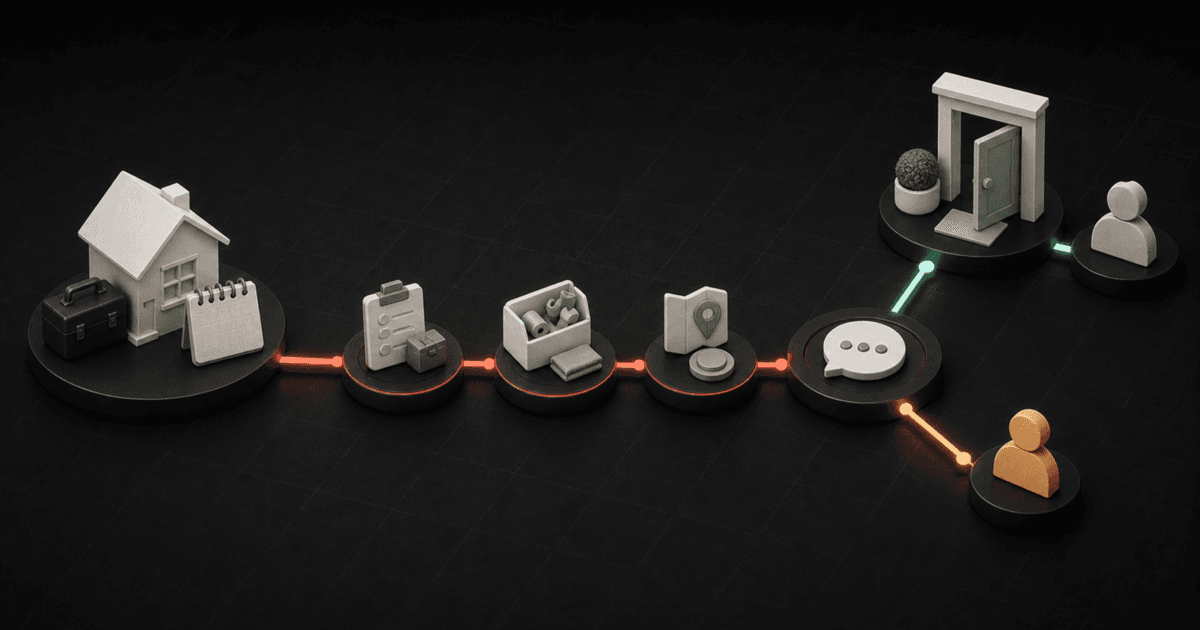
An appointment reminder should do more than repeat a date and time.
For a home-service business, the useful workflow has six jobs:
- start from the appointment that was actually booked;
- give the customer the details needed to prepare;
- make confirmation or a change request easy to express;
- stop the timed path when the situation changes;
- give every reply and exception an owner;
- record what happened after the visit.
Brent Attaway's Five Fortune Engines connects attention, lead capture, follow-up, conversion, customer advocacy, and automation as one operating system. A booked appointment sits in the middle of that system. Attention earned the inquiry. Lead capture created the record. Follow-up must now prepare the customer. Conversion depends on a clear next step. The customer experience has already begun. Automation should keep the process consistent without hiding a change from the team.
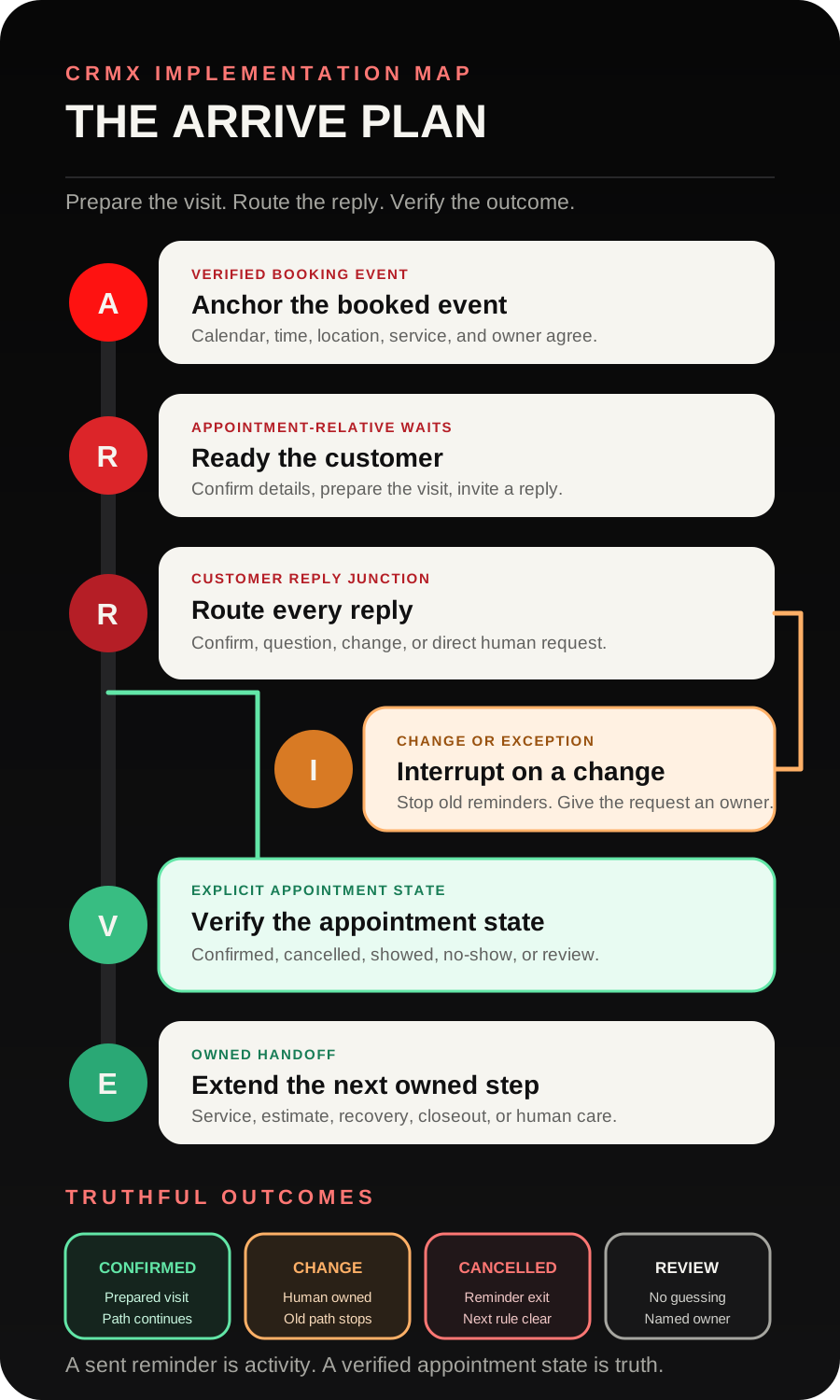
The CRMX ARRIVE Plan turns that strategy into a home-service appointment reminder automation: Anchor the booked event, Ready the customer, Route every reply, Interrupt on a change, Verify the appointment state, Extend the next owned step.
The tactic: automate the state, not just the message
A weak reminder workflow is a timer attached to a text.
A useful reminder workflow knows which appointment started it, what the customer needs before the visit, whether the customer replied, whether the time changed, and who owns the exception.
That difference matters because message activity is not customer state:
- Reminder sent does not mean the customer is prepared.
- Customer replied does not automatically mean confirmed.
- Link clicked does not mean the time still works.
- No reply does not prove a no-show.
- Appointment time passed does not prove the service happened.
Build the workflow around inspectable events and explicit exits. Let messages support the process rather than pretend to be the process.
Choose calendar notifications or a workflow deliberately
CRMX supports two useful layers.
The current calendar notification documentation describes configurable messages for booked, confirmed, canceled, rescheduled, reminder, and follow-up events. That layer is a good fit when the business needs a straightforward notification tied to one calendar.
Use a workflow when the next action must change based on more than the clock, such as:
- a customer reply that needs routing;
- preparation instructions that vary by appointment type;
- an AI employee answering an approved question;
- a schedule-change request that must reach dispatch;
- a pipeline or reporting state that needs updating;
- an internal alert when nobody owns the exception;
- different exits for confirmed, canceled, showed, and no-show states.
Do not activate both layers with overlapping copy and timing. Decide which layer owns each message, then test the complete customer experience from booking through visit outcome.
The CRMX ARRIVE Plan
A - Anchor the booked event
Start with the event your team can verify.
The official Customer Booked Appointment trigger documentation says a self-booked regular appointment can start a workflow and be filtered to the intended calendar or calendar group.
That is a clean start when the customer uses a CRMX booking link. If your team creates appointments manually or receives them through another approved path, use the documented Appointment Status trigger with the exact calendar and status filters your configuration needs. Do not assume one trigger covers every booking source or recurring appointment type.
Before sending anything, verify the appointment record contains the details the message promises:
- service or visit type;
- scheduled date and time;
- timezone display where it matters;
- property or meeting location;
- assigned owner or dispatch team;
- tested reschedule or contact path;
- approved preparation instructions.
If a required detail is missing, route the record for correction. A fast inaccurate reminder creates more work than a slower truthful one.
R - Ready the customer
Give each communication one job.
The booking acknowledgment confirms the essential details. A preparation message explains what the customer should do before the visit. A near-appointment reminder makes the next action easy.
The exact timing should reflect the appointment type and normal booking window. A same-day emergency visit, a tune-up booked three weeks ahead, and a roof inspection that needs property access should not share one rigid cadence.
Use the documented Wait action to pause relative to the upcoming appointment. Configure what happens when the appointment time has already passed before a contact reaches the step. A late-entering record should not receive a reminder for yesterday.
Before every outbound step, check the current state again. Stop or branch when the appointment is canceled, rescheduled, already showed, invalid, or owned by a person handling a live exception.
Preparation content may include:
- the arrival window the business can truthfully promise;
- whether an adult must be present;
- safe access instructions the business has approved;
- what equipment, rooms, documents, or questions should be ready;
- how to request a change;
- who to contact for an urgent issue.
Do not improvise technical, diagnostic, safety, access, or pricing instructions inside a generic template. Use only the business's approved service knowledge.
R - Route every reply
The customer should be able to answer naturally.
The documented Customer Replied trigger can start a workflow and narrow the event by channel, source workflow, phrase, tag, or other supported filters. Use that reply event to interrupt the reminder path and route the conversation.
Create at least four reply outcomes:
- Confirmed - the customer clearly confirms the current details.
- Change requested - the customer asks for a different time, date, location, service, or contact method.
- Question or concern - the customer needs an answer before the visit.
- Human requested - the customer asks for a person or the message falls outside Guy's approved role.
Do not treat every “yes” as confirmation without context. A customer may be answering a preparation question, accepting a call, or acknowledging receipt. Give Guy and the team the current appointment context before asking them to interpret the reply.
I - Interrupt on a change
A change request is not another reminder branch. It is an ownership event.
When a customer requests a different time or raises a service exception:
- stop the remaining timed messages for the current appointment;
- mark the conversation Change Requested - Human Owned or the equivalent visible state;
- assign dispatch, the office, or the appointment owner;
- notify that owner with the appointment and reply context;
- acknowledge the handoff without promising an unverified new time;
- restart the correct path only after the appointment record reflects the approved change.
This is where automation protects the customer experience. It prevents the old reminder from arriving after the customer has already said the time does not work.
If the customer reschedules through the approved calendar path, verify whether your configuration creates a new appointment event and whether the old workflow exits. Test that exact path instead of assuming the new time replaces every prior wait automatically.
V - Verify the appointment state
The appointment record should tell the truth after the conversation ends.
The current Appointment Status documentation lists states including New, Confirmed, Cancelled, Showed, No-show, and Invalid. Your business may add separate operating labels in a pipeline or field, but the team still needs a defined rule for who verifies each state.
Recommended working states include:
- Booked - Unconfirmed
- Confirmed - Prepared
- Change Requested - Human Owned
- Cancelled
- Showed
- No-show - Review
An automated message can request confirmation. It should not mark Showed. A lack of reply can create a review task. It should not mark No-show before the appointment owner verifies the outcome.
E - Extend the next owned step
The reminder workflow ends when another real process begins.
After the appointment, route the verified outcome:
- Showed and work continues: move the record to the correct service, estimate, or delivery stage.
- Showed and an estimate was delivered: begin the distinct estimate follow-up workflow.
- Canceled with a request to reschedule: give dispatch or the booking team the next action and date.
- Verified no-show: begin the business's approved recovery path.
- Service issue or complaint: stop ordinary marketing and route the issue to the responsible person.
- Completed visit: continue into the customer closeout and Raving Fan process only after the completion state is real.
The Automation Engine should connect those handoffs. It should not let one workflow keep speaking after ownership has moved elsewhere.
Build the appointment reminder automation in CRMX
1. Start with one appointment type
Choose one calendar and one service path for the first build.
Write down:
- how the appointment enters CRMX;
- who owns it before the visit;
- what the customer must know;
- which replies Guy may handle;
- which replies require a person;
- who may confirm, cancel, reschedule, show, or mark no-show;
- which next process owns each final state.
Do not mix emergency dispatch, maintenance visits, estimates, installations, and warranty work into the first workflow.
2. Define state separately from activity
Create a small state model that the team can inspect in CRMX pipelines and reporting.
Useful activity records include:
- booking acknowledgment sent;
- preparation message sent;
- reminder sent;
- customer replied;
- owner notified.
Useful states include:
- booked and awaiting confirmation;
- confirmed and prepared;
- change waiting for an owner;
- canceled;
- showed;
- no-show awaiting review.
Do not move a record because a message sent successfully. Move it when the underlying appointment or ownership state changed.
3. Build the booking entry
Filter the workflow to the selected calendar. Prevent unrelated appointments from entering.
The first actions should:
- identify the correct appointment context;
- confirm the assigned owner or team;
- set the initial operating state;
- send the booking acknowledgment once;
- notify the owner when a required appointment detail is missing;
- continue to the preparation wait only when the record is ready.
4. Add appointment-relative waits with fresh checks
Build the cadence backward from the appointment time.
A practical pattern may include:
- booking acknowledgment immediately after the verified event;
- preparation message at a useful point before the visit;
- one near-appointment reminder;
- a final state check at the appointment time;
- an outcome review after the appointment window.
At every wait exit, check whether the appointment still belongs in the path. Configure the past-date fallback deliberately. Test appointments booked before, inside, and after each wait window.
5. Build the reply route before adding more messages
Route customer replies into CRMX Conversations with the appointment context visible.
Train Guy as the AI employee to:
- restate the current verified appointment details;
- answer only from approved service and preparation knowledge;
- recognize a clear confirmation without inventing one;
- acknowledge a change request and stop promising the old time;
- hand pricing, diagnosis, safety, service exceptions, complaints, and direct human requests to the right person;
- preserve the customer's words in the handoff summary.
Guy should not negotiate arrival promises, diagnose a service condition, invent availability, or silently reschedule a visit.
6. Build explicit status exits
Create separate exits for Confirmed, Cancelled, Showed, No-show, and Invalid states on the selected calendar.
Each exit should answer:
- Which messages stop?
- Which owner receives the record?
- Which pipeline or operational state changes?
- What is the next customer-facing promise?
- Which report should include the outcome?
7. Test the workflow with safe records
Use test appointments that your team can inspect and remove according to its normal process.
Test:
- customer self-books the selected calendar;
- staff creates an appointment through the alternate path;
- appointment is booked before every wait window;
- appointment is booked after a wait point has passed;
- customer confirms clearly;
- customer replies with an unrelated “yes”;
- customer asks to reschedule;
- customer cancels through the approved path;
- customer asks a service question;
- customer requests a person;
- appointment is moved to a new time;
- appointment is marked showed;
- appointment is marked no-show after verification;
- assigned owner is unavailable;
- calendar connection, location, or meeting detail is missing;
- every message and action works on mobile as well as desktop.
Use case 1: an HVAC tune-up
An HVAC company offers a seasonal tune-up calendar. A homeowner books a Tuesday morning visit through the website.
CRMX starts the workflow from the selected calendar and sends:
Hi Maya, your [Tune-Up Name] with [Business Name] is scheduled for [Date] at [Time]. The appointment location is [Address]. Reply here if any of those details need to change.
At the preparation checkpoint, the workflow verifies that the appointment is still active and sends only the company's approved access instructions. Maya replies that the side gate will be unlocked but asks whether somebody must be home.
The reply stops the next generic reminder. Guy answers from the approved appointment policy if that answer is in his training. If it is not, he acknowledges the question and assigns the service coordinator with the appointment context.
When the question is resolved, the appointment remains Confirmed - Prepared. After the visit, the technician or office verifies Showed and moves the record into the correct completed-service or follow-up process.
No workflow infers service completion from the fact that Maya opened a reminder.
Use case 2: a roofing inspection
A roofing company books inspections that require the property owner to understand the arrival window and access expectations.
Andre books through the inspection calendar. The first message confirms the date, time window, property address, and tested change path. The preparation message gives only the approved access checklist.
Andre replies that the date no longer works.
CRMX stops the remaining messages for that appointment, marks Change Requested - Human Owned, and assigns the scheduling team. Guy replies:
Thanks for letting us know. I stopped the reminders for the current appointment and sent your request to [Scheduling Team] with the date and property details. They will continue with you here before a new time is confirmed.
The team updates the appointment through the approved calendar path. The new appointment enters the tested reminder route. The old appointment does not keep sending messages.
If Andre instead asks whether the roof needs replacement, Guy routes the question to the inspection owner rather than diagnosing the property before the visit.
The appointment state-and-owner decision aid
| Verified event or state | What CRMX should do | Owner |
|---|---|---|
| Selected appointment booked | Confirm details, set Booked - Unconfirmed, begin the correct wait path | Workflow plus appointment owner |
| Required detail missing | Stop customer-facing assumptions and create an internal exception | Appointment owner |
| Customer clearly confirms current details | Mark Confirmed - Prepared and continue only useful preparation | Workflow or bounded AI employee |
| Customer asks a routine approved question | Answer from approved knowledge and preserve the context | Guy |
| Customer requests a change | Stop current reminders, mark Human Owned, notify the scheduling owner | Dispatch or office team |
| Appointment status becomes Cancelled | Exit the reminder path and apply the approved cancellation next step | Workflow plus scheduling owner |
| Appointment is verified Showed | End reminder activity and hand off to the correct service outcome | Technician, office, or service owner |
| Appointment is verified No-show | End reminder activity and begin the approved review or recovery path | Appointment owner |
| State is uncertain | Do not guess; create an owned review | Named person |
Copy-ready appointment messages
Booking acknowledgment
Hi [First Name], your [Appointment Type] with [Business Name] is scheduled for [Date] at [Time] at [Location]. Reply here if any detail is incorrect or needs to change.
Preparation message
Before your [Appointment Type], please [Approved Preparation Step]. If you have a question or need to change the time, reply here so we can route it before the visit.
Near-appointment reminder
Reminder: [Business Name] has your [Appointment Type] scheduled for [Date] at [Time]. [Approved Arrival or Access Detail]. Reply if anything changed.
Change-request acknowledgment
Thanks for letting us know. I stopped the current reminder path and sent your request to [Owner or Team] with the appointment details. They will continue with you here before a new time is confirmed.
Human handoff
I want to make sure you get an accurate answer. I am handing this to [Owner or Team] with your appointment and question so you do not have to repeat it.
Replace every bracketed field. Verify the sender, calendar, appointment label, timezone, location, owner, preparation instruction, arrival language, and response promise before activation.
The ARRIVE build-and-QA checklist
- One appointment type and one calendar define the first version.
- The workflow trigger matches how that appointment actually enters CRMX.
- Every message uses the current appointment context.
- Calendar notifications and workflow messages do not duplicate one another.
- Every appointment-relative wait has a tested past-date rule.
- The current state is checked immediately before every outbound message.
- A reply interrupts the timed path and receives an owner.
- Free-form text does not silently confirm, cancel, reschedule, show, or no-show an appointment.
- Guy has approved preparation knowledge and clear handoff boundaries.
- Change requests stop the old reminder path.
- A rescheduled appointment enters the correct new path exactly once.
- Confirmed, canceled, showed, no-show, and invalid states have explicit exits.
- Owner notifications include the customer's words and appointment context.
- Missing owner, calendar, location, and appointment-detail paths are tested.
- Desktop and mobile messages, links, calendar screens, and conversation handoffs are verified.
- Reporting distinguishes messages sent from appointments confirmed, changed, canceled, showed, and no-showed.
Measure movement through the appointment, not message volume
Review counts such as:
- selected appointments booked;
- acknowledgments sent;
- appointments awaiting confirmation;
- confirmed and prepared appointments;
- replies waiting for an owner;
- change requests unresolved;
- canceled appointments;
- verified showed appointments;
- verified no-shows;
- records with a missing owner or next action;
- duplicate or late reminders caught during QA.
Those measures show whether the operating system is telling the truth. They do not promise a particular attendance or conversion result.
Frequently asked questions
How many appointment reminders should a home-service business send?
Use the fewest messages needed to confirm the details, prepare the customer, and make a change easy to request. Start with the actual booking window and service type. Test one clear acknowledgment, one useful preparation message, and one near-appointment reminder before adding more volume.
Should a customer reply automatically confirm the appointment?
Only when the reply clearly answers a confirmation request and the exact interpretation rule has been defined and tested. Otherwise, route the reply to Guy or a person with the appointment context. A reply is an event; its meaning still needs to be established.
Should I use calendar notifications or a workflow?
Use calendar notifications for straightforward booked, confirmed, canceled, rescheduled, reminder, and follow-up messages. Use a workflow when timing, reply routing, preparation, pipeline state, AI employee handling, internal alerts, or exception ownership must change what happens next.
Can Guy reschedule the appointment?
Guy can explain the tested reschedule path, collect the customer's request, and hand off the context. Let him change a live appointment only after the business has explicitly approved that action, connected the correct calendar, defined availability and ownership rules, and passed the relevant QA.
What happens when the appointment time passes without a reply?
Do not mark the customer No-show from silence alone. End or pause the pre-visit messaging, ask the appointment owner to verify the outcome, and record Showed, No-show, Cancelled, or another truthful state after that verification.
Make the first service handoff feel prepared
The customer should not have to decode a generic reminder, repeat a change request, or wonder who saw the reply.
Build one ARRIVE workflow for one real appointment type. Connect the booking, preparation, conversation, status, owner, and next process inside the CRMX home-service system. If you want to see how a trained AI employee handles the reply and handoff, audition Guy live. When you are ready to map and implement the full path, CRMX setup services can help turn the workflow into a tested operating system.