
Negative Review Response for Home Services: The CRMX REPAIR Route
Build a CRMX negative-review response workflow that alerts one owner, protects customer privacy, and separates public replies from private recovery.
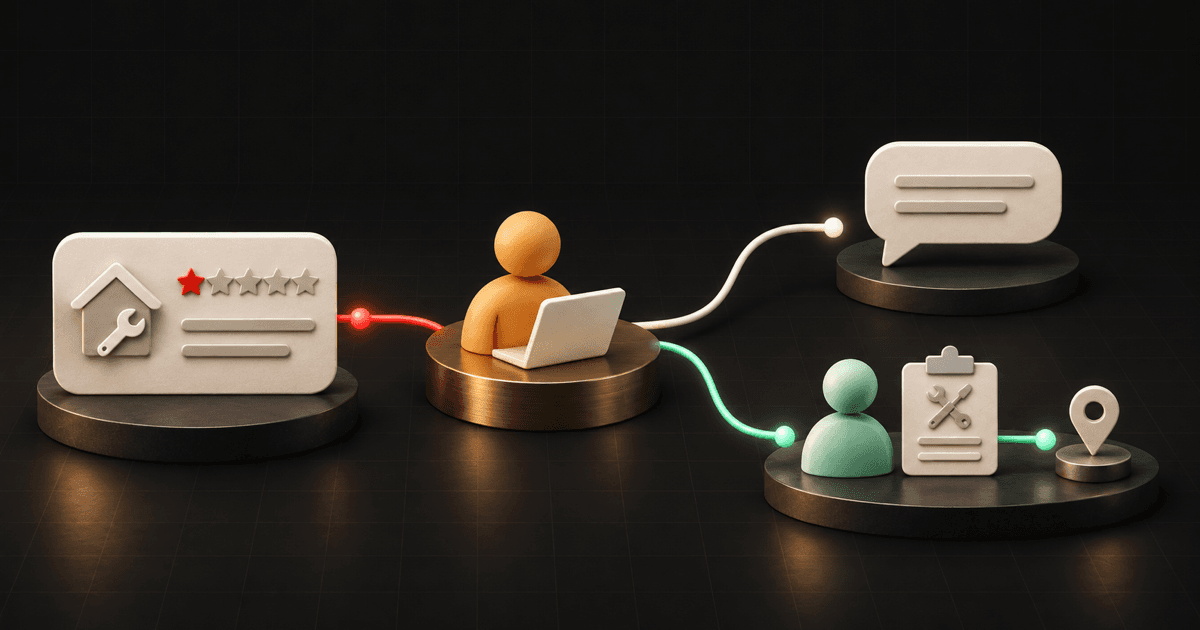
The right way to respond to a negative home-service review is to give the public reply and the private recovery conversation different jobs.
The public reply should acknowledge the concern, protect customer details, and offer one approved way to continue. The private conversation should verify the correct customer, understand what happened, assign the next step, and record the outcome. Neither path should pressure the reviewer to change or remove the review.
That is the CRMX REPAIR Route: Receive the verified review, Escalate it to one owner, Prepare the facts, Answer publicly, Identify the customer safely, Record the recovery outcome.
The idea follows Brent Attaway's Five Fortune Engines: every stage of follow-up needs one useful mission, and automation should make a defined system more consistent without taking judgment-heavy work away from people. CRMX can detect and route the review. A person should own identity matching, fact review, sensitive wording, service decisions, and resolution.
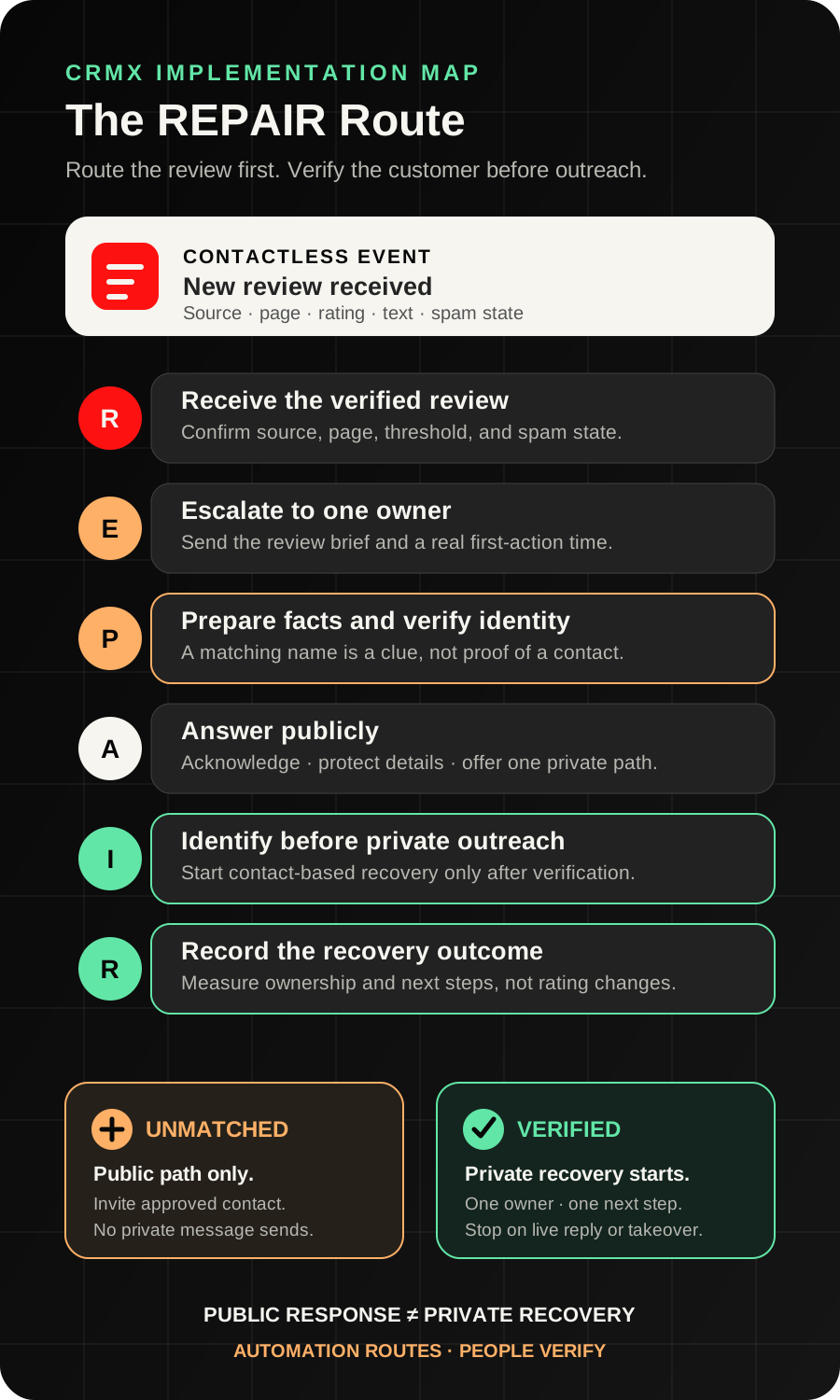
The hidden problem: the review trigger is contactless
A public reviewer name is not automatically a verified customer record.
The current New Review Received workflow documentation says the trigger is contactless. It can receive a review from a supported connected source, filter by source, rating, and spam status, and pass review details into supported workflow actions. It does not link the event to a specific contact.
That boundary changes the implementation.
Do not build one workflow that sees a low rating, guesses a matching contact, and immediately sends a text. Two people can share a name. A reviewer may use a nickname, family account, business account, or name that never appeared on the service record. The service may have been booked by someone else.
Use two controlled paths instead:
- Review-to-owner alert: a contactless workflow routes the review details to one internal owner.
- Verified-contact recovery: a separate contact-based process begins only after a person matches the reviewer to the correct record and approves the outreach channel.
This one separation prevents a reputation workflow from creating a second problem by contacting the wrong person.
The CRMX REPAIR Route
R — Receive the verified review event
Connect the correct review source to the correct CRMX location. When more than one business profile is connected, confirm which page received the review before anyone replies.
The official Google Business Profile integration guide documents that connected Google reviews can appear in the CRM and that the associated page name appears on review threads and outgoing responses.
Create a New Review Received workflow with narrow filters:
- the intended review source;
- the business's approved rating threshold;
- the correct spam state;
- no automatic public response;
- no customer text or email from this contactless workflow.
A practical first version can route one-, two-, and three-star reviews for human review. That threshold is an operating choice, not a universal standard. Test the exact sources and filters available in the CRMX location before publishing the workflow.
E — Escalate it to one owner
“The office” is not an owner.
Use the documented Internal Notification action to alert one person, role, or team that owns review response. Include the review source, page, rating, reviewer display name, review text, received time, and direct record link when the mapped values support it.
Use this internal brief:
New review needs human review
Source and page: [Verified Source / Page]
Rating: [Review Rating]
Reviewer display name: [Reviewer Name]
Review text: [Review Text]
Review record: [Approved Link]
Owner: [Review Owner]
First action due: [Real Due Time]
An alert proves only that the workflow step ran. It does not prove the owner read the review, found the customer, posted a reply, contacted anyone, or resolved the concern.
Create one visible state such as New Review — Owner Assigned and one due time the team can actually honor.
P — Prepare the facts before the reply
The owner should inspect the review without treating every statement as verified or every low rating as removable.
Check:
- the exact source page and review URL;
- whether the review contains a service, date, location, technician, or issue clue;
- possible matching contact and opportunity records;
- appointment, job, call, message, and note history;
- any open service-recovery item;
- whether another person already responded;
- whether the review contains a safety, injury, threat, discrimination, insurance, legal, privacy, or identity issue that needs authorized leadership.
Use the clues to find a candidate record, then verify it through the business's normal identity process. A matching name by itself is not enough.
Choose one of five paths:
- Matched — response ready: the customer record is verified and a standard service concern can proceed.
- Unmatched: the reviewer cannot yet be connected to a customer record.
- Policy review: the content may violate the review platform's policy.
- Leadership review: the subject is sensitive, disputed, or outside the response owner's authority.
- Duplicate or already owned: a current recovery case already has an owner.
Google's current removal guidance says only policy-violating reviews are eligible for removal and specifically warns businesses not to report a review merely because they disagree with it or dislike it. Keep policy reporting separate from ordinary service recovery.
A — Answer publicly without solving the case in public
The public reply has three jobs:
- acknowledge that the feedback was seen;
- avoid exposing or debating customer details;
- offer one approved private path.
Use a human-approved response such as:
Thank you for sharing this. We want to understand the concern and review the correct service record, but we do not want to discuss customer details publicly. Please contact [Owner or Team] at [Approved Phone or Email] and mention [Short Reference] so we can continue privately.
Adjust the language only after the owner reviews the facts. Do not paste a generic apology that admits a specific failure the team has not verified. Do not argue point by point, publish service details, identify a technician, promise a refund, diagnose equipment, or announce that the review is false.
Google's review-management guidance explains that an approved reply is public and the reviewer is notified. That makes the reply a visible handoff, not a private case note.
Record Public Reply Posted, the owner, the time, and the exact approved response. A drafted reply is not a posted reply. Reopen the source record and confirm the response is actually visible.
I — Identify the customer safely before private outreach
If the owner verifies the matching customer, start a separate contact-based recovery process.
Create fields or stages such as:
Review Recovery StatusReview SourceReview URLReview Received AtIdentity Match StatusRecovery OwnerRecovery Next ActionRecovery Next Action DuePublic Reply StatusRecovery Outcome
Set Identity Match Status to Verified only through the team's approved human process. Then create the recovery task and use the channel the customer has already approved.
A copy-ready first message:
Hi [First Name], this is [Owner Name] with [Business Name]. We matched your public review to your [Service] record from [Service Date]. I want to understand what happened and own the next step. Is [Phone / Email] the best way to continue this conversation?
Do not include the review text, sensitive service facts, payment details, property details, or a proposed outcome in the first message. First confirm that the team reached the right person and that the channel is appropriate.
If the review remains unmatched, do not send private outreach. Let the public reply offer the approved contact path and keep the state visible as Match Pending.
R — Record the recovery outcome, not the rating outcome
The workflow succeeds when the team follows the process truthfully—not when a rating changes.
Use outcomes such as:
- Resolved — customer confirmed next step
- Open — service action in progress
- Closed — team responded, no agreement
- Closed — no response after approved attempts
- Unmatched — public path remains open
- Policy report submitted
- Leadership-owned exception
Record the customer's concern, verified facts, owner, promised next action, due date, public reply, private conversation, service action, and final state. If the same issue appears more than once, route the pattern to operations or training without copying customer details into unrelated records.
Do not make “review changed to five stars” a required exit. Google's Maps content policy prohibits incentives in exchange for a review, a revision, or removal of a negative review. The team should never trade service, discounts, refunds, or priority for a rating change.
Build the workflow in CRMX step by step
1. Connect and verify the source
Confirm the correct Google Business Profile or other supported review source is connected to the intended CRMX location. If multiple pages exist, verify the page name and location used in the review thread.
Do not copy a workflow from another business without rechecking the source connection, owner, notification recipients, and public response path.
2. Build the contactless review alert
Create Home Services — Low-Rating Review Alert.
Trigger:
- New Review Received
- source: the selected connected platform;
- rating: the approved low-rating threshold;
- spam: the state the team intends to review.
Actions:
- send the mapped review brief to the review owner;
- notify a backup owner only when the primary is unavailable;
- direct the owner to the review record;
- stop.
Do not add customer-facing SMS, email, voicemail, or AI conversation actions to this contactless workflow.
3. Define the human verification gate
Document who may:
- match a reviewer to a customer;
- approve the public response;
- contact the customer privately;
- approve service, scheduling, billing, warranty, or refund decisions;
- report a review for policy review;
- close an unresolved case.
The gate should produce one visible status and one owner. If identity is uncertain, the correct state is Unmatched, not “probably this customer.”
4. Build the verified-contact recovery path
After a human verifies the correct contact, apply the approved status or tag that begins the second path.
That process should:
- assign the recovery owner;
- create one task with a real due time;
- send or prepare the approved private message;
- route every customer reply to the owner;
- stop timed messages when a person takes over;
- update the recovery state after each verified action;
- close only when the current next step and outcome are recorded.
Use Conversations, customer history, workflows, and reporting as one operating record. Avoid keeping the only facts in a private inbox or a separate note nobody else can see.
5. Give Guy a bounded support role
Guy can help by:
- assembling the internal brief from mapped review details;
- checking whether the required source, owner, and due time are present;
- summarizing verified service history for the human owner;
- drafting response options from approved facts and tone rules;
- identifying missing information and escalation conditions;
- routing a live customer reply to the current owner.
The AI employee should not guess the customer's identity, publish a sensitive response without approval, admit liability, interpret a contract or warranty, promise technical work, decide whether a review violates policy, or ask for a rating change.
6. Test the uncomfortable paths
Use safe, authorized test data and a controlled review source where the platform permits it. Test:
- one-star, two-star, three-star, and four-star reviews;
- the wrong review source;
- more than one connected business page;
- spam and non-spam states;
- missing review text;
- reviewer name that matches more than one contact;
- no matching contact;
- wrong-person private outreach blocked by the verification gate;
- a public reply draft that is never posted;
- a customer reply after private outreach;
- a human takeover;
- opt-out or wrong-number response;
- an already-open recovery case;
- a safety, legal, or leadership exception;
- a policy report that remains pending;
- duplicate review alert.
Use case 1: HVAC comfort concern after a repair
An HVAC company receives a two-star Google review saying the system still does not cool evenly after a repair. The reviewer uses a family member's account name, so the public name does not exactly match the appointment record.
The contactless CRMX workflow sends the review source, page, rating, text, and link to the service manager. It does not send a customer message.
The manager checks the service history and finds one possible record, then verifies the service date and property through the company's approved process. Only after the match is confirmed does the manager set Identity Match Status to Verified, create the recovery task, and begin the private conversation.
The public reply acknowledges the concern and offers the approved private path without discussing the home's equipment, technician notes, diagnosis, or proposed remedy. The recovery record remains open until the next service action or final outcome is documented.
Use case 2: plumbing arrival-window complaint with no match
A plumbing company receives a one-star review saying nobody communicated about a missed arrival window. The reviewer display name, wording, and date do not produce a reliable match.
CRMX alerts the reputation owner. The owner checks recent appointments, calls, and Conversations but leaves Identity Match Status as Unmatched. No private message sends.
The company posts a short public response that invites the reviewer to contact the service manager through one approved channel and mention a simple reference. If the reviewer reaches out and the team verifies the correct record, the contact-based recovery path can begin. Until then, the business does not guess, expose possible customer details, or mark the complaint resolved.
The same separation works for coaches and consultants: route the public review internally first, verify the correct client record, then move sensitive delivery or engagement details into a private human-owned conversation.
Copy-ready REPAIR scripts
Internal alert
New review needs human review. Source: [Source / Page]. Rating: [Rating]. Reviewer: [Display Name]. Review: [Text]. Record: [Link]. Owner: [Owner]. First action due: [Time]. Do not contact a customer until identity is verified.
Public response
Thank you for sharing this. We want to understand the concern and review the correct service record, but we do not want to discuss customer details publicly. Please contact [Owner or Team] at [Approved Phone or Email] and mention [Short Reference] so we can continue privately.
Verified private outreach
Hi [First Name], this is [Owner Name] with [Business Name]. We matched your public review to your [Service] record from [Service Date]. I want to understand what happened and own the next step. Is [Phone / Email] the best way to continue this conversation?
Closeout note
Review source and link: [Source / Link]. Identity match: [Status]. Public reply: [Posted / Not Posted]. Private conversation: [Status]. Verified concern: [Summary]. Owner: [Name]. Next action or outcome: [Action / Outcome]. Closed at: [Date / Time].
The REPAIR launch checklist
- The correct review source is connected to the correct CRMX location.
- Every connected business page has been verified by name and location.
- The low-rating threshold is defined and tested.
- Spam and non-spam behavior is deliberate.
- The review alert has one primary owner and one backup rule.
- The internal brief includes source, page, rating, display name, text, link, owner, and due time.
- The contactless workflow contains no customer-facing message.
- The identity-verification process is written and human-owned.
- A same-name match is never treated as proof by itself.
- The public response avoids customer, property, service, payment, warranty, and dispute details.
- Public replies require the approved level of human review.
- Unmatched reviews receive no private outreach.
- Verified matches start a separate contact-based recovery path.
- Private outreach uses an approved channel and current owner.
- Customer replies stop incompatible timed messages.
- Opt-out, wrong-person, human takeover, and leadership escalation paths work.
- Policy reporting is separate from ordinary service recovery.
- No service, discount, refund, or priority is traded for a review change.
- Reporting uses process states and outcomes, not rating changes as proof of success.
- Desktop and mobile review records, links, messages, and owner notifications have been tested.
Measure ownership and outcomes
Track:
- new reviews waiting for an owner;
- reviews waiting for identity verification;
- unmatched reviews;
- public replies drafted but not posted;
- public replies confirmed visible;
- verified private recoveries open by owner;
- recoveries without a current next action;
- policy reports and leadership exceptions;
- resolved, unresolved, no-response, and unmatched closeout states;
- repeated service themes reviewed by operations.
These measures tell you whether the process is operating. They do not prove that a reviewer saw the response, accepted a resolution, changed a rating, returned as a customer, or generated revenue.
The CRMX Revenue Flywheel does not end when the job is sold. The Raving Fan stage includes listening, owning the next step, and carrying verified context through the customer relationship. For the earlier process that confirms completion and sends one neutral invitation to every eligible customer, use the post-job review request workflow. For verified communication while work is still underway, use the home-service job-status update workflow.
Frequently asked questions
Can the review workflow automatically text the reviewer?
Do not assume it can. The documented New Review Received trigger is contactless, so the event is not linked to a specific contact. Route the review internally first. Begin private outreach only after a person verifies the correct customer record and approved channel.
Should every negative review be reported for removal?
No. Google's current guidance says only policy-violating reviews are eligible for removal and tells businesses not to report a review merely because they disagree with it or dislike it.
Should the response ask the customer to update the review?
Do not make that the recovery goal. Resolve the service issue on its own merits. Never offer payment, discounts, free service, refunds, or priority in exchange for a revision or removal.
Can Guy write the public response?
Guy can draft options from verified facts and approved tone rules. A person should review sensitive wording, identity, service facts, commitments, and escalation conditions before the response is published.
What if the customer never responds privately?
Keep the public response visible, record the approved outreach attempts, and close the private path with a truthful No Response outcome when the team's defined process ends. Do not mark the concern resolved.
To map this route to your review sources, service team, Conversations, and customer history, explore CRMX for home-service businesses or request a live CRMX strategy demo.
Sources and further reading
- Official Support: New Review Received workflow trigger
- Official Support: Internal Notification workflow action
- Official Support: Google Business Profile integration
- Google Business Profile Help: Manage customer reviews
- Google Business Profile Help: Report inappropriate reviews
- Google Maps policy: Prohibited and restricted content