
Deferred Work Follow-Up for Home Services: The CRMX RETURN Path
Build a CRMX deferred-work follow-up that records the real recommendation, reopens on the customer's date, and gives every reply one owner.
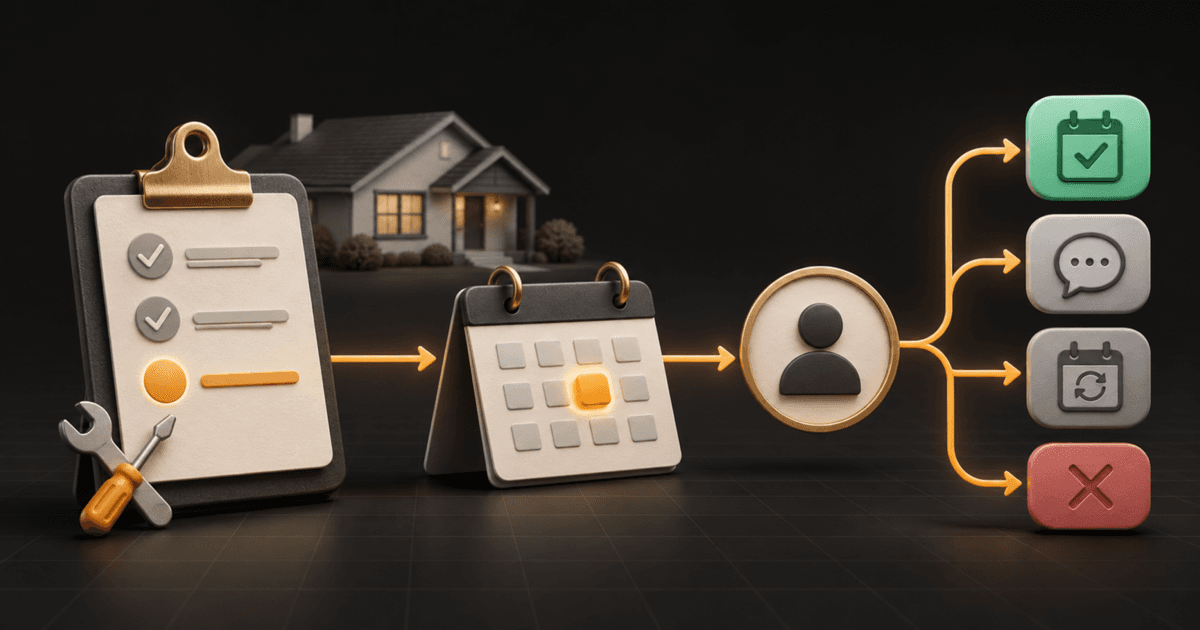
When a customer says, “Not today—check back with me in March,” do not leave the recommendation in a technician note or enroll the customer in a generic nurture sequence.
Record the exact recommended work, the completed visit that produced it, the customer's real return date, and the person who owns the next conversation. On that date, reopen with one useful question. Stop the timed path as soon as the customer or a team member replies, then record the real outcome.
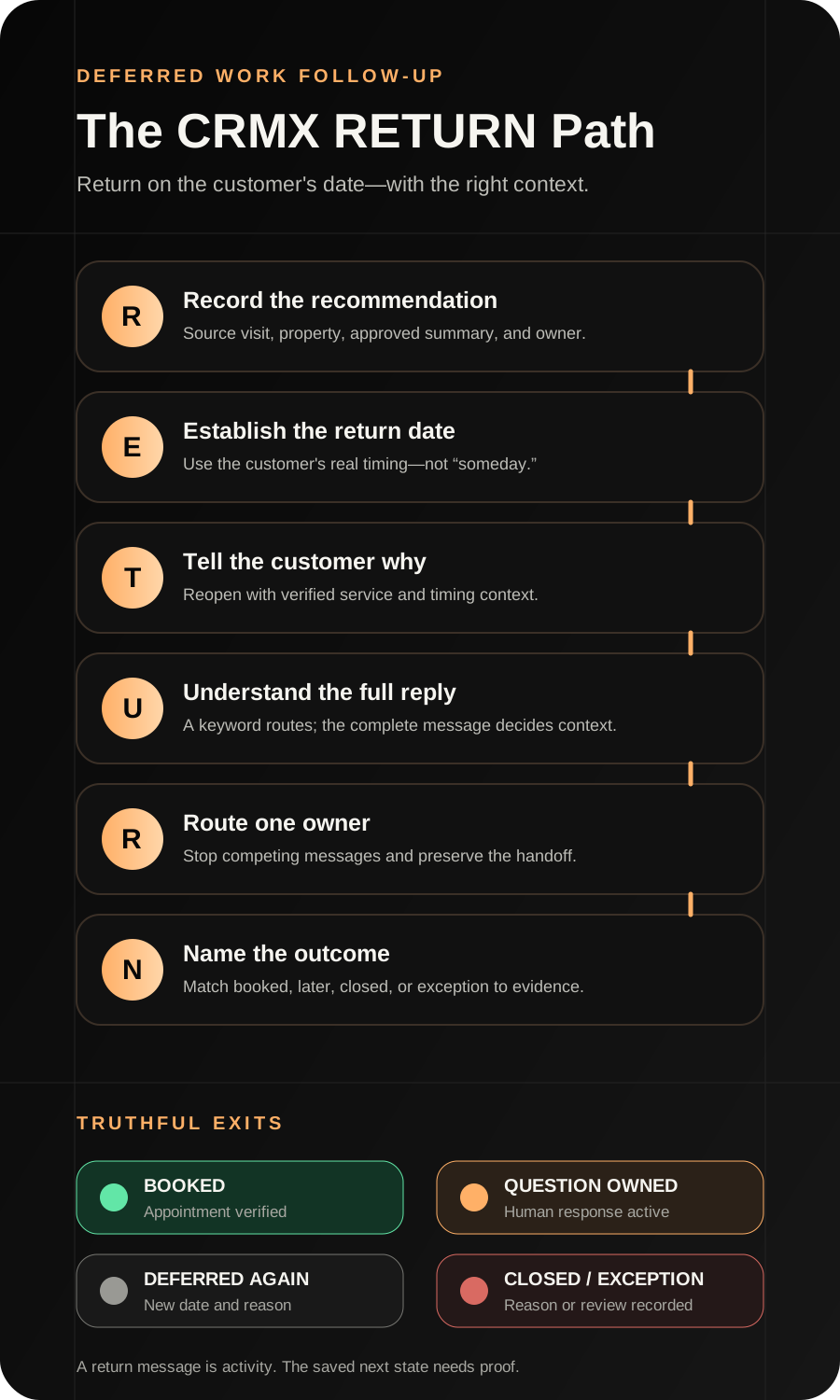
That is the CRMX RETURN Path: Record the recommendation, Establish the return date, Tell the customer why, Understand the reply, Route one owner, Name the outcome.
Brent Attaway's Five Fortune Engines separates post-appointment follow-up from long-term follow-up. The book's core idea is not to pressure people indefinitely; it is to stay useful, keep the next step clear, and build follow-up into the conversion system. RETURN applies that idea to recommended home-service work the customer deliberately postpones.
The tactic: turn “later” into a dated return path
Deferred work is not one generic list.
A customer might postpone because:
- another household or business priority comes first;
- the person needs to speak with someone else;
- the preferred time of year is different;
- the property is being sold, renovated, or temporarily unused;
- the customer wants a written explanation or a second conversation;
- the recommendation is no longer relevant;
- the business recorded the wrong property, system, or customer.
The workflow should not invent the reason. It should preserve what the customer actually said and reopen only when the timing and context remain valid.
RETURN is different from the 7-day estimate follow-up ladder. The estimate ladder handles the short decision window after a quote is delivered. RETURN begins only when a real later date or date range has been agreed and the short estimate path has ended.
It is also different from broad customer reactivation. Reactivation restarts an eligible dormant conversation. RETURN carries one known recommendation forward from one verified service event.
The CRMX RETURN Path
R — Record the exact recommendation
Start with a verified service event and a human-recorded recommendation.
The official Appointment Status trigger documentation says a workflow can start when an appointment status changes and can be filtered by calendar and the source of the change. That can help open a post-visit workflow when the intended appointment reaches the intended status.
An appointment status proves that the status changed. It does not prove the service was delivered correctly, the recommendation is accurate, the customer understood it, or the customer asked for later follow-up.
Require a trained person to record:
- Source Visit: the exact completed appointment or job context;
- Property or Service Location: the intended location;
- Deferred Work Summary: plain-language description approved for customer follow-up;
- Recommendation Owner: the person allowed to explain it;
- Customer Decision: schedule now, later with date, question active, decline, or exception;
- Return Date: the customer-approved date or reviewed operational date;
- Return Context: the customer's words or a short factual summary;
- Current State: one controlled RETURN state.
Do not copy a technical note directly into an automated message. Internal notes can contain shorthand, uncertainty, sensitive details, or language that was never approved for a customer.
If one contact can have several properties, visits, or recommendations, confirm whether these facts belong on an opportunity, job record, custom object, or another record that can keep each item separate. A single contact-level Deferred Work field can overwrite the wrong recommendation.
E — Establish a real return date
“Later” without a date is not a follow-up plan.
Ask:
What month or date would be better for us to check back about [Plain-Language Work Summary]?
If the customer gives a date range such as after the holidays or in early spring, a trained person should translate that into the business's reviewed date rule and preserve the customer's original wording. Do not pretend the customer named an exact date when they did not.
Use a date field named Deferred Work Return Date only after the team defines what it means and who can change it.
The documented Custom Date Reminder trigger can start a workflow before, on, or after a selected supported date field. The documentation also says an empty date does not trigger the workflow. That makes the field useful for RETURN, but it does not verify the recommendation or the date.
Before the record becomes eligible, check:
- the recommendation still belongs to the correct property or service context;
- the customer actually asked for or agreed to later contact;
- the return date exists and is not already obsolete;
- the short estimate or active sales path has stopped;
- no current appointment, completed work, decline, complaint, opt-out, or human conversation makes the reminder inappropriate;
- one person owns questions and exceptions.
Records that fail preflight should move to Exception Review, not into customer messaging.
T — Tell the customer why you are returning
On the return date, lead with the context the customer already created.
Use this script as a starting point:
Hi [First Name]—when we spoke after your [Service Visit] at [Property Context], you asked us to check back around [Return Date] about [Plain-Language Work Summary]. Is this still the right time to look at the next step, would another date be better, or should we close the loop?
Only include location and service details that are verified and appropriate for the approved channel. Do not expose access instructions, payment information, health details, dispute notes, or other sensitive data.
The first message has one job: confirm whether the deferred decision is still active.
Do not lead with a new discount, artificial deadline, unverified condition, or claim that the work has become more urgent. If new facts matter, a qualified person must establish them through the business's approved process.
If there is no reply, send at most the business's reviewed reminder path:
Hi [First Name]—I wanted to close the loop on the [Work Summary] follow-up you asked us to revisit. You can reply schedule, question, later, or close, or use your own words.
After the approved final touch, record No Decision or create a human review task. Silence is not a booking, decline, consent, or completed job.
U — Understand the full reply
A keyword is a routing hint, not the whole customer decision.
These replies are not equivalent:
- “Schedule it.”
- “Schedule it, but this is for the other property.”
- “I have a question about what was recommended.”
- “Later—call after we finish the remodel.”
- “Close this; we already handled it.”
- “The problem changed and now something else is happening.”
The official Customer Replied trigger starts a workflow when a contact replies and supports filters such as the workflow replied to, channel, tag, phrase, or intent type. Narrow the reply workflow to the verified RETURN context and preserve the complete message.
Set Live Reply Received before trying to classify the next step. A person or bounded AI employee can identify the apparent route, but sensitive, ambiguous, complaint-related, changed-condition, pricing, scope, or property questions should go to a person.
R — Route one owner and stop competing messages
The customer's reply should stop the dated sequence and create one owned conversation.
The official Workflow Settings guide documents Stop on Response, which can remove a contact from a workflow after the contact responds to a message sent by that workflow. Enable and test it for the exact RETURN messages and channels.
The official User Replied trigger can start when a team member sends from Conversations. Its documentation distinguishes a user reply from automated workflow or Conversation AI messages. That event can help record human-response evidence or stop a reminder when a person takes over.
Use the documented Assign To User action carefully. Its settings can assign among selected users and can replace an existing owner. A RETURN workflow should preserve the correct technician, estimator, comfort advisor, or service owner unless a reviewed rule authorizes reassignment.
Send this internal brief:
Deferred work reply needs an owner
Customer: [Name]
Source visit: [Appointment or Job]
Property or service context: [Verified Context]
Deferred work summary: [Approved Summary]
Original return date: [Return Date]
Return context: [Customer's Words]
Full current reply: [Reply]
Assigned owner: [User]
Required action: Review the conversation and record the next outcome
The Internal Notification action can alert selected internal users, roles, or teams. Treat the alert as visibility, not proof that someone answered.
The Add Task action can create assigned work with a due interval. Use it only when a person still owes a call, explanation, review, or scheduling action. Task creation is not task completion.
N — Name the outcome and evidence
Close the loop with a state that matches what actually happened.
The Update Contact Field action can write to supported standard and custom contact fields. Use it only after defining the record boundary and evidence for each state.
Use these RETURN states:
- Recommendation Recorded — a person preserved the source visit and approved summary.
- Deferred With Date — a real return date and owner exist.
- Return Message Sent — the workflow attempted the approved message.
- Live Reply Received — the customer supplied new context.
- Human Conversation Active — a person actually replied in the owned conversation.
- Scheduling Started — the approved scheduling path began.
- Booked — the intended appointment exists in the correct state and calendar.
- Deferred Again — a new reason, date, and owner replaced the old return path.
- Closed — the decision and reason ended the path.
- Exception Review — the record is incomplete, conflicting, sensitive, or requires a person.
Do not mark the work Booked because a calendar link was sent. Do not mark it Complete because a customer replied “yes.” Reopen the exact appointment, opportunity, job, or approved source that proves the outcome.
Build RETURN in CRMX
Connect CRMX customer records, Workflows, Conversations, tasks, calendars, pipelines, and reporting around two narrow workflows.
Workflow 1: record and defer
Entry event:
- the intended appointment reaches the reviewed completed state, or a trained user records the deferred recommendation through an approved internal path.
Actions:
- verify the source visit, property, customer, and owner;
- require a customer-approved later date or reviewed date rule;
- store the plain-language recommendation and original customer context;
- stop incompatible estimate or short-term messages;
- set Deferred With Date;
- route incomplete or ambiguous records to Exception Review;
- wait for the date-driven workflow rather than leaving an open-ended task.
Workflow 2: reopen on the real date
Trigger:
- Custom Date Reminder for Deferred Work Return Date.
Actions:
- rerun eligibility checks;
- preserve or confirm the correct owner;
- send the approved return-context message;
- set Return Message Sent;
- wait the reviewed interval;
- stop on customer or human reply;
- send one approved close-the-loop reminder if still eligible;
- record No Decision, create human review, or close according to the documented rule.
Build a separate live-reply workflow for the verified RETURN context. Do not let a generic keyword workflow catch unrelated conversations from the same customer.
Give Guy a bounded RETURN role
A trained CRMX AI employee can acknowledge the verified return context, identify schedule, question, later, or close intent, collect a preferred callback or appointment window, offer an approved calendar, and prepare the handoff.
Guy should not:
- invent or reinterpret a technician's recommendation;
- diagnose a condition or state that work is urgent, safe, unsafe, required, or covered;
- invent scope, pricing, discounts, availability, warranties, or results;
- treat a changed symptom or new request as the old recommendation;
- choose the property, system, or recommendation when records conflict;
- continue after an opt-out, wrong-person signal, close request, complaint, or human takeover.
Use this role instruction:
Guy handles verified deferred-work return conversations. He states only the approved service context, asks whether the customer wants to schedule, ask a question, choose another date, or close, and transfers changed conditions, technical questions, pricing, scope, complaints, property conflicts, sensitive details, or uncertainty to the assigned human with the full conversation attached.
Use case 1: HVAC comfort improvement deferred until spring
An HVAC service visit is completed. A trained team member records one approved customer-facing recommendation about a comfort improvement. The homeowner says the family wants to revisit it in March.
The record includes the source visit, correct property, approved summary, homeowner's words, March 10 return date, and assigned comfort advisor.
On March 10, RETURN asks whether the timing is still right.
The homeowner replies:
I have a question first. We changed how we use the upstairs rooms.
CRMX stops the timed path, preserves the complete message, and assigns the existing comfort advisor. Guy acknowledges the question but does not reuse the old recommendation as a diagnosis. The advisor reviews the changed context and decides the appropriate next conversation.
The outcome is Human Conversation Active, not Booked and not Work Required.
Use case 2: plumbing fixture work moved after a remodel
A plumbing customer receives a completed service visit and chooses to postpone a separate fixture project until after a kitchen remodel. The customer asks the business to check back in six weeks.
The RETURN record names the source visit, property, plain-language project summary, customer-supplied timing, and project owner.
At six weeks, the customer replies:
The remodel is delayed. Try me again on January 15.
The live-reply workflow stops the current sequence. The owner confirms the new date, updates Deferred Work Return Date, preserves the reason, and sets Deferred Again. The old date is no longer active.
The workflow does not keep sending the original schedule prompt. It does not treat the delay as a lost opportunity. It records the truth and returns when invited.
Measure whether the return path is real
Track observable facts:
- verified recommendations recorded from an approved source visit;
- deferred records with a real date and owner;
- records rejected by preflight;
- return messages attempted, delivered, failed, or skipped where the channel reports those states;
- live replies received;
- replies with one owner;
- human responses actually delivered from Conversations;
- scheduling paths started;
- appointments verified in the correct calendar and state;
- new customer-supplied dates recorded;
- closes with a documented reason;
- unresolved tasks past due;
- records with conflicting property, recommendation, date, or owner data.
These measures show whether RETURN is working as an operating system. They do not prove technical need, customer satisfaction, conversion lift, completed work, or revenue.
RETURN launch checklist
Before publishing the workflows, confirm:
- Name the exact service event that can create a recommendation.
- Define who may approve the customer-facing summary.
- Keep technician shorthand out of automated messages.
- Verify the customer, property, source visit, and recommendation.
- Decide whether the record belongs on the contact, opportunity, job, or another object.
- Keep simultaneous recommendations separate.
- Require a real return date or reviewed date rule.
- Preserve the customer's original timing words.
- Stop the short estimate path before starting RETURN.
- Require one owner before outreach.
- Route blank, past, conflicting, or unsupported dates to exception review.
- Review the approved sender, channel, and eligibility rules.
- Keep sensitive information out of messages.
- Make the return message explain why the business is checking back.
- Offer schedule, question, later, or close.
- Allow free-text replies.
- Enable and test Stop on Response.
- Narrow Customer Replied to the correct RETURN workflow.
- Use User Replied only for verified human-response evidence.
- Preserve a valid existing owner unless a reviewed rule says otherwise.
- Do not treat a notification or task as a completed response.
- Require a new date and reason for Deferred Again.
- Require an actual appointment for Booked.
- Write Guy's knowledge and escalation boundaries.
- Test schedule, question, later, close, no reply, wrong property, changed condition, complaint, opt-out, duplicate recommendation, missing owner, and human takeover.
- Reopen the exact records and compare the contact, conversation, workflow history, task, owner, calendar, and final state.
Frequently asked questions
Is deferred-work follow-up the same as estimate follow-up?
No. Estimate follow-up manages the short decision window after a quote. RETURN starts after the customer gives a real later date and the short path ends.
What if the customer says “later” but gives no date?
Ask for a useful month or date. If no date is available, keep the record in human review or another explicitly governed state. Do not invent a return date.
Can CRMX automatically decide whether the recommendation still applies?
No. CRMX can carry the verified record, date, messages, ownership, and state. A qualified person must handle changed conditions, technical judgment, and whether the prior recommendation remains appropriate.
Should RETURN send a new offer on the follow-up date?
The first message should confirm whether the customer's deferred decision is still active. Introduce a new offer only when it is approved, accurate, relevant, and appropriate for that customer and channel.
What happens when the customer books through another path?
Stop RETURN when the intended appointment or another reviewed exit becomes true. Verify the exact calendar and appointment state rather than assuming any booking resolves the deferred recommendation.
Can Guy handle the whole conversation?
Guy can handle approved context, routing, scheduling, and handoff. A person should own changed conditions, technical questions, scope, pricing, complaints, record conflicts, and any answer absent from approved knowledge.
Return when the customer asked you to return
Deferred work should not vanish in a note or trigger months of generic promotion.
Record the recommendation. Establish the date. Explain why you are back. Read the full reply. Route one owner. Name the outcome.
That is how RETURN supports the Convert stage of the CRMX Revenue Flywheel: useful follow-up continues after the first service conversation without pretending that timing, relevance, or technical judgment can be automated.
If you want help designing the records, workflows, AI-employee boundaries, owner handoffs, and QA around deferred work, request a live CRMX strategy demo.
Sources and further reading
- Official Support: Appointment Status workflow trigger
- Official Support: Custom Date Reminder workflow trigger
- Official Support: Workflow settings and Stop on Response
- Official Support: Customer Replied workflow trigger
- Official Support: User Replied workflow trigger
- Official Support: Update Contact Field workflow action
- Official Support: Assign To User workflow action
- Official Support: Internal Notification workflow action
- Official Support: Add Task workflow action