
Home Service Customer Reactivation: The CRMX REOPEN Path
Use the CRMX REOPEN Path to reactivate eligible home-service contacts with one relevant message, owned replies, and truthful pipeline outcomes.
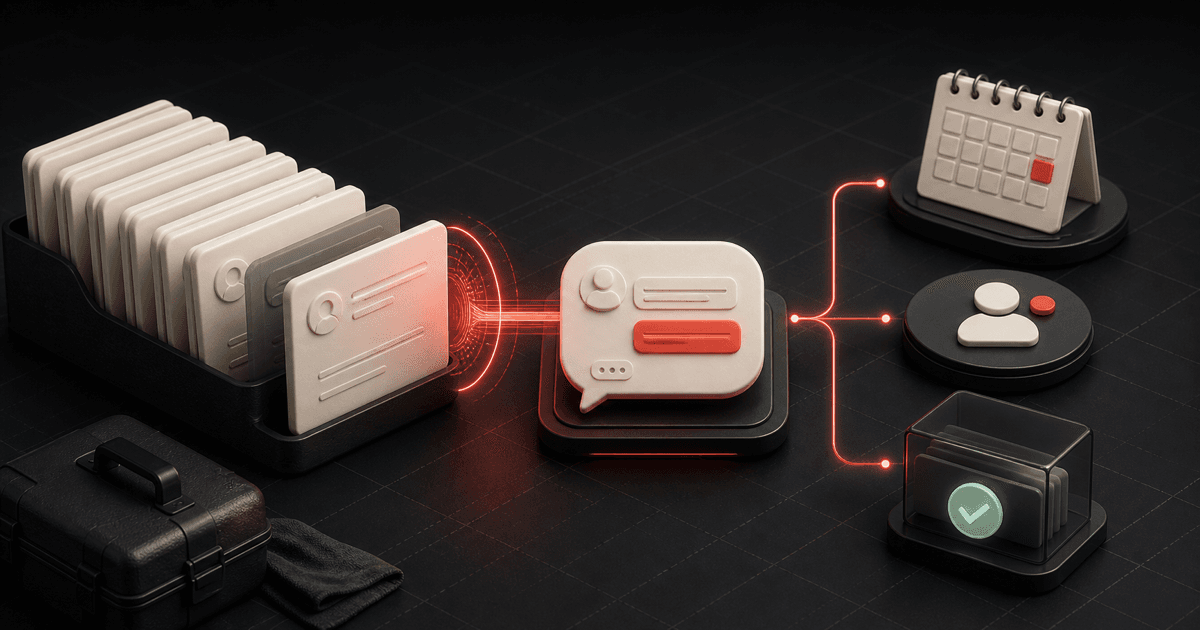
Most home-service databases do not need another blast. They need a better reason to reopen one conversation.
Customer reactivation should not mean selecting every old contact, sending the same promotion, and hoping somebody replies. It should mean finding a narrow group of people with a known relationship, a current reason for contact, and a next step the business can actually own.
That is the strategy behind the CRMX REOPEN Path: Review eligibility, Establish a real reason, Open one conversation, Process the reply, Enter the next step, Note the outcome.
It connects three ideas from Brent Attaway's Five Fortune Engines:
- The Follow-Up Engine keeps useful contact with people who were not ready at the first moment.
- The Raving Fan Engine continues the relationship after the initial job instead of disappearing when the transaction ends.
- The Automation Engine turns a defined trigger, message, owner, and exit into a repeatable system.
The result is not “more messages.” It is a controlled path from an eligible record to a truthful customer state.
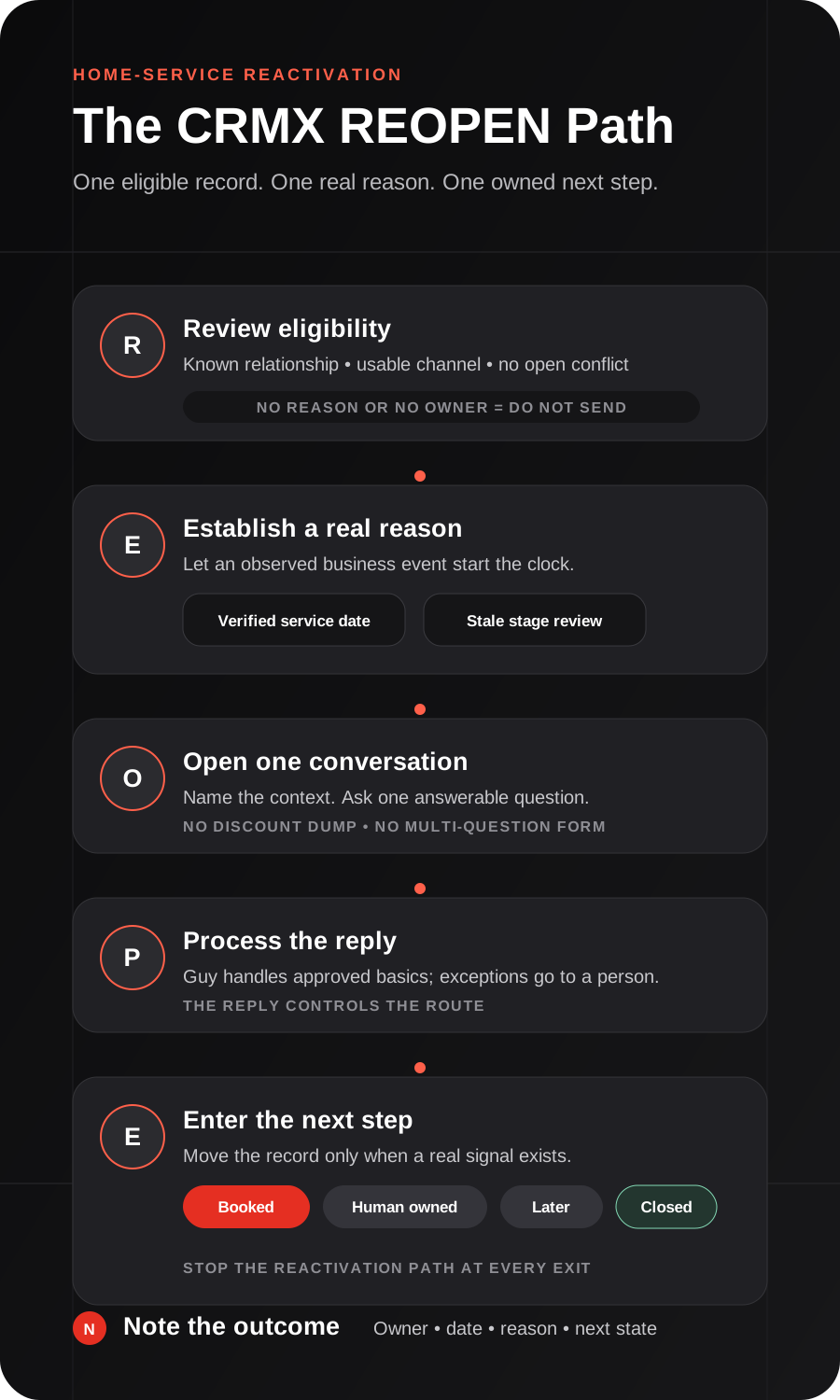
Reactivation is a routing problem before it is a copy problem
The first question is not, “What offer should we send?”
The first question is, “Why does this person belong in this conversation now?”
A home-service business may have several very different dormant groups:
- a past customer with a verified future service date;
- a homeowner who asked for an estimate but said the timing was not right;
- a lead whose opportunity has sat in the same stage without an owner action;
- a completed customer with an unresolved service issue;
- an invalid, duplicate, opted-out, or unrelated record.
Those groups should not receive the same message. Some should not receive a reactivation message at all.
Start with one segment and one reason. Make the segment narrow enough that the office can explain why every included record belongs there.
The CRMX REOPEN Path
R - Review eligibility
Use a five-part gate before any contact enters the workflow.
- Known relationship: CRMX shows how the person entered the database and whether the record is a past inquiry, past customer, or another known relationship.
- Current reason: a verified date, stage, service history, stated timing, or other approved business event explains why the conversation should reopen now.
- Usable context: the record contains enough accurate information to avoid a vague or misleading message.
- Defined owner: a person, team, or trained AI employee can handle the reply.
- Explicit exit: the workflow knows when to stop for a booking, human takeover, later decision, closure, invalid record, or other approved outcome.
If any of those are missing, do not solve the problem with more copy. Fix the record or remove it from the segment.
Create clear exclusions for contacts with:
- an active job or current appointment;
- an open complaint, refund, or sensitive service issue;
- an active sales conversation owned by a person;
- invalid or duplicate contact information;
- a record state that should not receive the selected channel;
- no verified reason for the reactivation.
This review protects the customer experience and the team's attention. It also prevents a generic reactivation workflow from colliding with real work already in progress.
E - Establish a real reason
CRMX should start the workflow from an observed event, not a guess.
Two trigger patterns cover many home-service use cases.
Pattern 1: a verified service date
Store the relevant date in a supported contact or opportunity date field only after the business has defined what that date means.
The current Custom Date Reminder trigger documentation says a workflow can start before, on, or after a selected supported date. It also notes that an empty date field does not trigger the workflow.
That makes the date useful for a real event such as:
- an approved maintenance reminder date;
- a plan-renewal review date;
- a customer-requested follow-up date;
- a project anniversary the business has chosen to recognize.
Do not let CRMX invent the interval. The service team must define and verify the business rule first.
Pattern 2: a stale opportunity review
Use the Stale Opportunities trigger for a selected pipeline stage that should not sit indefinitely.
The current Stale Opportunities documentation confirms that the trigger can watch a chosen pipeline and stage for a configured period without progress. It can then start actions such as notifying an owner, moving the opportunity for review, or beginning a follow-up path.
Treat “stale” as a review signal, not proof of interest.
The same documentation says the stale period is not retroactive to time before the trigger was added. If you are cleaning up an existing database, audit the current records separately instead of assuming a new trigger will find the entire backlog.
O - Open one conversation
The first message should answer three questions:
- Who is contacting me?
- Why now?
- What is the easiest useful reply?
For a verified service-date path:
Hi [First Name], this is [Business Name]. We helped with [verified service context], and our record shows [approved reason/date]. Would you like us to help with the next step, or is this no longer needed?
For a dormant estimate path:
Hi [First Name], this is [Business Name]. We spoke about [verified project type] and noted that the timing was not right then. Is it something you want to revisit, or should we close the loop for now?
The message does not need a discount, a list of services, three links, and five questions. Its job is to reopen a real conversation.
If the business cannot name the prior context honestly, do not fake familiarity. Use a different segment or require human review.
P - Process the reply
A reply is where reactivation becomes a live operating process.
The documented Customer Replied trigger can start a workflow when a contact responds. Filters can narrow the route by channel, tag, or the workflow being answered.
Build reply ownership before the first message goes out.
| Reply signal | First CRMX action | Owner |
|---|---|---|
| “Yes” or a clear service request | Ask the next approved route question | Guy or service coordinator |
| Booking request | Confirm the service path, then offer the assigned calendar | Guy or booking team |
| Question about scope, price, or prior work | Keep the context in Conversations and route to the right person | Human owner |
| Complaint, confusion, or unusual condition | Stop standard automation and escalate | Human owner |
| “Later” with a real timeframe | Store the date and confirm the next contact | Named owner or date workflow |
| “No,” resolved, wrong number, or invalid record | Close the path and record the reason | Office rule |
| No reply | Follow the approved final-touch rule, then stop | Workflow |
A trained CRMX AI employee such as Guy can acknowledge the reply, use approved service knowledge, ask one question at a time, and offer the correct calendar. Guy should not diagnose a problem, invent availability, negotiate an exception, or keep questioning someone who asked for a person.
E - Enter the next step
Do not move every reactivated contact directly to Hot Lead.
Use stages that describe what is true:
- Reactivation Review
- Conversation Open
- Reply - Human Owned
- Qualified Next Step
- Booked
- Later - Dated
- Closed / Not Needed
The Opportunity Changed trigger documentation describes filters for changes to stage, assignment, status, tags, and supported custom fields. Use those event changes to start the next approved workflow or notify the new owner.
The important distinction is between a message sent and a customer state changed. Sending the opener is an activity. A reply, booking, human assignment, dated-later decision, or closure is an outcome.
N - Note the outcome
Every record should leave the reactivation path with four facts:
- the reason the path started;
- the last meaningful response or no-response state;
- the current owner;
- the next action and date, or a clear closure.
Stop the reactivation workflow when:
- the person books;
- a human takes over;
- the person asks for later and a date is stored;
- the person says no or the need is resolved;
- the record is invalid or unrelated;
- the selected channel should no longer be used;
- another active workflow now owns the journey.
If a record still says Conversation Open with no owner and no next action, the workflow created a new leak instead of fixing one.
Build the first reactivation workflow in CRMX
1. Choose one narrow segment
Start with one of these:
- past customers with one verified service date;
- dormant estimates with one approved lost or delayed reason;
- opportunities stuck in one specific stage after a defined review period.
Do not combine past customers, open leads, lost opportunities, and unknown imported contacts in the first build.
2. Define the source fields
Use only fields the team can maintain:
Reactivation reasonLast service typeRelevant service datePrior decision or lost reasonReactivation ownerNext follow-up dateReactivation outcome
If a field is empty, decide whether the record should stop, route to review, or use a different workflow. Do not improvise the missing context inside the message.
3. Build the trigger and exclusions
For a service-date path, choose the verified date field and the approved offset. For a dormant opportunity, choose one pipeline, one stage, and a duration appropriate to that business's sales cycle.
Before the opener, check for active work, current appointments, sensitive states, duplicate reactivation, and missing ownership.
4. Write one opener per reason
Make the reason visible in the message. A service reminder, delayed estimate, unfinished question, and past-customer check-in need different openers.
Keep each opener to one answerable question. Test every merge field with a real test record.
5. Train Guy on the route
Give Guy:
- the allowed reactivation reasons;
- approved service and company knowledge;
- the minimum information required before booking;
- the assigned Appointment Booking calendar;
- the phrases and situations that require a person;
- one-question-at-a-time conversation rules;
- the exact outcome fields and stages to update.
Test Guy with interested, unsure, annoyed, urgent, out-of-area, wrong-number, pricing, existing-customer, and direct-human-request scenarios.
6. Create the outcome stages before activation
Map each reply route to a visible stage, owner, and stop rule. Do not rely on tags alone if the team needs a shared operating view.
7. Add the final no-response rule
The workflow needs an end. Decide whether the approved path includes one final close-the-loop message, a human task, or immediate closure after the opener.
Do not let the system keep sending merely because no one defined what silence means.
8. Measure states, not vanity activity
Review:
- records reviewed for eligibility;
- records excluded and why;
- conversations opened;
- replies received;
- replies waiting for an owner;
- qualified next steps;
- appointments booked;
- later dates recorded;
- records closed;
- records stuck in an open state.
These measures show whether the route is operating. They are not promised outcomes.
Use case 1: an HVAC service-date reminder
An HVAC company records a customer-requested follow-up date after a completed visit. The service team has defined what that date means and which customers belong in the reminder path.
Before the date workflow sends anything, CRMX checks that the contact has no active appointment, open service issue, or other current conversation.
The message says:
Hi Maya, this is Northline Heating & Air. After your last visit, we noted that you wanted us to check back around this time. Would you like help scheduling the next visit, or is it not needed right now?
Maya replies that she wants a visit next month. Guy acknowledges the request, asks the next approved scheduling question, and offers the assigned service calendar. When she books, CRMX moves the opportunity to Booked, ends reactivation, and starts the normal appointment-confirmation path.
Nothing in the workflow invents a maintenance schedule or assumes the customer is ready. The verified date opens the conversation; Maya's reply controls the route.
Use case 2: a roofing estimate that was delayed
A roofing company has an estimate opportunity marked Timing - Revisit Later with a dated follow-up requested by the homeowner. There is no active job, insurance discussion, complaint, or current owner conversation.
At the stored date, CRMX opens one message:
Hi Andre, this is Ridgeway Roofing. When we discussed the roof estimate, you asked us to check back around August. Is the project something you want to revisit, or should we close the loop for now?
Andre asks whether the original scope is still the right starting point. The reply stops the timed workflow and routes the complete conversation and estimate context to the assigned estimator.
The estimator reviews the record before responding. CRMX moves the opportunity to Reply - Human Owned rather than pretending the project is already qualified or booked.
For an estimate that merely went quiet, the same structure can begin with a stale-stage review. A person may decide the record has enough context to contact, needs a manual check, or should close without a message.
Copy-ready reactivation messages
Verified service-date opener
Hi [First Name], this is [Business Name]. We helped with [verified service context], and our record shows [approved reason/date]. Would you like help with the next step, or is this no longer needed?
Delayed-project opener
Hi [First Name], this is [Business Name]. We spoke about [verified project type], and you asked us to check back around [date/timeframe]. Is it something you want to revisit, or should we close the loop for now?
Human handoff
Thanks for the context. I’m routing this to [Owner Name or Team] with the notes from our conversation. They will review it and follow the approved next step.
Dated-later confirmation
Understood. I’ve noted [date/timeframe] for the next check-in. If anything changes before then, reply here and the conversation will stay together.
Close-the-loop message
Thanks for letting us know. I’ll close this reactivation follow-up so you do not keep receiving messages about it.
Replace every bracketed field and test the rendered message, sender, links, owner, and stop behavior before activation.
The REOPEN launch checklist
- One audience segment and one reason define the first workflow.
- The relationship source and prior context are visible in CRMX.
- The trigger comes from a verified date, selected stale stage, or approved manual review.
- Active jobs, appointments, complaints, live conversations, duplicates, invalid records, and incompatible channel states are excluded.
- A named person, team, or trained AI employee owns every possible reply.
- The opener identifies the business, names the context, and asks one question.
- Guy's knowledge, qualification, booking, and escalation boundaries are written and tested.
- The assigned Appointment Booking calendar is the correct next step for eligible requests.
- Replies stop the timed opener path and remain visible in Conversations.
- Stages describe Review, Conversation Open, Human Owned, Qualified, Booked, Later, or Closed.
- Human takeover, booking, later, closure, invalid record, and channel-stop states end reactivation.
- No-response behavior has a defined final action and stop.
- Test records cover eligible, excluded, missing-date, missing-owner, active-job, interested, question, later, no, complaint, wrong-number, no-reply, booking, human takeover, duplicate entry, and stale-record cases.
- The team reviews records stuck in Conversation Open.
Frequently asked questions
Should we reactivate every old lead?
No. Start with records that have a known relationship, accurate context, a real reason for contact, an appropriate channel state, a defined owner, and a clear exit. Unknown or incomplete records need review, not a larger send.
Is a stale opportunity automatically ready for outreach?
No. Stale means the opportunity has remained in a selected stage for the configured period. Use that as a review signal. Check the conversation, current work, owner activity, and reason before deciding what happens next.
Can Guy handle the whole reactivation conversation?
Guy can handle approved acknowledgments, service questions, one-at-a-time qualification, and the assigned booking path. A person should own complaints, unusual requests, uncertainty, pricing or scope exceptions, and any direct request for human help.
What if the customer says “later”?
Ask for or confirm a real timeframe, store it in the approved date field, move the record to Later - Dated, and stop the current reactivation workflow. Do not leave “later” as an undated note.
What if nobody replies?
Follow the business's approved final-touch rule, record the no-response outcome, and stop. Reactivation should have a deliberate end rather than an endless loop of generic check-ins.
Reopen the right conversation
Start with one clean segment, one verified reason, one answerable message, and one owner for every possible outcome. Once that path works manually with test records, automate the repeatable movement without hiding judgment inside the workflow.
CRMX brings customer records, Conversations, workflows, pipelines, calendars, reporting, and trained AI employees together in one AI-first growth platform. Explore the CRMX home-service system, or audition Guy live to see how a trained AI employee handles a real conversation.