
Home Service Sales-to-Operations Handoff: The CRMX PROMISE Brief
Build a sales-to-operations handoff that carries scope, promises, ownership, and the next due step from a won home-service opportunity into delivery.

A home-service sales-to-operations handoff should not begin just because a pipeline says Won.
It should begin when the business's real proceed condition has been verified, the promises made during the sale have been recorded, one operations owner has accepted the next step, and the customer-facing follow-up now matches what the delivery team can actually do.
That is the CRMX PROMISE Brief: Prove the proceed condition, Record the sold outcome, Own the next step, Move the opportunity truthfully, Interrupt obsolete sales follow-up, Send one complete brief, Evidence operations acceptance.
This is the bridge between the Conversion Engine and the Raving Fan Engine in Brent Attaway's Five Fortune Engines. Attention earns the first conversation. Lead capture preserves the source and customer context. Follow-up keeps the decision moving. Conversion produces a clear outcome. The Raving Fan Engine begins when delivery keeps the promise. Automation protects the repeated handoff without taking judgment away from people.
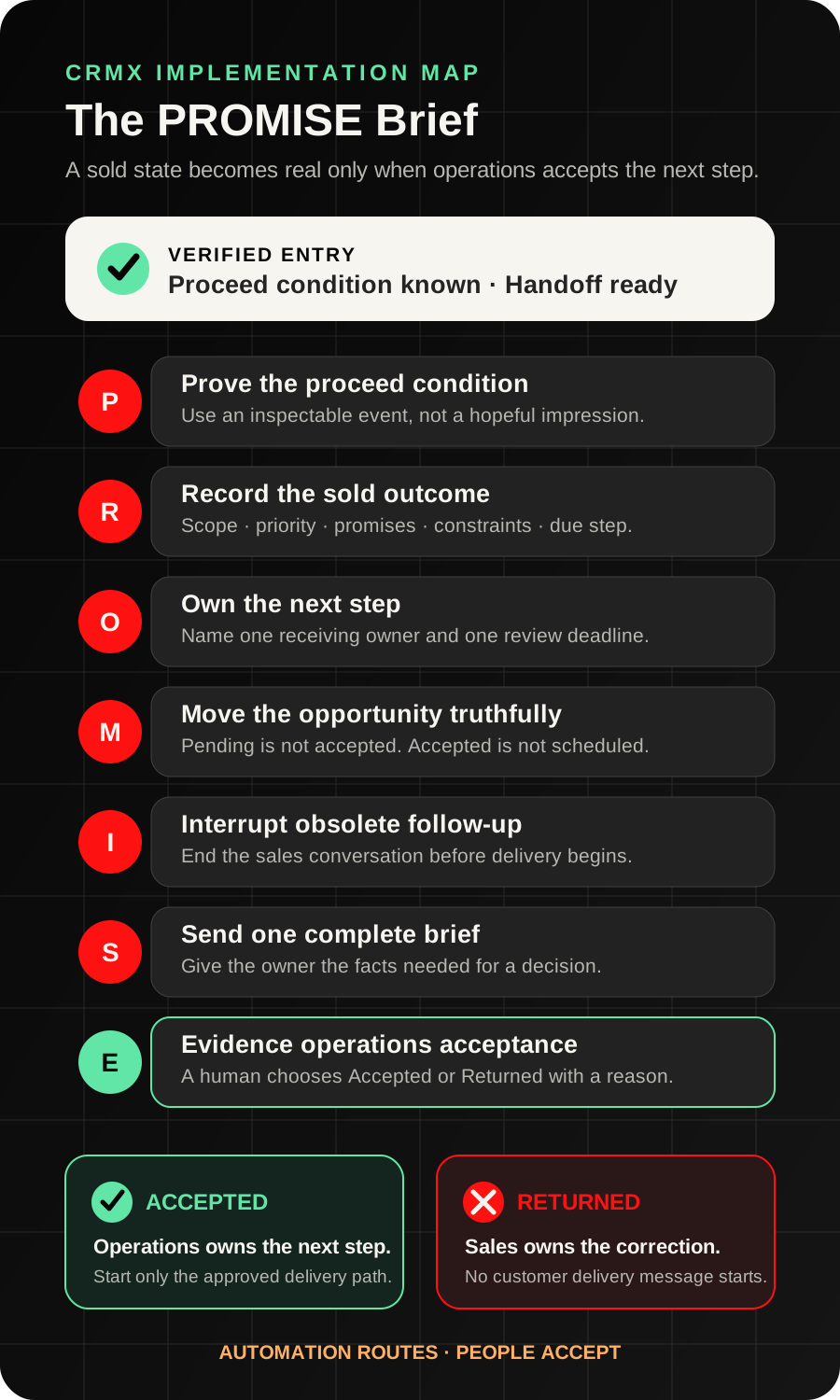
The strategy: move a promise, not just a pipeline card
A stage change is a signal. It is not a complete handoff.
If the salesperson moves an opportunity to Won and operations receives only a name, phone number, and total, the next team must reconstruct the sale. They may not know which option the customer chose, which expectations were set, what must happen next, who owns the first delivery action, or what should stop on the sales side.
That gap creates predictable drift:
- sales follow-up keeps running after the customer has proceeded;
- the customer repeats information they already provided;
- operations discovers a missing decision after the salesperson has moved on;
- tasks exist without a clear acceptance state;
- a sold record sits between teams with no current owner;
- reporting counts a handoff that nobody has actually accepted.
The better pattern is a state-first handoff: one verified entry event, one required brief, one named operations owner, one accept-or-return decision, and one observable exit.
The current Opportunity Changed workflow documentation supports filters for changes to opportunity stage, assignment, status, tags, and supported custom fields. That makes a deliberately maintained opportunity state useful as the beginning of the handoff.
It does not prove the brief is complete or that operations accepted it. Your operating process must define those facts.
The CRMX PROMISE Brief
P - Prove the proceed condition
Define the event your business recognizes as ready for handoff.
Do not use a vague rule such as “the customer sounded ready.” The proceed condition should be something the team can inspect and apply consistently. Depending on the business, that may include a human verification that the selected scope, customer decision, required internal approval, and next operational path are all known.
Create a field such as Handoff Ready and make the salesperson or authorized owner set it only after the required checks are complete. Use the opportunity's status, pipeline, and service type as additional filters so one workflow does not receive unrelated jobs.
If the trigger does not begin with an opportunity in context, use the documented Find Opportunity action to locate the correct matching record. It returns one configured earliest or latest match and has a separate not-found branch. When one contact can have multiple projects, do not rely on a broad lookup that could select the wrong job.
R - Record the sold outcome
The handoff should answer the questions operations would otherwise ask in a meeting.
Use the minimum fields needed for the first delivery decision:
- Selected scope: the approved service or project path the customer chose.
- Customer priority: what the customer is trying to solve or protect.
- Source promise: the relevant promise, offer, or expectation that brought the customer into the journey.
- Commitments made: only the verified timing, preparation, or next-step commitments the team must honor.
- Known constraints: access, schedule, property, stakeholder, or service details that affect the next action.
- Operations owner: the person or team responsible for accepting the handoff.
- Next action and due date: the first thing operations must do, and when it is due.
Do not turn the handoff brief into a second intake form. Preserve only what delivery needs to act correctly. Sensitive or protected information requires a separate approved collection and access process.
O - Own the next step
“Operations” is not an owner.
Assign one person or defined team to review the brief. Create one task that says what must be checked and when the accept-or-return decision is due.
The current Add Task workflow documentation supports a task title, description, assignee, and due interval. Use the description to carry the brief's decision fields and a direct link to the relevant record when your configuration supports it.
A created task is evidence that work was assigned. It is not evidence that anyone reviewed the scope, contacted the customer, or accepted responsibility.
M - Move the opportunity truthfully
Use stages that describe the handoff state:
- Sold - Brief Needed
- Handoff Pending Review
- Handoff Returned
- Operations Accepted
- First Delivery Step Scheduled
- Exception - Human Owner
The sales owner moves the record to Handoff Pending Review only after the required brief fields are complete. Operations then chooses Operations Accepted or Handoff Returned.
The Update Opportunity action documentation explains that an opportunity-based trigger supplies the opportunity context for later updates. A non-opportunity trigger needs the correct opportunity to be found first. Test this carefully when a contact can have more than one opportunity.
Do not treat Operations Accepted as proof that the job is scheduled, materials are available, work is complete, or the customer is satisfied. Those are later states with their own evidence.
I - Interrupt obsolete sales follow-up
The moment the verified handoff begins, remove the customer from messages that no longer match the journey.
Stop:
- estimate reminders that still ask for a decision;
- booking messages for the sales appointment that already happened;
- sales nurture that still presents the customer as undecided;
- duplicate “welcome” messages from overlapping workflows;
- salesperson tasks that conflict with the new operations owner.
This is the follow-up connection that makes the handoff commercially important. A good handoff does not merely start operations. It ends the old conversation cleanly and starts the next one with the same context.
S - Send one complete brief
Notify the operations owner with the facts needed for a decision, not a generic alert.
Use this internal template:
Handoff ready: [Project / Service]
Customer priority: [Verified Priority]
Selected scope: [Verified Scope]
Commitments made: [Verified Commitments]
Constraints or open items: [Known Constraints]
First operations action: [Next Action]
Due: [Due Date / Time]
Record: [Approved Record Link]
The documented Internal Notification action can notify selected users, roles, or teams through supported internal channels. If the message depends on contact or opportunity values, test those values in the exact workflow context.
An alert proves only that the notification step ran. It does not prove the recipient understood or accepted the handoff.
E - Evidence operations acceptance
Require a visible decision from the receiving owner.
Operations should choose one of two paths:
- Accept: the brief is sufficient, the owner is correct, and the first delivery action is defined.
- Return: one or more required facts are missing, contradictory, or assigned to the wrong owner.
Use a field such as Handoff Status with Pending, Accepted, and Returned values. Record the accepting owner and acceptance time through the team's defined process. If returned, require one short reason and route it back to the sales owner without beginning customer-facing delivery messages.
Only the accepted path should start the next operational workflow. The returned path should create a correction task, preserve the original brief, and keep one visible owner.
Build the handoff in CRMX step by step
1. Choose one sold path
Start with one service type and one sales-to-operations transition. Do not combine service calls, replacements, maintenance agreements, warranty requests, and large projects in the first workflow.
Map:
- the real proceed condition;
- the required brief fields;
- the sales owner;
- the operations owner;
- the accept and return states;
- the first operational action;
- the customer message, if any, that may send only after acceptance.
2. Create the minimum fields
Use fields the team can maintain during the real sales process. A practical first set is:
Handoff ReadyHandoff StatusSelected Scope SummaryCustomer PriorityCommitments MadeKnown ConstraintsOperations OwnerOperations Next ActionOperations Next Action DueHandoff Return Reason
If a required field is empty, route to Sold - Brief Needed instead of filling the gap with AI inference.
3. Build the ready trigger
Use Opportunity Changed with narrow filters for the intended pipeline, status, service path, and Handoff Ready change. Configure re-entry so routine edits do not create duplicate tasks and notifications.
The workflow should:
- verify the required fields;
- move the record to Handoff Pending Review;
- stop incompatible sales follow-up;
- assign the review task;
- send the complete internal brief;
- wait for the operations decision through the maintained handoff state.
4. Build the accepted route
When Handoff Status changes to Accepted:
- record the operations owner;
- move to Operations Accepted;
- create the first operational task or calendar path;
- send only the customer confirmation the business has approved for that service;
- start the separate delivery or job-status update workflow when its real entry event exists.
Do not say the job is scheduled until a scheduling event proves it.
5. Build the returned route
When Handoff Status changes to Returned:
- stop the accepted path;
- require a return reason;
- move to Handoff Returned;
- assign the correction to the sales owner;
- notify the operations owner when the brief is resubmitted;
- preserve the customer from duplicate or contradictory messages.
Returned is not failure. It is the control that prevents incomplete promises from entering delivery.
6. Train Guy for a bounded support role
Guy can support the handoff by:
- checking whether required verified fields are present;
- assembling the internal brief from approved record values;
- identifying contradictions for a person to review;
- sending an approved customer acknowledgment after acceptance;
- answering approved scheduling or preparation questions;
- routing exceptions into Conversations with the correct owner.
Guy should not decide that a sale is valid, invent missing scope, approve pricing, resolve technical feasibility, promise a crew or date, determine warranty coverage, or mark operations acceptance.
The AI employee supports the defined process. The authorized sales and operations owners make the commercial and delivery decisions.
7. Test the uncomfortable paths
Run at least these tests with authorized test records:
- Won status but Handoff Ready is not set;
- ready field set with one required brief field missing;
- contact with multiple opportunities;
- wrong operations owner;
- operations accepts;
- operations returns the brief;
- resubmitted brief;
- duplicate trigger event;
- customer replies during the handoff;
- salesperson manually takes over;
- first delivery date is still unknown;
- record enters the wrong service workflow.
Use case 1: HVAC replacement sold by a comfort advisor
A comfort advisor completes a residential replacement conversation. The homeowner chooses one approved system path and expects the office to contact them about the next scheduling step.
The advisor records:
- selected system path;
- the homeowner's main priority;
- the rooms or comfort issue discussed;
- verified access or scheduling constraints;
- the promise that the office will review the file and contact the homeowner about next steps;
- the installation coordinator as operations owner;
- a due time for the first review.
The advisor sets Handoff Ready. CRMX moves the opportunity to Handoff Pending Review, stops the estimate-decision sequence, creates the review task, and sends the PROMISE brief.
The coordinator notices that one required site detail is missing and chooses Returned. No installation confirmation is sent. The advisor adds the verified detail and resubmits. The coordinator accepts, and only then does the approved scheduling path begin.
The workflow protected the customer from a promise operations could not yet keep.
Use case 2: whole-home repipe moving from sales to production
A plumbing company sells a whole-home repipe after an onsite assessment. The estimator has discussed the selected scope, likely preparation needs, and the customer's preferred communication channel. The project manager will own the next operational step.
The PROMISE brief carries:
- the verified project scope summary;
- the customer's priority and relevant property context;
- the commitments the estimator actually made;
- known access and scheduling constraints;
- the project manager as owner;
- the first review task and due time.
The project manager accepts the handoff but does not mark the job scheduled. The next workflow creates the approved planning task. When the real scheduling event exists, the separate appointment and customer-preparation path can begin.
The customer does not receive an estimate reminder after the sale, and the project manager does not have to reconstruct the conversation from scattered notes.
The PROMISE handoff checklist
Before the first live handoff, verify:
- The business has defined one inspectable proceed condition.
- The first workflow covers one service path and one pipeline.
- Required scope, priority, promise, constraint, owner, and due-date fields exist.
- Missing fields route to review instead of being inferred.
- The correct opportunity remains in context when a contact has multiple projects.
- A named operations owner receives one complete brief.
- The review task has a useful title, description, assignee, and due time.
- Sales follow-up stops when the verified handoff begins.
- Operations can visibly accept or return the brief.
- A return reason creates one correction owner.
- Customer-facing operations messages wait for acceptance and the real downstream event.
- Guy's allowed actions and human-only decisions are documented.
- Duplicate entry, wrong owner, missing field, return, resubmission, and customer-reply paths pass.
- Reporting separates Handoff Pending, Accepted, Returned, and First Delivery Step Scheduled.
Measure handoff states, not notification volume
Review these counts and elapsed states:
- sold opportunities waiting for a complete brief;
- briefs pending operations review;
- accepted handoffs;
- returned handoffs and return reasons;
- accepted handoffs without a first operational action;
- customer replies waiting for an owner;
- records still receiving incompatible sales follow-up;
- first delivery steps created from an accepted handoff.
These measures show whether the process is operating. They are not promised business outcomes.
The CRMX platform can connect opportunities, workflows, tasks, Conversations, calendars, and reporting around the handoff. The Revenue Flywheel provides the broader strategy: the context that earned and converted the lead should continue into the customer experience instead of resetting at the sale.
Frequently asked questions
Should the handoff start when the opportunity is marked Won?
Only if your business has defined what Won proves and the required brief is complete at that moment. A safer first version uses a separate Handoff Ready state so the team can distinguish the commercial outcome from operational readiness.
Is an internal notification enough?
No. A notification is an alert. Require a visible Accepted or Returned decision from the receiving owner.
Should sales or operations own the customer during the handoff?
Define one owner for each state. Sales owns missing or corrected sale context. Operations owns the journey after it accepts the brief. If the customer replies during the transition, route the conversation to a named person rather than letting both teams assume the other has it.
Can Guy create the handoff brief?
Guy can assemble the brief from verified fields and flag missing information. Guy should not invent scope, promises, readiness, pricing, technical conclusions, or acceptance.
What if operations returns many handoffs?
Review the return reasons. Repeated missing fields may mean the sales process, form, training, or field definitions need improvement. Do not remove the acceptance gate merely to reduce the count.
Is this the same as customer onboarding?
No. The PROMISE Brief decides whether the delivery team has accepted enough context to begin. Onboarding, preparation, scheduling, job updates, and fulfillment are separate downstream processes with their own events and proof.
Carry the promise into delivery
Start with one sold service, one required brief, one operations owner, and one accept-or-return decision. That is enough to turn a pipeline movement into an owned handoff.
Explore the full CRMX Revenue Flywheel to connect capture, follow-up, conversion, and customer experience. If you want CRMX to map the handoff with your team, explore implementation services. To hear how a bounded AI employee supports the conversation without taking over human judgment, audition Guy live.