
Home Service Lead Follow-Up: The CRMX REPLY Relay
Build a home-service lead follow-up workflow that preserves inquiry context, routes customer and team replies, proves ownership, and stops cleanly.
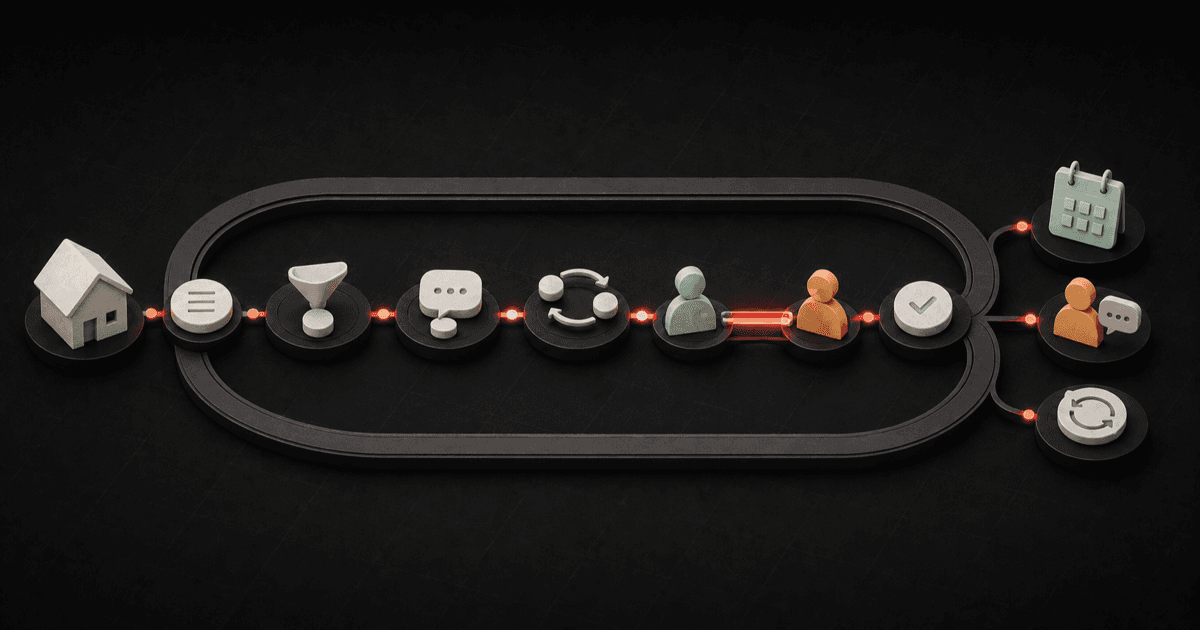
A useful home-service lead follow-up system does five things: preserves why the person reached out, responds with one relevant next step, changes route when the customer or team replies, proves who owns the conversation, and stops the short sequence when the lead books, closes, or moves into another defined path.
It is not a pile of reminders.
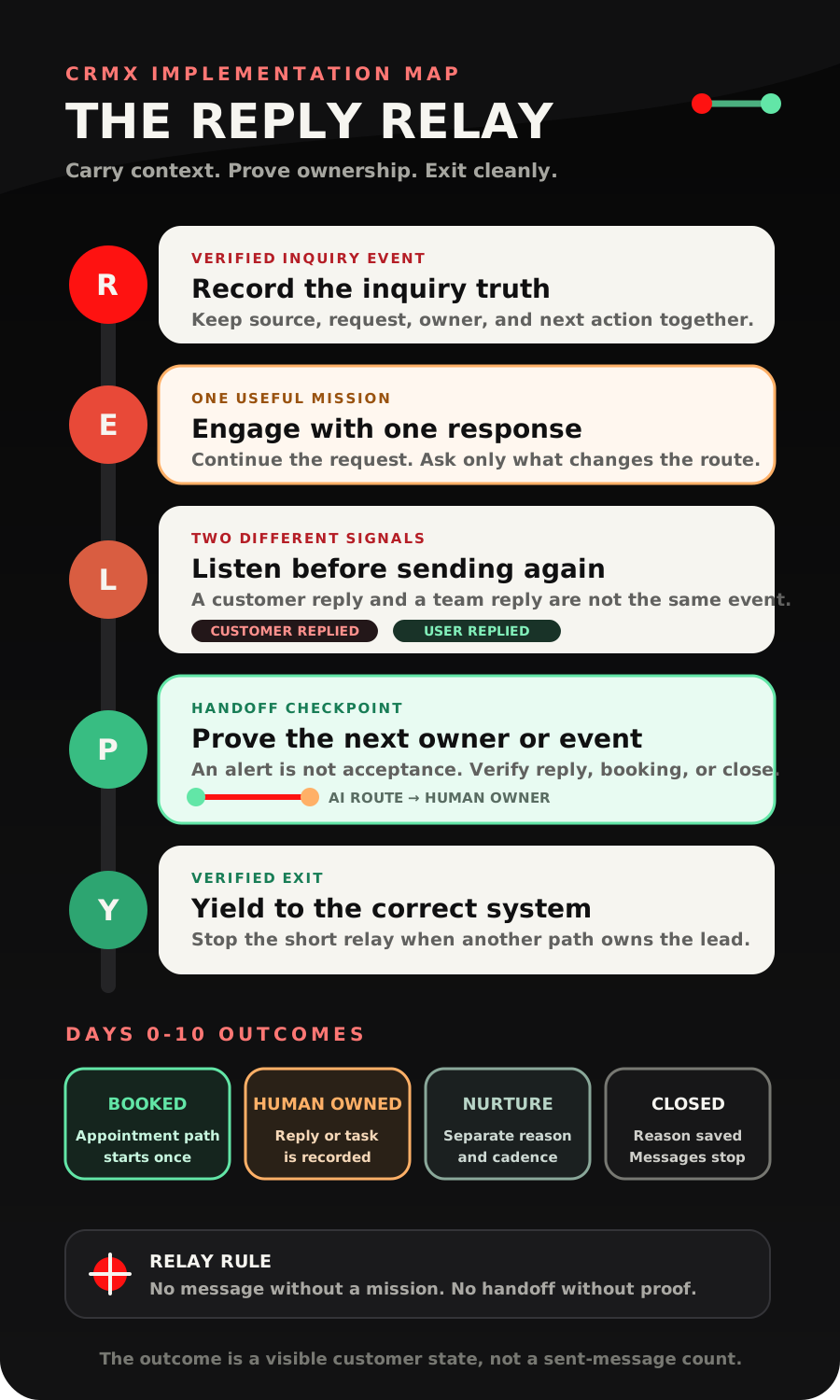
The CRMX REPLY Relay turns that operating idea into a Days 0-10 workflow: Record the inquiry truth, Engage with one useful response, Listen for customer and team signals, Prove the next owner or event, Yield to the correct downstream system.
The word relay matters. A captured lead should not bounce among a form, an inbox, an AI employee, a dispatcher, a calendar, and a pipeline with each system assuming somebody else has it. Every handoff needs a receiving owner or a verified event.
Brent Attaway's Five Fortune Engines connects attention, lead capture, follow-up, conversion, customer experience, and automation as one working system. This article applies those six engines to the first ten days after a home-service inquiry. It preserves the promise that earned attention, turns captured information into an owned conversation, gives each follow-up one mission, prepares the correct conversion step, protects context for later customer care, and automates only the parts the business has defined.
The problem is not sending. It is losing the state.
Most follow-up failures are described as message problems: the text was weak, the email was late, or the team did not call enough.
The deeper problem is often state.
A homeowner completes a form about a leaking water heater. The record says only New Lead. An automated text asks whether the person wants a quote. A dispatcher receives an alert with no service detail. Guy asks questions the homeowner already answered. A salesperson opens a second opportunity. Then the homeowner books, but the old nurture messages keep going.
Every individual tool may have worked. The journey still failed because context, state, ownership, and stop conditions did not travel together.
Google's current lead-form best-practice guidance recommends routing submissions directly into a CRM through an integration or webhook when rapid follow-up matters. That is a useful starting principle. The submission should arrive where the business can preserve the source, run the correct response, and measure deeper outcomes.
But arriving in the CRM is not the same as being handled.
The REPLY Relay separates six operating states:
- New - Unanswered: A verified inquiry entered CRMX, but no customer-facing response is recorded. Start the approved entry response and assign the route.
- AI Conversation Active: Guy is handling approved questions from known information. Continue until booking, a valid close, or a human boundary.
- Human Reply Required: The lead needs judgment, an exception, or a person. Notify a named owner and prove the owner actually replied.
- Appointment Booked: A verified booking event exists on the intended calendar. Stop new-lead follow-up and begin appointment preparation.
- Long-Term Nurture Eligible: The short path ended without a booking, and the business has a valid longer reason to stay in touch. Enter a separate nurture system with its own purpose and rules.
- Closed or Invalid: The lead declined, asked to stop, was a duplicate, was outside the service path, or otherwise should not continue. Record the reason and stop the sequence.
Those labels are recommended operating states, not built-in CRMX defaults. Use names that fit your business, but keep the differences visible.
The CRMX REPLY Relay
R - Record the inquiry truth
Start with the event that actually happened.
For a CRMX website or funnel form, the current Form Submitted trigger documentation says a selected form can begin a workflow. Use that filter to separate an emergency-service request, maintenance inquiry, estimate request, financing question, and general contact form when they need different handling.
Other sources may need their own verified entry event. A missed call belongs in the CRMX RING Route. A chat conversation, lead ad, manually created contact, or partner referral should not be silently treated as the same form submission.
At entry, preserve only the context the next step needs:
- lead source and source detail;
- requested service;
- property or service-area information the person supplied;
- stated timing, without converting it into an emergency diagnosis;
- campaign, page, form, or call context;
- assigned route and owner;
- the current follow-up state;
- the latest customer message;
- the next scheduled action.
Do not make the customer repeat information the business already captured. Do not invent information that is absent.
This is where the Attention Engine meets the Lead Capture Engine. The first response should continue the message and promise that brought the person in. A drain-cleaning request should not receive generic copy about all home services. A roof-replacement research guide should not receive emergency language.
E - Engage with one useful response
The first message has one job: make the correct next step easy.
For a straightforward inquiry, that may mean acknowledging the exact service and asking one approved question:
Hi [First Name], thanks for reaching out to [Business Name] about [Requested Service]. I have that here. Is the work needed at [Service Address or Area], and what is the most useful thing for us to help with first?
For a form that already collected the service area, ask the next missing question instead of asking for it again.
A trained CRMX AI employee such as Guy can handle the approved portion of this conversation: acknowledge the request, use the business's service knowledge, ask defined qualification questions, offer a tested calendar when the route is clear, and preserve the answers for the next owner.
Guy should not improvise safety instructions, diagnose an urgent condition, invent availability, negotiate price, resolve a complaint, or keep a person inside automation after they ask for a human. Those are handoff conditions.
The response can be immediate without being reckless. “Immediate” here means the approved workflow begins from the verified entry event. It is not a promise that every channel will deliver within a particular number of seconds.
L - Listen for customer and team signals
The workflow should wait for something meaningful, not merely delay and send again.
The current Wait action documentation describes waits for a fixed time, a customer reply, a team-user reply, an appointment, an action, a date, or a condition. Customer-reply and user-reply waits can use a timeout branch.
That supports a better design:
- send one useful message;
- wait for the relevant reply or event;
- change the state when the signal arrives;
- use the timeout only for the next approved action;
- stop the old branch when another owner or system takes over.
The documented Customer Replied trigger can begin a route when a contact responds and can be filtered by channel, phrase, tag, intent type, or the workflow being answered.
Treat the reply as new context, not as permission for a keyword to make a complex decision.
“Yes” could mean yes to a call, yes to a service question, yes to a proposed time, or yes to receiving more information. “Emergency” could describe the homeowner's emotion rather than a condition your business is qualified to interpret automatically. “How much?” may need a price explanation, an inspection, or a person.
The reply route should preserve the full message and choose the next owner.
P - Prove the next owner or event
An internal notification is not a completed handoff.
The current Internal Notification action documentation supports alerts to selected users, roles, or teams with dynamic context. Use it to send a compact lead brief:
Lead: [Full Name]
Request: [Requested Service]
Source: [Lead Source and Detail]
Location: [Service Area or Address]
Latest message: [Message Body]
Current state: [Follow-Up State]
Required action: Reply in this conversation by [Internal Expectation]
Owner: [Assigned User or Team]
That proves an alert was sent. It does not prove the owner replied.
The newer official User Replied trigger documentation distinguishes a message sent by a team user from a customer reply. It can support a response checkpoint, stop automation after a person takes over, or escalate when the internal response path times out.
Use the strongest practical proof available:
- a recorded user reply in the same conversation;
- a completed task with a clear disposition;
- a verified appointment booking;
- a pipeline state change tied to the correct opportunity;
- a documented close reason.
Do not mark a lead Human Owned because an alert exists. Mark it when a named person accepts and acts on the handoff according to the business's rule.
Y - Yield to the correct downstream system
The new-lead workflow should end cleanly.
When a customer independently books, the documented Customer Booked Appointment trigger can start a workflow and can be filtered to the intended calendar or calendar group.
Use that verified booking to:
- remove the lead from the new-inquiry sequence;
- record Appointment Booked on the correct opportunity;
- begin the matching confirmation and preparation path;
- prevent a generic “still interested?” message after booking;
- retain the original request and conversation for the appointment owner.
The CRMX ARRIVE Plan covers the next system: confirmation, preparation, reply routing, appointment-state changes, and the owned next step.
If the lead needs a person, yield to the human-response path. If the person says later and the business has an appropriate longer nurture process, close the short relay and enter that separate system. If the lead declines or asks to stop, close it. If the record is a duplicate or invalid, resolve it according to the business's data rule.
If an opportunity needs to change, the current Update Opportunity action documentation says the correct opportunity must already be in context or be found first. One homeowner can have multiple properties, jobs, estimates, or open opportunities. Never update a random deal simply because it belongs to the same contact.
A practical Days 0-10 follow-up map
The timing below is a starting operating design, not a universal cadence. Adapt it to the service, channel, business hours, approved messaging policy, and the signals you can verify.
Entry event - preserve context and establish ownership
Create or locate the correct opportunity, save the source detail, and set New - Unanswered. Exit this path immediately when the record is invalid or a duplicate.
First response - continue the exact inquiry
Send one acknowledgement and ask the next useful question. Guy may handle the approved route. Exit when the customer replies, books, closes, or needs a person.
Same operating day - prevent an unowned high-intent request
Check for a customer reply, user reply, booking, or exception. Notify the named owner when required. The window is complete only when the next owner or event is proved.
Days 1-3 - clarify and make the next step easy
Send useful context tied to the request, not a generic chase. Offer the correct call or calendar only when the route is ready. Exit when the lead is booked, human owned, closed, or explicitly later.
Days 4-7 - reduce friction without repeating the pitch
Ask one low-effort decision question and route the answer. A real state should replace “still following up.”
Days 8-10 - close the short relay honestly
Send the approved close-the-loop message or create the final human task. The short path should end in a visible outcome.
After Day 10 - use a different reason, cadence, and owner
Enter long-term nurture only when the lead is eligible. Otherwise, close the record. The initial-contact workflow should no longer be active.
Message count is not the goal. State movement is.
Build the lead follow-up system in CRMX
1. Choose one inquiry source
Start with one high-value, understandable entry point, such as the main service-request form on a CRMX website or funnel.
Document the fields, source values, existing notifications, assigned owner, business-hour behavior, and current customer-facing response. Test what happens when the same person submits twice.
2. Define the minimum pipeline states
Use a small set your team will maintain:
- New - Unanswered
- AI Conversation Active
- Human Reply Required
- Appointment Booked
- Long-Term Nurture Eligible
- Closed or Invalid
Add service-specific qualification states only when they change a real action. For service-area, urgency-boundary, calendar, and human-route design, use the CRMX ROUTE Card.
3. Build the entry workflow
Use the verified source trigger. Save the source detail. Create or find the correct opportunity according to your data model. Assign the initial owner. Send the approved first response. Then wait for a reply or event with a timeout branch.
Do not stack ten messages before building the reply and booking exits.
4. Train Guy for a bounded role
Give Guy:
- the approved greeting and business identity;
- supported services and service-area rules;
- the exact questions that determine the route;
- the calendars he may offer;
- the information he may and may not explain;
- phrases and situations that require a human;
- the handoff message and owner;
- the states that end the conversation.
Then test incomplete answers, typos, repeated messages, unknown services, direct human requests, pricing questions, scheduling conflicts, complaints, and urgent language.
5. Build customer-reply routing
When a lead replies, stop the next generic timed message. Re-read the active state and latest message. Let Guy continue only inside the approved training. Route every boundary to the named person with the source, request, prior answers, and required action.
6. Build human-response proof
Use the user-reply event, task disposition, or another explicit internal acceptance rule to confirm that the person acted. Add a timeout route when an alert remains unaccepted.
The escalation should say what is missing:
[Owner or Team], this lead still has no recorded team response. Review the conversation, reply or close the task, and set the correct state. Do not start a second outreach sequence.
7. Make booking and closure true exits
Test the exact booking trigger and calendar. Remove the lead from the short follow-up workflow. Begin the separate appointment path once.
Build equally clear exits for declined, stop requested, duplicate, invalid, outside service route, and long-term nurture eligible.
8. Measure outcomes, not message activity
A useful dashboard can show:
- verified new inquiries by source;
- New - Unanswered records past the internal expectation;
- customer replies;
- AI-handled conversations that reached an approved outcome;
- Human Reply Required records and recorded user replies;
- appointments booked from the inquiry path;
- closed and invalid reasons;
- leads moved to long-term nurture;
- duplicate sends, workflow errors, or records left without a next action.
Do not treat a sent notification, delivered message, or open pipeline record as a conversion.
Use case 1: an urgent plumbing inquiry
Elena submits a website form for a leaking water heater and selects Water heater. The form does not establish the severity, source of the leak, property condition, or whether the situation is safe.
CRMX records the form, service, page, and timestamp. The REPLY Relay sets New - Unanswered and sends:
Hi Elena, thanks for contacting Clearline Plumbing about the water heater. I have your request here. If there is an immediate safety concern or active property damage, follow your local emergency guidance and use the business's approved urgent contact path. Otherwise, what would be most useful for our team to understand first?
Elena replies that water is spreading near an electrical area. That is outside Guy's routine scheduling boundary. The customer-reply route sets Human Reply Required, stops the standard follow-up, and sends the on-duty dispatcher the full lead brief.
The internal alert does not mark the handoff complete. When the dispatcher replies in the conversation, the User Replied event records the human response and ends the AI path. The dispatcher owns the next action.
The workflow did not diagnose the condition, invent a safety instruction, offer an inappropriate calendar, or keep sending nurture messages.
Use case 2: a roofing project-research inquiry
Marcus downloads a roof-replacement planning guide from a funnel and says the project may happen later this year. He is not asking for emergency service or an immediate inspection.
CRMX records the guide, campaign, project timing, and source form. Guy acknowledges that exact context:
Hi Marcus, thanks for requesting the roof-replacement planning guide from Ridgeway Roofing. You mentioned the project may be later this year. Would it be more useful to understand the inspection process, the planning timeline, or the questions to ask before choosing a contractor?
Marcus chooses the planning timeline. Guy provides the approved explanation and asks whether Marcus wants to schedule a planning call or keep the guide for now.
Marcus asks for a call. Guy offers the tested consultation calendar. A verified booking moves the opportunity to Appointment Booked, ends the initial REPLY Relay, and begins the appointment-preparation path.
If Marcus had chosen “keep the guide for now,” the short relay could close as Long-Term Nurture Eligible only if the business has a relevant, approved longer path. It would not keep sending daily booking requests.
Copy-ready follow-up messages
Context-preserving first response
Hi [First Name], thanks for reaching out to [Business Name] about [Requested Service]. I have [Captured Context] here. [Ask the next approved question that changes the route.]
Low-friction decision question
Hi [First Name], should we help with [Next Approved Step], answer a question first, or close this request for now?
Human handoff
I want to make sure this is handled accurately. I am passing your request and this conversation to [Owner or Team], so you do not have to repeat the details. They will continue with you here.
Internal handoff brief
[Owner or Team], [First Name] needs a human response about [Reason]. The request came from [Source], the service is [Requested Service], the current state is [State], and the latest message is [Message Body]. Reply in this conversation or close the task with the correct outcome.
Close the short sequence
Hi [First Name], I will close this short follow-up so you do not keep receiving messages about the same request. If you still want help with [Requested Service], reply here and we will pick up with the context we already have.
Replace every bracketed value. Do not promise a person, response time, service, price, or appointment the operating process cannot support.
The REPLY launch checklist
- One approved inquiry source defines the first version.
- The source, service request, campaign or page context, and latest message are preserved.
- The first response asks one useful question tied to the inquiry.
- Guy's approved knowledge, calendars, boundaries, and human routes are documented and tested.
- Customer replies stop the next generic timed message.
- Customer Replied and User Replied are treated as different events.
- Every internal alert names an owner, includes the necessary context, and states the required action.
- Human ownership requires proof of acceptance or response, not just a sent notification.
- Booking starts the correct appointment path once and ends new-lead follow-up.
- Declined, stop-requested, duplicate, invalid, outside-route, and unknown states have tested exits.
- Long-term nurture is a separate system with a distinct reason, cadence, owner, and stop rules.
- The correct opportunity is found before any pipeline update.
- Desktop and mobile forms, links, messages, calendars, and workflow branches are tested with non-customer records.
- Reporting distinguishes inquiries, replies, human responses, bookings, closures, and unresolved states.
- Post-sale onboarding, delivery, review, referral, repeat-service, and reactivation workflows remain separate.
Frequently asked questions
How many times should a home-service business follow up with a new lead?
There is no useful universal number. Define the service, source, approved channels, business hours, customer signals, and stop conditions first. Each touch should have a different mission, and the short sequence should end when the person books, closes, asks to stop, needs a human, or moves into another defined system.
Should every new lead receive the same workflow?
No. An emergency-service form, estimate request, planning guide, missed call, customer referral, and existing-customer question can require different context, owners, questions, and exits. Start with one source and one journey.
Can Guy handle the entire follow-up conversation?
Guy can handle the portion supported by approved business knowledge and actions. He should hand off safety concerns, complaints, pricing exceptions, uncertain service questions, unsupported availability, unusual property or job conditions, and direct requests for a person.
Is an internal notification enough to count as a human response?
No. It proves the alert was sent. Use a recorded team reply, accepted task, verified booking, correct state change, or another explicit business rule to prove that the handoff was acted on.
What happens after a lead books?
End the initial lead-follow-up workflow and start the correct appointment confirmation and preparation path. Do not let the Days 0-10 sequence continue underneath the booked appointment.
Should a no-response lead enter long-term nurture automatically?
Only when the business has a truthful reason, approved message policy, clear owner, and tested exit rules for that longer path. “Did not reply” by itself does not define what the person wants.
Build the relay before you add more reminders
The strongest follow-up system is not the one that sends the most messages. It is the one that always knows why the lead entered, what happened next, who owns the conversation, and which system should take over.
CRMX can connect the home-service journey, AI employees, conversations, workflows, pipelines, calendars, and reporting inside one Revenue Flywheel. If you want to hear how a trained AI employee handles the first conversation and human handoff, audition Guy live. If you want the complete lead-follow-up relay mapped and built around your business, explore CRMX implementation services.
Sources and further reading
- Google Ads Help: Best practices for lead form assets
- HighLevel Support: Form Submitted workflow trigger
- HighLevel Support: Wait workflow action
- HighLevel Support: Customer Replied workflow trigger
- HighLevel Support: User Replied workflow trigger
- HighLevel Support: Internal Notification workflow action
- HighLevel Support: Customer Booked Appointment workflow trigger
- HighLevel Support: Update Opportunity workflow action