
Missed-Call Text-Back for Home Services: The CRMX RING Route
Turn an unanswered phone call into a clear CRMX conversation with one useful text, reply routing, booking rules, and visible outcomes.
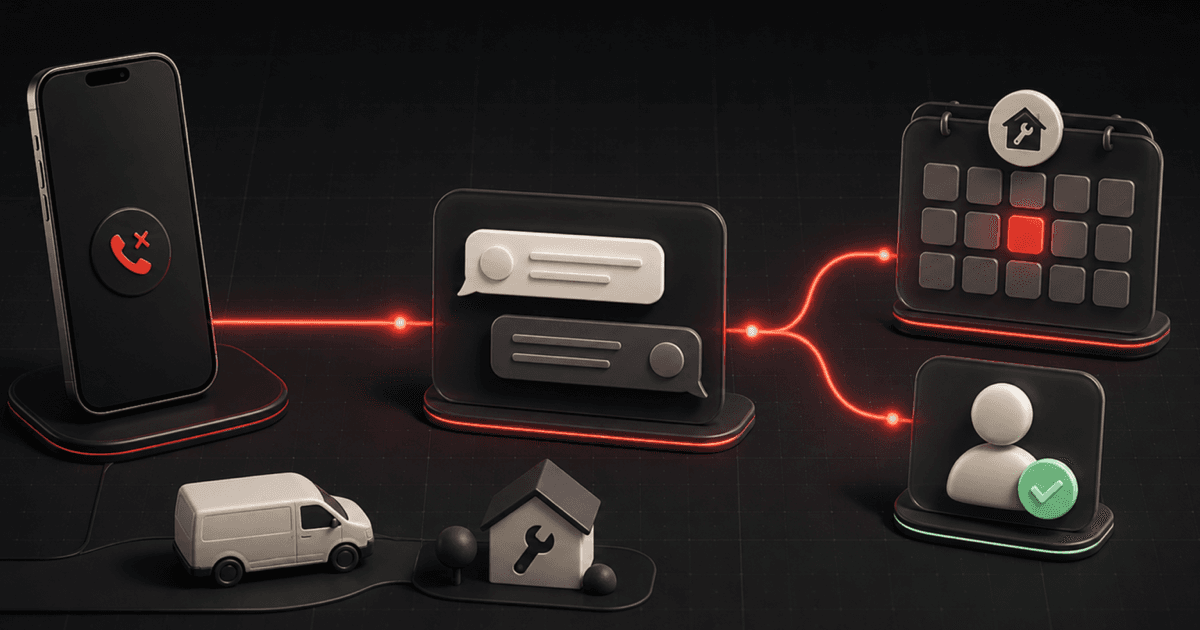
A missed phone call should not become an invisible voicemail, a sticky note, or a mystery callback hours later.
The practical tactic is simple: when a home-service call goes unanswered, send one useful text that identifies the business, acknowledges the call, and asks one easy question. Then route the reply to the right next step and record what happened.
That is different from blasting every missed caller with a booking link. The first text opens a conversation. The reply tells CRMX whether the person needs service, an estimate, an existing appointment, a human callback, or no follow-up at all.
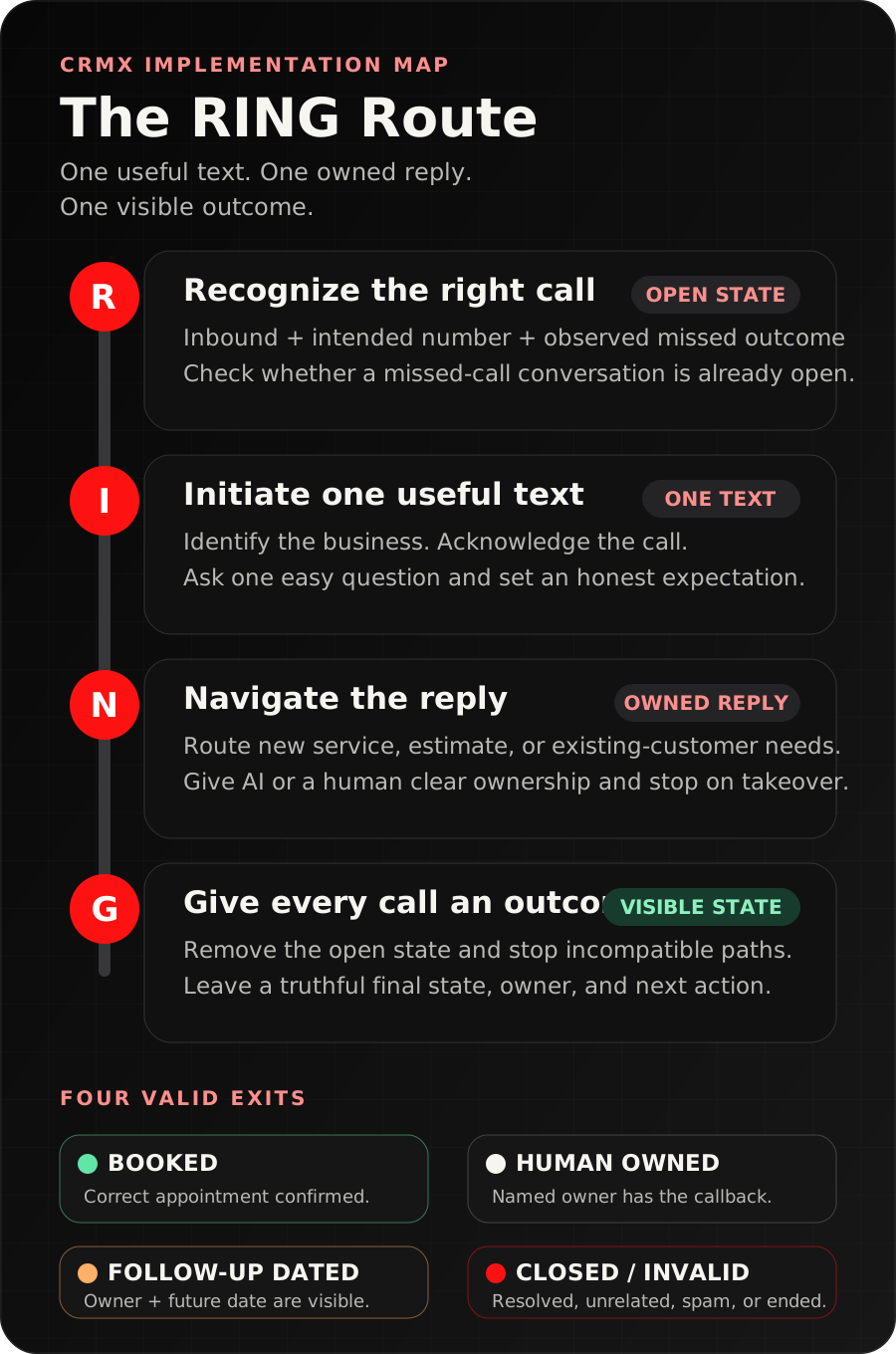
Brent Attaway's Five Fortune Engines moves directly from lead capture into initial contact. Its Follow-Up Engine calls for a first response that is immediate, useful, clear, and focused on the next step. The CRMX RING Route applies that principle to one common home-service moment: Recognize, Initiate, Navigate, Give an outcome.
The tactic: one text, one question, one owned next step
Use a first message like this:
Hi, this is [Business Name]. We just missed your call. What can we help with today? Reply here and we'll make sure it reaches the right person.
That message does four jobs:
- It names the business.
- It tells the caller why the text arrived.
- It asks one question a real person can answer quickly.
- It sets an honest expectation without pretending someone is already available.
Do not make the first text do too much:
Sorry we missed you! Book here: [Link]. Financing available. Ask about our special. Reply 1 for service, 2 for an estimate, 3 for maintenance, 4 for billing...
The caller has not told you why they called. A calendar may be the wrong next step. The correct first move is to reopen the conversation, not force every caller into the same funnel.
The current missed-call text-back documentation confirms that the phone setting can automatically send a customized SMS after an inbound call is missed. It also warns that the native setting can send a message for every missed attempt. That makes message design, repeat-call handling, and testing part of the tactic.
Decide whether you need the simple setting or the controlled workflow
CRMX gives you two sensible implementation levels.
Start with the native setting when the path is simple
Use the native missed-call text-back setting when:
- one business number serves one team;
- the same first message is appropriate for nearly every missed call;
- the office has a clear process for reading and owning replies;
- repeat-call behavior has been tested and accepted.
This is the fastest version. Configure the message, send a test, call the number from a test phone, miss the call deliberately, and inspect the complete experience.
Use a workflow when the call needs control
Build a workflow when:
- different phone numbers serve different locations or service lines;
- after-hours calls need different expectation-setting;
- repeat attempts should not receive the same introduction again;
- the reply needs assignment, an internal notification, a task, or a pipeline stage;
- booking and human handoff have different rules.
The documented Call Details trigger can filter by call direction, call outcome, phone number, number pool, and disposition. That gives the controlled version a clean starting event instead of asking the team to notice the call log manually.
Do not activate the native setting and a separate first-message workflow without testing them together. The operating goal is one clear opening message, not two automations racing to acknowledge the same call.
The CRMX RING Route
R - Recognize the right missed call
Start with a narrow event definition.
For a workflow version, use Call Details and filter for:
- call direction is inbound;
- the call reached the intended CRMX business number;
- the final outcome matches the missed states you have tested, such as no answer, voicemail, or busy;
- test numbers and known internal lines are excluded when appropriate.
Then check whether the contact already has an open missed-call conversation.
If this is the first missed attempt, add a state such as Missed Call - Open and continue to the first text. If the caller tries again while that state is still open, do not send the introduction again. Update the activity and notify the owner according to the business rule.
This repeat-call check matters because a second call is new information. It may mean urgency, confusion, or simply a dropped first attempt. It should increase visibility without creating a pile of identical texts.
I - Initiate one useful text
Write the first text around the customer's immediate question: "Did the business notice my call, and what should I do now?"
Use this daytime version:
Hi, this is [Business Name]. We just missed your call. What can we help with today? Reply here and we'll make sure it reaches the right person.
Use an honest after-hours version when nobody is expected to respond until the office reopens:
Hi, this is [Business Name]. Our office is closed, but we received your call. What can we help with? We'll review your reply when we reopen at [Time].
Replace every bracketed field. If the business has a trained AI employee that can respond outside office hours, describe only the support it can actually provide. Do not promise a person will call "right away" when there is no owner watching the queue.
Before activation, confirm the sending number, business identity, message formatting, and the way an opt-out appears in a real test. Those are phone and messaging setup checks, not details to assume from a template.
N - Navigate the reply
The reply is the useful signal. The Customer Replied trigger documentation confirms that a reply can start a workflow and be filtered by channel or the workflow being answered.
Route the reply into a small number of customer states:
| Reply type | First CRMX action | Owner |
|---|---|---|
| New service request | Acknowledge, gather the minimum route details, then offer the correct service path | AI employee or service coordinator |
| Estimate or inspection request | Confirm the request, collect the required property details, then offer the approved estimate path | AI employee or estimator |
| Existing appointment or customer issue | Stop new-lead prompts and route with the existing context | Office or service team |
| Caller asks for a person | Assign the conversation and set a callback expectation the team can keep | Named human owner |
| Urgent, sensitive, frustrated, or unclear | Stop standard automation and escalate | Human owner |
| Wrong number, vendor, spam, or invalid inquiry | Close the active lead path cleanly | Office rule |
A trained CRMX AI employee can acknowledge the reply, answer approved questions, ask one qualification question at a time, and offer the correct booking path. It should not diagnose a problem, invent availability, make promises, or keep questioning someone who asked for a person.
For a more detailed qualification map, use the CRMX ROUTE Card after the caller explains the need. The missed-call workflow opens the conversation; the ROUTE Card decides where a genuine service inquiry belongs.
G - Give every outcome a visible state
The workflow is not finished when a text sends. It is finished when the call has a truthful outcome.
Use four visible exits:
- Booked - the correct service visit, estimate, or consultation is confirmed.
- Human Owned - a named person owns the callback, question, complaint, or exception.
- Follow-Up Dated - the caller is not ready now, and a specific future action has an owner and date.
- Closed / Invalid - the call was resolved, unrelated, a wrong number, spam, or explicitly ended.
Remove Missed Call - Open at every valid exit. Stop the first-response automation when a person takes over, an appointment is booked, the caller opts out, or the record is closed.
If records remain open with no owner and no next action, the text-back message did not solve the operating problem. It only created another inbox.
Build the workflow in CRMX step by step
1. Choose one business number
Start with the number that receives the clearest new-customer intent, such as the main service line. Document where it rings, how voicemail works, who normally answers, and what happens after hours.
Do not begin by combining sales, dispatch, billing, vendor, and personal lines. A narrow first version is easier to test and easier for the team to own.
2. Define a missed call in your setup
List the call outcomes that should start the path. Test no answer, voicemail, busy, call rejection, forwarding, and a caller who hangs up quickly. Use the outcomes your CRMX call record actually shows.
Do not assume every unsuccessful-looking status means the same thing. The trigger should match observed call records from your configured number.
3. Create the open state
Add a tag or field such as:
Missed Call - OpenMissed Call NumberMissed Call TimeMissed Call OutcomeMissed Call Owner
The exact field names are less important than the rule: the team must be able to see whether the call is new, already being handled, or finished.
4. Write one first message per real context
Most teams need only:
- a daytime message;
- an after-hours message;
- an optional existing-customer route when the number is known and the context is clear.
Avoid a different message for every service. The caller's reply should reveal the service before CRMX chooses a detailed route.
5. Add repeat-attempt control
Before the first text sends, check for Missed Call - Open.
- If absent: add the open state and send the first message.
- If present: update the missed-call activity and follow the internal repeat-call rule.
The repeat-call rule might notify the assigned owner or create a callback task. It should not automatically label the call urgent or make a customer promise the team has not approved.
6. Build reply ownership before follow-up
Create the reply trigger and decide:
- who receives a new-service reply;
- who covers after hours or absence;
- which questions an AI employee may handle;
- which topics require a person;
- what happens when nobody accepts ownership;
- which action stops the automated path.
An internal notification is not ownership. Name the person, queue, or verified process responsible for the next action.
7. Connect the correct booking path
Offer a calendar only after the reply belongs on a calendar.
For each appointment type, define:
- eligible services and service area;
- information required before booking;
- assigned calendar and team;
- availability, buffers, and minimum notice;
- what the customer should expect;
- the fallback when no suitable time is available.
If a caller wants a person, assign the callback instead of forcing self-booking. If the request is outside the standard path, send it to human review.
8. Add stop rules
Stop the missed-call route when:
- a human reply takes over;
- an appointment is confirmed;
- the inquiry moves into an approved service workflow;
- the caller opts out;
- the caller says the need is resolved;
- the number is invalid, unrelated, or spam;
- the team closes the record.
Do not leave the first-response workflow running underneath a live human conversation.
9. Review the operating states
Each week, review:
- missed inbound calls;
- first messages sent;
- repeat call attempts;
- replies received;
- conversations waiting for an owner;
- bookings created from the path;
- human-owned callbacks still open;
- closed or invalid calls;
- records stuck in Missed Call - Open.
These are visibility checks, not promised performance results. They show whether the route is functioning and where the team's ownership is breaking.
Example 1: an after-hours plumbing call
A homeowner calls the main plumbing number after the office closes. The call reaches voicemail and CRMX records the missed outcome.
The workflow sees that no Missed Call - Open state exists and sends:
Hi, this is ClearFlow Plumbing. Our office is closed, but we received your call. What can we help with? We'll review your reply when we reopen at 7:00 AM.
The homeowner replies, "Water is leaking under the kitchen sink. I shut the valve off."
The reply stops the generic text-back path. Because the message describes a potentially time-sensitive service issue, it routes to the approved human on-call rule. CRMX preserves the message, number, call outcome, and owner in one conversation.
The workflow does not diagnose the leak or promise an arrival time. A person decides the correct service response.
Example 2: a roofing estimate request during a job
A project manager is on a roof and cannot answer the office line. A homeowner calls about storm damage, receives the daytime text, and replies, "I need someone to look at missing shingles and give me an estimate."
A trained AI employee acknowledges the request and asks for the property city. The address is inside the service area, so it gathers the approved estimate details and offers the inspection calendar.
When the homeowner books, CRMX moves the record to Booked, removes Missed Call - Open, starts the inspection confirmation path, and keeps the original call and text in the conversation history.
If the property were outside the service area or the homeowner asked about an unusual condition, the route would stop and create a human review instead of offering the wrong calendar.
The same RING Route can help a coach or consultant with a missed inquiry call: acknowledge it, ask what the person needs, route the reply, and record booking, human ownership, a dated next step, or closure.
Copy-ready message set
Daytime first response
Hi, this is [Business Name]. We just missed your call. What can we help with today? Reply here and we'll make sure it reaches the right person.
After-hours first response
Hi, this is [Business Name]. Our office is closed, but we received your call. What can we help with? We'll review your reply when we reopen at [Time].
Human callback handoff
Thanks for the details. [Owner Name or Team] will review this and call you [approved time expectation]. If there is anything else they should know, reply here and it will stay with the conversation.
Booking path
Thanks - this sounds like the right fit for our [Service Visit / Estimate / Inspection]. I can help with the next step. First, what is the service address?
Ask only the next required question. Do not paste the entire qualification form into one text.
Resolved or wrong-number close
Thanks for letting us know. I'll close this missed-call follow-up so you do not keep receiving messages about it.
Replace every bracketed field and test the complete conversation before activation.
The RING launch checklist
- One CRMX business number defines the first implementation.
- The normal ring, forwarding, voicemail, and after-hours behavior is documented.
- Actual test calls confirm which outcomes represent a missed call.
- Only the intended first-message path is active.
- The first text identifies the business, explains the message, and asks one question.
- Daytime and after-hours expectations are truthful.
- The sending number, sender identity, message formatting, and opt-out behavior pass a real test.
- Missed Call - Open prevents duplicate introductions during repeat attempts.
- Repeat calls increase visibility without making an unapproved urgency judgment.
- Customer replies start the intended reply route.
- A named person, queue, or verified process owns each human handoff.
- AI employee knowledge, qualification, booking, and escalation boundaries are written and tested.
- Existing customers do not remain in a generic new-lead path.
- The correct service, estimate, or inspection calendar is offered only after routing.
- Booking, human takeover, opt-out, resolution, invalid number, and closure stop the path.
- Every exit becomes Booked, Human Owned, Follow-Up Dated, or Closed / Invalid.
- Tests cover daytime, after hours, voicemail, no answer, busy, repeat calls, caller reply, no reply, booking, wrong number, existing customer, urgent wording, missing owner, and unavailable calendar.
- The team knows where to review records stuck in Missed Call - Open.
Frequently asked questions
Does every missed call need an automatic text?
No. Decide which business numbers and missed outcomes belong in the route. Internal lines, vendor calls, known spam, or numbers with a different service process may need another rule. Start with one customer-facing number and observed call records.
Should the first text include a booking link?
Usually not before you know why the person called. A service visit, estimate, inspection, callback, billing conversation, and existing appointment need different next steps. Open the conversation first, then offer the correct path.
What if the caller tries again right away?
The official native-setting documentation says another missed attempt can produce another text. If that creates a poor experience for your call pattern, use a controlled workflow with an open-state check so the repeat attempt updates visibility without resending the same introduction.
Can an AI employee handle the reply?
Yes, within a trained role. Give it approved company and service knowledge, one-question-at-a-time qualification, the assigned booking rules, and explicit human handoff conditions. Complaints, uncertainty, unusual requests, and a direct request for a person should follow the approved escalation path.
What should happen if the caller never replies?
Do not let the record remain open forever. Apply the business's callback rule, assign any required human task, then close or date the next step. This tactic does not assume that repeated automated texts are appropriate for every missed caller.
Make the next missed call visible
Start with one number, one honest text, one reply owner, and four possible outcomes. Run the route manually with test records until the team trusts it. Then automate the repeatable movement without hiding judgment inside the workflow.
CRMX brings the phone, conversation, AI employee, calendar, workflow, and pipeline into one AI-first growth platform. See the home-service system, or audition Guy live to hear how a trained AI employee handles a real conversation.