
Proposal Follow-Up for Consultants: The CRMX DECIDE Path
Build a proposal follow-up workflow that reacts to document and conversation states, proves human ownership, and records a clean decision.
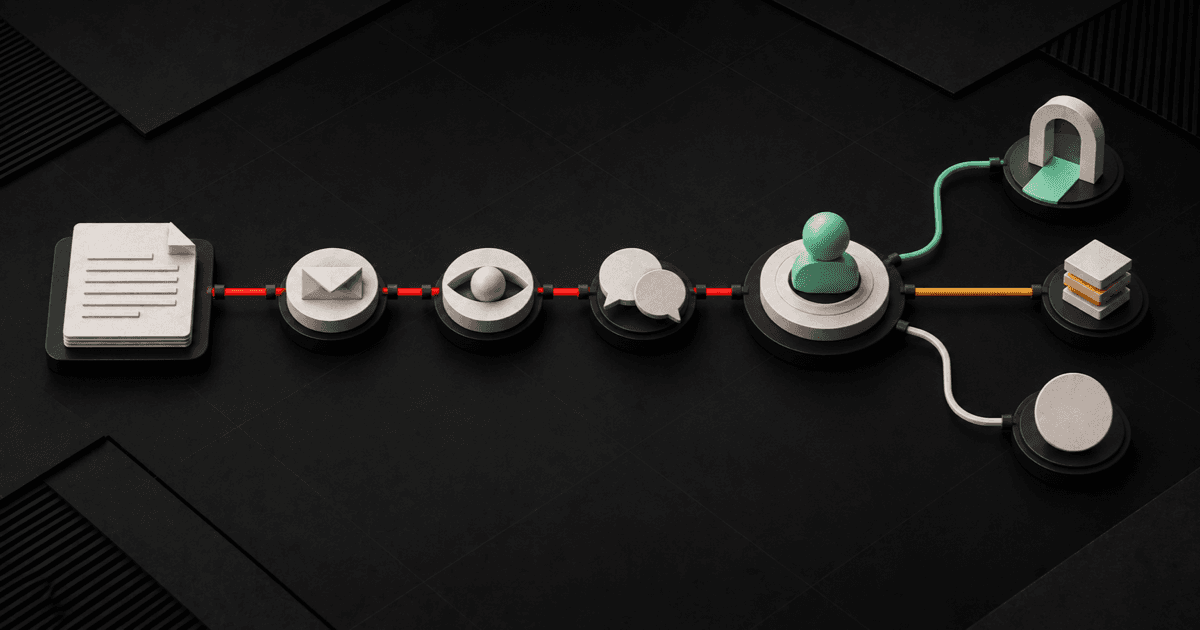
A useful proposal follow-up system for consultants does not ask, “Did you see the proposal?” five different ways.
It records the decision that the proposal is meant to support, watches the real document and conversation states, gives each follow-up one useful job, routes every human signal to an owner, and closes the path when the outcome is known.
The CRMX DECIDE Path turns that idea into six operating moves: Define the decision, Establish the real state, Continue with one useful question, Interrupt on a human signal, Direct the next owner, Enter the outcome.
This is post-consultation follow-up, not generic nurture. It begins after a coach or consultant has held the sales conversation and chosen to send a proposal. It ends when the prospect proceeds, requests a change, chooses a later date, declines, or reaches the final respectful close.
Brent Attaway's Five Fortune Engines connects attention, lead capture, follow-up, conversion, customer experience, and automation as one operating system. The proposal should preserve the message and diagnosis that earned the meeting. The contact and opportunity record should preserve the decision context. Follow-up should create a useful next step. Conversion should follow a repeatable path. Onboarding should inherit the truth of the sale. Automation should make the defined handoffs consistent while people retain commercial judgment.
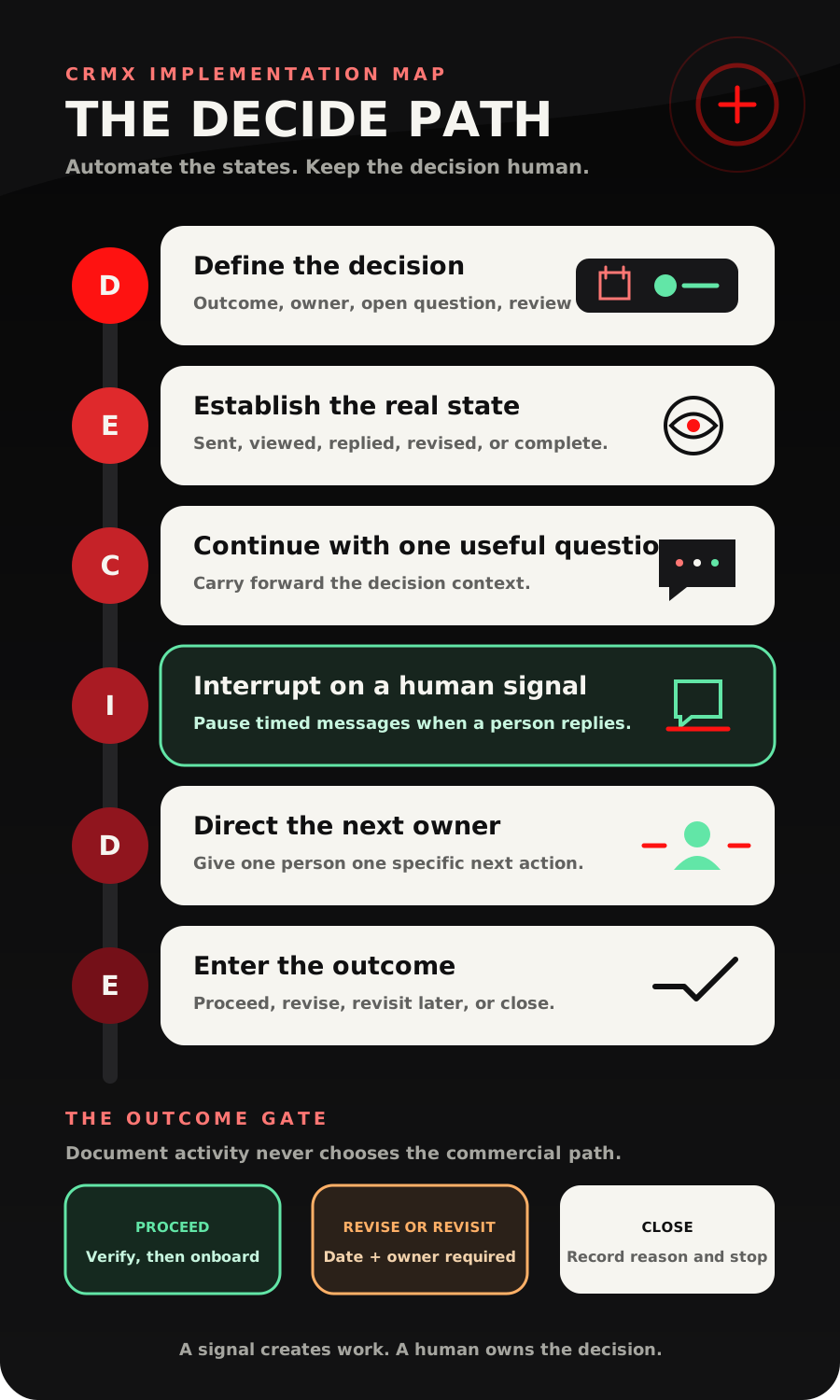
The strategy: follow the decision, not the PDF
A proposal is an artifact. It is not the decision itself.
Someone can receive a proposal without opening it. They can open it without understanding it. They can read it while waiting for another stakeholder. They can reply with a question that changes the scope. They can accept a document while another business requirement is still unresolved.
Those are different states. Treating all of them as “proposal sent” creates the familiar sequence of vague check-ins, overlapping human and automated messages, and pipeline stages that no longer describe reality.
CRMX can provide observable events for the operating system. The current Documents & Contracts workflow trigger documentation documents status-based triggers for Sent, Viewed, Signed/Accepted, and Completed, with filters for the relevant template and recipient. The current document-template workflow guide also documents reusable templates, workflow sending, and dashboard states including draft, sent, viewed, and completed.
Use those states as signals, not conclusions.
- Sent proves that the documented send event occurred. It does not prove delivery, reading, or agreement.
- Viewed proves document activity. It does not prove buying intent, understanding, or approval.
- Signed/Accepted or Completed should stop proposal reminders. Your business still needs to verify its actual commercial readiness rule before starting onboarding.
- Customer Replied proves that a real conversation needs an owner. It should interrupt the timed sequence.
- User Replied can prove that a team member delivered a message from CRMX Conversations. A task or assignment alone does not prove that anyone responded.
The workflow's job is to keep the decision state visible and hand the right work to the right owner. It should never manufacture certainty from activity.
The CRMX DECIDE Path
D - Define the decision
Do this before the proposal is sent.
Record the outcome discussed, the offer or scope being considered, the actual decision owner, any additional stakeholder, the main open question, and the agreed review date. If the prospect said, “Send it and follow up Friday after I talk with my partner,” Friday is meaningful. An arbitrary 24-hour chase is not.
Use opportunity fields when the information belongs to this specific deal. A practical starting set is:
- proposal type or template;
- proposal sent date;
- agreed decision date;
- decision owner;
- additional stakeholder;
- open decision question;
- proposal state;
- next action;
- next-action owner;
- final outcome and reason.
If the decision was not clear enough to record, the next step is not more automation. It is a short human clarification.
E - Establish the real state
Connect each workflow to the actual proposal template and state it is meant to observe.
Do not build one giant workflow that treats every document in the account as a sales proposal. A discovery worksheet, nondisclosure document, coaching agreement, consulting scope, and onboarding form may all have different owners and next steps.
Use a small state model:
- Proposal prepared - the owner is responsible for a final human review.
- Sent - the context message and agreed review date are active.
- Viewed - activity is visible, but the decision is still unknown.
- Question active - a customer reply has paused timed reminders.
- Human response delivered - a team reply from Conversations proves the handoff progressed.
- Revision requested - scope, timing, stakeholders, or another material detail needs a human decision.
- Won verification - proposal reminders stop while the business checks its defined proceed condition.
- Revisit later - a real date and owner move the lead to a separate long-term path.
- Closed - the short proposal path ends with the reason recorded.
These are operating recommendations, not default CRMX stages. Adapt the names to the way your business actually sells.
C - Continue with one useful question
Every follow-up should reduce one piece of decision friction.
“Just checking in” asks the prospect to reconstruct the entire conversation. A useful follow-up carries forward the context and makes one response easy.
Ask about the unresolved decision:
- Is the main question the scope, the timing, or who needs to approve it?
- Would it help to compare the two delivery options in a short call?
- Should we keep the current start window, choose a later review date, or close this for now?
The message should not invent urgency or assume the person wants to proceed. It should make the honest next answer easier to give.
I - Interrupt on a human signal
The moment a prospect replies, the timed proposal sequence has lost authority.
The current Customer Replied trigger documentation supports starting a workflow from a contact reply and filtering by items such as phrase, tag, intent type, the workflow replied to, and channel. Use that signal to pause the proposal sequence, assign the conversation, notify the owner, and create the specific task the reply requires.
Guy can acknowledge the reply, capture an approved logistical answer, collect the prospect's question, or route a scheduling request. Guy should not negotiate pricing, change scope, interpret terms, promise a concession, or decide whether the business should accept the work.
Automation also needs proof that the human handoff progressed. The current User Replied trigger documentation documents an event for delivered messages a team user sends from CRMX Conversations. It distinguishes those messages from workflow messages and Conversation AI messages.
That gives you a useful proof rule:
- assignment is not response;
- notification is not response;
- task creation is not response;
- an AI acknowledgment is not a human commercial answer;
- a delivered user reply is evidence that the named person responded through Conversations.
Use a timed escalation when a question is assigned but no human response is proven within your business's defined service window.
D - Direct the next owner
Each state needs one owner and one next action.
The proposal owner may handle fit, scope, price, terms, objections, and the final commercial decision. An operations coordinator may schedule the next call or prepare a corrected document after the owner approves the change. Guy may handle approved logistics and question capture. A workflow may manage waits, tags, tasks, notifications, and state updates.
Avoid shared ownership labels such as “sales team” when no specific person receives the work. A pipeline full of team-owned tasks is often a pipeline full of assumptions.
If a real call supplies the next decision, the current Call Details trigger documentation distinguishes system call status from a team-selected custom disposition. A completed call only proves the system recorded a completed call. If your workflow needs “Proposal revision requested” or “Decision moved to October,” train the owner to select that defined disposition or update the decision fields before the next workflow begins.
E - Enter the outcome
Every short proposal path needs a real exit.
Use one of four outcome families:
- Proceed: stop proposal follow-up, verify the business's proceed condition, then hand the record to the separate client onboarding workflow.
- Revise: pause the timer, assign the commercial owner, record the requested change, and send a new version only after approval.
- Revisit later: record why, set a real review date, assign the next owner, and move the contact into an appropriate long-term follow-up path.
- Close: record the reason, end the short workflow, and suppress further proposal reminders.
Do not leave a prospect in “Proposal Sent” for months because nobody wants to choose a final state. A truthful closed outcome is more useful than an inflated open pipeline.
A Days 0-10 operating timeline
The exact timing should come from the sales conversation. Use this as a starting pattern, not a universal cadence.
Day 0 - send with context
The owner reviews the proposal, confirms the intended recipient, sends it, and records the agreed decision date. The same-day message explains what was sent, names the outcome it supports, and reminds the prospect of the next agreed step.
Day 1 or the next business day - verify the path
If the proposal is still Sent, check the address and delivery path before sending another sales message. If it is Viewed, do not celebrate or pounce. Keep the agreed follow-up date unless the prospect asked for a different step.
Agreed review date - ask one decision question
Carry forward the open question from the consultation. Offer one answerable choice and one route to a human conversation.
Two to three business days later - resolve or reschedule
If there is still no reply, ask whether the prospect wants to keep the proposal active, choose a later review date, or close it. Do not send this touch when the record shows an active question, a promised team response, a revision, or a completed proceed condition.
Day 7 to 10 - close the short path
Send one respectful close-the-loop message. Record Revisit later only when there is a real date and owner. Otherwise record Closed and end the workflow.
If longer-term follow-up is appropriate, make it a separate system with its own purpose, cadence, permission, and stop rules. Do not let the short proposal sequence run forever.
Build the proposal workflow in CRMX
1. Define the entry and exit events
Choose the exact proposal template and document state that begins the path. Then define every event that must stop it: customer reply, user response, revision request, Signed/Accepted or Completed, verified proceed condition, revisit-later date, or closed outcome.
2. Create the decision fields and pipeline states
Keep document activity separate from business decisions. The record should be able to show Viewed and Decision Pending at the same time because those facts answer different questions.
3. Build state-specific workflows
Prefer small workflows with clear responsibilities:
- proposal sent and context delivered;
- document state updated;
- customer reply routed;
- human response monitored;
- proposal decision recorded;
- verified proceed condition handed to onboarding;
- revisit-later date handed to long-term follow-up.
This makes failures easier to inspect than one workflow with dozens of branches and hidden assumptions.
4. Train Guy on the bounded role
Give Guy the approved offer summary, scheduling rules, common process questions, escalation triggers, and exact prohibited subjects. Tell Guy to capture the question and hand it off whenever a reply involves pricing, scope, terms, procurement, legal language, concessions, refunds, exceptions, or decision authority.
Explore how a trained role works on the CRMX AI Employees page, then test the exact handoff messages before launch.
5. Prove human response
When the proposal owner replies from Conversations, update the last-human-response field or move the record to Human Response Delivered. If your team replies outside that surface, define another honest proof method. Never mark the handoff complete merely because the notification was sent.
6. Separate sales follow-up from onboarding
A proposal-status event should stop proposal reminders. It should not automatically imply that payment, internal approval, scheduling, access, or another commercial requirement is complete.
Define the business's real won condition. Once it is verified, pass the agreed outcome, scope, stakeholders, commitments, and open delivery questions into onboarding.
7. Add failure alerts
Create an internal alert for states that should not persist:
- proposal prepared but not sent;
- customer question without a named owner;
- assigned question without a proven human response;
- revision requested without a due date;
- Signed/Accepted or Completed without a verified next owner;
- revisit later without a date;
- open proposal after the short path should have ended.
8. Test every branch
Use test records and a test proposal template. Verify Sent, Viewed, reply, human response, revision, proceed, revisit later, and closed paths. Test re-entry, duplicate events, missing fields, multiple open opportunities, and messages arriving at the same time as a scheduled follow-up.
Use case 1: an executive coach's engagement proposal
An executive coach completes a fit call with a founder. The founder wants to review the six-month engagement with a business partner and agrees to respond Friday.
The coach records the intended outcome, the partner as an additional stakeholder, the scheduling concern discussed on the call, and Friday as the agreed decision date. The proposal is sent with a message that names the engagement and the next agreed step.
The document is viewed Wednesday. Nothing salesy happens. On Friday, the workflow prepares one question about the scheduling concern. The founder replies that the partner wants to understand how the first month works.
That reply pauses the timed sequence. Guy acknowledges the question and assigns it to the coach. The coach responds from Conversations, which records human-response evidence. If the answer creates a scope change, the proposal moves to Revision requested. If the founder proceeds, proposal reminders stop and the record waits for the coach's defined won verification before entering onboarding.
Use case 2: an operations consultant's scope proposal
An operations consultant presents a diagnostic to a leadership team. The COO is the working owner, but the CFO must approve the project. The proposal includes two implementation phases and a possible later phase that is not part of the current decision.
The consultant records the current scope, both stakeholders, the open budget-timing question, and the date of the leadership review. The proposal workflow is filtered to the correct consulting template.
When the COO replies with a request to move one deliverable between phases, automation does not rewrite the scope or resend the document. It pauses follow-up, captures the request, and assigns the consultant. The consultant decides whether the change affects price, timing, or terms, records the approved revision, and sends the next version.
If the team chooses to revisit in the next quarter, the record receives a real review date and leaves the short proposal path. If they decline, the consultant records the reason and closes the opportunity. Neither result remains hidden behind “Proposal Sent.”
Copy-ready proposal follow-up messages
Same-day context message
Hi [First Name], I sent the [Proposal Name] we discussed for [specific outcome]. You mentioned [decision context or open question], so I kept that visible in the proposal. We agreed to reconnect on [Decision Date]. If a question comes up before then, reply here and it will reach me.
Agreed-date decision question
Hi [First Name], when we spoke, the main decision was [open question]. Is that now clear, or would it help to talk through [two relevant options] together?
Human handoff acknowledgment for Guy
Thanks, [First Name]. I captured your question about [short topic] and sent it to [Owner Name], who owns this decision. They will continue with you here. I will pause the proposal reminders while that conversation is active.
Revisit-later confirmation
Understood. I have this set to revisit on [Review Date] with [Owner Name]. We will close the current proposal follow-up for now and reconnect around that date with the same context.
Final close-the-loop message
Hi [First Name], I am closing the short follow-up for [Proposal Name] so we do not keep nudging you. If you want to revisit [outcome], reply here and we can reopen the right conversation. No reply is needed if the timing is not right.
Measure decisions, not document activity
A sent or viewed proposal is not a conversion.
Google Analytics currently recommends separate events for stages such as generate_lead, qualify_lead, working_lead, close_convert_lead, and close_unconvert_lead in its recommended event guidance. Whether or not you send all of those events to analytics, the operating principle is useful: active work and final outcomes deserve different measurements.
Track at least:
- proposals prepared and sent;
- sent without a verified next step;
- viewed without an inferred outcome;
- customer questions received;
- questions with a named owner;
- questions with a proven human response;
- revisions requested and resolved;
- proceed conditions verified;
- revisit-later outcomes with a real date;
- closed outcomes with a reason;
- records still open after the defined short path.
Review the leaks between states. If questions wait without a human response, fix ownership. If proposals are sent without a decision date, fix the sales conversation. If completed documents wait without a next owner, fix the handoff. Do not respond to every leak by adding another reminder.
The DECIDE launch checklist
- Scope one proposal template and one audience.
- Record the decision, decision owner, open question, and agreed date before sending.
- Keep document activity and business-decision states separate.
- Test Sent, Viewed, Signed/Accepted, and Completed events with the intended template.
- Make customer replies stop the timed proposal sequence.
- Give every reply a named owner and a specific task.
- Prove human response instead of inferring it from assignment or notification.
- Document Guy's approved answers and escalation boundaries.
- Keep pricing, scope, terms, negotiation, and exceptions human-owned.
- Make revision requests pause the existing path and record a due date.
- Define the business's proceed condition independently of document activity.
- Hand the original sales context into onboarding after a verified win.
- Give revisit-later outcomes a date and owner.
- Make closed outcomes stop proposal reminders.
- Test simultaneous replies and scheduled messages.
- Separate activity, human work, and final outcomes in reporting.
Frequently asked questions
Should proposal follow-up start when the document is sent or viewed?
Start the operating record when the proposal is sent, but anchor customer-facing timing to the agreement made in the sales conversation. A view is a useful activity signal, not permission to chase or proof that the person is ready to decide.
Can Guy answer proposal questions?
Guy can answer approved process and scheduling questions, capture what the prospect needs, and route the conversation. A human should own pricing, scope, terms, negotiation, concessions, exceptions, and the commercial decision.
Should a signed or completed document start onboarding automatically?
It should stop proposal reminders. Start onboarding only after the business verifies every condition it has defined for proceeding. That may include more than a document state.
What if the prospect asks to revisit later?
Record a real review date, reason, and owner, then end the short proposal workflow. Move the contact into a separate long-term path that matches the permission and context.
How many proposal follow-up messages should I send?
Use the minimum needed to serve the agreed decision. One context message, one agreed-date question, one resolve-or-reschedule touch, and one clean close is a practical starting pattern. The state checks and stop rules matter more than the message count.
Is a pipeline stage enough to manage proposal follow-up?
No single stage can represent document activity, decision state, conversation ownership, and the next action. Use the pipeline for the deal's commercial position, then use fields, tasks, Conversations, and workflows to make the operational truth visible.
Build the next decision into the system
The proposal should not disappear into an inbox while everyone waits for someone else to move.
Use the CRMX platform to connect the document, conversation, workflow, pipeline, task, calendar, and reporting around one visible decision. Connect that system to the Revenue Flywheel so the post-appointment gap has an owner, an honest next step, and a clean exit.
If you want help turning your current proposal process into a tested CRMX workflow, explore CRMX implementation services. Or audition Guy live and test how an AI employee can acknowledge a proposal question, preserve context, and route the decision to the right human without pretending to make it.
Sources and further reading
- Official Support: Documents & Contracts workflow trigger
- Official Support: Create and send document templates through workflows
- Official Support: Customer Replied workflow trigger
- Official Support: User Replied workflow trigger
- Official Support: Call Details workflow trigger
- Google Analytics Help: Recommended events