
Discovery Call Follow-Up for Coaches: The CRMX NEXT Card
Build a discovery call follow-up workflow that records the real outcome, routes one agreed next step, and proves human ownership.
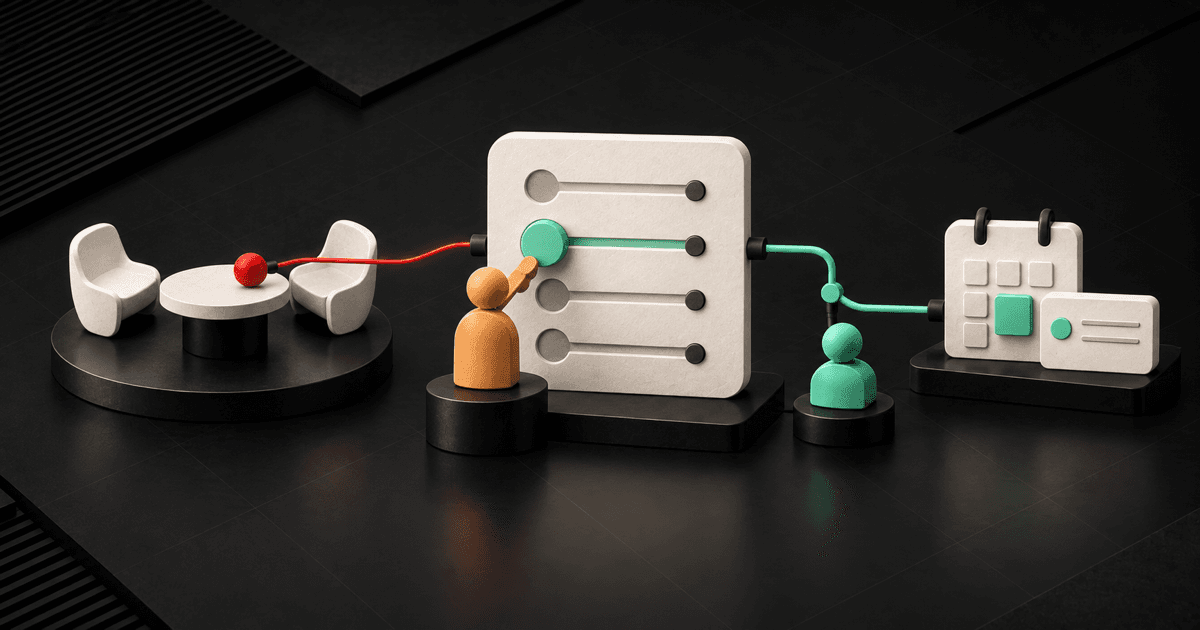
A useful discovery call follow-up system for coaches does not begin with, “Great call—just checking in.”
It begins by recording what actually happened: the problem discussed, the human judgment about fit, the prospect's decision state, the one next commitment, who owns it, and when it is due. Then it follows that truth until the next decision is known.
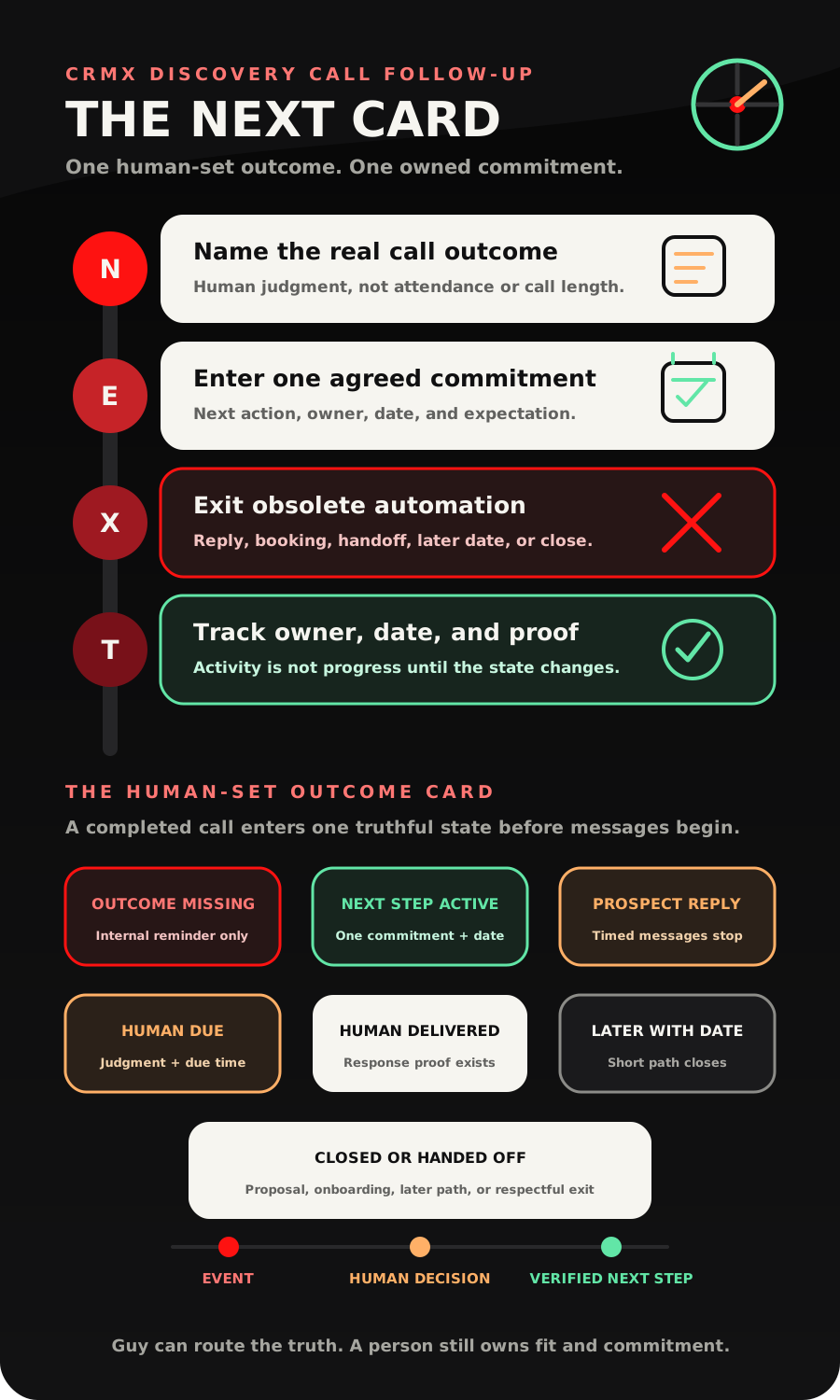
The CRMX NEXT Card turns that into four operating moves: Name the real call outcome, Enter one agreed next commitment, eXit obsolete automation on a live signal, Track the decision, owner, date, and proof.
This is the bridge between a completed discovery call and the right next system. That may be a proposal, a second conversation, a useful resource, a future review date, onboarding after a verified proceed condition, or a respectful close. The workflow should not choose the commercial outcome. It should make the human-chosen outcome impossible to lose.
Brent Attaway's Five Fortune Engines connects attention, lead capture, follow-up, conversion, customer experience, and automation as one operating system. The message that earned the call should survive into the contact record. Discovery should produce a clear next step. Follow-up should continue the real conversation. Conversion should use a repeatable path. Onboarding should inherit the promises made. Automation should make the defined handoffs consistent while people keep judgment.
The strategy: the call ending is not the outcome
A calendar event can be marked Showed. A phone record can be marked Completed. Neither state tells you what the prospect decided.
The current Appointment Status workflow documentation supports triggers for states including New, Confirmed, Cancelled, Showed, No-show, and Invalid, with filters for the intended calendar, group, user, tag, and modification source. That makes Showed useful as an entry signal for a post-call process.
It is not a sales conclusion.
A showed appointment does not prove that the full conversation happened, the prospect is qualified, an offer was made, a proposal is needed, or anyone agreed to a next step.
The same distinction applies to phone calls. The current Call Details trigger documentation separates system-recorded call status from a human-selected custom disposition. A completed call status describes the call record. A disposition such as Proposal requested, Second call agreed, Later with date, or Not fit can describe the outcome your team actually needs.
The best post-call automation starts from an observable event, pauses for honest human classification, then routes one defined next commitment. That is what is working now: event-based entry, human-owned judgment, state-specific workflow actions, live-signal interruption, and proof that the handoff progressed.
The CRMX NEXT Card
N - Name the real call outcome
Before the coach or consultant moves to the next call, record the outcome in plain language.
Use a short outcome card:
- problem or outcome the prospect wants;
- offer or path discussed;
- fit decision made by the human owner;
- open question or objection;
- stakeholder who is not yet in the conversation;
- prospect's stated decision state;
- next commitment;
- owner and due date;
- follow-up permission and preferred channel;
- final exit when known.
Do not ask automation to infer the state from call length, attendance, sentiment, or a message open. Those can be signals. They are not the commercial decision.
A practical set of human-selected outcomes is:
- Next conversation agreed - another person, question, or decision needs a scheduled conversation.
- Proposal or scope needed - the owner has enough information to prepare a defined document or recommendation.
- Question active - the prospect needs a human answer before deciding.
- Ready for verified proceed path - the business's actual proceed condition is satisfied or must now be checked.
- Later with date - the timing is real, the reason is known, and a specific review date exists.
- Not fit or closed - the short path ends without manufacturing another chase.
If no one can choose one of those states, use Outcome Missing. That state should create an internal task for the call owner, not launch prospect-facing follow-up.
E - Enter one agreed next commitment
The next step should be something the prospect recognizes.
“Follow up next week” is not enough. Record what will happen, who will do it, what the prospect expects, and when it is due.
Examples:
- Coach sends the decision worksheet by Tuesday; prospect replies before Friday.
- Consultant prepares a two-phase scope; prospect and CFO review it on the 12th.
- Prospect invites a business partner to a second call; coach owns the calendar link and recap.
- Prospect asks for a later conversation after a new hire starts; consultant records the date and closes the short sequence.
- Coach sends one approved resource; no sales follow-up continues unless the prospect replies or chooses a next step.
CRMX can make the commitment visible through the contact record, opportunity, pipeline stage, task, calendar, Conversations thread, and workflow history. The current Add Task documentation supports a named task, description, assignee, due interval, optional due time, and weekend handling.
Task creation is not completion. It proves only that the work was created. Your operating model still needs evidence that the owner delivered the resource, held the second call, sent the scope, or responded to the question.
X - Exit obsolete automation on a live signal
The moment the prospect replies, the timed message sequence loses authority.
The current Customer Replied trigger documentation supports starting a workflow from a contact reply and narrowing the event by items such as phrase, tag, intent, originating workflow, and channel. Use the reply to pause the timer, assign the conversation, notify the owner, and route the new context.
Do not let a keyword decide that the prospect is qualified, ready to buy, or closed. A reply such as “yes” can mean yes to receiving a resource, yes to including a partner, or yes to a proposal. The record and conversation context still matter.
Other valid exit signals include:
- a human owner replies;
- the next appointment is booked;
- a proposal path begins;
- the verified proceed condition is recorded;
- a later date is accepted;
- the prospect declines;
- the owner closes the opportunity;
- the contact asks not to continue.
Build exits before writing the first timed message. Otherwise the workflow is designed to keep sending, not to keep listening.
T - Track the decision, owner, date, and proof
Every active state needs one owner, one due time, and one honest proof rule.
The current User Replied trigger documentation distinguishes a delivered message sent by a team user from workflow and Conversation AI messages. That supports a clean human-response rule inside CRMX Conversations:
- assignment is not response;
- notification is not response;
- task creation is not response;
- Guy acknowledging a question is not a human commercial answer;
- a delivered user reply is evidence that the named person responded through Conversations.
If your team responds outside CRMX Conversations, define another truthful proof method. The point is not to force every conversation into one tool. The point is to stop treating internal activity as customer-facing progress.
The Update Opportunity workflow action can move an existing opportunity when the workflow has the correct opportunity context. Test that context carefully, especially when one contact may have several programs, proposals, or consulting projects. A stage update on the wrong opportunity is worse than a missing update because it creates false confidence.
The seven visible post-call states
Use state names that your team can understand without opening the workflow builder.
Outcome Missing
The appointment or call event occurred, but a human has not recorded what happened. No prospect-facing sequence should begin.
Next Step Active
One agreed commitment has an owner and due date. The workflow may send only the approved recap or resource attached to that commitment.
Prospect Reply Active
The prospect replied. Timed messages stop. The reply is assigned and visible in Conversations.
Human Response Due
The reply needs human judgment about fit, price, scope, objections, terms, or another exception. A task and internal alert are active.
Human Response Delivered
The owner has provided a real response through the defined proof method. The next decision or date must now be recorded.
Later with Date
The short post-call sequence closes. A specific future date and owner move the prospect into a separate long-term follow-up path.
Closed or Handed Off
The prospect declined, was not a fit, entered a proposal path, or reached the verified condition for onboarding. The short workflow ends and the record passes only the known truth to the next system.
Build the discovery call follow-up in CRMX
1. Choose the truthful entry event
Use the specific discovery-call calendar and a Showed state when your appointment process reliably records attendance. If discovery happens by phone and your team uses defined custom dispositions, use the selected disposition that represents the call outcome.
Do not use every completed call or every showed appointment in the account. Filter the trigger to the intended calendar, phone line, disposition, user, or offer context.
2. Require a human outcome card
Create the smallest field set your next step actually needs. Contact fields are appropriate for durable person-level facts. Opportunity fields are safer for deal-specific facts such as offer, stakeholder, objection, next decision, and outcome.
Set a short completion expectation for the call owner. If the card is still incomplete, notify the owner and create a task. Do not send the prospect a generic message merely because the event occurred.
The current Internal Notification documentation supports alerts to selected users, roles, or teams. Include the prospect, call context, missing field, owner, and due time in the alert.
3. Build one route per outcome family
Keep the architecture inspectable:
- outcome missing and owner reminder;
- next conversation and calendar path;
- proposal or scope handoff;
- question and human-response path;
- verified proceed and onboarding handoff;
- later-with-date path;
- not-fit or closed path.
This is easier to test than one giant workflow with hidden branches and one universal nurture sequence.
4. Send a recap only when the truth is ready
The recap should name the problem, what was agreed, who owns the next step, and the due date. It should not add a new promise, urgency claim, guarantee, scope, or price.
If the outcome card is missing, wait for the owner. A fast inaccurate recap is not better service.
5. Build reply interruption and human proof
When the prospect replies, stop the timed path, assign the conversation, and alert the right owner. Use a bounded acknowledgment only when it helps set expectations.
If the message needs human judgment, start a response clock. Mark the handoff progressed only when your defined human-response evidence exists.
6. Update the pipeline from decisions, not message activity
Useful post-call stages might include Outcome Missing, Next Step Active, Question Active, Proposal Path, Later with Date, Verified Proceed, and Closed.
Do not move an opportunity to won because a recap was sent, a message was opened, a task was created, a proposal was requested, or a calendar link was clicked.
7. Hand off complete context
When the next path begins, pass the call outcome, desired result, offer discussed, stakeholders, open question, commitments made, and owner.
If the business's proceed condition is verified, send that context into the client onboarding workflow. If a proposal is required, use the separate proposal follow-up system. Do not make one workflow pretend to own every stage of the relationship.
8. Test the failure states
Use test records to verify:
- showed appointment with no outcome card;
- completed call without a custom disposition;
- several opportunities for one contact;
- prospect reply arriving during a scheduled wait;
- team reply and automated message arriving close together;
- a second appointment booked before the first recap;
- a proposal requested and then withdrawn;
- later state without a date;
- closed state followed by a new inbound reply;
- workflow re-entry after another discovery call.
Use case 1: a business coach's fit call
A business coach meets with an owner who wants help creating a management rhythm. The owner likes the program but wants the operations manager involved before choosing a start date.
The coach records Next conversation agreed, names the operations manager as the missing stakeholder, and sets the next commitment: the coach will send a one-page decision brief today, and the owner will invite the manager to a 30-minute call next Tuesday.
CRMX creates the assigned task, sends the approved recap after the outcome card is complete, and moves the opportunity to Next Step Active. Guy may answer an approved scheduling question or help book the selected calendar. Guy does not decide whether the manager is a fit or reinterpret the program.
The owner replies with a question about team participation. That reply stops the timed reminder. Guy acknowledges the question and routes it to the coach. The coach answers from Conversations, creating human-response evidence. The coach then records whether the next call remains active, a proposal is needed, the decision moved to a later date, or the opportunity should close.
Use case 2: an operations consultant's diagnostic call
An operations consultant completes a diagnostic call with a founder. The founder agrees that delivery handoffs are the core issue but needs a budget range and an implementation sequence before involving the CFO.
The consultant chooses Proposal or scope needed and records the exact deliverable: a two-phase scope showing the diagnostic sprint and implementation option. The consultant owns the draft by Thursday. The founder owns the CFO review on Monday.
The workflow creates the internal task and sends a recap that repeats only the agreed problem, deliverable, owners, and dates. It does not send a generic “ready to get started?” message while the consultant is still preparing the scope.
When the scope is sent, the record leaves the NEXT workflow and enters the proposal path. If the founder says the budget discussion must wait until the next quarter, the consultant records the reason, sets the real review date, and moves the opportunity to Later with Date. If the founder declines, the short path closes. None of those outcomes remain hidden behind Call completed.
Copy-ready discovery call follow-up messages
Agreed-next-step recap
Hi [First Name], thank you for the conversation about [specific problem or outcome]. We agreed that [Owner] will [next commitment] by [Date], and the next decision is [decision or meeting]. I have that recorded so we can keep the follow-up focused on what we actually discussed.
Resource delivery
Hi [First Name], here is the [Resource Name] we agreed I would send. It is meant to help with [specific decision]. No new task is hiding inside it—our next agreed step is still [Next Step] on [Date].
Guy's human-handoff acknowledgment
Thanks, [First Name]. I captured your question about [short topic] and sent it to [Owner Name], who owns that decision. I will pause the scheduled follow-up while that conversation is active.
Later-with-date confirmation
Understood. I have closed the short post-call follow-up and recorded [Review Date] as the next useful time to revisit [Outcome]. [Owner Name] will pick the conversation back up then with the same context.
Respectful close
Thanks for the honest conversation. I am closing the current follow-up so we do not keep nudging you. If [Outcome] becomes relevant again, reply here and we can reopen the right conversation without starting over.
Give Guy a narrow post-call role
Guy can help when the role is explicit and the boundaries are trained.
Guy may:
- send an approved recap after the outcome card is complete;
- provide an approved resource;
- answer supported scheduling or process questions;
- capture a prospect's question without interpreting it;
- book on an approved calendar path;
- acknowledge a reply and name the human owner;
- summarize known context for the internal handoff;
- pause obsolete automation and route the conversation.
Guy should not:
- decide whether the prospect is a fit;
- invent the call outcome;
- negotiate price, scope, terms, or concessions;
- handle a sensitive objection as if it were settled;
- promise a start date, result, capacity, or exception;
- mark an opportunity won;
- treat a friendly message as agreement;
- send a proposal or commitment the human owner has not approved.
See how a trained role fits into the journey on the CRMX AI Employees page, and inspect the connected Conversations, Workflows, pipelines, calendars, and reporting surfaces on the CRMX platform page.
Measure the state change, not the follow-up volume
Start with operational measures your system can prove:
- discovery calls marked Showed or given the selected call disposition;
- outcome cards completed;
- outcome cards still missing after the owner deadline;
- next commitments with an owner and due date;
- prospect replies routed;
- human responses proven;
- second conversations booked;
- proposal paths started;
- later states with a valid date;
- verified proceed handoffs;
- closed outcomes with a reason;
- records stuck in an active state beyond the defined limit.
Message count is not conversion. Task count is not ownership. Pipeline movement is not truth unless the event and decision behind the movement are trustworthy.
Use these measures to find the leak. If outcome cards are missing, fix the call-owner behavior. If replies wait without a human response, fix routing and capacity. If too many records stay in Next Step Active, inspect whether the commitment was real. If proposals begin without complete context, improve the handoff.
The NEXT launch checklist
Outcome design
- Define the discovery-call calendar, phone path, or custom disposition that can enter the system.
- Write the approved outcome families in plain language.
- Decide which facts belong to the contact and which belong to the opportunity.
- Require one next commitment, owner, and date.
- Define the business's verified proceed condition.
CRMX build
- Create the outcome fields and visible pipeline states.
- Build the Outcome Missing reminder before any prospect-facing message.
- Create one route per outcome family.
- Add the task, internal alert, and opportunity update only where the context is correct.
- Build Customer Replied interruption.
- Build human-response proof.
- Connect proposal, later, onboarding, and closed exits to separate systems.
Messaging and Guy
- Approve recap, resource, acknowledgment, later, and close templates.
- Train Guy on the offer, process, scheduling rules, allowed answers, and prohibited subjects.
- Make human handoff language name the owner and expectation.
- Stop scheduled messages while a live conversation is active.
- Never let Guy infer fit, agreement, or a sale.
Edge-case QA
- Test missing outcome, duplicate event, re-entry, and multiple-opportunity records.
- Test a prospect reply during every wait.
- Test a human reply before and after an escalation.
- Test second-call booking, proposal start, later date, decline, and verified proceed.
- Confirm every active state has one owner and due time.
- Confirm every final state ends the short sequence.
Frequently asked questions
How soon should a coach follow up after a discovery call?
Send the agreed recap as soon as the human outcome card is complete and accurate. Timing should follow the commitment made on the call. A same-day recap is useful only when it carries the right truth.
Should a Showed appointment automatically start sales follow-up?
It can start an internal outcome-capture path. It should not automatically prove fit, launch a proposal, or send a generic sales sequence. Require a human-recorded outcome first.
What if the prospect needs time to decide?
Record why, choose the next useful date, assign the owner, and close the short post-call sequence. Move the prospect into a separate long-term path only when that path is appropriate.
Can Guy summarize the discovery call?
Guy can summarize approved, available conversation context for an internal handoff. A human should verify the commercial outcome, commitments, stakeholders, and any sensitive details before prospect-facing follow-up uses them.
Is this the same as proposal follow-up?
No. NEXT decides which post-call path is real. Proposal follow-up begins only after a specific proposal or scope enters the decision process.
What if the call was not a fit?
Record the reason, send the appropriate respectful close if one was agreed, and end the short workflow. Do not move the prospect into generic nurture merely to avoid a closed outcome.
Make the next step part of the call
The strongest discovery call follow-up is designed before the call ends.
Name the outcome. Enter the commitment. Exit on a live signal. Track the decision and the proof. That is how a conversation becomes momentum instead of another open loop.
The CRMX Revenue Flywheel connects that post-call handoff to the rest of capture, contact, qualification, booking, follow-up, conversion, and customer experience. If you want to see the AI-employee role inside the workflow, audition Guy in the live CRMX demo. If you want the state model mapped to your actual offer and sales process, explore CRMX implementation services.
Sources and further reading
- Official Support: Appointment Status workflow trigger
- Official Support: Call Details workflow trigger
- Official Support: Customer Replied workflow trigger
- Official Support: User Replied workflow trigger
- Official Support: Update Opportunity workflow action
- Official Support: Add Task workflow action
- Official Support: Internal Notification workflow action