
Coaching Program Waitlist Follow-Up: The CRMX SEAT Route
Build a coaching program waitlist follow-up workflow that starts with a verified opening, invites a reviewed group, and gives every reply an owner.

A coaching program waitlist should not become a list you blast whenever enrollment feels slow.
The useful tactic is narrower: record the exact program interest, wait until a real opening is verified, approve a relevant group, send one honest invitation, and move every reply or booking into an owned next step.
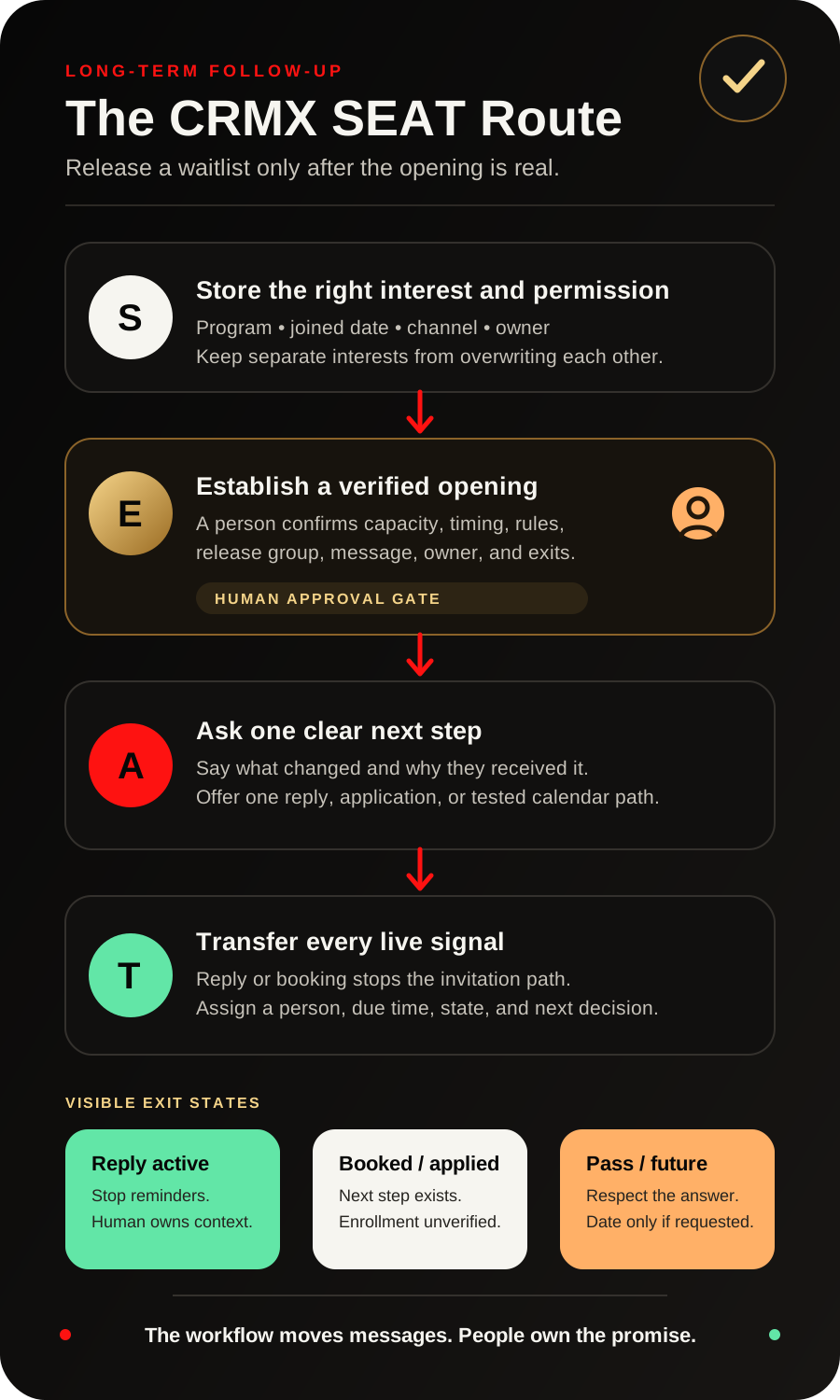
The CRMX SEAT Route turns that tactic into four operating moves: Store the right interest and permission, Establish a verified opening, Ask one clear next step, Transfer every live signal and close obsolete paths.
That distinction matters. A waitlist form proves that someone submitted a waitlist form. A tag proves that a tag exists. A workflow log proves that an action ran. None of those facts prove that a place is open, the person still wants it, the message arrived, the person qualifies, or enrollment is complete.
Brent Attaway's Five Fortune Engines connects lead capture, follow-up, conversion, customer experience, and automation as one system. Capture should earn permission and preserve useful context. Follow-up should be clear, relevant, and respectful over time. Conversion should move toward one defined next step. Automation should handle repeatable work while people keep judgment. A waitlist release is a clean place to apply all four principles.
The strategy: a waitlist opening is an event, not an excuse
The person joined because the timing, capacity, cohort, program, or service path was not ready then. Good follow-up waits for a meaningful change.
The change might be:
- a place becomes available in a defined cohort;
- a new cohort date is approved;
- a consulting intensive adds a verified session;
- a previously full calendar receives a tested appointment block;
- the business approves another delivery slot and an owner for the replies.
That is different from sending a generic “still interested?” message every few weeks.
The opening event gives the message a reason. The stored waitlist context makes it relevant. The human approval gate keeps capacity and fit honest. The exit workflows prevent reminders from continuing after a real reply or booking.
This is a long-term follow-up tactic with a conversion purpose: stay quiet until the reason to contact the person is real, then make the next action simple.
The CRMX SEAT Route
S - Store the right interest and permission
Start with a dedicated waitlist form or another approved capture path. Do not infer waitlist interest from a newsletter subscription, an old discovery call, a page view, or a generic contact record.
The current Form Submitted workflow documentation supports starting a workflow from a selected form. That gives the waitlist a visible entry event.
Capture only what changes the future invitation:
- program or offer requested;
- date the person joined the waitlist;
- preferred start window, if useful;
- approved contact channel;
- source of the request;
- assigned owner;
- current waitlist state;
- next review date when the opening is not expected soon.
Use the form's displayed language to explain what the person is requesting and what follow-up to expect. A waitlist request for one program is not universal permission for unrelated campaigns.
The current custom-field documentation supports business-specific data in contact or opportunity fields across supported forms, records, workflows, filters, pipelines, and personalization. Choose the object carefully.
If one person can wait for only one offer at a time, a small contact-field set may be enough. If one person can be interested in several programs at once, a single contact field such as Waitlist Program can overwrite the truth. Use an opportunity-scoped or separately modeled record after testing the exact setup.
E - Establish a verified opening
Do not let automation invent capacity.
Before anyone receives an invitation, a human owner should complete a release card:
- Program: Which exact offer has an opening?
- Opening proof: What changed, and who verified it?
- Effective window: When is the opening actually available?
- Eligibility: Which already-approved rules should the team apply?
- Release group: Which reviewed contacts may receive the message now?
- Channel: Which recorded channel fits the original request?
- Next action: Reply, apply, or book which tested calendar?
- Owner: Who handles questions and exceptions?
- Response policy: What happens if several people respond?
- Stop conditions: Which events end the invitation path?
The release card is not a CRM feature. It is an operating control. It prevents a filtered list from becoming a claim about capacity.
After the opening is verified, use CRMX to build the reviewed group. The current bulk workflow enrollment documentation supports filtering contacts in Smart Lists, reviewing selected records, and adding those contacts to a published workflow immediately, at a scheduled time, or in drip mode.
That bulk action should remain a human approval point. Filter the list, inspect the records, select the intended group, and confirm the workflow. Do not automatically enroll every contact who happens to match one field.
An alternative is an approved opening tag. The current Contact Tag trigger documentation supports starting a workflow when a selected tag is added or removed. A tag such as Opening Approved - Leadership Intensive can make the gate visible.
The tag means approved for this invitation. It does not mean the person saw the message, accepted the offer, paid, or enrolled.
A - Ask one clear next step
The invitation should say what changed, why the person is receiving it, and what to do next.
It should not imply that a place is reserved unless the business has actually reserved it. It should not use a fake deadline. It should not turn a waitlist request into a guarantee of fit.
A practical opening message is:
Hi [First name] — you asked to hear when a place became available for [Program]. We have now verified an opening. If you would like to explore it, reply INTERESTED and [Owner] will confirm the next step. This message does not reserve a place.
If the right next step is a tested fit-call calendar, use:
Hi [First name] — an opening is available for [Program], and you are receiving this because you joined its waitlist. If the timing still fits, you can choose a conversation time here: [Tested calendar link]. Questions are welcome—just reply to this message.
If the offer requires an application, say that plainly:
A place has opened for [Program]. The next step is the short application here: [Application link]. Submitting it starts the review; it does not guarantee acceptance. If your situation has changed, reply PASS and we will close this invitation.
One optional reminder can be useful when the opening remains real and the person has not replied. Treat the timing as a business decision, not a universal rule.
Quick follow-up on the [Program] opening you asked about. If you want the next step, reply INTERESTED. If the timing is not right, reply PASS and we will update your waitlist record.
Do not keep reminding after a question, decline, complaint, booking, application, or human takeover. The live signal is more important than the planned sequence.
T - Transfer every live signal and close obsolete paths
A waitlist invitation is complete only when every response has an owner and every obsolete message stops.
The current Customer Replied trigger documentation supports starting a workflow when a contact replies, with filters for the originating workflow, tag, phrase, intent type, or channel. Use that trigger to remove the contact from the invitation sequence, change the visible state to Reply Active, and alert the assigned owner.
Do not route only the word INTERESTED. A question, decline, complaint, stop request, or unclear reply also changes the state. Exact keywords can help organize an obvious response, but they should not be the only exit.
The current Appointment Status trigger documentation supports workflow entry when an appointment is created or changes status. Filter the New state to the exact calendar used for the waitlist conversation. That event can remove the person from the invitation sequence and change the state to Booked.
A booked appointment is not enrollment. It proves that an appointment exists on the selected calendar. The human owner still confirms fit, capacity, terms, payment, and the final program state.
Use the Remove from Workflow action narrowly. Remove the contact from the named waitlist invitation workflow instead of clearing every active workflow. Other relevant onboarding, service, or communication paths may still be valid.
An Internal Notification action can alert the assigned person or team. An alert is not ownership by itself. Pair it with:
- a named owner;
- a due time;
- the program and invitation context;
- the contact's actual reply;
- the next decision required;
- a visible completion state.
Use seven states your team can read
Keep the state model small enough to inspect from a contact, opportunity, Smart List, or pipeline view.
- Waitlist Active — the program-specific request and approved channel are recorded.
- Opening Verified — the business confirmed a real opening and response owner.
- Invitation Approved — this contact passed the human release review.
- Invitation Sent — the approved message action ran.
- Reply Active — the contact replied and the human conversation owns the truth.
- Booked or Applied — the selected next-step event exists; final acceptance is still unverified.
- Passed or Future Review — the person declined, became ineligible, opted out, or asked for a later date.
Do not use Enrolled unless the business's actual enrollment condition is verified. Depending on the offer, that may require acceptance, payment, agreement, completed onboarding, or another defined event.
Build the three-workflow CRMX implementation
Workflow 1: Waitlist capture
Trigger: Form Submitted for the exact waitlist form.
Actions:
- Record the program, join date, source, channel preference, owner, and current state.
- Add the program-specific waitlist tag.
- Send a confirmation that accurately explains what the waitlist means.
- Alert the owner only when a person must review missing or unusual context.
Confirmation script:
Thanks, [First name]. You are on the waitlist for [Program]. We will contact you through [approved channel] if a relevant opening is verified. Joining the waitlist does not reserve a place or guarantee acceptance. If your plans change, reply here and we will update the record.
Workflow 2: Human-approved opening release
Entry: A human filters and reviews eligible records, then bulk adds the selected group to the published workflow or applies the approved opening tag.
Actions:
- Change the state to Invitation Approved.
- Add
Waitlist Invitation Active - [Program]. - Send the approved opening message through the recorded channel.
- Change the state to Invitation Sent.
- Wait for the business's tested response window.
- If no live exit exists and the opening remains real, send one optional reminder.
- End in Passed or Future Review according to the approved policy—never silently recycle the person forever.
Workflow 3: Reply and appointment exits
Use two observable triggers when both paths are offered:
- Customer Replied, filtered to the invitation workflow or active tag;
- Appointment Status = New, filtered to the exact waitlist calendar.
Actions:
- Remove the contact from the named invitation workflow.
- Remove the invitation-active tag.
- Set Reply Active or Booked or Applied.
- Assign or confirm the human owner.
- Send the owner the relevant context and due time.
- Record the final outcome only after the business verifies it.
Example 1: a business coaching cohort
A business coach runs a cohort with defined start dates. People can join a dedicated waitlist when the current group is full or the next start date is not yet approved.
The form records the cohort requested, preferred start window, contact channel, and waitlist date. The confirmation makes clear that the request is not enrollment.
When the coach verifies a real opening, the program owner completes the release card. The team filters the waitlist to the correct cohort and timing, reviews the records, and adds only the approved group to the opening workflow.
The message offers one next action: reply to speak with the enrollment owner. Any reply stops the reminder. A booked conversation moves the record to Booked or Applied. The coach—not the workflow—decides fit and final enrollment.
Example 2: a leadership consultant's small-group intensive
A leadership consultant offers a limited small-group intensive several times a year. Prospects can request notice for a future opening after a discovery conversation or a dedicated form.
The waitlist record preserves the intensive requested, team size, preferred quarter, and owner. It does not store a claim that the prospect is approved.
When a session is added, the consultant verifies the delivery slot and the calendar used for fit conversations. The team reviews the waitlist, excludes contacts with an active proposal or opt-out state, and releases the invitation to a controlled group.
One prospect replies with a scheduling question. The reply workflow stops the reminder and assigns the conversation. Another books the fit call and exits through the appointment workflow. A third says the quarter no longer works and receives a dated future-review state only after asking for it.
What Guy can and cannot own
A trained CRMX AI employee such as Guy can acknowledge a reply, repeat approved program facts, answer tested logistical questions, share the approved application or calendar, capture a preferred time, and prepare a handoff.
Guy should hand off:
- fit or eligibility decisions;
- pricing, discounts, payment exceptions, or agreements;
- a promise that a place is reserved;
- a request to change program rules;
- complaints or sensitive context;
- unclear capacity or availability;
- any direct request for a person.
The AI employee can keep the conversation moving. The business still owns the commercial promise.
Measure the operating truth
Use the workflow to find leaks, not to manufacture a success story.
Track:
- waitlist records with a complete program and approved channel;
- contacts reviewed before each release;
- invitations sent by program and date;
- replies awaiting a human response;
- owner response time;
- booked or applied next steps;
- passes, opt-outs, and future-review requests;
- records left in Invitation Sent beyond the response window;
- duplicate invitations or messages sent after a live exit;
- final outcomes that remain unverified.
If replies are waiting, fix ownership. If the group includes the wrong program, fix the data model and filters. If reminders continue after a reply, fix the exit workflow. If the team cannot explain why the opening was real, fix the release card before sending another invitation.
Launch checklist
- Confirm: the waitlist form names the exact program or offer.
- Confirm: the form language accurately describes the follow-up the person is requesting.
- Confirm: the program, join date, channel, owner, and state are stored in the correct object.
- Confirm: one contact cannot overwrite another active program interest.
- Confirm: opt-out and channel restrictions are respected.
- Confirm: the opening is verified by a named human owner.
- Confirm: the release card identifies the response policy and final states.
- Confirm: the Smart List filters match the intended program and timing.
- Confirm: every selected contact is reviewed before bulk enrollment or tagging.
- Confirm: the invitation does not imply a reserved place or guaranteed acceptance.
- Confirm: the application or calendar path works on mobile and desktop.
- Confirm: the reply trigger catches questions and declines, not only a positive keyword.
- Confirm: the appointment exit uses the exact calendar and intended appointment state.
- Confirm: reply and booking exits remove only the named invitation workflow.
- Confirm: the human owner receives the actual context and a due time.
- Confirm: one optional reminder is suppressed after every live signal.
- Confirm: manual bookings, applications, and decisions have an explicit update path.
- Confirm: test records cover positive reply, question, pass, opt-out, booking, no response, duplicate tag, and wrong-program cases.
- Confirm: the workflow is published only after execution logs and record states match the design.
- Confirm: the team can explain the final state without opening the workflow builder.
Frequently asked questions
What should trigger a coaching waitlist invitation?
A real, human-verified opening should trigger the release decision. After that decision, a reviewed bulk workflow enrollment or an approved contact tag can start the CRMX invitation path.
Should I invite the entire waitlist at once?
Not automatically. Review the real opening, program rules, contact context, response policy, and the team's ability to own simultaneous replies. Release only the group the business has deliberately approved.
How many waitlist messages should I send?
Start with one clear invitation and, if the opening remains real, one optional reminder. The correct timing and channel depend on the original request, business policy, and response ownership. Stop immediately on a reply, booking, application, opt-out, complaint, or human takeover.
Does a booked call mean the person has a place?
No. It proves that an appointment exists on the selected calendar. Fit, acceptance, payment, reservation, and enrollment remain separate business states.
Can an AI employee run the waitlist?
An AI employee can handle approved information, logistics, a tested next-step path, and handoff preparation. A person should verify capacity, approve the release group, decide fit, handle exceptions, and confirm final enrollment.
What if one person joins several program waitlists?
Do not store several active interests in one field that can be overwritten. Model each program interest separately with the correct opportunity or approved record structure, then test filters, workflows, and updates before launch.
Give the opening a system before it gets a message
The strongest waitlist follow-up does not sound clever. It sounds timely because the event is real, relevant because the original interest is visible, and trustworthy because the next step is honest.
Build the waitlist as part of the CRMX Revenue Flywheel: capture the right context, follow up when something meaningful changes, route the response, and keep the conversion decision human-owned. The CRMX platform connects the forms, records, Smart Lists, workflows, conversations, calendars, pipelines, and reporting needed to operate that path.
If a person is genuinely not ready rather than waiting for a specific opening, use a dated long-term nurture path. If the next step is an application, keep the decision inside a human-owned coaching application review workflow. If the opening leads to a strategy call, preserve the next commitment with a discovery call follow-up card.
Explore CRMX for coaches and consultants, or request a live CRMX strategy demo to map the SEAT Route to your program, owners, and verified enrollment process.
Sources and further reading
- Official Support: Form Submitted workflow trigger
- Official Support: Custom Fields
- Official Support: Add contacts in bulk to a workflow
- Official Support: Contact Tag workflow trigger
- Official Support: Customer Replied workflow trigger
- Official Support: Appointment Status workflow trigger
- Official Support: Remove from Workflow action
- Official Support: Internal Notification workflow action