
Coaching Application Review Workflow: The CRMX SCREEN Path
Build a CRMX coaching application review workflow with human-owned decisions, clear applicant responses, visible next steps, and tested stop rules.
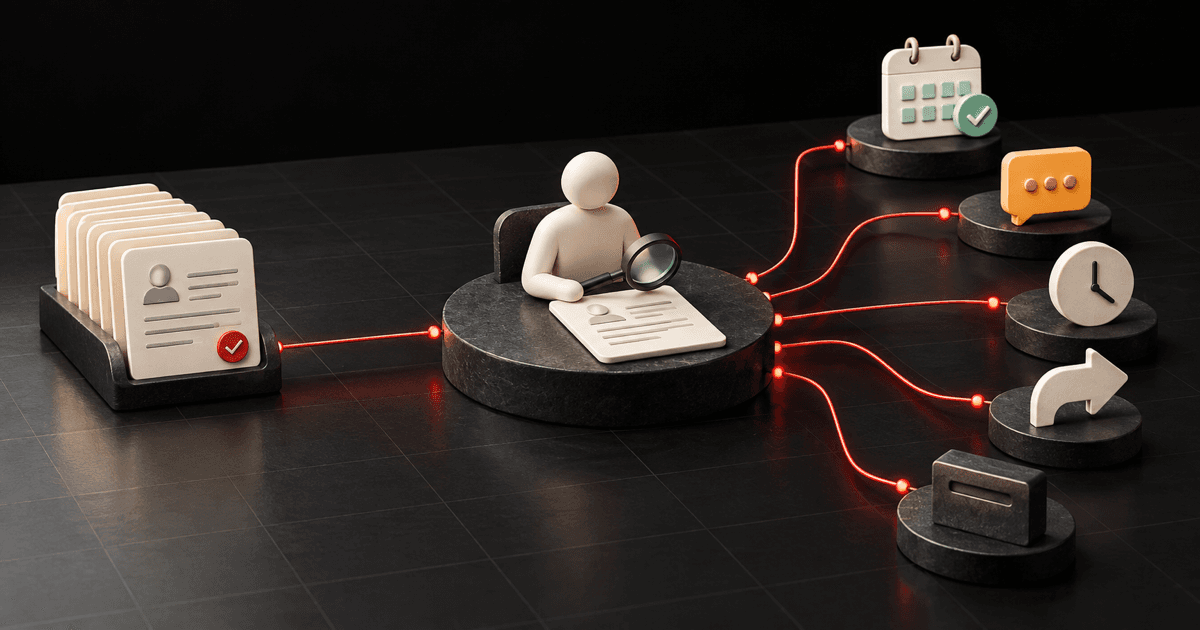
A complete coaching application should never disappear into an inbox.
The practical tactic is to separate receipt, review, decision, and response. CRMX can acknowledge the submission, preserve the application state, create an assigned review task, and send the approved next step after a person makes the decision. The system handles repetition. The coach or consultant keeps judgment.
That is the CRMX SCREEN Path: Start from a complete submission, Create an owned review, Record one decision state, Explain one next step, Exit incompatible automation, Name the next owner and date.
Brent Attaway's Five Fortune Engines connects permission-based capture, useful follow-up, clear discovery, repeatable conversion systems, and checklist-first automation. SCREEN applies those principles to the moment after an application is submitted. It is not an automatic acceptance or rejection machine. It is a reliable way to make sure every complete application reaches a complete, human-owned next step.
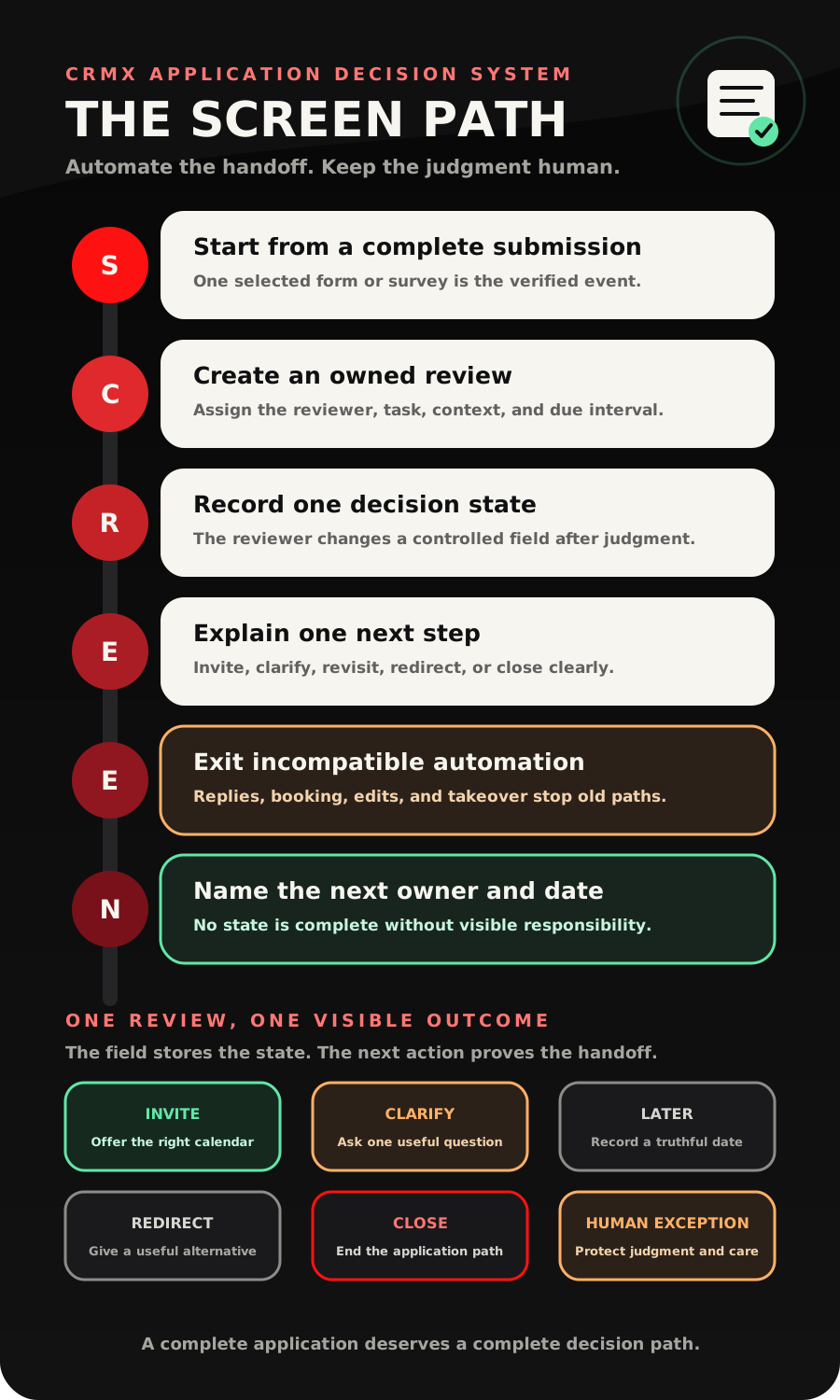
The tactic: automate the handoff, not the judgment
Many application systems automate the wrong part.
They assign a score, send a generic message, and move a record before a person has considered the context. Other systems do almost nothing: the application lands in email, the team talks about it, and nobody can tell whether the applicant received an answer.
Use a smaller division of labor:
- CRMX proves the application was submitted.
- CRMX records Review Pending and assigns the review.
- A person reviews the application against the business's approved fit rules.
- The reviewer records one controlled decision state.
- CRMX sends the approved message and creates the correct next action.
- A reply, booking, field correction, or human takeover stops the incompatible path.
This begins where the incomplete application follow-up workflow ends. That earlier system helps someone return and finish. SCREEN starts only after the selected form or survey records a complete submission.
Give the application one truthful state
Before building messages, create an Application Decision custom field with a controlled set of values:
- Review Pending
- Invite to Conversation
- Clarification Needed
- Later With Date
- Useful Redirect
- Closed
- Human Exception
Add four supporting fields only if the team will maintain them:
- Application Offer: the program or engagement being considered;
- Application Reviewer: the person responsible for the decision;
- Decision Date: when the state was set;
- Next Review Date: used only for a genuine later-with-date outcome.
These fields describe operating state. They do not prove fit, quality, intent, eligibility, or future success.
If a contact may apply for more than one offer, do not let one contact-level field erase the context of another application. Use the correct opportunity or another engagement-specific record so the reviewer can tell which application is being decided.
The CRMX SCREEN Path
S - Start from a complete submission
Use one event the system can verify.
The official Form Submitted documentation confirms that a workflow can start from a selected CRMX form. The official Survey Submitted documentation supports the same pattern for a selected survey.
Choose the trigger that matches the application you actually built. Filter it to the exact form or survey. Do not use a page view, link click, partial answer, or manually added tag as proof that the application is complete.
The receipt workflow should immediately:
- set Application Decision to Review Pending;
- preserve the offer and source context;
- send a short receipt message;
- create the owned review task;
- alert the reviewer only when the alert contains useful context.
The Form Submitted documentation also notes that another submission can fire the trigger again. Test duplicate submissions before activation. A second application may need review, but it should not silently create conflicting tasks or reset a completed decision.
C - Create an owned review
An internal notification is not ownership by itself.
The official Add Task workflow action can create a task with a title, description, assignee, and due interval. The Internal Notification action can alert selected users, roles, or teams through configured internal channels.
Use both only when they serve different jobs:
- the task says who must review what and by when;
- the notification makes the new work visible with enough context to act.
A useful review task description contains:
Application: [application name]
Applicant: [name]
Desired outcome: [approved application field]
Timing context: [approved application field]
Review record: [contact or opportunity link]
Required finish: set one Application Decision state and next owner.
Choose the due interval based on the promise the business actually makes. Do not publish a response-time promise the team has not staffed and tested.
R - Record one decision state
The reviewer should not finish by writing “looks good” in a private message.
After reviewing the application, the person updates Application Decision to one controlled value. The official Contact Changed trigger documentation confirms that a workflow can react when a selected custom field changes. That makes the decision field a clean start event for the second workflow.
Use a short human review card:
- Does the request match the offer's intended problem and scope?
- Is the next useful step a conversation, one clarification, a later date, another resource, or a close?
- Does any part of the application require sensitive judgment or a direct human response?
- Who owns the next action?
- What evidence will prove the handoff happened?
Do not put protected, medical, legal, financial, or other sensitive attributes into automatic acceptance or rejection logic. If the context is sensitive or ambiguous, use Human Exception and continue person to person.
E - Explain one next step
The decision-response workflow starts when the reviewer changes the decision field. An If/Else action can route the record according to that field.
Each state gets one primary applicant-facing action:
| Decision state | Applicant-facing next step | Operating owner |
|---|---|---|
| Invite to Conversation | Offer the correct consultation calendar | Reviewer or assigned advisor |
| Clarification Needed | Ask one question that changes the route | Reviewer |
| Later With Date | Confirm the relevant future date and stop short-term pursuit | Named future owner |
| Useful Redirect | Share one truthful alternative or resource | Reviewer or approved AI employee |
| Closed | End the application path clearly and respectfully | Reviewer |
| Human Exception | Acknowledge receipt and continue without a timed decision message | Named person |
Do not send a calendar, a nurture email, a redirect, and a sales message at the same time. A clear decision deserves a clear next action.
E - Exit incompatible automation
Every branch needs a stop rule.
The official Customer Replied trigger can start a workflow from a contact reply and can be filtered to the relevant reply context. Use it to move a real response into a visible owner queue.
The documented Remove from Workflow action can remove a contact from the current or another workflow. Use the narrowest safe scope. Removing someone from every workflow can also remove them from unrelated customer journeys.
Stop or redirect the active branch when:
- the applicant replies with a question or meaningful context;
- the invited conversation is booked;
- the reviewer corrects the decision field;
- a person takes ownership;
- the application is withdrawn;
- the path reaches its approved close state.
Contact Changed can fire again when a tracked field changes again. Test repeated edits so a corrected decision does not send two contradictory messages.
N - Name the next owner and date
The response is not the finish line. The handoff is.
An Invite to Conversation state needs the correct calendar, a named owner, and a booking result. A Clarification Needed state needs someone responsible for reading the answer. Later With Date needs a real review date. Human Exception needs a person and a next action visible in the record.
Before calling the review complete, confirm:
- the decision state is visible;
- the approved message sent once;
- the applicant's reply path is owned;
- the next owner is named;
- the next date or completion event is known;
- the previous application path can no longer send an incompatible message.
That is the difference between activity and a working qualification system.
Build the workflow in CRMX step by step
Workflow 1: application receipt and review assignment
Trigger: the exact application form or survey is submitted.
Actions:
- Check whether the same application already has an active or completed review.
- Update Application Decision to Review Pending only when a new review should begin.
- Record the application offer and submitted date.
- Send the receipt message.
- Create the review task for the named reviewer.
- Send one internal notification with the application context and record link.
- End. Do not wait inside this workflow for the review decision.
Keeping receipt separate prevents a long-running wait from becoming the hidden owner of every future outcome.
Workflow 2: decision response and next action
Trigger: Application Decision changes to one of the approved outcome states.
Actions:
- Check the exact decision value.
- Route through If/Else.
- Remove the contact from the incompatible branch, not unrelated automation.
- Send the one approved state message.
- Create the correct next task, calendar path, or future date.
- Record the decision date and next owner.
- End at a visible operating state.
Use a separate reply-routing workflow when a customer reply needs to interrupt several different application branches. Keep the reply in CRMX Conversations so the next person receives the context rather than asking the applicant to start again.
Copy-ready application messages
Receipt
Hi [First Name], we received your [Application Name]. [Reviewer Name or Team] will review it for the next useful step. If there is context you meant to include, reply here so it stays with your application.
Invite to conversation
Thanks for completing the application, [First Name]. The next useful step is a [Conversation Name] with [Owner Name]. Choose a time here: [Calendar Link]. If the listed times do not work, reply here instead of booking the wrong appointment.
Clarification needed
Thanks, [First Name]. Before we choose the next step, one answer would help: [One Decision-Changing Question]. You can reply here in a sentence or two.
Later with date
Thanks for the context, [First Name]. Based on what you shared, [Month or Date] is the more useful time to revisit this. We have recorded that date. If your situation changes sooner, reply here and we will review the next step with you.
Useful redirect
Thanks for completing the application, [First Name]. This specific [Program or Engagement] is not the most useful next step based on the current request. A better place to start is [Approved Resource or Alternative] here: [Link]. If we misunderstood the context, reply and a person will review it.
Closed
Thanks for the time you put into the application, [First Name]. We are closing this application path, so you will not receive more application reminders. If you need to correct something material, reply here and we will route it to a person.
Keep these messages proportional to the real offer. Do not promise acceptance, access, pricing, results, response times, or exceptions the business has not approved.
Two concrete use cases
Use case 1: a business coach's mastermind application
A business coach receives an application for a small mastermind. The form captures the applicant's current business model, primary growth constraint, desired change, timing, and reason for seeking the group.
CRMX records Review Pending, creates a task for the program advisor, and sends the applicant a receipt. The advisor reviews the application and chooses Clarification Needed because the applicant described two different priorities.
The system asks one question: which priority would they want the group to help them address first? When the applicant replies, the timed path stops and the advisor receives the conversation. After reviewing the answer, the advisor changes the state to Invite to Conversation. CRMX sends the correct calendar and records the advisor as the next owner.
The automation moved the work. The advisor made the judgment.
Use case 2: an operations consultant's diagnostic engagement
An operations consultant uses an application for a paid diagnostic engagement. A founder submits clear information about recurring meeting failures, but the requested start date is after a planned reorganization.
The consultant chooses Later With Date and records the first useful review date after the reorganization. CRMX sends the approved later message, removes the applicant from the short-term decision path, and creates the future review task.
If the founder replies that the reorganization moved forward, the response enters a human-owned conversation. The system does not pretend the original timing still applies.
What an AI employee should and should not do
A trained CRMX AI employee can support this workflow without becoming the reviewer.
It can:
- acknowledge receipt using approved language;
- answer approved logistics questions about the application or calendar;
- ask one reviewer-written clarification question;
- preserve the applicant's answer in the conversation;
- route a reply to the named person;
- state the current recorded next step without inventing a decision.
It should not:
- decide whether someone is accepted, qualified, safe, appropriate, or likely to succeed;
- infer missing facts or sensitive attributes;
- change scope, pricing, access, guarantees, or policy;
- deliver a rejection the reviewer has not explicitly recorded;
- continue timed messages after a person takes ownership.
The AI employee can carry context. The reviewer owns the decision and relationship.
Measure the application path without inventing success
Track operating evidence rather than flattering activity:
- applications received;
- reviews still pending;
- time from submission to recorded decision;
- applications in each decision state;
- clarification replies awaiting an owner;
- invited applicants who booked the intended calendar;
- later-with-date records missing a future task;
- duplicate or contradictory decision messages;
- human exceptions without a named owner.
These measures show where the process is stuck. They do not prove program fit, coaching quality, client outcomes, or revenue.
This is the Qualify stage of the CRMX Revenue Flywheel. The goal is not to reject faster. It is to preserve context and move each complete application toward the most useful truthful next step.
The SCREEN launch checklist
- The workflow starts only from the exact complete application form or survey.
- Duplicate submissions cannot overwrite a finished decision without review.
- Application Decision uses a controlled list of approved states.
- The reviewer, task, and due interval are explicit.
- Sensitive or ambiguous context routes to Human Exception.
- The receipt message does not imply acceptance or promise a response time.
- Every state has one approved message and one primary next action.
- Invite to Conversation uses the correct calendar.
- Clarification Needed asks only one decision-changing question.
- Later With Date stores a real date and creates a future owner action.
- Useful Redirect links only to a verified resource or path.
- Closed ends application reminders.
- Customer replies stop the incompatible timed branch.
- Repeated decision-field edits do not send contradictory messages.
- Human takeover is visible and prevents further automation from competing.
- Test records cover every state on desktop and mobile.
- The team reopens the contact, task, conversation, and calendar result after each test.
Frequently asked questions
Should CRMX automatically accept or reject coaching applications?
Use CRMX to collect the complete submission, assign review, preserve state, send approved responses, and prove the next handoff. Keep acceptance, rejection, sensitive interpretation, and unusual exceptions with an authorized person.
How is this different from incomplete application follow-up?
Incomplete application follow-up begins when someone requests or starts the path and ends when a verified submission arrives. SCREEN begins after that complete submission and manages review, decision, response, and ownership.
Do I need a pipeline for applications?
Not always. A controlled custom field may be enough for one simple offer. Use a pipeline or engagement-specific record when several reviewers, offers, applications, or active opportunities would make one contact-level state ambiguous.
What if an applicant replies after receiving a decision message?
Route the reply into the shared conversation, stop the incompatible timed branch, and assign the correct person. Do not let the previous decision workflow keep speaking while a real conversation is active.
Can I use the same workflow for every program or consulting offer?
Only when the applications, fit rules, reviewer, calendar, messages, and next states are genuinely the same. Start with one offer. Reuse components after the first path has passed every duplicate, reply, correction, booking, and takeover test.
Give every complete application a complete path
The best application workflow does not make the decision feel automated. It makes the process feel owned.
The applicant knows the current next step. The reviewer sees the work. CRMX carries the repetitive handoff, message, and stop logic. And the record shows what happens next without asking the team to reconstruct the decision from an inbox.
Explore the connected CRMX platform, see how CRMX supports coaches and consultants, or audition Guy live to hear how a trained AI employee can acknowledge, clarify, and route without replacing human judgment.
Sources and further reading
- Official Support: Form Submitted workflow trigger
- Official Support: Survey Submitted workflow trigger
- Official Support: Update Contact Field workflow action
- Official Support: Add Task workflow action
- Official Support: Internal Notification workflow action
- Official Support: Contact Changed workflow trigger
- Official Support: If/Else workflow action
- Official Support: Customer Replied workflow trigger
- Official Support: Remove from Workflow action