
Incomplete Application Follow-Up for Coaches: The CRMX FINISH Path
Build a CRMX application follow-up workflow that uses verified start and finish events, one useful reminder, reply ownership, and clear outcomes.
Someone asks for your application, receives the link, and disappears. What should happen next?
The useful answer is not a seven-message chase. It is a small system that can tell the difference between invited, complete, replied, and closed.
The tactic is to split the path into two verified events:
- A short gateway form records that the person asked for the application and gives you permission to follow up.
- The completed application records that the person finished it.
Between those events, CRMX sends the promised link, checks the real application state before reminding, asks one useful question, routes replies to an owner, and ends cleanly.
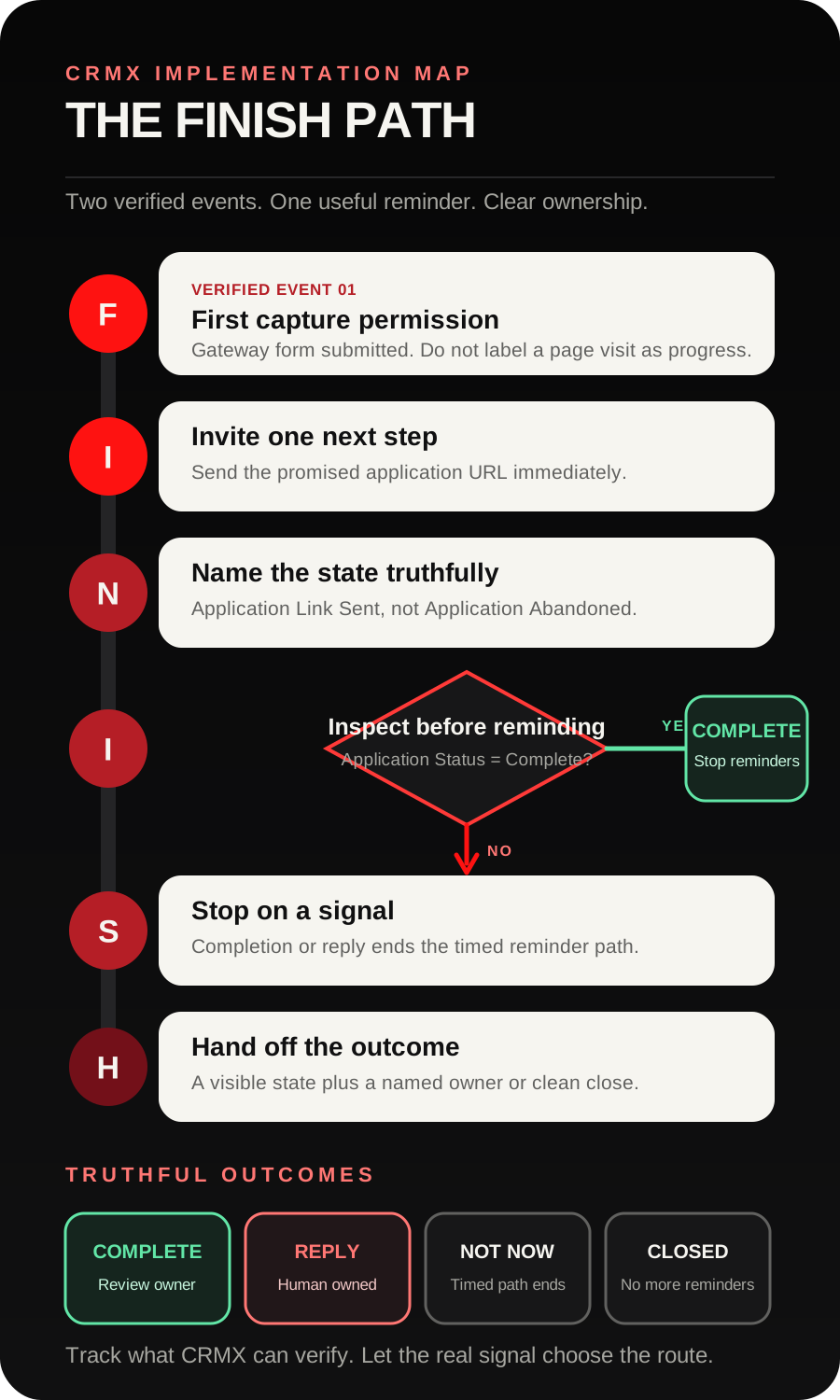
Brent Attaway's Five Fortune Engines frames lead capture as an exchange of value for permission to follow up. Its Follow-Up Engine then emphasizes immediate contact with value, clarity, and one next step. The CRMX FINISH Path turns those principles into an application workflow: First capture permission, Invite one next step, Name the state, Inspect before reminding, Stop on a signal, Hand off the outcome.
The tactic: use two events you can prove
Many application-recovery workflows begin with a weak assumption:
They visited the page, so they must have started the application.
A page visit does not prove that. Neither does a button click. The person may have opened the page, changed devices, closed the tab, or decided the offer was not for them.
Use a small gateway form before the longer application. Ask only for the information required to deliver the application and continue the conversation, usually:
- first name;
- email or mobile number;
- one consent-aware communication choice;
- one optional routing question if it changes which application they should receive.
When that form is submitted, the official Form Submitted trigger documentation confirms that a workflow can start and be filtered to the specific form. That is your verified start event.
The gateway submission should set the state to Application Link Sent, not Application Started. The system knows the link was requested and delivered. It does not know how far the person got.
Build the application as a specific CRMX survey. When it is submitted, the documented Survey Submitted trigger provides the verified finish event. That event changes the state to Application Complete and stops the incomplete path.
This two-event model is the foundation. Everything else is just useful movement between two truths.
Make the application easier to return to
For a multi-step application, enable Save exit confirmation and test it before launch. The current official Save Progress release says the setting can save progress for multi-step forms, surveys, and quizzes and offer a returning respondent the choice to continue or start over.
Keep the promise proportional to the feature:
- Use one stable application URL.
- Tell the person they can return to that application.
- Do not promise a unique resume link unless you have built and tested one.
- Do not assume saved progress starts a workflow.
- Do not call a partial response complete.
Save Progress helps the person return. The two verified submission events control the automation.
The CRMX FINISH Path
F - First capture permission
The gateway form has one job: make the next step explicit.
Place it on the offer page after enough explanation for a person to understand:
- what the application is for;
- who should complete it;
- what happens after submission;
- whether completing it guarantees anything.
Use accurate language such as Get the application or See if this conversation is the right next step. Do not use Book now if the person still needs to complete an application and wait for review.
The form submission creates or updates the contact record and starts the invitation workflow. It should not mark the person qualified, accepted, or booked.
I - Invite one next step
Send the application link immediately after the gateway form is submitted. Keep the message useful and specific:
Hi [First Name], here is the [Application Name] you requested: [Application Link]. It helps us understand [specific purpose]. If you get stuck or are unsure whether it fits, reply here and ask one question.
The message has one mission: help the person take the promised next step.
Do not crowd it with a calendar link, a second offer, a long founder story, and three different calls to action. If the correct next step is the application, make that path unmistakable.
N - Name the state truthfully
Create a custom contact field called Application Status before building the workflow. The official Update Contact Field documentation confirms that a workflow can write a value to an existing standard or custom contact field.
Use a small set of operating values:
- Application Link Sent
- Application Complete
- Reply - Human Owned
- Not Now
- Closed
If the business already has a useful application pipeline, mirror these as opportunity stages only where they help the team see and own work. Do not create a second pipeline just to display workflow activity.
The name matters. Application Link Sent is something the system can verify. Application Abandoned assigns intent the system does not know.
I - Inspect before reminding
After the invitation, wait for the business's chosen window. Then use an If/Else check on Application Status.
The current If/Else workflow guidance supports checking contact-specific data after a wait and sending the contact down the matching branch.
- If status is Application Complete, end the incomplete path.
- If status is Reply - Human Owned, end the timed path and let the owner continue.
- If status is still Application Link Sent, send one answerable reminder.
- If status is Not Now or Closed, stop.
The state check should happen immediately before every automated message. A reminder that was appropriate yesterday can become awkward after the person completes the application or asks a real question.
S - Stop on a signal
Completion is one stop signal. A reply is another.
Use a reply-routing workflow so questions enter CRMX Conversations and reach a named owner. The documented Customer Replied trigger can start a workflow from a contact reply and filter it to the relevant workflow, channel, tag, or other reply condition.
A trained CRMX AI employee can acknowledge the message, answer approved logistics questions, restate the application purpose, and ask one clarifying question at a time. A person should own:
- program-fit decisions;
- pricing or payment exceptions;
- health, legal, financial, or other sensitive context;
- unusual scope requests;
- complaints or confusion;
- any direct request for a person.
Do not let the timed workflow keep talking after the conversation becomes human-owned.
H - Hand off the outcome
The incomplete path should finish in a state someone can understand without opening the workflow log.
- Application Complete: route the submission to the defined review owner. If approved, offer the correct consultation calendar and begin the preparation path.
- Reply - Human Owned: keep the context in Conversations and assign the next action.
- Not Now: stop the short recovery path. Use longer-term value-based follow-up only if it fits the person's permission and the business's policy.
- Closed: end the path with no additional application reminders.
The workflow is not complete because two texts sent. It is complete when the customer's state and owner are clear.
Build the FINISH workflow in CRMX step by step
1. Choose one application path
Start with one offer and one application, such as a business-growth program, leadership advisory engagement, or private coaching assessment.
Write down:
- the application's purpose;
- the minimum fields required for review;
- the person who reviews it;
- the possible review outcomes;
- the calendar, if any, used after approval;
- questions that require a human.
Do not combine every offer into the first version.
2. Build the gateway page and form
Use a CRMX website or funnel page to explain the offer and set expectations. Place the short gateway form after the explanation.
On submission:
- update Application Status to Application Link Sent;
- record the correct source or offer context;
- send the application link;
- begin the incomplete-application wait;
- assign an owner only if that person has a defined action.
Test the page and form on a phone before building more automation.
3. Build the application survey
Keep the application as short as responsible review allows. Group questions by purpose and use plain language.
For example:
- current situation;
- desired outcome;
- what has already been tried;
- timing or decision context;
- one open question that helps the reviewer understand fit.
Do not ask for data you will not use. Enable Save Progress when it improves the multi-step experience, and verify the leave-and-return behavior on desktop and mobile.
4. Build the invitation workflow
Trigger the workflow from the specific gateway form submission.
Add:
- status update to Application Link Sent;
- the immediate application message;
- a wait;
- the status If/Else check;
- one incomplete-path reminder;
- another wait and state check;
- one final close-the-loop message;
- a final update to Not Now or Closed.
Choose wait intervals that match the application's length, urgency, and the hours when the team can answer. The timing is an operating choice, not a universal benchmark.
5. Build the completion workflow
Trigger a separate workflow from the specific application survey submission.
Add:
- update Application Status to Application Complete;
- remove the contact from the incomplete reminder path;
- acknowledge receipt without promising acceptance;
- notify or assign the review owner with useful context;
- move the opportunity to Application Complete - Review if a pipeline is used;
- route the approved next step only after the defined review decision.
The submission event proves completion. It does not prove fit.
6. Build reply ownership
Before activating reminders, decide:
- who owns a reply;
- who covers when that person is unavailable;
- which questions the AI employee can answer;
- how a person takes over;
- how the status changes to Reply - Human Owned;
- what closes the conversation.
An internal notification is not ownership unless the recipient knows what to do next.
7. Test every stop condition
Use test contacts to run:
- gateway submitted, application completed immediately;
- gateway submitted, application completed after the first wait;
- gateway submitted, prospect replies with a question;
- prospect asks for a person;
- prospect says not now;
- no reply and no completion;
- duplicate gateway submission;
- duplicate application submission;
- wrong application link;
- missing review owner;
- save-progress return on desktop and mobile.
Confirm that no completion or reply branch receives the next incomplete reminder.
8. Review states, not sends
Each week, inspect:
- gateway forms submitted;
- application links sent;
- applications completed;
- replies needing an owner;
- records still open beyond the expected window;
- not-now and closed outcomes;
- completed applications awaiting review.
Those are operating states, not promised results. They show where the path needs clearer copy, fewer questions, better ownership, or a different next step.
Example 1: a business coach's growth-program application
A business coach offers a twelve-week program for owners working through a specific growth bottleneck.
The offer page explains the program, expected participation, and what happens after an application. A prospect submits the short Get the Application form. CRMX records Application Link Sent and immediately delivers the application.
The prospect does not complete it during the first session. Save Progress is enabled on the multi-step survey. At the first checkpoint, CRMX sees that the status is still Application Link Sent and sends:
Hi [First Name], do you still want to complete the [Program Name] application? Here is the link: [Application Link]. If one question is holding you up, reply and tell me which one.
The prospect returns, completes the application, and triggers the completion workflow. CRMX updates the status, stops the reminder path, acknowledges receipt, and assigns the review to the coach. The calendar is offered only after the coach makes the defined review decision.
The system never claims the person abandoned the application or was accepted automatically.
Example 2: a leadership consultant's diagnostic application
A leadership consultant offers an executive friction diagnostic for founder-led teams.
The gateway form asks for the prospect's name, work email, organization, and whether the request concerns an individual leader or a leadership team. That last answer selects the correct application link.
The prospect receives the team application but replies that the organization is still deciding who should participate. The reply workflow changes the state to Reply - Human Owned, stops the timed reminders, and routes the context to the consultant.
The consultant answers the scope question in the same conversation and sends the correct next step. The automation does not keep sending “finish your application” messages while a real decision is being discussed.
A home-service business can adapt the same structure for a detailed project request: use a short request form as the verified start, a project survey as the verified finish, and a human owner for unusual scope, access, financing, or safety questions.
The application state-and-owner decision aid
| Verified state | What CRMX should do | Owner |
|---|---|---|
| Gateway form submitted; application not complete | Send the promised link and run the defined wait | Workflow |
| Application status still Link Sent at checkpoint | Send one answerable reminder | Workflow |
| Application survey submitted | Stop reminders, acknowledge receipt, route review | Review owner |
| Prospect replies with a routine logistics question | Answer from approved knowledge or collect one missing fact | AI employee or assigned person |
| Fit, price, scope, sensitive context, complaint, or exception appears | Stop timed reminders and continue the conversation | Named person |
| No response after the final close | Mark Not Now or Closed and end the short path | Workflow |
Copy-ready application messages
Immediate application delivery
Hi [First Name], here is the [Application Name] you requested: [Application Link]. It helps us understand [specific purpose]. If you get stuck or are unsure whether it fits, reply here and ask one question.
One incomplete-path reminder
Hi [First Name], do you still want to complete the [Application Name]? Here is the link: [Application Link]. If one question is holding you up, reply and tell me which one.
Completion acknowledgment
Thanks, [First Name]. We received your [Application Name]. [Review Owner] will review it for [specific next decision]. We will continue with you here once that review is complete.
Human handoff acknowledgment
Thanks for explaining that. I am handing this to [Owner Name] with the context you shared so you do not have to repeat it. They will continue with you here.
Final close-the-loop message
Hi [First Name], I am closing the application loop for now. If you want to revisit [outcome], you can use this link: [Application Link]. No reply is needed if the timing is not right.
Replace every bracketed field. Confirm the sender, application name, purpose, owner, link, and review promise before activation.
The FINISH launch checklist
- One offer and one application define the first implementation.
- The offer page explains the application purpose and what submission does and does not guarantee.
- The gateway form asks only for information needed to deliver and route the application.
- Form Submitted is filtered to the correct gateway form.
- The immediate message has one primary next step and the correct application link.
- The application uses plain questions grouped by review purpose.
- Save Progress is deliberately enabled or disabled and tested on desktop and mobile.
- Survey Submitted is filtered to the correct application.
- Application Status exists before workflows try to update it.
- Every wait is followed by a fresh state check before a reminder.
- Completion removes the contact from the incomplete path.
- Replies stop timed reminders and reach a named owner.
- AI employee knowledge and escalation boundaries are written and tested.
- Completion acknowledgment does not promise acceptance, availability, or an outcome.
- The correct calendar appears only at the approved point in the process.
- The final message ends the short recovery path.
- Test contacts cover completion, reply, not now, no response, duplicate entry, wrong link, missing owner, and human takeover.
- Reporting separates link sent, application complete, reply owned, not now, closed, and awaiting review.
Frequently asked questions
Can CRMX detect that someone started typing an application?
Do not design the first workflow around that assumption. Use the gateway form submission as the verified request event and the application survey submission as the verified completion event. Save Progress can help a respondent return, but this workflow does not treat partial activity as a finished application.
How many reminders should an incomplete application receive?
Start with one useful reminder and one final close-the-loop message. Give each message a purpose, check the status immediately before sending, and end the path. Improve the process from observed states instead of adding volume by default.
Should the first application message include the consultation calendar?
Only if booking before review is genuinely the intended process. If the application must be completed or reviewed first, keep the application as the one next step and offer the correct calendar after the defined decision.
Can an AI employee review the application?
It can summarize approved fields, answer approved logistics questions, collect a missing fact, and route the record. Keep fit, price, scope, sensitive context, exceptions, and commitments with the defined human owner unless the business has explicitly designed and approved a narrower automated rule.
What happens after the final close?
Mark the record Not Now or Closed and stop the short application path. A separate long-term follow-up may be appropriate when it provides ongoing value and matches the person's permission. Do not leave the application workflow running indefinitely.
Make the next step easy, then record what is true
The FINISH Path is deliberately small: capture permission, deliver the application, name the state honestly, inspect before reminding, stop on a reply or completion, and hand off the real outcome.
Pair it with the SIGNAL lead magnet funnel before the application and the RESCUE no-show workflow after a consultation is booked. Together, those paths keep the prospect's context moving without pretending every signal means the same thing.
Explore the connected CRMX system for coaches and consultants, see the platform behind the workflow, or audition Guy live to hear how a trained AI employee handles one question at a time. If you want the application path mapped and built with your team, explore CRMX implementation services.
Sources and further reading
- HighLevel Changelog: Save Progress for Forms, Surveys, and Quizzes
- HighLevel Support: Form Submitted workflow trigger
- HighLevel Support: Survey Submitted workflow trigger
- HighLevel Support: Update Contact Field workflow action
- HighLevel Support: If/Else workflow action
- HighLevel Support: Customer Replied workflow trigger