
Consultation No-Show Recovery: The CRMX RESCUE Loop
Build a respectful CRMX no-show workflow that offers one easy rebooking choice, gives every reply an owner, and records the real outcome.
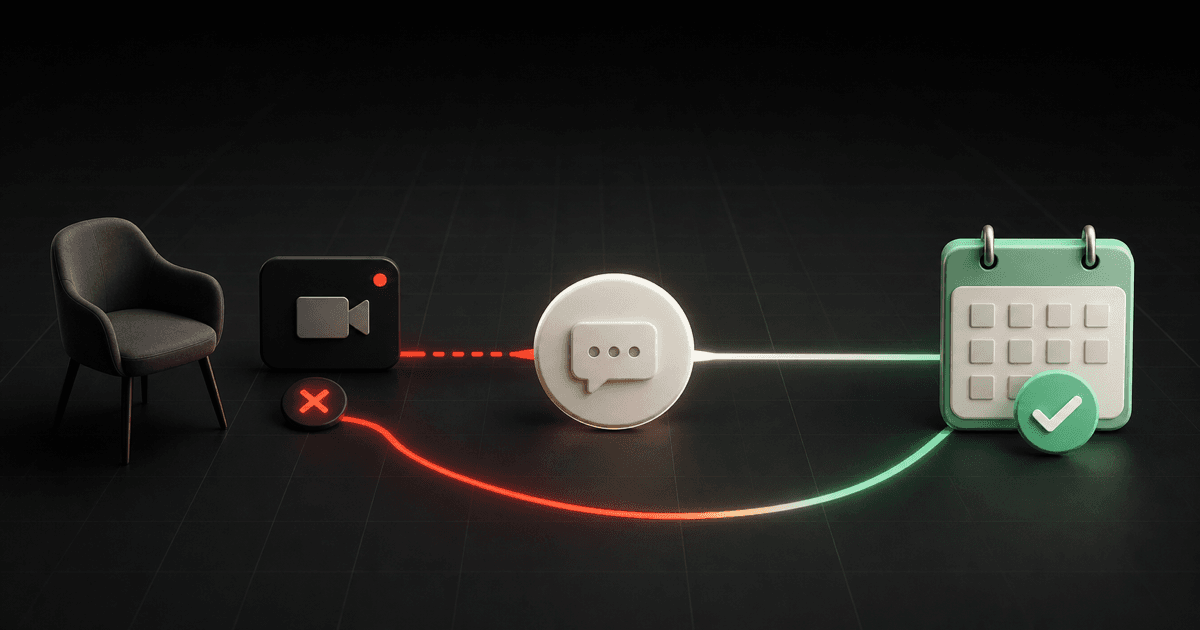
A missed consultation is not a verdict on the lead. It is a new state that needs a clear next step.
The most useful no-show tactic is simple: after the appointment is verified as missed, send one respectful message that gives the person two easy choices—pick a new time or close the loop for now. Then give every reply an owner and stop the timed sequence when the outcome is known.
Brent Attaway's Five Fortune Engines treats appointment show-up as part of the Follow-Up Engine. The work begins when the consultation is booked, with confirmation, expectation-setting, and reminders. The same engine keeps respectful contact with people who never showed instead of silently discarding them.
The CRMX implementation is the RESCUE Loop: Record, End, Send, Continue, Use, Enter.
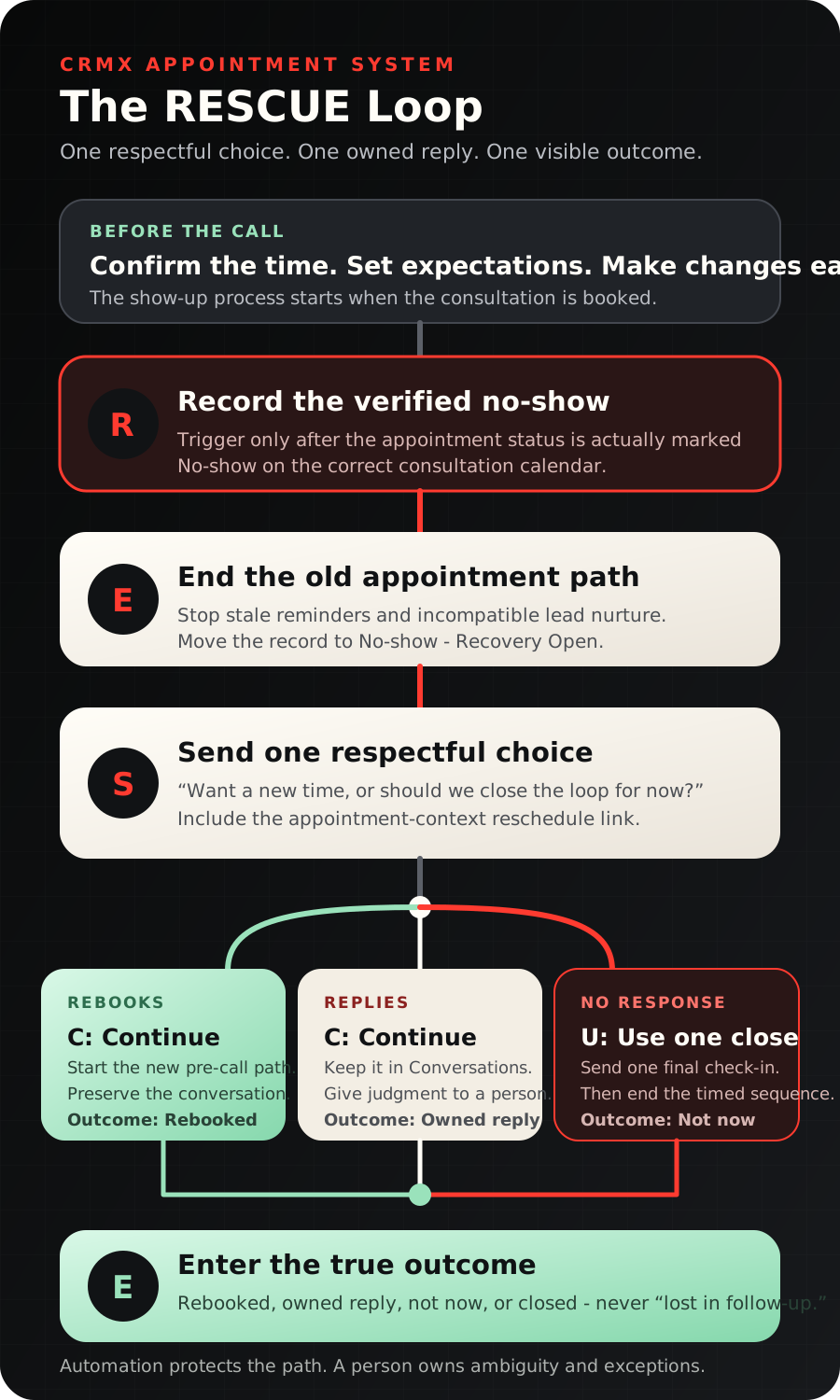
The tactic: turn a missed call into one answerable choice
Do not open with guilt:
You missed your appointment. Please reschedule immediately.
Do not pretend nothing happened:
Just following up. Are you still interested?
Name the missed appointment, remove the pressure, and offer one decision:
Hi [First Name]—we missed you for your [Appointment Name] today. No problem. Would you like to choose a new time, or should we close the loop for now? New time: [Reschedule Link]. You can also reply LATER.
That message works as an operating tactic because each response changes the route:
- The person selects a new time: start the new pre-call path.
- The person replies with a question or context: continue in the same conversation and assign an owner.
- The person says later: record Not Now and stop the rescue sequence.
- The person does not respond: send one final close-the-loop message, then end the timed path.
This is not a promise that every missed call will rebook. It is a way to make the next decision easy, respectful, and visible.
Start before the no-show
No-show recovery is weaker when the person never understood what the consultation was for.
Use the booking moment to make four things clear:
- the exact appointment name;
- the date, time, and timezone;
- what the person should expect or prepare;
- how to change the time if needed.
The official Customer Booked Appointment trigger documentation confirms that a self-booked appointment can start a workflow and be filtered to the intended calendar. Use that event to send the confirmation and begin the correct reminder path.
A practical starting sequence is:
- confirmation immediately after booking;
- one expectation-setting message before the appointment;
- one short reminder near the appointment time.
The exact timing should match the appointment, audience, and hours when your team can respond. Those intervals are operating choices, not universal performance claims.
CRMX can include a direct reschedule path in an appointment-triggered workflow. The current cancellation and reschedule documentation explains that the {{appointment.reschedule_link}} custom value is available when rescheduling is enabled and the workflow has appointment context.
Test the link with a real test appointment. A contact added through a general form or pipeline-stage trigger may not carry the appointment context needed to render that link.
The CRMX RESCUE Loop
R — Record the verified no-show
The recovery workflow should not guess that a person missed the call.
Give the coach, consultant, or appointment owner a simple rule: after the agreed waiting window, confirm that the meeting did not happen and mark the appointment No-show. If the team was late, the meeting link failed, or the status is uncertain, handle that first.
The documented Appointment Status trigger can start a workflow when the appointment status changes to No-show. Filter it to the correct consultation calendar so a missed onboarding call, group session, or internal appointment does not enter the wrong recovery path.
E — End the old appointment path
A no-show should end messages that describe the original appointment as upcoming.
Stop:
- remaining reminders for the missed time;
- lead-nurture messages that still ask the person to book;
- appointment-preparation messages tied to the old slot;
- duplicate recovery workflows.
Move the opportunity to No-show — Recovery Open. The stage should describe the person's current state, not merely confirm that a text was sent.
S — Send one respectful choice
Wait only long enough to confirm the status and make sure the appointment owner did not connect another way. Then send the no-show message through the established conversation channel.
Keep it short:
- name the appointment;
- remove blame;
- offer the direct reschedule path;
- provide a simple “later” option;
- ask only one question.
Do not add a discount, fake deadline, long explanation, or a new qualification form. The person already raised a hand and booked. Recovery should reduce friction, not make them earn another chance to talk.
C — Continue when there is a signal
There are two useful signals: a new booking or a reply.
If the person rebooks
Move the opportunity to Rebooked and start the preparation path for the new appointment. Keep the original conversation visible so the coach knows what happened without asking the person to repeat it.
Official appointment-scenario documentation explains that a rescheduled appointment is treated as a new appointment for workflow purposes. Configure re-entry and calendar filters deliberately, then test that the new confirmation starts once and the old recovery path stops.
If the person replies
Keep the response in CRMX Conversations and assign it to the appointment owner or defined backup.
The Customer Replied trigger can start a reply-routing workflow. Use it to notify the owner and make the conversation visible. Do not let a keyword decide that a complex answer is a rebooking request.
A trained CRMX AI employee may acknowledge the message, answer approved logistics questions, and offer the correct calendar link. Human judgment should own complaints, sensitive explanations, pricing questions, exceptions, or unclear intent.
U — Use one final close-the-loop message
If the person does not reply within your defined window, send one final message:
Hi [First Name]—I’m closing the loop on your [Appointment Name] for now. If you want to revisit [topic], you can choose a new time here: [Reschedule Link]. No reply is needed if the timing is not right.
Then stop the timed rescue sequence.
Do not turn one missed consultation into an endless series of “just checking in” messages. The person can enter an appropriate long-term follow-up path later, but the no-show workflow itself should have a clear end.
E — Enter the true outcome
Every exit should leave one visible state:
- Rebooked
- Reply — Human Owned
- Not Now
- Closed
If the record still says No-show — Recovery Open a week later, the workflow did not finish its operational job.
Build the workflow in CRMX step by step
1. Choose one consultation calendar
Start with one high-value appointment type, such as a strategy call, assessment review, or consultation. Confirm the appointment title, owner assignment, availability, meeting location, timezone display, and reschedule policy.
Do not combine every calendar into the first workflow. Different appointment types may need different preparation, ownership, and recovery rules.
2. Create the customer-state stages
Use a small pipeline:
- Consultation Booked
- Prepared / Confirmed
- No-show — Recovery Open
- Rebooked
- Call Held
- Reply — Human Owned
- Not Now
- Closed
If the business already has a useful sales pipeline, add only the missing states. Do not create a parallel pipeline just to make the automation look organized.
3. Build the pre-call workflow
Use Customer Booked Appointment as the trigger and filter it to the selected calendar.
Add:
- immediate confirmation with the appointment details;
- a concise description of what will happen;
- one useful preparation request;
- an approved reminder sequence;
- the tested reschedule link;
- stop conditions for cancellation, rescheduling, human takeover, and attendance.
4. Build the recovery workflow
Use Appointment Status as the trigger. Filter for:
- status is No-show;
- calendar is the selected consultation calendar;
- test, canceled, and invalid records are excluded.
Move the opportunity to No-show — Recovery Open, stop incompatible automation, and send the first rescue message.
5. Route replies before adding more messages
Create the reply workflow and ownership rule before scheduling the final follow-up.
Decide:
- who owns the first reply;
- who covers when that person is unavailable;
- how quickly the team can truthfully respond;
- which questions an AI employee may answer;
- which topics always require a person.
An automated notification without an owner is not a handoff.
6. Make rebooking a real exit
When a new appointment is scheduled:
- move the opportunity to Rebooked;
- remove the contact from the old no-show sequence;
- begin the new appointment's confirmation and preparation path;
- preserve the original conversation;
- prevent duplicate confirmations.
Test self-rescheduling and team-assisted rescheduling separately.
7. Close the timed path
After the final no-response message, move the opportunity to Not Now or Closed according to the business rule. Stop the workflow.
If the person belongs in long-term nurture, enroll them in a separate value-based follow-up only after the no-show sequence ends. The long-term path should have its own purpose, cadence, and stop conditions.
8. Review the leak, not just the message count
Each week, review:
- consultations booked;
- appointments marked showed;
- verified no-shows;
- no-show replies;
- rebooked appointments;
- rebooked appointments later marked showed;
- records still stuck in recovery.
These are operating states, not promised results. The purpose is to see where the consultation path is breaking and which owner or workflow needs attention.
Example 1: a business coach's growth assessment
A business owner books a Growth Bottleneck Review after completing a scorecard. The confirmation names the call, links to the scorecard, and asks the owner to bring one current growth constraint.
The owner misses the call. After confirming the meeting did not happen, the coach marks the appointment No-show. CRMX moves the opportunity to No-show — Recovery Open and sends the choice message.
The owner replies that an employee emergency interrupted the day and asks for another time. The reply appears in Conversations, the coach acknowledges it, and the owner uses the reschedule link. CRMX moves the record to Rebooked and starts the new preparation path.
Nothing in the workflow assumes why the person missed. The signal—a reply and new booking—controls the next step.
Example 2: a leadership consultant's executive briefing
A leadership consultant schedules a 90-Day Friction Map Review with a prospective client. The preparation message explains that the call will identify one decision bottleneck and asks the client to have one recent example ready.
The client misses the meeting and does not answer the first rescue message. The workflow sends one final close-the-loop note the next day, then moves the opportunity to Not Now and ends.
Six weeks later, the consultant may include the contact in an appropriate long-term insight sequence. That is a separate decision. The no-show workflow does not keep pretending the original appointment is active.
For a home-service business, the same structure can recover a missed estimate or consultation: verify the status, stop the old reminders, offer a direct new time, own the reply, and record the outcome.
Copy-ready message set
Booking confirmation
Hi [First Name]—you’re booked for [Appointment Name] on [Day] at [Time] [Timezone]. We’ll use the time to [specific outcome]. Please bring [one useful input]. Need a different time? [Reschedule Link]
No-show check-in
Hi [First Name]—we missed you for your [Appointment Name] today. No problem. Would you like to choose a new time, or should we close the loop for now? New time: [Reschedule Link]. You can also reply LATER.
Reply acknowledgment
Thanks for letting me know. I’ve kept your notes with the conversation. You can choose a new time here: [Reschedule Link]. If you need something different, tell me and [Owner Name] will review it.
Final close-the-loop message
Hi [First Name]—I’m closing the loop on your [Appointment Name] for now. If you want to revisit [topic], choose a new time here: [Reschedule Link]. No reply is needed if the timing is not right.
Replace every bracketed field. Test the sender, appointment name, timezone, and link before activation.
The RESCUE build checklist
- One calendar and appointment type define the first implementation.
- The confirmation states the purpose, time, timezone, and one preparation request.
- Rescheduling is enabled according to the business rule.
- The appointment-context reschedule link works in a real test booking.
- A person or verified process marks the appointment No-show.
- The recovery trigger filters to the correct status and calendar.
- Old reminders and incompatible nurture stop.
- The first message asks one respectful question.
- The message offers a direct new time and a simple later option.
- Replies reach a named owner in Conversations.
- AI employee boundaries are written and tested.
- Rebooking stops recovery and starts the new preparation path once.
- The final no-response message ends the timed sequence.
- Every exit records Rebooked, Reply — Human Owned, Not Now, or Closed.
- Test records cover self-reschedule, assisted reschedule, reply, no reply, cancellation, duplicate entry, missing owner, broken link, and wrong calendar.
Frequently asked questions
How soon should the first no-show message send?
Send it after the appointment owner has confirmed the meeting did not happen and any agreed grace period has passed. The right delay depends on the appointment and operating hours. The important rule is verified status before automation.
Should a no-show return to ordinary lead nurture?
Not while the recovery decision is open. Stop messages that ask the person to book as if no appointment existed. After the rescue path ends, a separate long-term follow-up may be appropriate if its purpose and stop conditions are clear.
Can an AI employee handle the whole recovery?
It can handle the approved opening, logistics questions, and calendar path. A person should own unclear intent, complaints, sensitive context, pricing, exceptions, and any promise outside the trained rules.
Should the workflow keep sending reminders until the person rebooks?
No. Use a small, defined sequence with a clear end. One initial choice and one final close-the-loop message are enough for the first version. Improve the process from observed states instead of adding volume by default.
Make the next decision easy
The RESCUE Loop is deliberately small: verify the no-show, stop the old path, offer one choice, own the reply, close the timed sequence, and record what is true.
Connect it to the broader CRMX lead journey, or pair it with the SIGNAL lead magnet funnel for coaches so the same context follows a prospect from first interest through the booked conversation.
Explore CRMX for coaches and consultants, see the connected platform, or audition Guy to hear how a trained AI employee handles one question at a time. If you want the workflow mapped and built with your team, explore CRMX implementation services.