
Home Service Booking Follow-Up: The CRMX BRIDGE Route
Build a CRMX booking follow-up workflow that helps home-service leads schedule, routes replies to an owner, and stops when booking is verified.
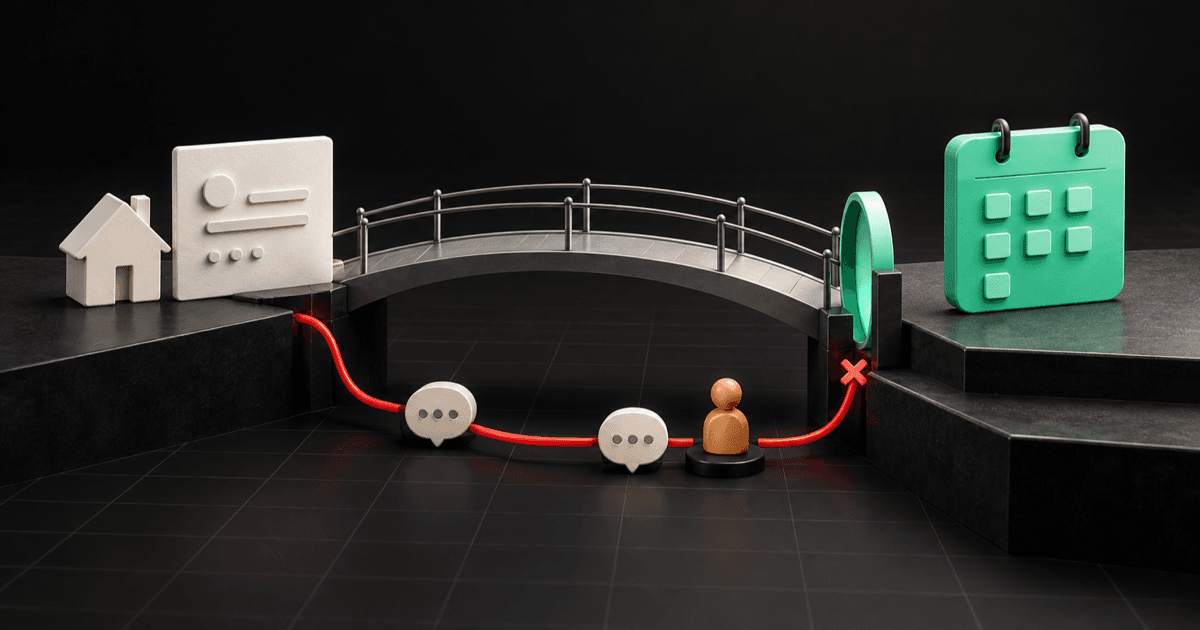
A home-service booking follow-up workflow should begin with one event you can prove, make one appointment action easy, give replies to a real owner, and stop the moment an appointment is verified.
That sounds simple. The dangerous version is not.
A visitor reaches a calendar but does not book. The system labels the person Abandoned Booking, sends a string of reminders, and keeps going even after an office manager schedules the appointment by phone. The business has confused elapsed time with intent and automation with truth.
The better tactic is a two-event bridge:
- A person submits a short service-request form.
- CRMX listens for the matching customer-booked appointment.
Between those events, the business may help the person finish the next step. When booking, reply, or human takeover is verified, the recovery path ends.
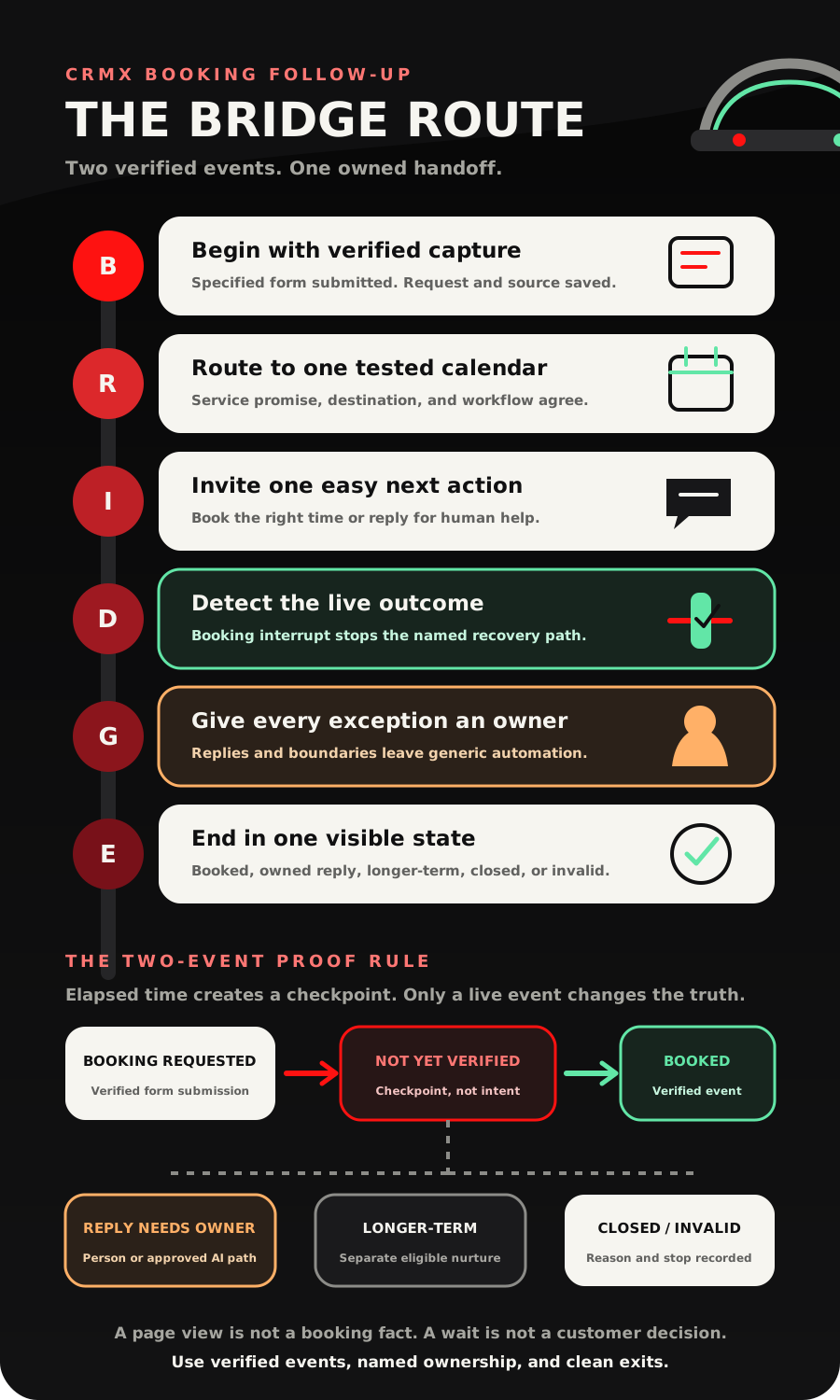
The CRMX BRIDGE Route turns that rule into a buildable workflow: Begin with verified capture, Route to one tested calendar, Invite one easy next action, Detect the live outcome, Give every exception an owner, End in one visible state.
Brent Attaway's Five Fortune Engines treats lead capture as permission to continue a useful conversation, follow-up as a clear path to the next step, and automation as support for a process the business has already defined. This tactic applies those ideas to one small but costly operating gap: the distance between “I need help” and “I booked a time.”
The tactic: prove both sides of the booking gap
Do not start from a page view, link click, or guess that someone “almost booked.” Start from a submitted form that records the person's contact information and service request.
The current official Form Submitted documentation says a specified CRMX form can begin a workflow. That is the first proof point.
The current Customer Booked Appointment documentation says a customer-created appointment can begin another workflow and can be filtered to an intended calendar or calendar group. That is the second proof point.
Everything between those points should be described honestly.
Use Booking Not Yet Verified, not Abandoned Booking.
The first label reports system state. The second invents a customer decision. The person may have been interrupted, disliked the available times, wanted to ask a question, called the office, used another device, or simply chosen to return later.
Your workflow does not need to know why before it helps. It only needs to know what has and has not been verified.
Define the five operating states first
The BRIDGE Route uses five visible states. These are recommended names, not built-in CRMX defaults.
- Booking Requested: The selected form was submitted and the next step is the tested calendar.
- Booking Not Yet Verified: The first booking checkpoint arrived without a matching self-booked appointment event.
- Reply Needs Owner: The person replied, asked a question, reported a problem, or requested a human.
- Appointment Booked: The intended booking event or approved manual-booking exit was verified.
- Closed or Longer-Term: The short recovery route ended without a booking and the record has one honest next state.
Each state needs an owner, a next action, and an exit.
That prevents the most common failure: a lead remaining inside a “reminder” sequence even though another system or person has already taken over.
The CRMX BRIDGE Route
B - Begin with verified capture
Use a short service-request form before the booking step. Collect only what the next action requires, such as:
- first and last name;
- mobile number or email for the approved follow-up channel;
- requested service;
- ZIP code or service area;
- the source page or campaign;
- one optional context field when it changes the route.
Do not turn the gateway into a full estimate questionnaire. The goal is to preserve the request and make the booking step easier, not create a second obstacle.
Filter the Form Submitted trigger to this exact form. When the event arrives, set Booking Requested, assign the initial owner, and preserve the source and service context.
For urgent-language or safety-sensitive routes, do not force self-booking. Send the approved urgent guidance and hand the record to the designated person or urgent contact path. A calendar-recovery workflow is for appropriate bookable requests, not emergency triage.
R - Route to one tested calendar
Give the person one primary calendar that matches the request. A roofing inspection should not land on a generic “talk to us” page with four unrelated options.
The handoff can happen through the tested destination your page supports, a confirmation step, or the immediate follow-up message. What matters is that the business tests the complete path on mobile and desktop:
- submit the exact form;
- reach the intended calendar;
- choose an available time;
- complete the booking;
- confirm the correct contact and calendar event appear in CRMX;
- confirm the recovery path stops.
Keep the form name, calendar name, workflow filter, and customer-facing service promise in agreement. A person who requests an HVAC replacement consultation should not be routed into a maintenance calendar unless that is the business's documented path.
I - Invite one easy next action
The first message should acknowledge the request and offer one clear choice: book the intended appointment or reply for help.
Hi [First Name], thanks for contacting [Business Name] about [Requested Service]. You can choose a time here: [Booking Link]. If the available times do not work or you have a question first, reply here and our team will help.
That message has one mission. It does not repeat the entire sales pitch, create false urgency, or claim the person abandoned anything.
The first checkpoint might be about 15 minutes for a routine request, but that is a starting design, not a universal rule. Adjust timing for the service, staffed hours, expected customer journey, and channel policy.
At the checkpoint, ask only whether the live exit exists. If no booking, reply, or human takeover is recorded, set Booking Not Yet Verified and send one useful nudge:
Hi [First Name], I still have your [Requested Service] request. If you want to schedule, here is the same booking link: [Booking Link]. If you would rather have someone help with timing, reply HELP.
D - Detect the live outcome
Build a second workflow named something like Booking Gap - Stop on Customer Booking.
Use Customer Booked Appointment as the trigger and filter it to the intended calendar or calendar group. Then use the documented Remove from Workflow action to remove the contact from one specific workflow: Booking Gap - Recovery.
Do not choose All Workflows. A booking should end the booking-gap recovery path, not wipe out unrelated onboarding, service, billing, or customer-care communication.
After removal:
- set Appointment Booked;
- record the correct calendar and appointment context;
- begin the matching confirmation and preparation workflow once;
- preserve the original service request for the appointment owner.
The customer-booked trigger has an important documented limit: it does not fire when a team member books on the customer's behalf, and it does not support recurring appointments. Create and test a separate manual-booking exit. That can be a tightly controlled team step, status, or tag that removes the contact from the same named recovery workflow and starts the correct appointment path.
G - Give every exception an owner
A customer reply is not another timed-message branch. It is a conversation.
The current Customer Replied documentation says replies can start a filtered workflow. Filter the route to the booking-gap messages or tag, stop the next generic nudge, set Reply Needs Owner, and send the named team member the full context.
Use an internal brief such as:
Lead: [Full Name]
Service: [Requested Service]
Source: [Source Page or Campaign]
Latest reply: [Message Body]
Current state: Reply Needs Owner
Required action: Review the conversation and reply or close the route
Owner: [Assigned User or Team]
The current Internal Notification documentation supports alerts to selected users, roles, or teams with dynamic context. The notification proves an alert was sent. It does not prove the person responded.
Give Guy a narrow role if an AI employee supports the route. Guy may acknowledge the request, repeat the tested link, answer approved scheduling questions, and ask one routing question. A person owns unavailable-time problems, price exceptions, complaints, safety concerns, accessibility needs, unclear services, and direct human requests.
E - End in one visible state
The short recovery route should not become endless nurture.
After one or two helpful checkpoints, close the immediate path with a final message that removes pressure:
Hi [First Name], I am closing this scheduling reminder for now so we do not keep nudging you. Your booking link is [Booking Link] if you want it later. You can also reply here if our team can help.
Then set one final outcome:
- Appointment Booked;
- Reply Needs Owner;
- Closed - No Immediate Booking;
- Longer-Term Follow-Up Eligible;
- Invalid, Duplicate, or Outside Route.
If longer-term follow-up is appropriate, enroll the record only after this short workflow ends and only under the business's approved eligibility, channel, cadence, and stop rules. The Revenue Flywheel works when each stage hands a known state to the next system.
Build the workflow in CRMX step by step
Workflow 1: Booking Gap - Recovery
- Trigger from Form Submitted and filter to one tested service-request form.
- Save the source and requested service.
- Set Booking Requested and assign the initial owner.
- Send the booking link with the reply-for-help option.
- Add a short fixed Wait checkpoint.
- If no verified exit has removed the contact, set Booking Not Yet Verified.
- Send one helpful reminder.
- Use a reply wait with a timeout if that matches the approved channel. The Wait action documentation supports reply waits with timeouts.
- Route replies to the owner and end generic nudges.
- Send the approved close-the-loop message at the final checkpoint.
- End in a recorded state.
Workflow 2: Booking Gap - Stop on Customer Booking
- Trigger from Customer Booked Appointment.
- Filter to the intended calendar or calendar group.
- Remove the contact from Booking Gap - Recovery only.
- Set Appointment Booked.
- Start the correct appointment confirmation and preparation path once.
- Log and review any removal or enrollment failure.
Workflow 3: Booking Gap - Reply Ownership
- Trigger from Customer Replied and narrow it to the booking-gap context.
- Remove the contact from Booking Gap - Recovery.
- Set Reply Needs Owner.
- Assign the correct user or team.
- Send the internal brief.
- Require the owner to reply, book manually through the approved path, or close with a reason.
Manual-booking exit
Document exactly what an office team member does when booking for the customer. Because the documented customer-booked trigger does not cover team-booked appointments, test this as its own path:
- create the appointment in the intended calendar;
- apply the approved manual-booking state or action;
- remove the contact from Booking Gap - Recovery;
- start the matching appointment preparation workflow once;
- confirm no “finish booking” message remains queued.
Example 1: HVAC replacement consultation
A homeowner submits a short form for an HVAC replacement consultation and enters the service ZIP code. The form submission starts the recovery workflow and presents the replacement-consultation calendar.
The homeowner does not self-book at the first checkpoint. CRMX sets Booking Not Yet Verified and sends one message with the same calendar and a reply-for-help option.
The homeowner replies, “I need an evening time.”
The reply route removes the contact from the generic recovery workflow, sets Reply Needs Owner, and sends the scheduling coordinator the requested service, ZIP code, source, and exact message. The coordinator owns the exception. If the coordinator books the appointment manually, the team follows the manual-booking exit and starts the appointment confirmation path.
The automation did not invent availability or continue sending reminders after the person asked for help.
Example 2: Roofing inspection request
A homeowner submits a roof-inspection form after reading a storm-damage page. The business's documented route says ordinary inspection requests may self-book, while active hazards go to a person.
The form submission records the source page and requested service, sets Booking Requested, and offers the inspection calendar.
This homeowner books independently. The calendar-filtered customer-booked workflow removes the contact from Booking Gap - Recovery, sets Appointment Booked, and starts the separate inspection-confirmation workflow.
The later recovery messages never send because the verified booking interrupt ended the old path.
Copy-ready booking-gap messages
First invitation
Hi [First Name], thanks for reaching out to [Business Name] about [Requested Service]. Choose a time here: [Booking Link]. If you need help or the times do not work, reply here.
Helpful checkpoint
Hi [First Name], your [Requested Service] request is still here. You can schedule at [Booking Link], or reply HELP and our team will assist with the next step.
Human handoff acknowledgment
Thanks, [First Name]. I have passed your message to [Owner or Team]. They can see your original [Requested Service] request, so you should not need to start over.
Close the short path
Hi [First Name], I am closing this scheduling reminder for now so we do not keep nudging you. Your link is [Booking Link] if you want it later, and you can reply here for help.
Adapt every message to the business's approved identity, channel, consent policy, staffed hours, and service boundaries. Do not use a script as a substitute for those decisions.
Measure the bridge, not just the messages
Track the events that reveal where the handoff breaks:
- verified form submissions entering the route;
- self-booked appointments on the target calendar;
- approved manual bookings;
- customer replies before booking;
- Reply Needs Owner records without a recorded team action;
- records removed from the recovery workflow after booking;
- duplicate recovery messages after a verified exit;
- closed and longer-term outcomes;
- records with no owner or no next action.
Do not treat sent messages, link clicks, or open opportunities as booked appointments.
The useful ratio is not “How many reminders did we send?” It is “Did every verified request reach a verified booking, owned conversation, or honest close?”
The BRIDGE launch checklist
Entry and calendar
- Confirm the trigger is filtered to the exact service-request form.
- Confirm required contact fields write to the intended contact record.
- Confirm the source and requested service survive the handoff.
- Confirm the customer sees one relevant booking path.
- Confirm the calendar works on desktop and mobile.
- Confirm unavailable times and calendar errors have a human-help route.
Recovery workflow
- Confirm the first message names the requested service accurately.
- Confirm the timing matches staffed hours and the service context.
- Confirm no message claims the person abandoned booking.
- Confirm every message offers either the tested calendar or human help.
- Confirm the short path has a final checkpoint and does not loop forever.
Exit workflows
- Confirm a customer self-booking removes the contact from the named recovery workflow.
- Confirm the removal action does not target all workflows.
- Confirm a customer reply stops the next generic message.
- Confirm the reply alert names one owner and includes the original context.
- Confirm the manual-booking exit works separately.
- Confirm the appointment preparation workflow starts once.
Edge-case QA
- Test the same person submitting twice.
- Test a booking before the first wait ends.
- Test a booking after the first reminder.
- Test a reply before booking.
- Test a reply after booking.
- Test a team-booked appointment.
- Test a request outside the service route.
- Test urgent language and a direct request for a person.
- Inspect workflow history for every test record.
- Reopen the contact, conversation, opportunity, and calendar event before calling the system ready.
Frequently asked questions
Can CRMX detect every visitor who opens a calendar but does not book?
Do not assume that. This workflow begins from a specified submitted form and checks for a later verified booking event. A page view, click, or elapsed wait is not proof that the person attempted or abandoned a booking.
Why not put the full qualification form before the calendar?
Every required field adds work. Collect only the context needed to route the request and support the next action. Put deeper qualification where it genuinely changes service fit, preparation, or ownership.
How long should I wait before the first reminder?
There is no universal interval. Use a short checkpoint that fits the service, business hours, channel, and customer expectation. Then test the complete path and adjust from verified behavior rather than copying a generic cadence.
What if an employee books the appointment for the customer?
Use a separate manual-booking exit. The current official documentation says the Customer Booked Appointment trigger applies when the customer independently books and does not fire for team-booked appointments.
Should Guy keep talking after the customer replies?
Only inside an approved role. Guy can answer tested scheduling questions and repeat the correct link. Pricing exceptions, safety issues, complaints, unavailable-time problems, unclear services, and human requests should move to the named person.
Close the gap with proof
The booking gap does not need more pressure. It needs better event truth.
Begin with a verified request. Offer one tested calendar. Help once or twice. Let replies change ownership. Stop recovery on a verified booking. End every other path in an honest state.
That is how the booking stage supports the wider CRMX platform: forms capture the request, workflows carry the next action, Conversations preserve the thread, calendars prove the booking, pipelines expose ownership, and reporting shows where the bridge is breaking.
Explore the complete home-service growth system, connect this tactic to the broader home-service lead follow-up workflow, and hand verified bookings into the home-service appointment reminder automation. If your team needs an after-hours owner before the booking step, use the CRMX NIGHT Shift. To see how Guy can support the bounded conversation, audition Guy live.
Sources and further reading
- HighLevel Support: Form Submitted workflow trigger
- HighLevel Support: Customer Booked Appointment workflow trigger
- HighLevel Support: Remove from Workflow action
- HighLevel Support: Wait workflow action
- HighLevel Support: Customer Replied workflow trigger
- HighLevel Support: Internal Notification workflow action