
Home Service Referral Workflow: The CRMX INTRO Path
Build a permission-based CRMX referral workflow that earns the ask, lets customers control the introduction, and gives every new inquiry an owner.
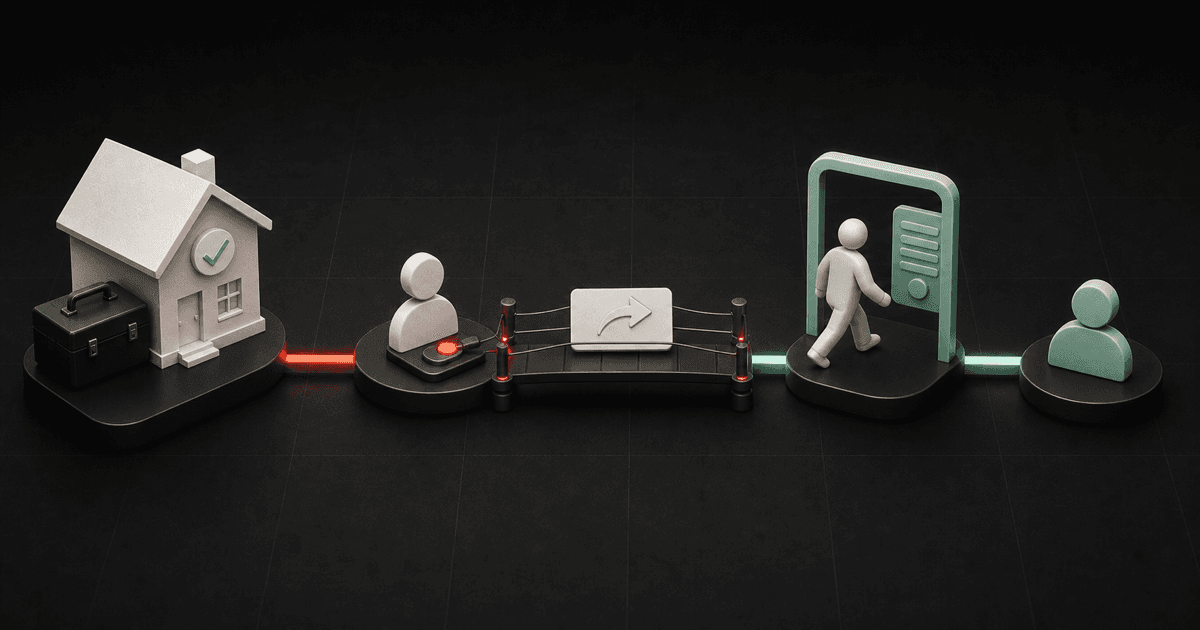
The easiest way to ruin a referral ask is to treat the customer like a name dispenser.
Do not ask, “Who do you know?” and then request somebody else's phone number. Build a smaller, cleaner path:
- Confirm the job and customer relationship are in the right state.
- Ask for one specific introduction.
- Give the customer a useful invitation they can choose to share.
- Let the referred person submit their own information.
- Give that new conversation a named owner immediately.
Brent Attaway's Five Fortune Engines places the referral request after a deliberately designed customer experience. It also treats customer care as an assigned, repeatable operating system rather than a lucky moment. The CRMX INTRO Path turns those principles into a practical workflow: Inspect the customer state, Name the useful introduction, Transfer control, Receive the opt-in, Own the first response.
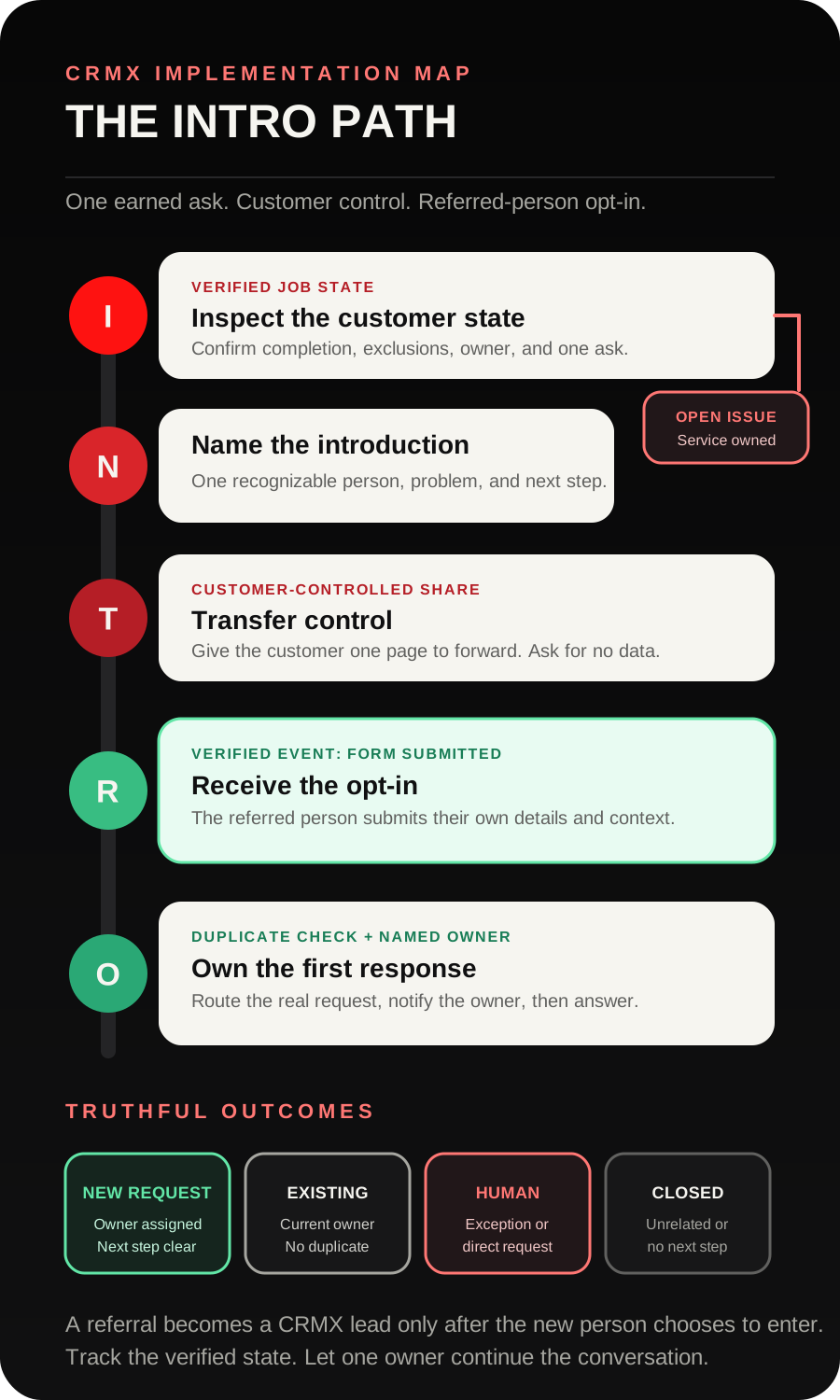
The tactic: ask for an introduction, not somebody's data
A customer may be willing to introduce you without being willing to hand over another person's contact information. Respect that distinction.
Your referral workflow should give the existing customer a short message and a simple page to forward. The new person decides whether to open the page, complete the form, and start a conversation.
That creates three useful boundaries:
- the customer controls whether to share the invitation;
- the referred person controls whether to respond;
- your team owns what happens only after a real response appears.
This is not a public-review workflow. CRMX already has a separate post-job review request process that closes unresolved service issues and sends one neutral review invitation. Keep the referral ask separate so a review is never the price of an introduction and an introduction is never the price of service recovery.
Start with an eligibility gate
“Job complete” is a useful trigger. It is not a complete decision.
Before a referral ask becomes ready, verify:
- the work has reached the completion milestone your team actually uses;
- there is no unresolved service item, complaint, return visit, cancellation, or payment discussion that should be handled first;
- the record is not already inside another customer request or reactivation path;
- the customer has not already received this referral ask for the same job;
- a named person or team can respond when a new introduction arrives;
- the invitation page, form, routing, and calendar have been tested.
Use a stage such as Job Complete - Referral Review to start the eligibility check. The current Pipeline Stage Changed trigger documentation confirms that a workflow can start when an opportunity moves between stages and can be narrowed to the intended pipeline and stage.
That trigger should create a review task or state check. It should not blindly send the request.
The CRMX INTRO Path
I - Inspect the customer state
Create one contact field called Referral Ask Status with a small set of values:
- Not Reviewed
- Ready
- Sent
- Reply - Human Owned
- Introduction Received
- Closed
The official custom-field documentation confirms that contact fields can support forms, workflows, Smart Lists, and contact records. Your exact labels are operating choices, not built-in CRMX defaults.
A workflow may assemble the facts, but a person should own exceptions. If the record shows an open issue or missing context, stop the ask and route the job to the appropriate service owner.
Do not use an automated “positive sentiment” score as permission to proceed. The decision should reflect the service state your team can verify.
N - Name the useful introduction
“Do you know anyone who needs us?” forces the customer to do too much thinking.
Make the introduction concrete enough to recognize:
If you have a neighbor who is trying to solve [specific service problem], you can send them this short page. It explains what we handle and lets them ask us a question directly.
The service description should match the work you can actually route. An HVAC company might name a homeowner who needs help with an aging comfort system. A roofer might name a property owner who has visible storm damage and wants an inspection conversation.
Do not add urgency, savings, guarantees, availability, or diagnostic claims unless the business has separately approved and verified them.
T - Transfer control
Give the customer one shareable asset:
- a short CRMX website or funnel page;
- one clear explanation of who the business can help;
- a small form for the referred person;
- one primary action;
- the expected next step after submission.
The existing customer can forward the link by text or email. CRMX does not need the friend's phone number from the customer.
If the customer replies with a question, “not now,” a service concern, or a request for a person, route that reply instead of continuing the timed path. The current Customer Replied trigger documentation supports starting a reply workflow and filtering it to the relevant workflow, channel, or other reply condition.
R - Receive the opt-in
The referred person becomes a new inquiry when they submit the introduction form or contact the business directly.
Keep the form small:
- first name;
- preferred response channel;
- email or mobile number for that channel;
- service needed;
- service location or area when it changes routing;
- optional Who should we thank for introducing you? field.
The documented Form Submitted trigger can start a workflow from the specific CRMX form. That submission is your verified intake event. A page view or forwarded link is not.
Store only what the person submits. Recommended fields include:
- Introduced by
- Referral context
- Introduction status
- Introduction owner
- Next action date
If the person does not identify the customer who shared the link, leave Introduced by blank. Do not guess.
O - Own the first response
The form workflow should make the new inquiry visible before it sends more messages.
Add these actions in order:
- check for an existing contact, active job, or open opportunity according to your tested duplicate rules;
- set the source and introduction fields that the form can verify;
- create an opportunity in New Introduction only when your duplicate rules allow it;
- assign the correct owner;
- notify that owner with the service context;
- send one accurate acknowledgment to the referred person;
- offer the correct next question, conversation, or calendar only after the route is known.
The current Create Opportunity action documentation supports creating an opportunity in a selected pipeline and stage, setting a source, and controlling duplicates by contact. Test the behavior with existing contacts before activation.
The Internal Notification action can alert selected users, roles, or teams. An alert is not ownership by itself. The recipient needs a defined action and a clear response expectation.
Build the referral workflow in CRMX step by step
1. Choose one completed-job moment
Start with one service line and one milestone your team already records reliably.
Write down:
- which pipeline contains the job;
- which stage means the work reached the referral review point;
- which unresolved states block the ask;
- who can mark Referral Ask Status = Ready;
- who owns a new introduction;
- which next step that owner may offer.
Do not combine maintenance, emergency service, replacements, warranty work, and unresolved estimates into the first version.
2. Create the operating fields and stages
At minimum, create:
- Referral Ask Status on the existing customer's contact record;
- Introduced by on the new person's contact record;
- Introduction status on the new person's contact record;
- New Introduction as a useful first opportunity stage if the existing sales pipeline needs it.
Keep activity and state separate. Referral message sent is an activity. Introduction form submitted, Human owned, Booked, and Closed are states.
3. Build the share page and form
The page should answer four questions quickly:
- Who is this for?
- What service conversation can the business help with?
- What information is required to route the request?
- What happens after the form is submitted?
Use one headline, a short service explanation, two or three trust-building facts the business can verify, and the form. Do not make the referred person hunt through the main website to understand why the link was sent.
On mobile, keep the explanation and first form field close to the top. Test the full form with the keyboard open, validation errors visible, and the confirmation state loaded.
4. Build the customer ask workflow
Trigger the workflow from the selected completion stage, then check Referral Ask Status and the blocking conditions.
The basic path is:
- stage changes to Job Complete - Referral Review;
- CRMX checks the defined exclusions;
- a person or approved rule marks the record Ready;
- CRMX sends one introduction message;
- status changes to Sent;
- a reply moves to Reply - Human Owned;
- a verified referred-person form submission changes the source customer's status to Introduction Received only when the relationship is known;
- otherwise the short path ends at Closed according to the business's rule.
This workflow does not need a long reminder sequence. The goal is to make sharing easy, not to turn a customer into an unpaid salesperson.
5. Build the introduction intake workflow
Trigger a separate workflow from the specific introduction form.
Add:
- duplicate and active-customer checks;
- source and context field updates;
- opportunity creation when appropriate;
- owner assignment;
- internal notification;
- acknowledgment to the new person;
- the first approved routing question;
- stop rules for human takeover, booking, closure, or an unrelated request.
Keep this workflow focused on the referred person's journey. Updating the existing customer's record is optional and should happen only when Introduced by is known and your configuration can match the correct person safely.
6. Train the AI employee on the first response
A trained CRMX AI employee such as Guy can acknowledge the submission, use approved service knowledge, ask one routing question at a time, and offer the assigned calendar when the route is clear.
Give Guy:
- the services this page covers;
- service-area rules;
- the minimum facts required before booking;
- the correct calendar for each supported route;
- messages that require a person;
- the stages and fields Guy may update;
- a rule never to invent who made the introduction.
A person should own complaints, active-customer issues, pricing or scope exceptions, sensitive circumstances, unusual service conditions, and direct human requests.
7. Test the exception paths
Use test contacts for:
- completed job with no open issue;
- completed job with an unresolved service item;
- customer already sent the referral ask;
- customer replies yes;
- customer says not now;
- customer raises a service concern;
- new person submits the form;
- existing customer submits the form;
- duplicate contact submits the form;
- form omits Introduced by;
- service request is outside the approved route;
- owner is unavailable;
- calendar is disconnected or incorrect;
- person asks for a human;
- form validation on desktop and mobile.
Do not activate until every branch has a truthful state, owner, and stop rule.
8. Review movement, not promises
Inspect operating counts such as:
- jobs reviewed for eligibility;
- referral asks marked ready;
- referral invitations sent;
- customer replies waiting for an owner;
- introduction forms submitted;
- duplicates or existing customers routed correctly;
- new introductions awaiting a first response;
- qualified next steps;
- bookings;
- closed or unrelated requests;
- records stuck without an owner or next action.
These numbers show whether the workflow is functioning. They are not guaranteed outcomes.
Example 1: an HVAC maintenance introduction
An HVAC company finishes a maintenance visit and moves the opportunity to Job Complete - Referral Review.
CRMX sees that the visit is complete, there is no open service item, and the customer has not received this ask for the job. The service coordinator confirms Referral Ask Status = Ready.
The workflow sends:
Hi Maya, thanks again for having Northline Heating & Air out. If you have a neighbor who is trying to sort out a heating or cooling issue, you can send them this short page: [Introduction Link]. They can tell us what is going on and choose how they want us to respond.
Maya forwards the page to Luis. Luis submits his own name, mobile number, service area, and a short description of the issue. He adds Maya's name in Who should we thank for introducing you?
CRMX records the source, creates a New Introduction opportunity after the duplicate check, assigns the service coordinator, and sends one acknowledgment. Guy asks the next approved routing question. If Luis requests a person, the conversation moves to the coordinator and the automated route stops.
The workflow never asks Maya to provide Luis's contact information.
Example 2: a roofing project introduction
A roofing company completes a residential project. The final service check is closed, but the company keeps the referral ask separate from its neutral review request.
The customer receives:
Hi Andre, your Ridgeway Roofing project is marked complete. If someone you know wants help understanding a roof concern, you can share this page: [Introduction Link]. It explains what we can review and lets them contact us directly.
Andre forwards the link to a property owner who noticed visible storm damage. The property owner submits the form and selects the approved inspection conversation.
CRMX checks for an existing contact, creates the opportunity in the correct stage, assigns the inspection owner, and offers the correct next step. If the address is outside the service area or the request concerns an existing claim or project, the workflow routes to a person instead of improvising an answer.
A coach or consultant can adapt the same path after a completed engagement milestone: name the kind of client conversation they can help with, give the client a shareable page, let the new person opt in, and assign the first response.
The introduction state-and-owner decision aid
| Verified state | What CRMX should do | Owner |
|---|---|---|
| Job reaches Referral Review | Check exclusions and create the review action | Workflow plus service owner |
| Referral Ask Status is Ready | Send one shareable invitation and mark Sent | Workflow |
| Customer replies with a question or concern | Stop the timed path and keep the context in Conversations | Named person or bounded AI employee |
| Referred person submits the form | Check duplicates, record source, route the request | Introduction owner |
| Introduced by is blank | Continue the new person's route without guessing | Introduction owner |
| Existing customer or active job is detected | Route to the current owner instead of creating duplicate work | Current owner |
| New request is qualified for the defined route | Offer the correct next question or calendar | AI employee or booking team |
| Request is unrelated, closed, or asks for a person | Stop automation and record the truthful outcome | Named person |
Copy-ready referral messages
Initial introduction ask
Hi [First Name], thanks again for having [Business Name] help with [Service Context]. If you have a [neighbor, friend, client, or colleague] who is trying to solve [specific problem], you can send them this page: [Introduction Link]. They can see what we handle and choose how they want us to respond.
Customer says yes
Thank you. You can forward this page whenever it is useful: [Introduction Link]. They will contact us directly, so you do not need to send their phone number or email.
Customer says not now
No problem. I will close this request. There is nothing else you need to do.
Referred-person acknowledgment
Hi [First Name], thanks for contacting [Business Name] about [Service Context]. We received your request. I can ask one question to route the next step, or you can tell me if you would rather speak with [Owner or Team].
Human handoff
Thanks for explaining that. I am handing this to [Owner Name or Team] with the context you shared so you do not have to repeat it. They will continue with you here.
Replace every bracketed field. Verify the business name, service context, audience label, page URL, owner, and response promise before activation.
The INTRO launch checklist
- One service line and one completed-job milestone define the first version.
- Job Complete - Referral Review or an equivalent verified stage exists.
- Open service issues, duplicate asks, active work, and conflicting workflows block the request.
- Referral Ask Status has a small, documented set of values.
- A named person can mark the customer Ready or handle exceptions.
- The introduction ask names one recognizable problem and one shareable action.
- The customer is never asked to submit another person's contact information.
- The share page explains who the business can help and what happens next.
- The introduction form asks only for information needed to route the request.
- The referred person chooses the response channel and submits their own details.
- Form Submitted is filtered to the correct form.
- Introduced by remains blank when the source is unknown.
- Duplicate-contact, active-customer, and open-opportunity behavior is tested.
- Opportunity creation uses the correct pipeline, stage, source, and duplicate setting.
- The introduction owner and backup owner are defined.
- Internal notifications contain useful context and a clear action.
- The acknowledgment makes no promise about price, availability, diagnosis, or outcome.
- Guy's service knowledge, routing questions, calendar, and escalation boundaries are tested.
- Customer replies stop the timed path and remain visible in Conversations.
- The workflow ends after the chosen ask; it does not chase the customer indefinitely.
- Desktop and mobile tests cover the page, form, validation, confirmation, and internal links.
- Reporting separates invitations sent from introductions received and outcomes owned.
Frequently asked questions
Is a referral request the same as a review request?
No. A review request invites a customer to describe their own experience publicly. A referral request invites the customer to share a private introduction page with someone who may need help. Keep the workflows, messages, and outcomes separate.
Should the customer give us the friend's phone number?
This workflow does not need it. Give the customer a shareable page and let the referred person decide whether to submit their own contact information.
When should a home-service business send the referral ask?
Use a verified customer milestone and a service-state check. The exact timing depends on the service and the team's ability to respond. Do not send merely because a generic delay elapsed.
Should we offer a referral incentive?
This workflow uses no gift, discount, contest, payment, or other incentive. If a business wants a separate incentive program, it should be designed and reviewed separately rather than added casually to this automation.
Can an AI employee handle the new inquiry?
Yes, within approved boundaries. An AI employee can acknowledge the form, answer approved service questions, collect one fact at a time, and offer the assigned calendar when the route is clear. A person should own exceptions, sensitive context, service problems, and direct human requests.
What if the referred person is already a customer?
Route the request to the current owner or active service process. Test duplicate and existing-customer behavior before activation so the form does not create competing opportunities or conflicting messages.
Make the introduction easy to give and easy to own
The referral ask should feel like a useful handoff, not a demand for names.
Inspect the customer state. Name the person you can help. Transfer control with one shareable page. Receive the new person's own request. Give the first response a real owner.
That is the CRMX INTRO Path.
Explore how CRMX connects websites and forms, Conversations, workflows, pipelines, calendars, and reporting, see the full home-service growth system, or audition Guy live. If you want help turning the map into a tested implementation, review CRMX services.
Sources and further reading
- HighLevel Support: Pipeline Stage Changed workflow trigger
- HighLevel Support: Customer Replied workflow trigger
- HighLevel Support: Form Submitted workflow trigger
- HighLevel Support: How to Use Custom Fields
- HighLevel Support: Create Opportunity workflow action
- HighLevel Support: Internal Notification workflow action