
Client Check-In Automation for Coaches: The CRMX PULSE Loop
Build a CRMX client check-in system that follows one commitment, routes blockers to a person, and records the next state without automating coaching judgment.
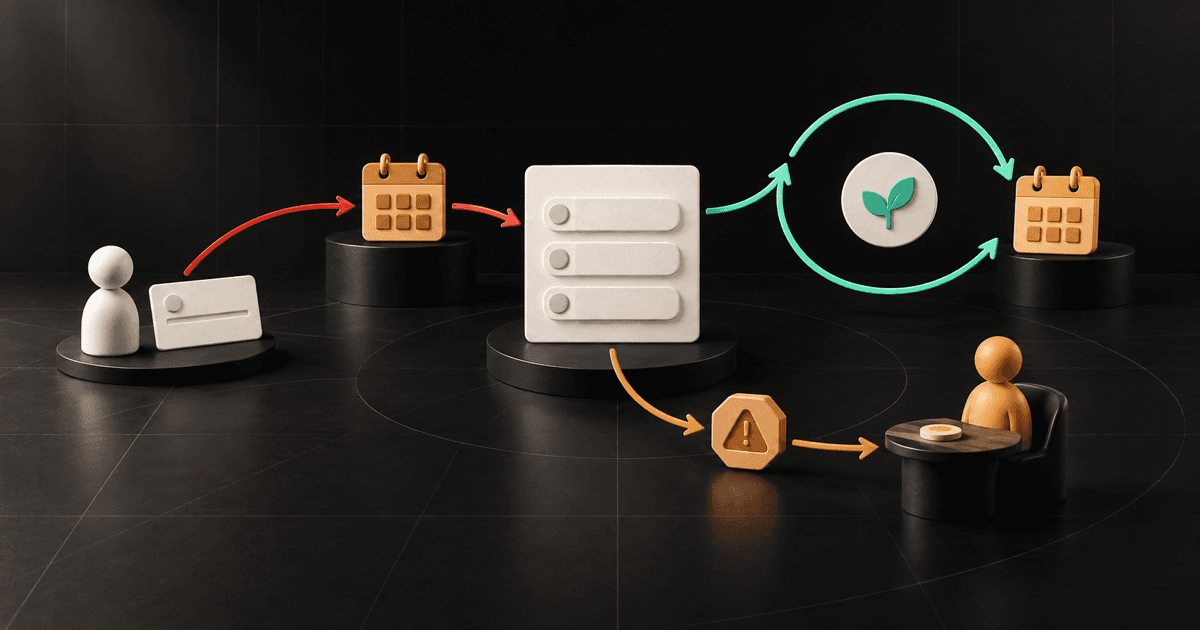
The best client check-in automation for a coach does not try to coach the client.
It remembers one commitment, waits for the agreed date, asks a short set of useful questions, routes blockers to the right person, and records what happens next. The repetitive rhythm belongs to automation. Interpretation, accountability, empathy, and judgment stay with the coach or consultant.
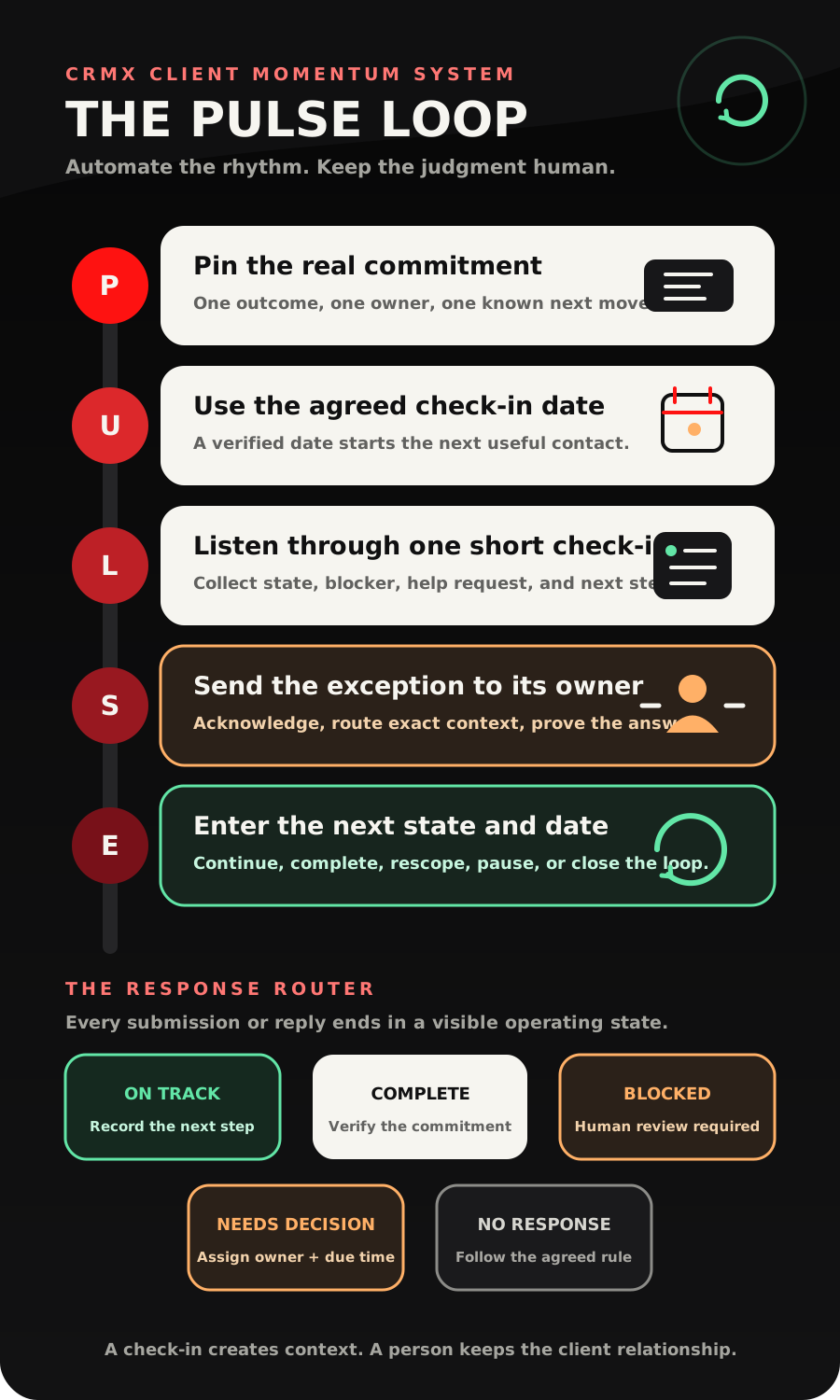
That is the CRMX PULSE Loop: Pin the real commitment, Use the agreed check-in date, Listen through one short check-in, Send the exception to the right owner, Enter the next state and date.
Brent Attaway's Five Fortune Engines connects consistent attention, structured capture, useful follow-up, repeatable conversion systems, post-sale care, and automation. PULSE applies those engines after the sale. It turns a client promise into visible operating context without pretending that a workflow can decide whether the client is succeeding.
The strategy: automate the checkpoint, not the coaching
Most check-in systems start with a calendar rule: every Friday, send every client the same form.
The schedule is easy. The meaning is not.
One client promised to finish a hiring scorecard. Another needs to decide whether a leadership team will adopt a new meeting rhythm. A third already completed the work and is waiting on the consultant. Sending all three the same "How did your week go?" message creates activity without producing a useful next state.
Start from the commitment instead:
- Name the specific outcome or decision being followed.
- Confirm who owns the next action.
- Agree on the next useful check-in date.
- Ask only for the information needed to choose the next step.
- Pause automation when a blocker, question, change, or human conversation appears.
- Record the next state and date before the loop restarts.
This sits between the earlier CRMX client onboarding handoff and the later client renewal decision. Onboarding starts the relationship. PULSE protects delivery momentum. Renewal decides what happens after the engagement reaches a real review point.
The CRMX PULSE Loop
P - Pin the real commitment
Do not automate a check-in against a vague goal.
Store one commitment that can be discussed clearly at the next checkpoint. A practical record might include:
- Client Commitment: the outcome, action, or decision being followed;
- Commitment Owner: client, coach, consultant, shared, or another named owner;
- Commitment State: Active, On Track, Complete, Blocked, Needs Decision, Paused, or Closed;
- Next Check-In Date: the agreed date for the next useful contact;
- Check-In Owner: the person responsible for reviewing a live response;
- Latest Check-In Summary: a concise operational summary, not an invented interpretation;
- Next Step: the action that should happen before the next checkpoint.
If one engagement contains several projects, do not flatten them into one contact-level status. Keep engagement-specific commitments attached to the correct opportunity or delivery record. A contact can be involved in more than one initiative, and the workflow needs the correct context before it changes anything.
A CRMX pipeline can make delivery states visible when the business already manages client commitments as opportunities. The official Pipeline Stage Changed documentation confirms that a workflow can begin from a filtered stage move. That does not mean every client interaction needs a new pipeline card. Use the smallest model the team will maintain honestly.
U - Use the agreed check-in date
The next check-in should come from the client process, not a universal cadence somebody copied from a template.
A weekly commitment may need a Friday checkpoint. A 30-day implementation milestone may need one mid-point review and one completion review. A decision that depends on a board meeting should follow the board date, not the consultant's preferred sequence.
The official Custom Date Reminder documentation says a workflow can begin before, on, or after a selected supported date field. It also says an empty selected date does not activate the trigger.
Treat that empty-field behavior as a quality gate:
- Valid date and active commitment: schedule the check-in.
- Date missing: assign internal review. Do not invent one.
- Date already passed: decide whether to send now, reschedule, or close before publishing the workflow.
- Commitment complete or closed: stop the recurring path.
- Client requested a pause: store the reason and approved future date.
- Owner unclear: resolve ownership before any customer-facing message.
One date should have one meaning. If Next Check-In Date sometimes means "send the form," sometimes means "coach should call," and sometimes means "engagement ends," the automation will create confusion faster.
L - Listen through one short check-in
The check-in should collect a state, not demand an essay.
Use four questions as a starting structure:
- What is the current state: on track, complete, blocked, or changed?
- What happened since the last checkpoint?
- What help or decision is needed, if any?
- What is the next useful action or date?
CRMX can use a short survey when structured answers help. The current survey-submission documentation says submissions can be viewed individually, multiple submissions from the same contact remain separately tracked, mapped fields can connect answers to the contact record, and Survey Submitted can start a workflow.
Keep the survey short enough to finish on a phone. Use plain labels, generous spacing, clear button targets, and one question per decision when possible. The client should be able to understand the request without reading an operations manual.
When a blocker requires more context, conditional logic can ask one relevant follow-up instead of showing every client every question. The current Conditional Logic v2 documentation supports ordered rules that can show or hide fields, display a message, redirect, or jump within a newly created or cloned survey. It also notes that those rules are not carried in account snapshots, so test the actual survey in the intended CRMX location rather than assuming a copied asset preserved them.
Do not use a score alone to declare the client healthy, at risk, successful, or failing. A score is a routing input. The human owner interprets the context.
S - Send the exception to the right owner
Every response should enter one of five routes:
- On Track: record the next action and agreed date.
- Complete: send to the person who verifies completion and chooses the next commitment.
- Blocked: acknowledge the response, pause generic reminders, and assign a person to review the blocker.
- Needs Decision: give one named owner the exact question and a due time.
- No Response: follow the pre-approved reminder or review rule; do not silently assume progress or failure.
The Customer Replied trigger can start a workflow when a contact responds and can be narrowed with supported filters. Use a reply as a reason to pause the timed path and inspect the conversation, not as permission to classify the client automatically.
For work that requires a person, the official Add Task documentation confirms that a workflow can create a named task, assign it to a selected user, include a description, and set a due time. A useful task contains:
- client and engagement;
- commitment being followed;
- exact response or survey state;
- requested help or decision;
- what Guy already acknowledged;
- assigned owner and due time;
- next customer-facing action.
A task is not proof that the client received an answer.
The User Replied trigger documentation distinguishes a delivered user message sent from the conversation view from workflow and Conversation AI messages. Use that distinction when the operating standard requires proof that a person responded. An automated acknowledgment can set expectations. It should not make the record look human-resolved.
E - Enter the next state and date
Every check-in needs a visible ending.
- On Track: store the next action and next check-in date.
- Complete: verify the commitment, choose the next commitment or close the delivery cycle.
- Blocked: keep one human owner until the blocker has a documented next step.
- Needs Decision: record the decision, owner, and effective date.
- Paused: store why, who approved it, and when the record should be reviewed.
- Closed: record the reason and stop the loop.
The official Update Contact Field documentation confirms that a workflow can change supported standard or custom contact fields. It also warns, in practical terms, that a wrong update is not automatically reversible. Use a small field set, make field ownership explicit, and test every branch with test-only records before publishing.
This final step makes PULSE a loop. The next check-in begins from the current commitment and newly agreed date, not from an endless recurring timer.
What Guy should and should not handle
A trained CRMX AI employee such as Guy can make the check-in experience faster without crossing the human boundary.
Guy may:
- identify the business and the commitment being followed;
- send the approved check-in link or approved questions;
- acknowledge a submitted response;
- collect missing operational context;
- answer approved logistical questions;
- share an approved calendar when a meeting is the agreed next step;
- prepare the response summary and handoff task;
- stop the generic path when a live conversation begins.
Guy should hand off when:
- the client asks for coaching or consulting judgment;
- the response contains sensitive personal, personnel, financial, health, or legal context;
- the commitment, owner, or engagement scope is disputed;
- the client requests a refund, exception, scope change, or commercial decision;
- progress cannot be established from approved facts;
- the business needs to decide whether the commitment is complete;
- tone or context suggests the client needs a person.
The AI employee can carry context. The coach or consultant keeps the relationship.
Two concrete use cases
Use case 1: a business coach's weekly implementation commitment
A business coach and client agree that the client will draft a hiring scorecard by Friday. The coach records the commitment, owner, and Friday check-in date in CRMX.
On Friday, CRMX sends one short check-in. The client selects Blocked and explains that the leadership team has not agreed on the role's three measurable outcomes.
Guy acknowledges the response and says the coach will review it. CRMX pauses the next generic reminder, creates a task for the coach with the commitment and exact blocker, and keeps the state Blocked until the coach replies from the conversation view.
The coach sends a focused question and schedules a 20-minute working session. The record becomes Needs Decision, the leadership-outcome decision gets an owner, and the next check-in date moves to after that session.
The workflow handled timing, collection, acknowledgment, routing, and state visibility. The coach handled diagnosis and judgment.
Use case 2: an operations consultant's 30-day rollout milestone
An operations consultant is helping a client adopt a new weekly meeting system. The agreed milestone is: three department leads run the format for two consecutive weeks and record unresolved decisions.
At the midpoint, CRMX sends the check-in. The client reports On Track, names one scheduling issue, and asks whether the agenda should be changed.
The scheduling issue becomes an internal operations task. The agenda question goes to the consultant because it changes the delivery design. Guy acknowledges both items but does not recommend a new agenda.
After the consultant responds, the next step and date are recorded. At the 30-day checkpoint, the client reports Complete. The consultant verifies the milestone, chooses the next adoption commitment, and starts a new PULSE cycle.
Completion does not automatically trigger a review request. The separate video-testimonial follow-up workflow belongs only after the business has earned the ask and applied its approval process.
Copy-ready client check-in messages
Scheduled check-in
Hi [First Name], this is [Business Name]. We agreed to check in today on [Client Commitment]. Which state is most accurate: on track, complete, blocked, or changed? You can reply here or use this short check-in: [Link].
Automated acknowledgment
Thanks, [First Name]. I recorded your update on [Client Commitment]. [Owner Name or Team] will review [the blocker / the decision request / the completion update] and follow up by [Approved Response Window].
Human blocker response
I reviewed your update. The blocker I see is [Confirmed Blocker]. Before we change the plan, I need to understand [One Useful Question].
Human decision response
The decision we need is [Decision]. [Owner] will make or confirm it by [Date]. Until then, the current next step is [Next Step].
No-response review
Hi [First Name], we did not receive the check-in for [Client Commitment]. Should we keep the current commitment and choose a new date, pause it, or close it?
These are operating templates, not universal communication rules. Use the channel, permission, timing, accessibility, and frequency standards approved for the business and client relationship.
Build the client check-in system in CRMX
1. Define the commitment contract
Write the exact meaning of a commitment, who may create one, which owner types are allowed, and what makes it complete.
2. Choose the correct record
Use contact fields for durable person-level facts. Use the intended opportunity or delivery record for engagement-specific commitments. Do not update whichever opportunity happens to be easiest to find.
3. Create the smallest useful field set
Create the commitment, owner, state, next date, check-in owner, latest summary, and next-step fields. Decide who can change each field.
4. Build one mobile-first check-in
Ask for state, progress, blocker or decision, and next step. Add conditional questions only when they change the route. Preview every branch.
5. Build the date trigger
Use Custom Date Reminder against the supported Next Check-In Date field. Filter to active commitments with a valid owner and approved channel.
6. Build the submission and reply routes
Use the selected survey's submission event for structured check-ins. Use Customer Replied for conversational answers. Both paths should pause generic reminders and apply the five-outcome router.
7. Build human proof
Create the blocker or decision task, send an automated acknowledgment only when appropriate, and use an honest user-response checkpoint when a human reply is required.
8. Record the outcome before recurrence
Do not restart the loop until the commitment state, next action, owner, and next date are current.
9. Test the complete state machine
Run test-only records through On Track, Complete, Blocked, Needs Decision, No Response, missing date, missing owner, pause, and close. Test the actual survey, workflows, conversations, tasks, pipeline updates, calendar handoff, and reporting views on mobile and desktop.
Measure client momentum without inventing success
Track operating evidence:
- active commitments with a valid next check-in date;
- check-ins sent, delivered, failed, submitted, or unanswered;
- responses by On Track, Complete, Blocked, Needs Decision, or Changed;
- blockers without an assigned owner;
- human-response time after a blocker or decision request;
- commitments that remain open past the agreed date;
- verified completions;
- paused and closed reasons;
- records with conflicting dates, owners, or states;
- next commitments created after verified completion.
A survey submission proves that a response was recorded. A workflow execution proves that CRMX ran a configured step. A task proves that work was created. None of those facts alone proves client progress, satisfaction, retention, or results.
Use CRMX reporting, pipelines, conversations, workflows, calendars, and tasks to find the operating leak. If dates are missing, fix the commitment handoff. If blockers wait without a human answer, fix ownership. If clients stop responding, inspect the usefulness and timing of the check-in before adding more reminders.
The PULSE launch checklist
- The check-in follows one specific commitment.
- The commitment has one current owner.
- The next check-in date is agreed and stored.
- Missing, conflicting, and expired dates stop for review.
- The selected contact or opportunity record is unambiguous.
- The check-in is short and usable on mobile.
- Conditional survey paths have been tested in the actual account.
- On Track, Complete, Blocked, Needs Decision, and No Response have explicit routes.
- Every live reply pauses generic reminders.
- Blockers and decision requests create one named human owner and due time.
- An automated acknowledgment is not counted as a human response.
- Guy's knowledge, response, and escalation boundaries are approved.
- Completion requires a defined verification step.
- The next state, action, owner, and date are recorded before recurrence.
- Pause, close, opt-out, invalid-record, and failure exits are tested.
- Review and testimonial requests remain separate from routine check-ins.
- Test-only records pass every branch on mobile and desktop.
Frequently asked questions
How often should coaches automate client check-ins?
Use the cadence agreed for the commitment and delivery model. Weekly is not automatically better. The next check-in should occur when new information can change the next action.
Should every check-in use a survey?
No. Use a short survey when structured answers improve routing or reporting. Use the conversation when a direct reply is easier and the team can still preserve the commitment context.
Can Guy review the check-in and tell the client what to do?
Only within the approved knowledge and decision boundaries for that role. Guy can collect and organize context. Coaching judgment, sensitive interpretation, scope changes, and consequential advice should go to the human owner.
What should happen when a client does not respond?
Follow the pre-approved no-response rule: one reminder, a human review, a new agreed date, a pause, or a close. Do not mark the commitment complete, failed, or on track from silence.
Should a completed commitment trigger a review request?
Not automatically. First verify completion, address any open issue, and decide whether the experience has earned a separate review or testimonial invitation.
Is a client-delivery pipeline required?
No. Use one when it gives the team useful visibility and the record stays unambiguous. A small field-and-task model may be enough for a simpler engagement.
Give every commitment a visible next conversation
Client momentum does not come from sending more forms. It comes from knowing what was promised, when to ask, what the response means operationally, who owns the exception, and what happens next.
That is the post-sale side of the CRMX Revenue Flywheel: automation protects the rhythm while people protect the relationship.
If your coaching or consulting business needs that operating layer built across surveys, conversations, workflows, pipelines, tasks, calendars, reporting, and a trained Guy role, explore CRMX for coaches and consultants or audition Guy live.
Sources and further reading
- Official Support: Conditional Logic in Surveys v2
- Official Support: View and Export Survey Answers
- Official Support: Custom Date Reminder workflow trigger
- Official Support: Customer Replied workflow trigger
- Official Support: User Replied workflow trigger
- Official Support: Add Task workflow action
- Official Support: Update Contact Field workflow action
- Official Support: Pipeline Stage Changed workflow trigger