
Coaching Inquiry Follow-Up: The CRMX FIRST Reply
Build a CRMX coaching inquiry follow-up that asks one useful routing question, stops on a live reply, and gives the conversation one clear owner.
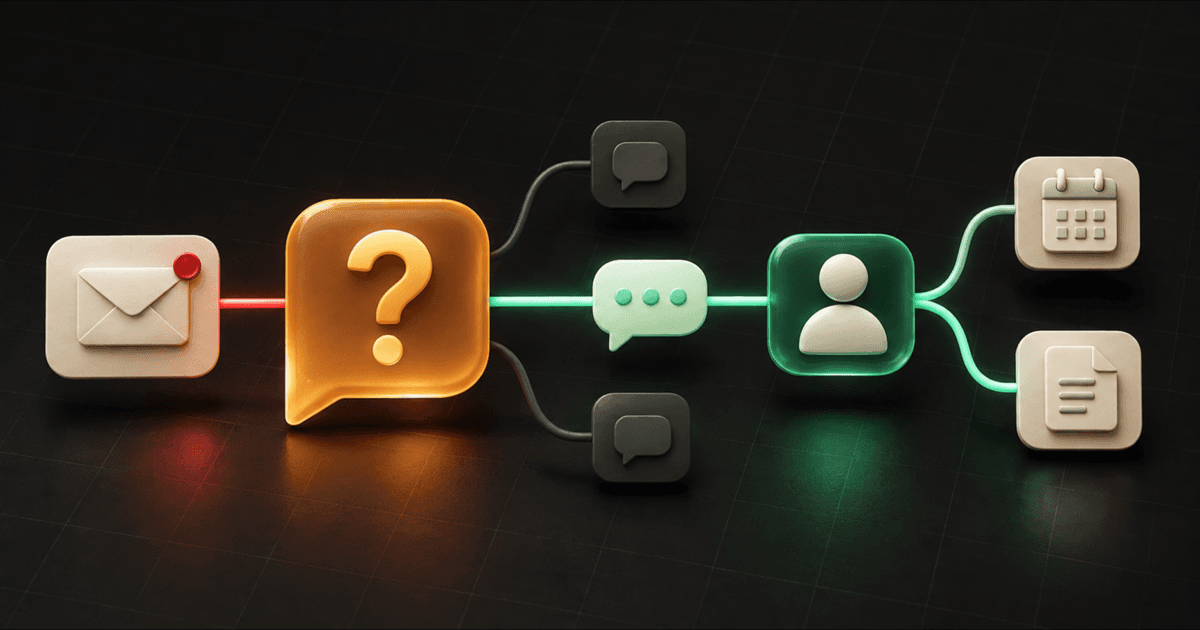
The best first follow-up to a coaching or consulting inquiry is often one useful question—not an immediate calendar link.
Start from the real inquiry, acknowledge what the person asked about, and ask one easy question whose answer changes the next step. When the person replies, stop the timed messages and give the complete context to one owner.
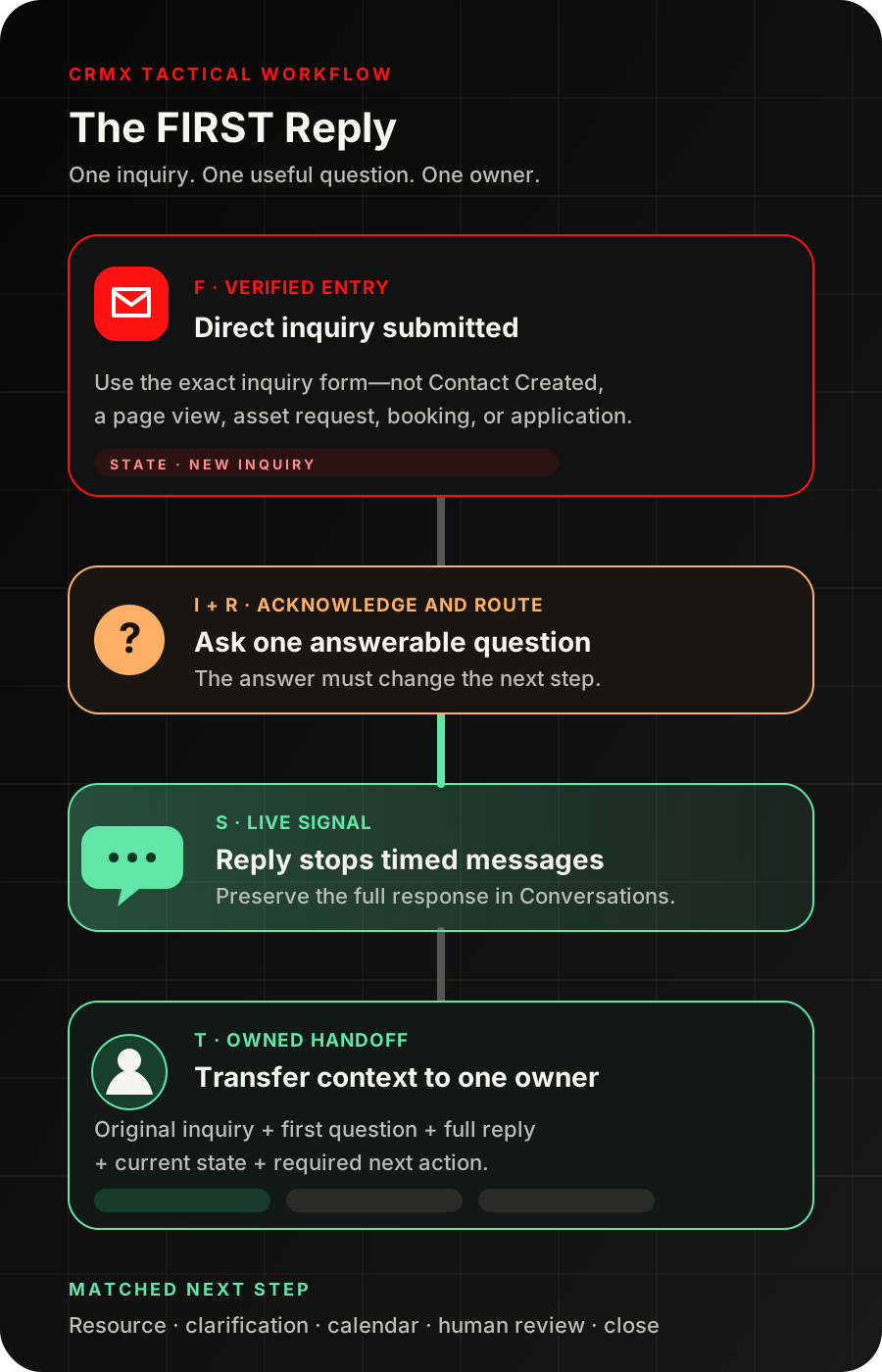
That is the CRMX FIRST Reply: Fire from a verified inquiry, Immediately acknowledge it, Route with one useful question, Stop on a live reply, Transfer the context to one owner.
Brent Attaway's Five Fortune Engines connects permission-based lead capture to immediate, useful follow-up and a clear next step. It also makes automation the final layer over a defined system—not a substitute for judgment. FIRST applies those principles to the small but important gap between “I am interested” and “here is what would help me next.”
The tactic: ask before you send the calendar
A direct inquiry can sound clear while still hiding the decision you need.
Someone may write:
I want to learn more about your coaching.
That message does not tell you whether the person needs a resource, has a specific question, wants help choosing an engagement, is ready for a conversation, or reached the wrong place.
Sending the same calendar link to every inquiry makes the prospect do the sorting. Sending a long intake form asks for more effort before the business has helped. Starting a ten-day nurture sequence keeps talking before the person has supplied the missing context.
Use one routing question instead.
A useful first question has four qualities:
- It can be answered in one short reply.
- Its answer changes the resource, owner, calendar, or conversation.
- It does not ask the prospect to diagnose themselves.
- It leaves room for the person to answer in their own words.
If every answer receives the same next step, remove the question.
The CRMX FIRST Reply
F — Fire from a verified inquiry
Do not start this workflow from Contact Created. A contact can be created by an import, manual entry, booking, integration, purchase, or unrelated form.
Start from the exact direct-inquiry event you intend to answer. The official Form Submitted workflow documentation says a selected CRM form submission can start a workflow and that repeated submissions can trigger again.
Name the form and the workflow narrowly:
- form: Coaching and Consulting Inquiry;
- workflow: Direct Inquiry — FIRST Reply;
- entry proof: selected form submitted;
- re-entry rule: reviewed and tested for duplicate submissions;
- excluded entries: asset requests, quizzes, applications, bookings, support requests, and existing-client forms.
Capture only what the first response needs:
- name;
- approved reply channel;
- broad topic or service interest;
- the person's question in their own words.
The form submission proves that the selected form was submitted. It does not prove fit, urgency, budget, authority, or readiness to book.
I — Immediately acknowledge the real context
The first response should prove that the system received the inquiry without pretending it already understands everything.
The documented Send SMS action can send a configured message when a workflow reaches that step, use supported contact values, and provide a test-number path. Use SMS only when the location, sender, channel eligibility, consent path, and applicable requirements have been reviewed. Email or another approved channel can carry the same tactic after testing.
Use a short acknowledgment:
Hi [First Name]—thanks for reaching out to [Business Name] about [Inquiry Topic]. I want to point you to the right next step instead of sending a generic link.
Do not say the inquiry was reviewed by a person unless it was. Do not promise a response time the team cannot keep. Do not repeat sensitive details in an automated message.
Set the inquiry state to First Question Sent, then record the message time. A workflow execution is activity; it is not proof the message was delivered or read.
R — Route with one useful question
Add one answerable question to the acknowledgment:
Which would be most useful right now: A) help naming the real problem, B) help choosing the right path, or C) a conversation about a specific situation? Reply A, B, C, or use your own words.
This is a starting template, not a universal script. Replace the options with distinctions that matter to the actual business.
For example, a leadership consultant could ask:
Which issue is closest to the reason you reached out: A) new-manager readiness, B) team alignment, C) decision ownership, or D) something else? Reply with the letter or describe it in your own words.
The options do not decide fit. They give the next owner a better first question and keep a broad inquiry from becoming a blind calendar booking.
Use one of these routes:
- Resource: the person needs a useful explanation before a conversation.
- Clarification: one more approved question is required.
- Calendar: the topic and next step are clear enough to offer the correct conversation.
- Human review: the reply is ambiguous, sensitive, urgent, complaint-related, or outside approved knowledge.
- Close: the inquiry is wrong-person, spam, out of scope, or explicitly closed.
S — Stop on a live reply
The prospect's reply is new context. The timed path should stop talking.
The official Workflow Settings guide documents Stop on Response, which can remove a contact from a workflow when the contact replies to a message sent by that workflow. Enable it for the FIRST Reply workflow and test the exact channels and messages the business will use.
Then create a separate Direct Inquiry — Live Reply workflow. The documented Customer Replied trigger can start from a contact reply and can be filtered by items such as the originating workflow, tag, phrase, intent type, or reply channel.
Use the narrowest verified filter that identifies the FIRST Reply conversation. When the reply arrives:
- set Inquiry State to Live Reply Received;
- preserve the reply in the conversation history;
- assign or confirm one owner;
- send the owner a concise handoff;
- create a task only when a human action remains unresolved;
- end incompatible timed messages.
Do not let an exact-letter reply make a final fit, eligibility, pricing, or scope decision. A person can type B and then add important context. Keep the full message visible.
T — Transfer the context to one owner
“The team” is not an owner.
The documented Assign To User action can assign a contact to selected users through supported ownership settings. Configure the overwrite and distribution behavior deliberately; a new inquiry should not silently replace the right existing owner.
The documented Internal Notification action can alert selected users, roles, or teams. Use it to deliver the handoff, but do not treat the alert as proof that someone replied.
Copy this internal brief:
Direct inquiry has a live reply
Contact: [Name]
Inquiry source: [Exact Form]
Original topic: [Inquiry Topic]
Original question: [Inquiry Message]
FIRST reply: [Message Sent]
Prospect response: [Full Reply]
Current state: Live Reply Received
Owner: [Assigned User]
Required next action: [Review and continue in Conversations]
Use the documented Add Task action only when an unresolved human action needs a due interval. A task that exists is not a task that was completed.
Set Human Conversation Active only when a person or approved AI employee has actually taken ownership. Set Matched Next Step only when the correct resource, clarification, calendar, or human conversation has been offered.
Build the FIRST Reply in CRMX
Use CRMX forms, workflows, Conversations, tasks, pipelines, calendars, and reporting as one connected path.
1. Create one direct-inquiry form
Keep this form separate from lead magnets, quizzes, program applications, bookings, support, and existing-client requests.
Use a broad topic field only when it changes the owner or first question. Let the open-text inquiry field preserve the person's actual language.
2. Add one inquiry-state field
The documented Update Contact Field action can write values to an existing standard or custom contact field.
Create Inquiry State with a small controlled list:
- New Inquiry
- First Question Sent
- Live Reply Received
- Human Conversation Active
- Matched Next Step
- Closed
If the same person can have multiple simultaneous inquiries or offers, confirm whether the state belongs on a contact, opportunity, or another record before building. A person-level field can collide with more than one active engagement.
3. Build the first-response workflow
Trigger:
- selected form submitted: Coaching and Consulting Inquiry.
Actions:
- check duplicate and current-client rules;
- assign or preserve the correct owner;
- set Inquiry State to New Inquiry;
- send the acknowledgment and one routing question;
- set Inquiry State to First Question Sent;
- wait the business's reviewed interval;
- if no reply is verified, send at most one useful reminder;
- close the short path or create a human review task;
- enable and test Stop on Response.
Do not publish the workflow until a test contact proves the correct form, message, owner, state, wait, stop, and re-entry behavior.
4. Build the live-reply workflow
Trigger:
- Customer Replied, filtered to the verified FIRST Reply context.
Actions:
- set Inquiry State to Live Reply Received;
- preserve the full reply;
- assign the correct owner without overwriting a valid one;
- send the internal brief;
- create a review task when needed;
- route the conversation to a person or a bounded AI employee;
- record the matched next step.
5. Give Guy a bounded job
A trained CRMX AI employee can acknowledge the selected inquiry, ask the approved routing question, answer approved logistical questions, offer the matched calendar after the route is clear, and transfer the full context to a person.
Guy should not:
- diagnose a personal, health, employment, financial, or business condition;
- decide fit from sensitive information;
- invent program scope, pricing, availability, or exceptions;
- promise an outcome;
- hide an uncertain answer;
- continue selling after an opt-out, wrong-person signal, or human takeover.
Use this role instruction:
Guy acknowledges verified direct inquiries, asks the approved FIRST routing question, answers only from approved knowledge, offers the matched next step when the route is clear, and transfers ambiguous, sensitive, pricing, scope, complaint, or exception questions to the assigned human with the full context attached.
Use case 1: a business coach's broad growth inquiry
A business owner submits:
We have leads, but growth still feels inconsistent. I want to know how your coaching works.
The FIRST Reply does not send the program calendar immediately.
It asks:
Which gap feels closest right now: A) starting more qualified conversations, B) following up consistently, C) turning conversations into decisions, or D) something else?
The owner replies:
B. Leads come in, but nobody owns the next step.
CRMX stops the timed reminder, records Live Reply Received, and sends the full exchange to the assigned coach. Guy may share an approved follow-up diagnostic or offer the correct strategy conversation. The coach owns any fit, scope, or commercial decision.
The useful context is not the letter B. It is the prospect's sentence about missing ownership.
Use case 2: a leadership consultant's team inquiry
An operations leader submits:
We need help with our managers. I am not sure whether this is training or consulting.
The FIRST Reply asks:
What would make the next step most useful: A) clarify the problem, B) compare engagement paths, or C) discuss a specific team situation?
The leader replies:
C. Three new managers are making decisions differently, and it is slowing the team down.
The reply route assigns the inquiry to the consultant, attaches the original form and full response, and creates one review task. The consultant can continue in Conversations or offer the right calendar after reviewing the context.
The workflow does not label the company, diagnose the managers, select an engagement, or promise that a workshop will solve the problem.
What to send when there is no reply
Do not answer silence with an endless sequence.
After the business's reviewed interval, send one useful close-the-loop message:
Hi [First Name]—I wanted to make sure my question did not get buried. You can reply with A, B, C, or your own words. If now is not the right time, reply later and we will close this short path.
If the person still does not reply, set the state to Closed or move the record into a separately governed nurture path only when a real permission and relevance basis exists.
Do not invent a not-now reason or date. If the person later supplies one, use a dated long-term nurture path.
Measure the system without inventing success
Track observable operating facts:
- verified direct inquiries;
- first questions attempted;
- messages sent, delivered, failed, or skipped where the channel reports those states;
- live replies received;
- replies with an owner;
- human conversations actually started;
- matched resources, clarifications, calendars, or closes;
- unresolved tasks past their due time;
- duplicate entries and wrong-route cases;
- final outcomes recorded.
These measures show whether the workflow is functioning. They do not prove message quality, prospect fit, booking lift, conversion, or revenue.
FIRST Reply launch checklist
Before publishing the workflow, confirm:
- Name the exact direct-inquiry form.
- Exclude asset requests, quizzes, applications, bookings, support, and client forms.
- Define re-entry and duplicate-submission behavior.
- Make the first message acknowledge only verified context.
- Keep the routing question answerable in one short reply.
- Make every answer change a resource, owner, calendar, clarification, or human route.
- Allow free-text replies.
- Review the approved sender and channel.
- Confirm dynamic values on a real test contact.
- Enable and test Stop on Response.
- Narrow the Customer Replied trigger to the correct context.
- Confirm the full reply appears in Conversations and the internal brief.
- Assign one owner without overwriting a valid owner.
- Do not treat a notification as proof of human action.
- Create tasks only when work remains.
- Write Guy's knowledge, booking, pricing, fit, and escalation boundaries.
- Route sensitive, ambiguous, complaint, wrong-person, opt-out, and exception replies to a person.
- End no-reply behavior cleanly.
- Match the inquiry state to what actually happened.
- Confirm workflow execution logs and the contact record agree after each test.
Frequently asked questions
Should the first coaching inquiry response include a calendar link?
Only when the direct inquiry already makes the correct conversation clear. If the prospect still needs help choosing the next step, ask one routing question first. Offer the matched calendar after the answer, not as a reflex.
How fast should the FIRST Reply send?
The workflow should run when the verified inquiry event occurs and the approved channel is allowed to send. Choose a timing rule the business can support, test the actual workflow, and avoid publishing a response-time promise that has not been proven.
Can Guy handle the entire inquiry?
Guy can handle approved acknowledgment, routing, logistics, resource delivery, and booking. A person should own sensitive context, uncertain answers, fit, scope, pricing, exceptions, complaints, and commercial decisions.
What if the person replies with something other than A, B, or C?
Keep the full message. The letters reduce effort; they are not the only valid answers. Free-text replies often contain the most useful context and should route to the same owner.
Is this the same as a lead-magnet follow-up?
No. A lead-magnet funnel starts from a specific resource request. FIRST starts from a direct request for help or information and isolates the first-response decision before a resource, application, or calendar has been selected.
Make the first response earn the next step
A direct inquiry is already a moment of attention and permission. Do not waste it with a generic confirmation or make the prospect sort through every offer alone.
Ask one useful question. Stop when the person answers. Give the context to one owner. Then offer the next step that matches what the person actually said.
That is immediate follow-up inside the CRMX Revenue Flywheel: capture the inquiry, contact with relevance, qualify through a real conversation, and book only when the path is clear.
If you want CRMX to help turn this into a tested implementation, explore done-for-you CRMX services. Or audition Guy live to see how a trained AI employee handles a conversation within defined boundaries.
Sources and further reading
- Official Support: Form Submitted workflow trigger
- Official Support: Send SMS workflow action
- Official Support: Workflow settings and Stop on Response
- Official Support: Customer Replied workflow trigger
- Official Support: Assign To User workflow action
- Official Support: Internal Notification workflow action
- Official Support: Add Task workflow action
- Official Support: Update Contact Field workflow action