
Client Renewal Workflow for Coaches: The CRMX RENEW Loop
Build a CRMX client renewal workflow that starts from a verified review date, checks delivery state, routes replies, and keeps the decision human-owned.
A client renewal workflow should not begin with an automated “Ready to renew?” message.
That message assumes the business delivered what it promised, the client is eligible for the same next step, the right person is asking, and the review date is real. If any of those conditions are wrong, automation makes the mistake arrive faster.
A better system starts before the outreach. It records the actual review date, checks the delivery state, prepares a human owner, presents honest continuation paths, routes the reply, and records the decision.
Brent Attaway's Five Fortune Engines treats the customer journey as one connected system. Attention earns relevance and trust. Lead Capture turns that attention into permission and a usable record. Follow-Up creates the next useful step. Conversion gives the team a repeatable decision path. The Raving Fan Engine begins after the sale, when the business must keep making the customer feel seen. The Automation Engine then turns a defined checklist into consistent actions while people keep the judgment-heavy work.
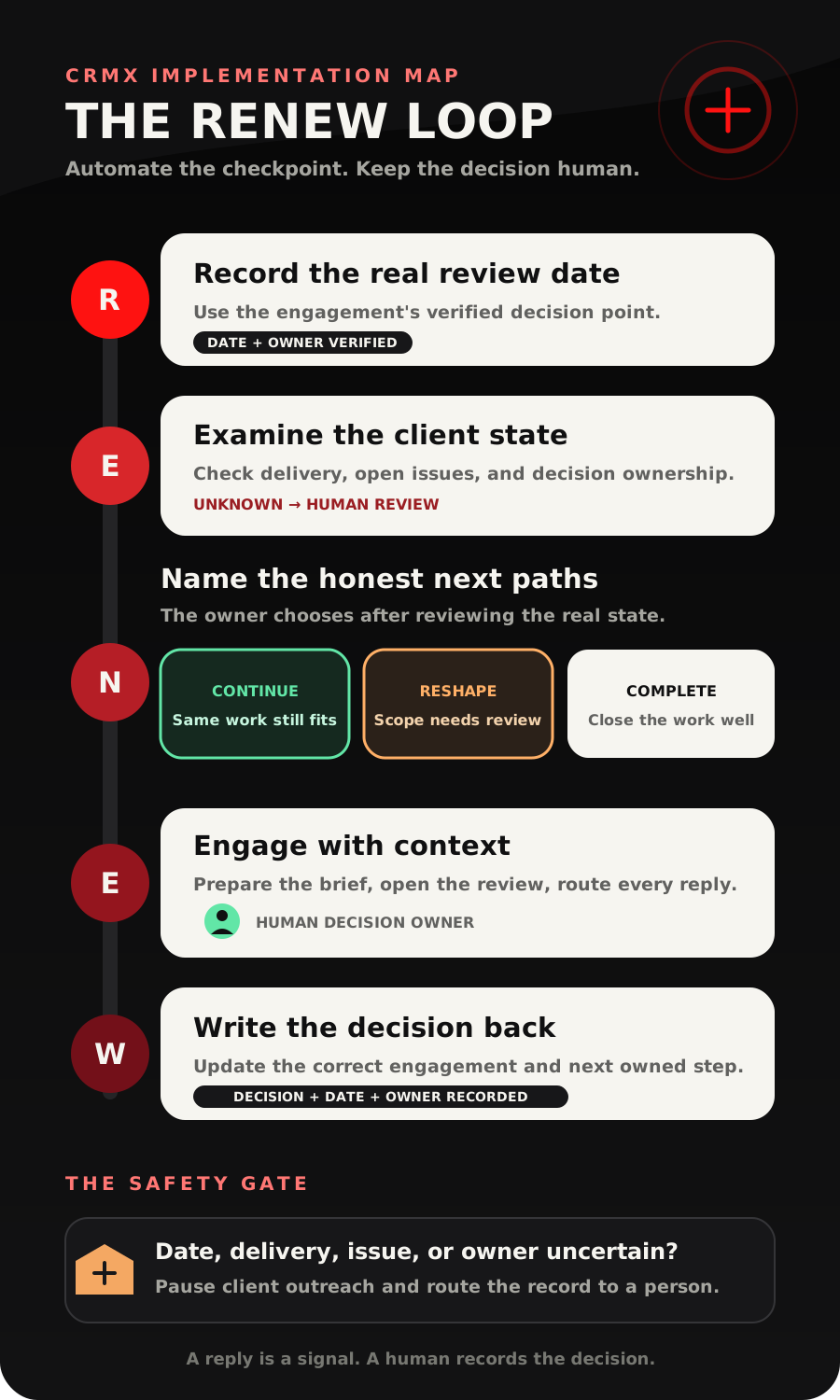
The CRMX RENEW Loop translates that strategy for coaches and consultants: Record the real review date, Examine the client state, Name the honest next paths, Engage with context, Write the decision back.
The tactic: automate the checkpoint, not the decision
Renewal is often treated like a campaign. It is more useful to treat it as a customer-state transition.
At the review checkpoint, one of several things may be true:
- the current engagement is still in progress;
- a promised milestone is incomplete;
- the client is ready to discuss continuing the same work;
- the client needs a different scope or cadence;
- an unresolved issue needs a person before any offer;
- the work has reached a healthy completion point;
- the client has already decided not to continue.
Those are different states. One generic sequence should not speak to all of them.
The automation's job is to surface the checkpoint and gather the facts. The coach, consultant, or account owner owns the recommendation and the conversation.
Start with a renewal eligibility gate
Before CRMX sends a client-facing message, require a human-readable answer to four questions:
- Is the review date verified? Use the date tied to the actual engagement, not a guessed anniversary or a fixed delay from an unreliable trigger.
- Is delivery current? Confirm the promised work is complete, on track, or explicitly accounted for.
- Is there an unresolved issue? A service concern, missing deliverable, ownership gap, or disputed expectation should leave the promotional path.
- Is one person responsible? Name the human who will review the context and own the next conversation.
Use a small state model:
| Renewal readiness | Meaning | Next action |
|---|---|---|
| Review Date Missing | The system cannot place the checkpoint reliably | Assign the record for correction |
| Delivery Review Required | Progress or completion is unclear | Notify the client owner; do not send the invitation |
| Issue Resolution Required | A concern must be handled first | Route to the responsible person |
| Ready for Human Review | The date and delivery state are verified | Prepare the continuation brief |
| Conversation Open | A contextual invitation was sent | Route every reply to the owner |
| Decision Recorded | Continue, reshape, complete, or revisit later is known | Move the record to the matching state |
These are recommended operating labels, not built-in CRMX statuses. Adapt them to the business, then test every transition.
The CRMX RENEW Loop
R - Record the real review date
Create one date field named Engagement Review Date. It should represent the date when a continuation decision becomes useful, not necessarily the final day of a contract or program.
The current official Custom Date Reminder documentation says a workflow can start before, on, or after a selected date field. It also explains that the available date fields depend on the workflow type and that a blank field does not activate the trigger.
That makes the date a useful entry point only when the business controls its quality.
Define:
- who sets the date;
- which event makes the date trustworthy;
- whether the year must match;
- what happens when the date changes;
- what happens when the field is blank;
- how far before the date the internal review should begin.
For a six-month coaching engagement, the internal checkpoint might begin several weeks before the planned review conversation. For a consulting engagement with a quarterly scope review, the stored date may be the next agreed review point.
Do not invent the timing in the workflow. Record it from the actual delivery plan or have the owner verify it.
E - Examine the client state
The date trigger should open an internal audit before it opens a client conversation.
Create fields that make the audit inspectable:
| Field | Suggested object | Example values |
|---|---|---|
| Engagement Review Date | Opportunity or contact, based on the data model | Verified date |
| Delivery State | Opportunity | On Track, Complete, Needs Review, Issue Open |
| Continuation Readiness | Opportunity | Not Reviewed, Ready, Human Review Required |
| Continuation Path | Opportunity | Continue, Reshape, Complete, Revisit Later |
| Decision Owner | Opportunity or assigned user | Named human owner |
| Decision Recorded At | Opportunity date field | Verified decision date |
The current custom-field documentation distinguishes person-level contact fields from deal-specific opportunity fields. A renewal decision usually belongs to a particular engagement, especially when one person can have multiple programs or consulting projects. Confirm the object before creating the field because the documentation says its object cannot be switched later.
Use an If/Else action to evaluate the stored state. The documented action can branch on contact-specific data, supports stored date values, and includes a fallback path.
The first version needs only three branches:
- Ready: verified date, acceptable delivery state, no open issue, and a named owner;
- Resolve first: issue open or delivery state needs review;
- Unknown: anything missing, unexpected, or outside the defined model.
The unknown branch is not an error to hide. It is how the system prevents weak data from becoming confident outreach.
N - Name the honest next paths
“Renew” is not the only successful outcome.
Give the human owner three honest paths to discuss:
- Continue: the client has a useful next outcome and the existing type of work still fits.
- Reshape: the next outcome needs a different scope, cadence, format, or owner.
- Complete: the engagement has done its job, and the cleanest next step is to close well.
Add Revisit Later only when a real future review date and owner are recorded. “Follow up someday” is not a state.
This path design matters because a continuation workflow should protect the relationship, not merely keep a deal marked open. Healthy completion can still feed the Raving Fan Engine through thoughtful follow-up, useful resources, referrals, or future work when appropriate. Those should remain separate systems with their own eligibility rules.
Do not ask automation to interpret contract language, set pricing, promise scope, decide whether delivery was satisfactory, or choose the best offer. Those are human-owned decisions.
E - Engage with context
Once the record is Ready for Human Review, send one internal continuation brief using the documented Internal Notification action. The official documentation says notifications can go to selected users, roles, or teams and can include dynamic fields.
Copy-ready internal continuation brief
Subject: Client continuation review - [Client name] - [Review date]
Body:
Engagement: [Opportunity name]
Review date: [Engagement Review Date]
Delivery state: [Delivery State]
Open issue: [Issue state or None recorded]
Current client outcome: [Approved progress summary]
Possible paths: Continue, Reshape, or Complete
Decision owner: [Assigned owner]
Human review: Verify the record, choose the appropriate conversation, and update Continuation Readiness before any client invitation is sent.
The owner should then send or approve a contextual invitation.
Copy-ready client invitation
Hi [First name] - our next review point is coming up on [date]. Before we decide what comes next, I want to look at the outcome you started with, what is complete, and what would actually be useful from here. Would you like to use [proposed time or booking link] for that conversation?
That message does not assume a renewal. It invites a review.
A trained CRMX AI employee can answer approved scheduling questions, send the correct calendar link, acknowledge a routine reply, or hand the conversation to the owner. Guy should not recommend scope, negotiate terms, promise results, interpret an agreement, or tell the client what they “need.”
The documented Customer Replied trigger can narrow replies by workflow and channel. Use it to stop the reminder path, assign the conversation, notify the owner, or create the next task. Do not use a positive-intent label as permission to finalize the decision automatically.
W - Write the decision back
A renewal conversation that lives only in someone's inbox is invisible to the operating system.
Record the actual outcome:
- Continue - Review Complete
- Reshape - Scope Conversation Required
- Complete - Closeout in Progress
- Revisit Later - Date and Owner Set
- Declined - Reason Recorded by Human
- Issue Resolution Required
The current Update Opportunity action documentation says a workflow can update an existing opportunity's pipeline, stage, name, or other supported details. It also warns that a non-opportunity trigger needs a Find Opportunity step before the correct deal can be updated.
That warning is important. If the date lives on a contact but the decision belongs to an opportunity, locate and verify the intended engagement before changing it. A contact with two active programs should not have the wrong opportunity moved because the workflow guessed.
Use CRMX pipelines, workflows, conversations, calendars, and reporting to make the outcome visible. Measure the state transitions, not the optimism of the message copy.
Build the client renewal workflow in CRMX
1. Define the decision before the automation
Write one sentence for each path:
- Continue means...
- Reshape means...
- Complete means...
- Revisit Later means...
Name who can choose each state and what evidence they need.
2. Choose the record object
Use opportunity fields when the date, delivery state, and decision belong to one engagement. Use contact fields only when the information is truly person-level and will not conflict across multiple engagements.
If the business permits multiple opportunities per contact, test the lookup and update path with two active engagements before launch.
3. Build a client-continuation pipeline
A simple pipeline might use:
- Review Date Set
- Internal Review Due
- Issue Resolution Required
- Ready for Conversation
- Conversation Open
- Continue Confirmed
- Reshape Required
- Complete or Revisit Later
Stages should describe customer or decision state, not staff activity such as Email Sent.
4. Start with the internal trigger
Use the verified Engagement Review Date and begin with an internal notification. Do not make the first action a client email or text.
Confirm how the trigger behaves when:
- the date is blank;
- the date is changed after enrollment;
- the date is in the past;
- the year does not match;
- the opportunity is already complete;
- the contact has more than one engagement.
5. Build the eligibility branches
Check Delivery State, Issue State, Continuation Readiness, and Decision Owner. Route missing or unexpected values to Human Review Required.
Only a verified ready state should prepare the client invitation.
6. Connect the review calendar
Create a calendar for the continuation review only if the meeting has a distinct purpose and owner. Keep the description honest: review progress, clarify the next outcome, and decide whether continuing, reshaping, or completing makes sense.
Do not reuse a generic discovery-call description for an existing client.
7. Route the conversation
When the client replies:
- stop generic reminders;
- assign the conversation to the decision owner;
- acknowledge the reply within approved boundaries;
- create a task when a person must respond;
- preserve the reply in the conversation history;
- update the state only after the meaning is clear.
8. Close the loop
After the decision, update the opportunity and set any new review date deliberately. Remove the client from obsolete reminders. If the engagement completes, hand off to the business's closeout or Raving Fan process instead of leaving the person in a renewal loop.
Use case 1: a business coach's six-month engagement
A business coach delivers a six-month program with a midpoint review and an end-of-engagement decision.
Thirty days before the final review date, CRMX checks the program opportunity. The client has completed the planned sessions, the delivery state is On Track, no issue is open, and the coach is the named decision owner.
The workflow prepares the continuation brief. The coach reviews the original outcome and current state, then approves an invitation to a Next Outcome Review.
During the conversation, the client says the original operating problem is stable but a new leadership constraint has appeared. The coach does not let the workflow mark the engagement renewed. The opportunity moves to Reshape Required, with a human-owned next step to define whether the new problem belongs in the coach's approved scope.
If the client instead says the work is complete, the coach records Complete - Closeout in Progress and starts the separate closeout experience.
Use case 2: a consultant's quarterly retainer review
A consultant reviews a client engagement each quarter. One contact can be connected to several projects, so the review date and decision fields live on the opportunity rather than the contact.
The date trigger opens an internal audit. One deliverable is still marked Needs Review, so the record takes the Resolve first branch. CRMX notifies the engagement owner and does not send the continuation invitation.
After the owner verifies the deliverable and updates the state, the opportunity becomes Ready for Conversation. The consultant opens the review with the agreed outcome, completed work, and the decision that now needs to be made.
The client chooses to continue at the current scope. The consultant records Continue Confirmed, sets the next verified review date, and moves the opportunity forward. The system preserves the decision; it does not manufacture it.
The renewal state-and-owner decision aid
| Verified state | What CRMX should do | Owner |
|---|---|---|
| Review date is missing or uncertain | Create a correction task; send nothing to the client | Engagement owner |
| Delivery needs review | Prepare an internal audit and pause outreach | Delivery owner |
| Issue is open | Route to issue resolution | Responsible human |
| Date, delivery, and owner are verified | Prepare the continuation brief | Decision owner |
| Client asks a scheduling question | Answer from approved calendar information | Guy or scheduling owner |
| Client asks about scope, terms, or pricing | Hand off with context; do not improvise | Decision owner |
| Client chooses Continue | Record the decision and next verified date | Decision owner |
| Client chooses Reshape | Open a human-owned scope conversation | Decision owner |
| Client chooses Complete | Start closeout and remove renewal reminders | Client owner |
| Client chooses Revisit Later | Store a real date, reason, and owner | Decision owner |
Measure the decision system
Use counts and state movement the business can verify:
- engagements with a review date;
- reviews due in the next defined window;
- records routed to Delivery Review Required;
- records routed to Issue Resolution Required;
- continuation conversations opened;
- decisions recorded by path;
- Revisit Later records with a valid date and owner;
- opportunities still in Conversation Open after the team's service standard;
- records with conflicting contact and opportunity data.
Do not label an email sent, a positive reply, or a booked review as a renewal. Report the outcome only after a person records the decision.
The RENEW build-and-QA checklist
Data and pipeline
- Define Continue, Reshape, Complete, and Revisit Later.
- Choose contact or opportunity fields deliberately.
- Create Engagement Review Date, Delivery State, Continuation Readiness, Continuation Path, Decision Owner, and Decision Recorded At.
- Confirm the review date comes from a trustworthy event or human update.
- Create stages that describe decision state.
- Test two simultaneous opportunities for one contact when that model is allowed.
Workflow and ownership
- Begin with an internal checkpoint.
- Test the date trigger before, on, and after the field date as configured.
- Test a blank, changed, past, and wrong-year date.
- Build Ready, Resolve first, and Unknown branches.
- Make the unknown branch human-owned.
- Confirm the internal brief reaches the named owner.
- Confirm the client invitation cannot send when an issue is open.
- Confirm a reply stops or exits obsolete reminders.
- Confirm the opportunity update targets the correct engagement.
- Confirm every outcome has a next owner or a clean end.
Conversation and closeout
- Verify Guy answers only approved logistics.
- Route scope, pricing, terms, delivery concerns, and exceptions to a person.
- Test Continue, Reshape, Complete, Declined, and Revisit Later.
- Require a real date and owner for Revisit Later.
- Remove completed engagements from renewal reminders.
- Start referral, review, or re-engagement workflows only through their own eligibility gates.
- Review the entire path on mobile and desktop.
Frequently asked questions
When should a coach start a client renewal conversation?
Start from the engagement's real review point, then work backward far enough for the owner to verify delivery and prepare. The RENEW Loop does not prescribe one universal number of days. The timing should match the program, agreement, delivery plan, and decision process.
Should the first renewal message be automated?
The first action should usually be an internal review. A client-facing invitation can be automated only after the business has defined and tested the eligibility state, message, owner, stop conditions, and exception paths.
Can Guy handle the renewal conversation?
Guy can handle approved scheduling, routine questions, acknowledgments, and human handoffs. The coach, consultant, or authorized owner should decide scope, pricing, terms, fit, exceptions, and the recommendation.
Should renewal data live on the contact or opportunity?
Use the opportunity when the date and decision belong to a specific engagement. Use the contact only when the field is truly person-level. If one person can have multiple active engagements, verify the correct opportunity before any update.
What if delivery is incomplete?
Route the record to Delivery Review Required and pause the promotional path. A person should resolve or explain the delivery state before the business asks the client to continue.
Is completing the engagement a failed outcome?
No. Complete is an honest customer state. Close the work well, preserve the relationship, and let any future review, referral, or re-engagement begin through a separate qualified path.
Make the next decision worthy of the work already done
The renewal workflow is not a last-minute reminder. It is the handoff between delivered value and the client's next honest decision.
Record the real date. Examine the state. Name the paths. Engage with context. Write the outcome back. Automate those repeatable checkpoints so the human owner can focus on the conversation that actually requires judgment.
Explore the complete CRMX path for coaches and consultants, see how the Revenue Flywheel connects customer states across the business, audition Guy live, or use CRMX implementation services to build and test the workflow with your real delivery process.
Sources and further reading
- HighLevel Support: Custom Date Reminder workflow trigger
- HighLevel Support: How to Use Custom Fields
- HighLevel Support: If/Else workflow action
- HighLevel Support: Internal Notification workflow action
- HighLevel Support: Customer Replied workflow trigger
- HighLevel Support: Update Opportunity workflow action