
CRMX Can Now Generate Schema Markup When You Publish
CRMX can now generate missing schema markup when you publish a website, funnel, or webinar page. Learn how to enable it and what to verify.

CRMX can now create missing schema markup when you publish a page. Turn on the new setting for a Website, Funnel, or Webinar, and CRMX can generate structured data in the background when a published page does not already have it.
The official release notice, published July 24, 2026, presents the feature as a current release. It does not list a beta flag, Labs requirement, phased schedule, regional restriction, or agency-only limitation.
This is a useful safety net for businesses that regularly publish landing pages, service pages, registration pages, and campaign funnels. It does not guarantee rankings, rich results, AI citations, traffic, leads, or revenue. It does make one commonly missed technical step easier to cover.
What changed in CRMX
Schema markup is structured information added to a page so search engines and other systems can more clearly interpret what the page represents. It can describe a business, service, article, event, product, course, FAQ, and other visible information.
Before this release, a CRMX user could create schema manually or ask Schema Markup AI to generate it inside the page editor. The new publish-time setting adds an automatic path.
When Auto-generate schema is on and you publish a page that has no schema:
- CRMX generates schema for that page in the background.
- Page publishing continues without waiting for generation to finish.
- Existing schema is preserved rather than overwritten.
- The behavior works for Websites, Funnels, and Webinars.
- It applies to Builder Publish, save-triggered publish, and version-history publish paths.
The control lives under Settings → SEO & AEO for the Website, Funnel, or Webinar.
There is an important default difference:
- Assets created before the July 24 release keep the setting off unless you enable it.
- Assets created on or after the release default the setting on.
That protects existing publishing behavior while giving new assets automatic coverage from the start.
Why it matters operationally and financially
Schema is easy to postpone because it does not change the visible design. A page can look finished while still missing structured information that helps machines understand what the page contains.
The new setting improves the publishing process in three practical ways:
- Fewer missed steps: A page without existing schema can receive a generated first pass automatically.
- Less repetitive setup: Teams do not have to begin every page by selecting schema types and filling fields one at a time.
- Safer custom work: Deliberate schema already on the page is not replaced by the automatic process.
The financial value is operational, not guaranteed search performance. A business that publishes many campaign pages may spend less time on repetitive technical setup and reduce the chance of shipping a page with no schema at all. The release does not promise a revenue lift, and search platforms still decide whether a page ranks or receives an enhanced result.
Who benefits most
This update is especially useful for:
- home-service businesses publishing service-area, seasonal-offer, financing, or estimate-request pages;
- coaches and consultants launching webinars, workshops, applications, lead magnets, or program pages;
- small marketing teams that move quickly and need a reliable publishing checklist;
- operators who want automatic coverage without losing control of custom schema;
- businesses managing several funnels or websites inside CRMX.
It matters less when every important page already has carefully maintained custom schema or when the page is hosted outside CRMX.
The CRMX publish-to-verify loop
Automatic generation should remove repetitive work, not human judgment. Use this four-stage loop whenever the setting is enabled.
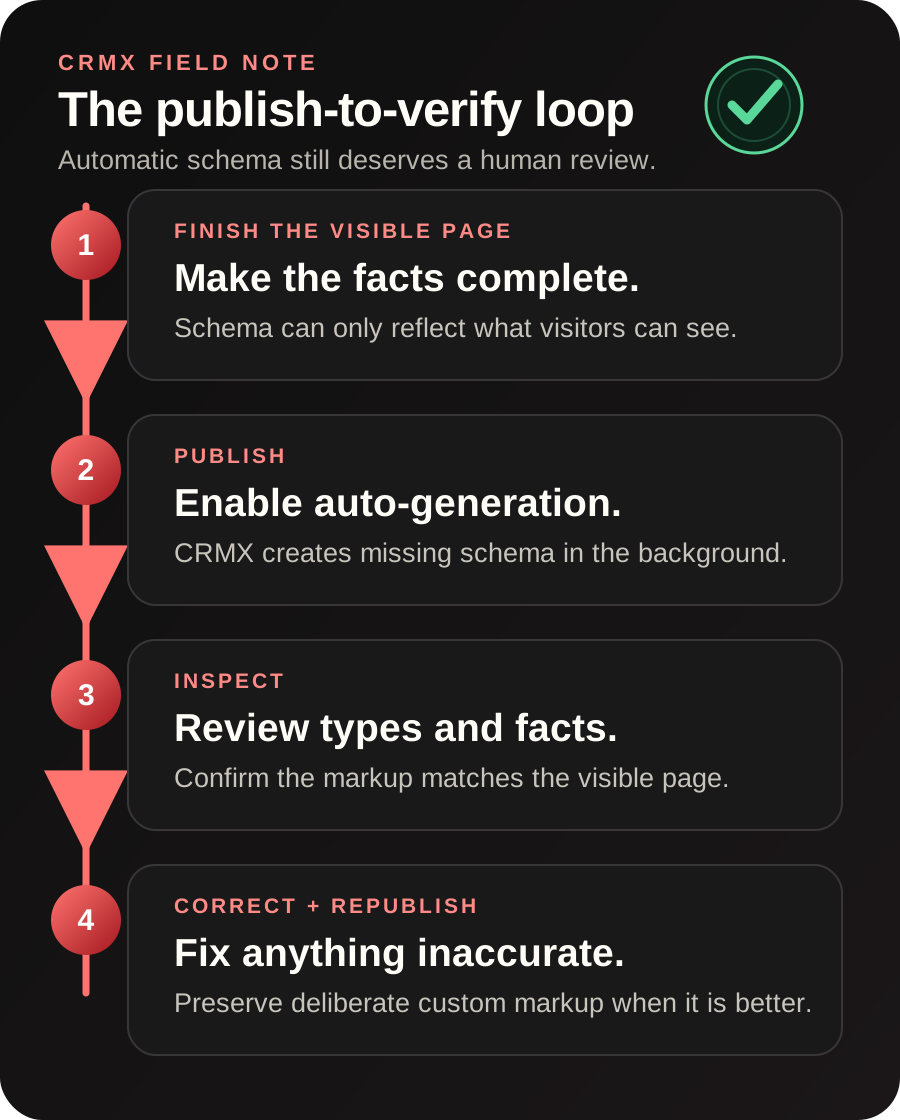
1. Finish the visible page
Complete the real page content before publishing. Confirm the business name, service description, location, hours, dates, prices, offer details, FAQs, and contact information that visitors can see.
The official Schema Markup AI guide explains that page content informs the generated schema. If the visible page is incomplete or inaccurate, the structured data may be incomplete or inaccurate too.
2. Publish with auto-generation enabled
Open the Website, Funnel, or Webinar settings, find SEO & AEO, turn on Auto-generate schema, and save. Publish the page through the normal CRMX flow.
Generation runs in the background, so publishing is not held up while CRMX creates missing schema.
3. Inspect what was generated
Do not treat “automatic” as “unreviewed.” Open the page's schema area and check:
- the schema types selected;
- business, service, event, and contact facts;
- URLs, images, dates, times, and locations;
- any field that could have changed since the page was drafted;
- whether the markup describes content that is actually visible.
The official manual schema guide recommends keeping structured data accurate, current, and aligned with visible page content.
4. Correct and republish when needed
If a value is wrong, correct the visible page or edit the schema directly, validate the change, and publish again. If a specialist has already created better custom schema, keep it. The automatic process is designed not to overwrite existing markup.
Example 1: an HVAC seasonal service page
An HVAC company publishes a spring tune-up landing page with:
- the service name and description;
- the cities or service area covered;
- a clear appointment-request form;
- current business contact information;
- visible FAQs about what the visit includes.
With auto-generation enabled, CRMX can create missing schema when the page is published. The operator then reviews whether the generated types and facts accurately represent the business and service.
The useful outcome is not “instant rankings.” It is a cleaner publish process: finish the offer, publish the page, inspect the structured data, and correct anything that does not match the visible service.
For the wider customer journey behind that page, see how CRMX supports home-service businesses.
Example 2: a coach or consultant webinar
A business coach publishes a registration page for a live workshop. The page includes the event title, date, start time, time zone, host, topic, and registration action.
After publishing with auto-generation enabled, the coach or marketing assistant reviews whether the generated schema reflects the correct event details. Dates and time zones deserve special attention because a small error can make otherwise valid structured data misleading.
If the page later becomes an on-demand replay, update both the visible offer and its structured data. The markup should describe the page people can access now, not the event that existed last month.
Explore the connected system CRMX provides for coaches and consultants.
How to enable automatic schema in CRMX
Use this setup sequence for each Website, Funnel, or Webinar where you want the behavior:
- Open the asset inside Sites.
- Open Settings.
- Go to the SEO & AEO section.
- Turn on Auto-generate schema.
- Save the setting.
- Finish and verify the visible page content.
- Publish the page.
- After generation completes, inspect the schema for accuracy.
Existing assets require the setting to be turned on. New assets created on or after the release default it on, but it is still worth confirming the toggle before an important launch.
Limitations and rollout notes
Keep these boundaries in view:
- Existing assets do not change automatically. Their setting defaults to off.
- The setting is controlled per asset. Turning it on for one Website, Funnel, or Webinar does not establish a universal account rule.
- Existing schema is not overwritten. Automatic generation applies when the published page has no schema.
- Schema remains page-specific. Review important pages individually.
- Generation does not delay publishing. Because it runs in the background, verify the result rather than assuming it appeared at the exact moment the page went live.
- Visible facts still control quality. Automation cannot repair an inaccurate service description, old event date, or incomplete location detail.
- Search outcomes are not guaranteed. Valid structured data can help systems interpret a page, but it does not force rankings, rich results, traffic, or citations.
The official help articles were last modified before this July 24 release and describe the manual generation flow. Their prior statement that Schema Markup AI must be triggered manually still applies to that manual workflow; the newer changelog documents the additional automatic publish-time setting.
A practical schema QA checklist
Before publishing:
- Make sure the page has one clear purpose and accurate visible copy.
- Confirm names, services, locations, dates, times, and contact details.
- Remove old claims, offers, or event information.
- Decide whether existing custom schema should be preserved.
- Confirm the Auto-generate schema setting for the asset.
After publishing:
- Confirm schema was created only where it was missing.
- Review the selected schema types.
- Compare every material value with the visible page.
- Validate manually if you edit the result.
- Recheck the page after material content changes.
- Record who owns future page and schema updates.
For a broader page-quality process, read How to Build an AI-First Website That Converts Leads.
Where this fits in the CRMX lead-to-customer system
This release does not change how a CRMX AI employee answers, qualifies, books, or follows up. It improves the publishing infrastructure before the conversation begins.
A website or funnel helps a prospect understand the offer and take action. The form, calendar, inbox, workflow, and customer record then carry that action forward inside the broader CRMX platform. Automatic schema can make the page layer easier to maintain, but it does not train an AI employee or authorize new customer-facing behavior.
That distinction keeps the system honest: use schema to describe the page, and use trained workflows and AI employees to handle the lead after the response.
Frequently asked questions
Will CRMX overwrite schema already on my page?
No. The official release states that existing schema is preserved. Automatic generation applies when a published page does not already have schema.
Is automatic schema enabled on existing Websites and Funnels?
No. Assets created before the release default the setting to off. Open the asset's SEO & AEO settings, enable it, and save if you want automatic generation.
Is it enabled on new assets?
Assets created on or after the July 24 release default the setting to on. Confirm the setting before a major launch rather than relying only on the default.
Does automatic schema guarantee better rankings or AI citations?
No. Structured data can help systems interpret a page, but rankings, rich results, citations, traffic, leads, and revenue are not guaranteed.
Can I review or edit generated schema?
Yes. CRMX supports form and JSON views, validation, and manual editing. Review generated values whenever a page contains business-critical facts such as locations, dates, services, or offers.
Which CRMX assets support the new setting?
The release lists Websites, Funnels, and Webinars.
Turn the setting on, then keep the review step
Start with the next page your business plans to publish. Finish the visible content, enable automatic schema, publish, inspect the result, and correct what needs attention.
If you want CRMX to help build the page, conversion path, follow-up, and reporting as one working system, explore done-for-you services. The best automation removes repetitive work while keeping the facts under human control.