
Canceled Appointment Follow-Up for Home Services: The CRMX REBOOK Route
Build a CRMX cancellation follow-up workflow that stops old reminders, offers one useful next step, routes exceptions, and records the real outcome.
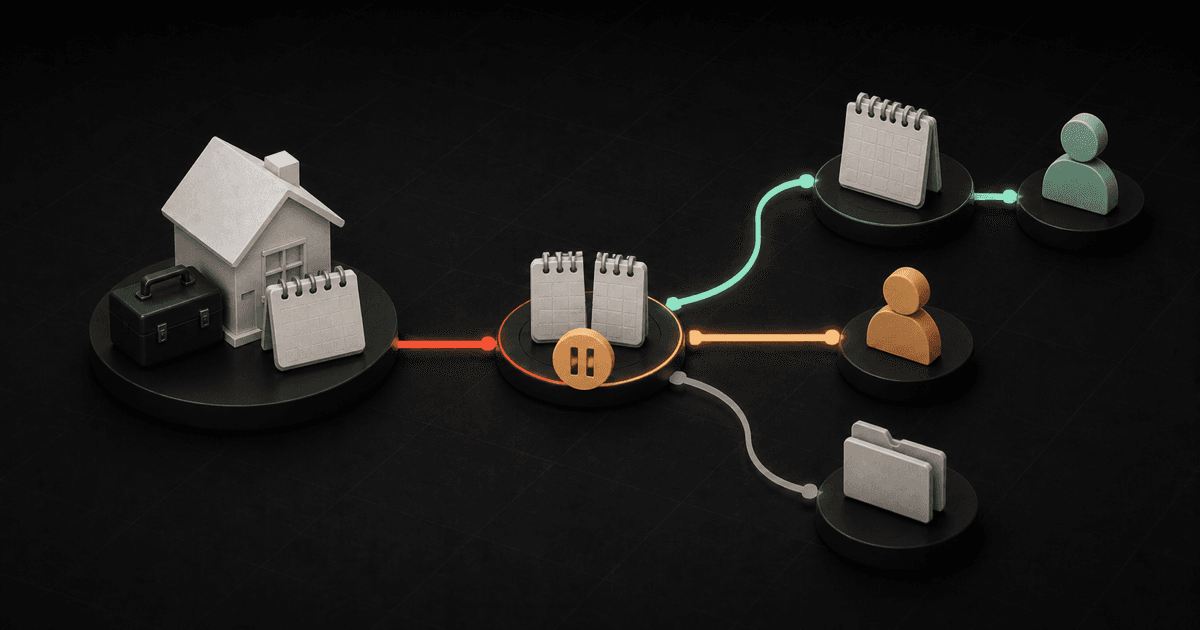
A canceled appointment should end one schedule, not erase the customer journey.
The useful tactic is simple: when CRMX receives a verified Cancelled appointment status, stop the old reminder path, identify whether the change came from the customer or the business, offer one honest next step, and record what happens next.
That next step is not always another booking. The customer may want a new time, need a person, prefer a later date, or be finished. The workflow should make each outcome visible instead of treating every cancellation as a dead lead or sending the same reschedule link to everyone.
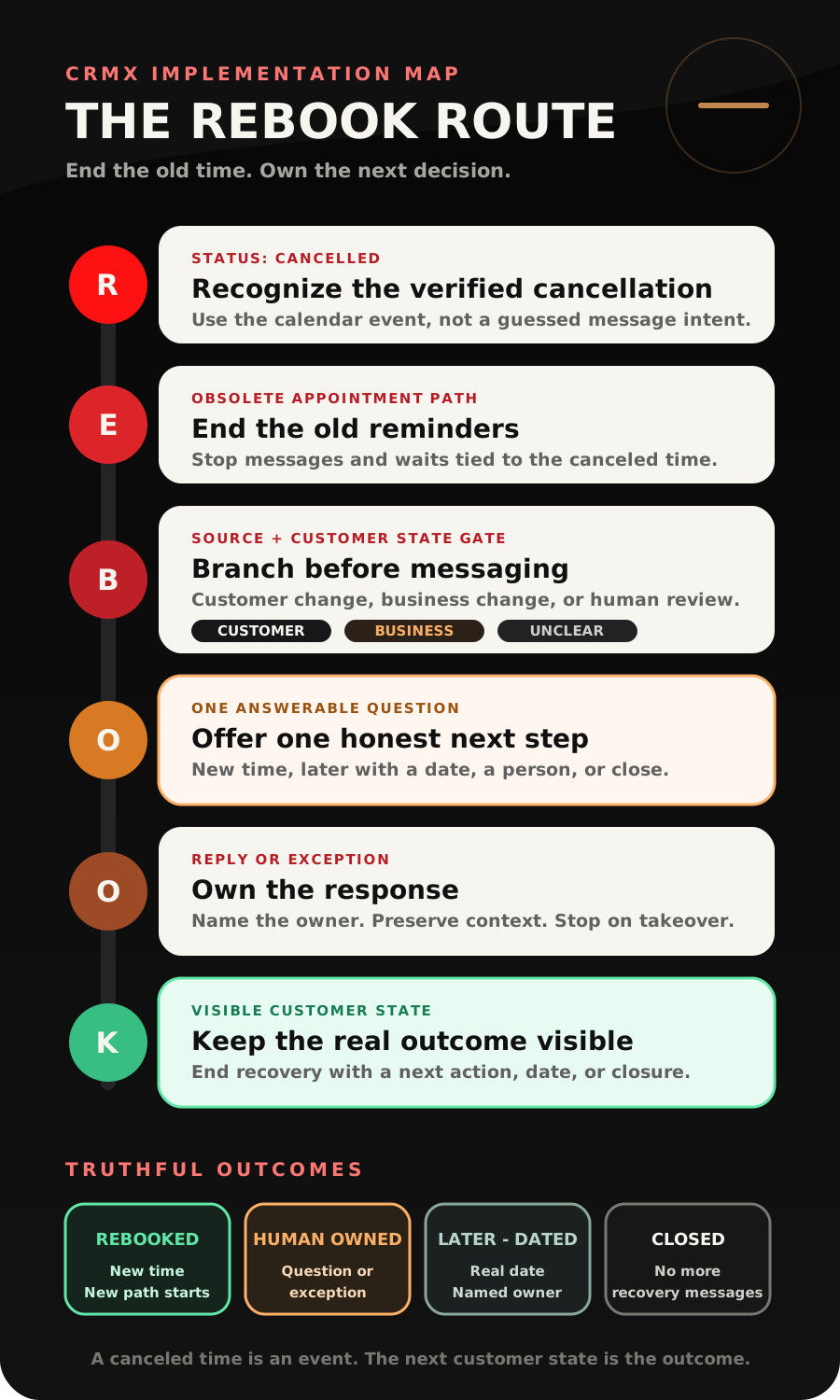
Brent Attaway's Five Fortune Engines treats follow-up as a set of distinct phases, makes appointment preparation deliberate, and uses automation to keep an already-defined process consistent. The CRMX REBOOK Route turns those principles into a focused home-service cancellation follow-up: Recognize the verified cancellation, End the old path, Branch by source and state, Offer one honest next step, Own every reply and exception, Keep the final outcome visible.
The tactic: recover the decision, not just the calendar slot
A cancellation creates a new decision point.
Weak automation sees an empty appointment and immediately pushes another booking link. Useful automation first asks what is true:
- Did the customer cancel, or did someone on the team change the appointment?
- Did the old reminder workflow actually stop?
- Is there an active complaint, access issue, scheduling exception, or service question?
- Is self-rescheduling appropriate for this appointment type?
- Who owns a reply that cannot be handled from approved information?
- What state should CRMX show if the customer does not want another time?
This article begins where the CRMX ARRIVE appointment reminder plan ends. ARRIVE prepares an active appointment and exits when its state changes. REBOOK begins only after the cancellation is verified and owns the next decision.
It is also different from no-show recovery. A cancellation is an explicit schedule state. A no-show is verified after the appointment time and needs a different conversation. Do not make a customer who canceled correctly feel as if they missed an appointment.
The CRMX REBOOK Route
R - Recognize the verified cancellation
Start from the calendar event, not a guess based on message text.
The current Appointment Status workflow trigger documentation lists Cancelled as a supported appointment-status filter. It also documents filters for the calendar, event type, tag, user, and who modified the appointment.
Build one workflow for one appointment type first. Name the trigger something specific, such as HVAC Tune-Up - Cancelled or Roof Inspection - Cancelled. Filter it to the intended calendar and status.
The Modified By filter can help separate changes made by a customer, user, workflow, or API. Treat that value as routing context, not proof of motive. A customer cancellation does not tell you why the person changed the appointment. A staff cancellation does not tell you that the customer wants another time.
Do not start recovery because a message contains the word “cancel.” Route that reply for interpretation, let the approved calendar action change the appointment, and begin REBOOK from the verified status.
E - End the old appointment path
The first action after cancellation is not a new sales message. It is cleanup.
The official appointment-scenarios documentation explains that a canceled appointment is pulled out of an appointment-based wait path so later appointment actions do not continue. The separate Remove from Workflow action can remove the contact from a named workflow when an explicit exit is needed.
Verify the behavior in your exact setup. Calendar notifications, reminder workflows, estimate nurture, and manual tasks may be separate systems. Stopping one workflow does not prove that every old message or task has been canceled.
At the cancellation event:
- remove the contact from the old reminder workflow when required;
- stop any customer-facing sequence that depends on the canceled time;
- move the appointment opportunity to Cancellation - Recovery Open only if the correct opportunity is in context;
- preserve the conversation and cancellation event;
- prevent a late reminder from referring to the old date;
- route missing appointment or owner context to a person.
Do not remove the contact from every workflow by default. A current service-recovery conversation, an unrelated project, or a necessary internal process may still be valid. Target the obsolete appointment path.
B - Branch by source and customer state
Use a small decision gate before sending anything.
Customer changed the appointment
If the customer canceled through the approved calendar path and there is no active exception, the workflow may offer a simple choice: another time or close the loop.
Do not require the person to explain the reason before receiving help. Ask for context only when it changes the route.
The business changed the appointment
If a team member, workflow, or connected system canceled the appointment, send an internal alert first. Give the change to a named scheduling owner. The customer should receive an accurate acknowledgment and a real owner, not an automated message that implies the customer caused the cancellation.
A service question or concern is active
If the conversation contains a complaint, access problem, scope question, prior-work issue, billing discussion, or unusual condition, stop the standard recovery copy and route the context to a person.
The source or appointment is unclear
An unexpected API change, duplicate appointment, missing owner, mismatched calendar, or unknown source is a human-review state. Do not improvise a customer-facing explanation.
The branch exists to protect relevance. It is not a customer score.
O - Offer one honest next step
For a clean customer cancellation, send one answerable question:
Hi [First Name], I saw that your [Appointment Type] with [Business Name] on [Date] is no longer scheduled. Would you like a new time, or should we close this for now?
If the customer says new time, use the tested scheduling path for that appointment. That may be a self-service link, a reply handled by the scheduling team, or a trained AI employee offering only approved availability.
If the customer says later, ask for a useful timeframe only when the business has a real dated follow-up process:
No problem. What month or date would be useful for us to check back?
If the customer says close, acknowledge it and end recovery:
Understood. I have closed the appointment follow-up. If you need help later, you can start a new conversation here.
If the business caused the change, use a human-owned acknowledgment instead:
Hi [First Name], this is [Business Name]. We need to change your [Appointment Type] that was scheduled for [Date]. [Owner or Team] has the appointment details and will continue with you here to arrange the next step.
Replace every bracketed field. Never promise that someone will contact the customer unless the named owner and operating process can support that promise.
The message should not add a discount, urgency claim, list of services, or several booking links. Its job is to reopen one decision with the context intact.
O - Own every reply and exception
The current Customer Replied trigger documentation says a contact reply can start a workflow and can be filtered by channel, tag, phrase, intent type, or the workflow being answered.
Use the reply as a routing event. Do not let a keyword silently reschedule, close, or diagnose the situation.
Build reply ownership before sending the recovery question:
| Reply or event | First CRMX action | Owner |
|---|---|---|
| Clear request for a new time | Offer the approved calendar route | Guy or scheduling team |
| Customer asks for a person | Stop standard automation and assign the conversation | Named human owner |
| Question about scope, prior work, price, or access | Preserve the appointment context and notify the right person | Service or scheduling owner |
| Complaint, confusion, or unusual condition | Stop recovery copy and escalate | Human owner |
| Later with a real date | Save the date and confirm the next contact | Named owner or dated workflow |
| No longer needed | Close recovery and stop messages | Workflow or office rule |
| New appointment is created | Exit recovery and begin the new appointment path | Workflow plus appointment owner |
| No reply after the approved final touch | Close the timed route or create a named task | Defined business rule |
The documented Internal Notification action can alert a selected user, role, or team with dynamic context. Include the customer, appointment, cancellation source, latest message, and required next action. A notification without an owner or response expectation is not a handoff.
A trained CRMX AI employee such as Guy can acknowledge the reply, ask one useful question, explain a tested booking path, and use approved service knowledge. Guy should hand off pricing exceptions, complaints, sensitive service details, unclear intent, unsupported availability, or a direct request for a person.
K - Keep the final outcome visible
Recovery is complete only when the record describes what is true.
Use a small state model:
- Cancellation - Recovery Open
- Rebooked
- Reply - Human Owned
- Later - Dated
- Closed - Not Needed
- Service Exception - Human Owned
The current Update Opportunity action documentation says a workflow can change the stage of an existing opportunity when that opportunity is in context or has been found first. Do not update a random deal belonging to the same contact. A homeowner may have more than one estimate, service request, property, or project.
When a new appointment is scheduled, remove the contact from the cancellation-recovery workflow, move the correct opportunity to Rebooked, and let the new appointment enter its own confirmation and preparation path. The old time should never keep generating messages.
When the customer chooses later, store a real date and owner. When the customer closes, stop. When a person takes over, stop the standard sequence and keep the conversation visible.
If a record stays in Cancellation - Recovery Open without a reply owner, next action, or end date, the workflow created a new leak.
Build the cancellation follow-up in CRMX step by step
1. Choose one calendar and one canceled state
Start with one appointment type where the office understands the normal booking and cancellation path. Do not combine emergency service, maintenance, inspections, estimates, recurring visits, and multi-person appointments in the first workflow.
Test how a customer, user, workflow, and connected system can each change that appointment.
2. Create the minimum operating fields
Use fields your team will maintain:
Cancellation sourceCancellation recovery stateCancellation recovery ownerRequested follow-up dateCancellation outcome
Use built-in appointment context where it is reliable. Do not duplicate data merely to make the workflow look complete.
3. Build the verified trigger
Create an Appointment Status trigger filtered to:
- appointment status is Cancelled;
- the selected calendar or calendar group;
- the intended event type;
- any source or owner filter needed for the first version.
Enable re-entry only when repeated appointments and repeated cancellations have been tested. A second cancellation may need a human review instead of another identical automated sequence.
4. Stop obsolete messages
Confirm the old reminder path stops. Remove the contact from the named reminder workflow if your design requires it. Check calendar-level notifications separately.
Test a cancellation before each scheduled reminder, during a wait, and close to the appointment time.
5. Apply the source-and-state gate
Branch customer changes, business changes, active exceptions, and unknown changes. Route missing owner or appointment context to human review.
Do not send customer-cancellation copy after a business-created change.
6. Send one recovery question
For the eligible customer-canceled path, send the new time or close question. For the business-canceled path, notify the owner before any approved customer acknowledgment.
Check the current appointment state immediately before sending. A new appointment may already exist.
7. Route the reply
Use the reply workflow to stop later automated messages, assign the conversation, and enter the correct state. Let the answer control the next question.
8. Make the new appointment a real exit
When a new appointment is created or the appointment is rescheduled through the approved path:
- end cancellation recovery;
- confirm the new date, time, location, and owner;
- begin the correct new reminder path once;
- preserve the prior cancellation context;
- prevent duplicate opportunities or messages.
9. Close the timed route
Define whether the first version includes one final close-the-loop message, a human task, or immediate closure after no response. Then stop.
Do not turn one cancellation into endless “still interested?” messages. If a separate long-term path is appropriate, give it a different reason, cadence, owner, and stop rules.
Example 1: an HVAC tune-up canceled by the homeowner
Maya cancels a seasonal tune-up through the approved calendar path two days before the visit. CRMX receives Cancelled, records Customer as the modification source, and ends the old ARRIVE reminder path.
There is no active complaint, current job, duplicate appointment, or human-owned conversation. REBOOK sends:
Hi Maya, I saw that your seasonal tune-up with Northline Heating & Air on Friday is no longer scheduled. Would you like a new time, or should we close this for now?
Maya replies, “A new time next week.” Guy asks the next approved scheduling question and offers the assigned tune-up calendar. When Maya books, CRMX moves the correct opportunity to Rebooked, ends cancellation recovery, and starts the new appointment's preparation workflow.
The old Friday reminder does not fire. The customer does not have to repeat what service she needed.
Example 2: a roofing inspection changed by the office
Andre has a roof inspection scheduled for Tuesday. The assigned inspector becomes unavailable, and a team member cancels the appointment while the scheduling owner finds a replacement time.
The trigger records a User modification. REBOOK does not send copy implying Andre canceled. It moves the record to Reply - Human Owned and sends the scheduling owner an internal notification containing the customer, property, appointment, prior messages, and required next action.
The owner sends the approved acknowledgment:
Hi Andre, this is Ridgeway Roofing. We need to change your Tuesday inspection. I have the property and appointment details here, and I will help arrange the next available time in this conversation.
Andre asks whether a morning time is available. The owner handles the exception and books the new inspection through the approved calendar path. CRMX enters Rebooked and starts the new appointment workflow once.
The automation did not invent a reason, make Andre responsible for the change, or leave him with a generic link and no owner.
Copy-ready cancellation follow-up scripts
Customer canceled: new time or close
Hi [First Name], I saw that your [Appointment Type] with [Business Name] on [Date] is no longer scheduled. Would you like a new time, or should we close this for now?
Customer wants another time
I can help with that. [Use the approved scheduling question or tested booking path.] If none of those options fit, I will hand this to [Owner or Team] with your appointment details.
Customer wants later
No problem. What month or date would be useful for us to check back? I will record that timing so you do not have to restart the conversation.
Customer is finished
Understood. I have closed the appointment follow-up. If you need help later, you can start a new conversation here.
Human handoff
I want to make sure this is handled accurately. I am handing the appointment and your message to [Owner or Team] so you do not have to repeat the details. They will continue with you here.
Business changed the appointment
Hi [First Name], this is [Business Name]. We need to change your [Appointment Type] that was scheduled for [Date]. [Owner or Team] has the details and will continue with you here to arrange the next step.
The REBOOK launch checklist
- One appointment type and one calendar define the first version.
- The trigger starts only from a verified Cancelled status.
- Customer, user, workflow, API, duplicate, and unknown-source changes are tested.
- Old calendar notifications and reminder workflows stop at the canceled time.
- The workflow targets the obsolete appointment path, not every unrelated workflow.
- Customer-canceled and business-canceled messages are different.
- A new appointment is checked before any recovery message is sent.
- The first customer message offers one useful choice.
- Every reply has a named owner and a backup owner.
- Guy uses approved service and calendar knowledge and asks one question at a time.
- Pricing, complaints, unusual service details, and direct human requests stop automation.
- Rebooked, Human Owned, Later - Dated, Closed, and Service Exception are visible outcomes.
- The correct opportunity is found before its stage is updated.
- A later decision includes a real date and owner.
- A closed decision stops the recovery route.
- Rebooking begins the new appointment workflow exactly once.
- A second cancellation has an explicit review rule.
- No-response recovery has a clear end.
- Desktop and mobile messages, links, calendar screens, and handoffs are tested.
- Reporting distinguishes cancellation events, conversations, rebooked appointments, later dates, human exceptions, and closed outcomes.
Measure recovered states, not messages sent
Review counts such as:
- verified cancellations by source;
- cancellations excluded from automation;
- recovery questions sent;
- replies waiting for an owner;
- new appointments created;
- later dates recorded;
- closed or no-longer-needed outcomes;
- service exceptions routed to people;
- records stuck in recovery;
- duplicate or late reminders caught during QA.
These are operating states. They do not promise a rebooking rate or prove why someone canceled.
Frequently asked questions
How soon should a canceled-appointment message be sent?
Start only after CRMX shows the verified Cancelled status and the source-and-state gate passes. A clean customer cancellation may receive the approved question promptly. A business-created or unclear cancellation should reach a human owner first.
Should every cancellation receive a reschedule link?
No. Offer a self-service link only when the appointment type, calendar, availability, ownership, and mobile experience have been tested. Questions, complaints, business-created changes, and unclear states may need a person instead.
Is cancellation follow-up the same as no-show recovery?
No. A cancellation is an explicit change to the appointment before or around the scheduled time. A no-show is a verified outcome after the appointment. Use different wording, timing, ownership, and reporting.
Can Guy rebook the appointment?
Guy can acknowledge the cancellation, ask one useful question, explain the approved path, and offer verified availability only within the role and calendar rules the business has tested. Pricing exceptions, unclear availability, service concerns, or a request for a person should transfer to a human owner.
What if the customer cancels twice?
Do not assume the same automated recovery should repeat forever. Set a re-entry rule. A second cancellation may route directly to the scheduling owner or close the timed path, depending on the business's actual appointment policy.
Should a canceled contact enter long-term follow-up?
Only when there is a separate, truthful reason for that path. End the cancellation sequence first. Then use a dated customer request or another approved event to begin the appropriate Revenue Flywheel follow-up stage.
Make the next decision easy to see
A cancellation is not a reason to pressure the customer or lose the context. It is a signal to end one appointment path and offer the next honest choice.
Build REBOOK for one calendar. Prove the cancellation source, old-message exit, reply owner, new appointment path, and closed outcome. Then connect it to the wider CRMX home-service system. If you want to see how Guy handles a routine reply and human handoff, audition Guy live. When you are ready to map the complete implementation, CRMX setup services can help turn the route into a tested operating system.
Sources and further reading
- HighLevel Support: Appointment Status workflow trigger
- HighLevel Support: Appointment scenarios in workflows
- HighLevel Support: Remove from Workflow action
- HighLevel Support: Customer Replied workflow trigger
- HighLevel Support: Internal Notification workflow action
- HighLevel Support: Update Opportunity workflow action