
CRMX Workflows Can Now Route New Leads to a Winning A/B Test Path
CRMX workflow A/B testing now compares 2–10 follow-up paths, measures one conversion goal, and can route future contacts to the winner.

CRMX can now compare multiple follow-up paths inside one workflow, measure every path against the same conversion goal, and route future contacts to the strongest result.
The new A/B Test action supports 2–10 evenly distributed paths. You decide what counts as a conversion, choose when the test should end, and tell CRMX whether new contacts should move to the winning path or keep entering the comparison.
The feature was announced in the official product changelog on October 27, 2026. The matching official workflow A/B Test guide confirms the current setup path, goal options, statistics, winner rules, and reset behavior.
This is more than a random traffic split. CRMX can measure the outcome and use the reported winner to change where future contacts go.
It is not automatic proof that one message caused the result, that the result will continue, or that more revenue was created. A useful test still needs one clear question, a fair comparison, a stopping rule, and a real-world review after the workflow runs.
What changed in CRMX workflows
The A/B Test action adds an experiment and routing layer directly to Workflow Builder.
Compare 2–10 paths against one goal
Every contact who reaches the action is distributed evenly among the paths. Each path can contain its own combination of emails, SMS messages, waits, internal actions, and other supported workflow steps.
Every path is measured against the same winning criterion. The official guide documents two ways to define that result:
- Goal event: an event such as email activity, a clicked trigger link, appointment status, form submission, payment received, or invoice paid;
- Custom condition: a contact or custom-field condition, such as a qualification status.
That shared goal is important. If one path is judged by booked appointments and another by email clicks, the result would not answer one coherent business question.
Choose when the comparison ends
CRMX can end the test after:
- a specified number of contacts enter;
- a specified number of goal completions occur; or
- a selected date and time arrives in the account's time zone.
You can also use Declare winner in Statistics to end the test early. That option is operationally useful, but it should not become an invitation to stop as soon as one path briefly moves ahead.
Route new contacts after the test
When the test ends, CRMX can either:
- send new contacts to the path with the highest conversion percentage; or
- continue distributing contacts evenly while marking the result in Statistics.
Contacts already inside another path complete that path. Winner routing applies to future entrants.
Review the result in Statistics
The Statistics view reports:
- how many contacts entered each path;
- how many completed the shared conversion goal;
- the conversion percentage for each path; and
- which path CRMX treats as the winner.
If paths tie, the first path is treated as the winner. If you reset the test and save, previous results are cleared, and returning contacts may enter a different path in the new comparison.
Why this matters operationally and financially
Most follow-up decisions are made from habit: use the message the team has always used, wait the amount of time that feels reasonable, or copy the sequence that worked for someone else.
The new action creates a controlled way to compare those choices inside the same customer journey.
You can test questions such as:
- Does a direct booking invitation outperform an education-first path for this audience?
- Does one follow-up sequence create more qualified appointments than another?
- Does a shorter delay move more eligible leads to the next step?
- Does a proof-led consultation invitation outperform a problem-led invitation?
The operational benefit is a cleaner decision. Instead of comparing two workflows with different triggers, audiences, dates, and tracking, you can place the variations under one action and judge them against one result.
The financial relevance comes from improving how existing leads move toward a useful outcome. Better evidence can help a business direct future follow-up toward the path that produced more of the chosen goal during the test.
That is still not a revenue guarantee. A booked appointment may not show. A payment event may be affected by price, offer, traffic quality, season, or staff follow-up. CRMX reports the configured conversion result; the business must interpret what that result means.
The feature benefits teams that already have enough eligible workflow activity to compare paths, including:
- home-service businesses testing estimate, maintenance, or appointment follow-up;
- coaches and consultants testing discovery-call, application, or proposal nurture;
- multi-location or multi-offer teams standardizing experiments in one workflow;
- operators replacing opinion-based edits with a documented result;
- CRMX administrators who need a controlled way to roll a stronger path forward.
Use the CRMX FAIR test method
The product supplies the measurement and routing controls. The CRMX FAIR method makes the comparison easier to trust.
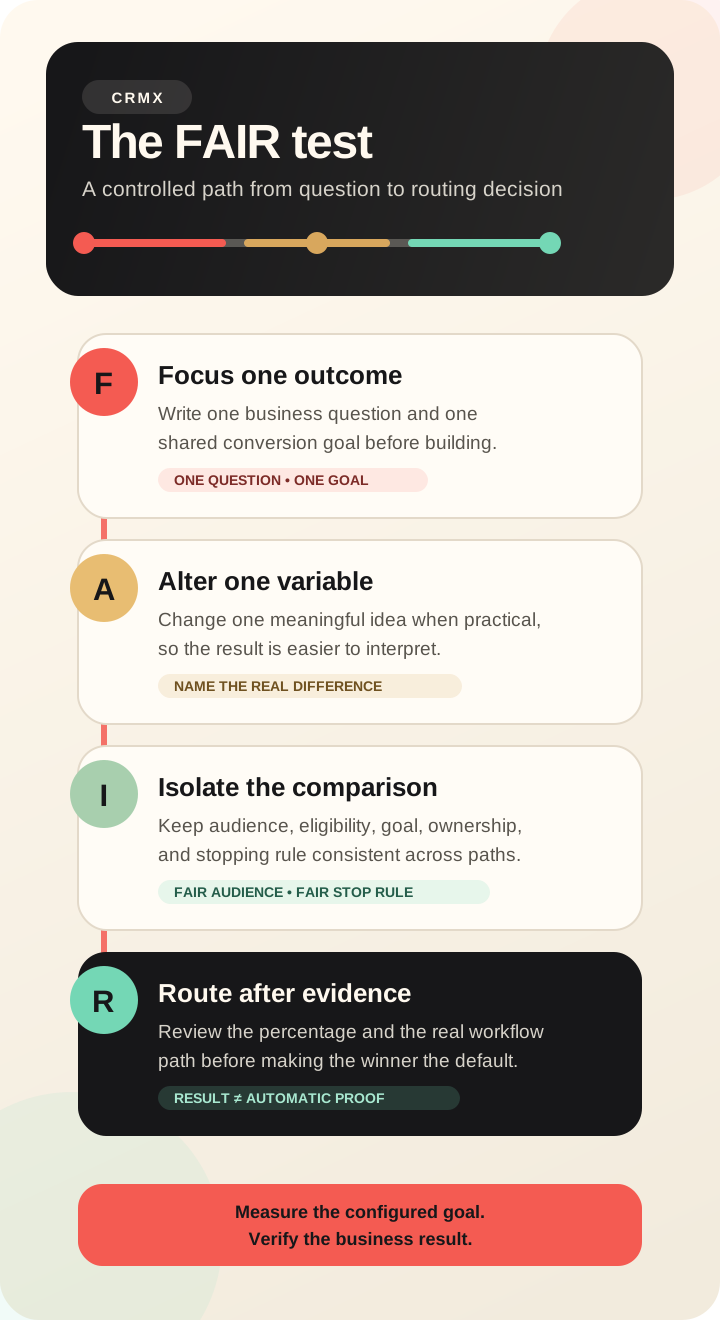
1. Focus one outcome
Start with one decision the business needs to make.
Weak question: “Which workflow is better?”
Stronger question: “For eligible estimate leads, which follow-up path produces a higher booked-appointment percentage by the test's stopping point?”
Choose the goal before building the paths. Make sure the event or condition can be measured consistently for every contact. A clicked link can be useful when the question is about engagement. An appointment status is more useful when the question is about booking.
Do not choose an easy metric merely because it will produce more activity. The goal should represent the next business state you actually care about.
2. Alter one meaningful variable
Change one important part of the experience when practical:
- direct invitation versus education-first message;
- short wait versus longer wait;
- proof-led message versus problem-led message;
- email-only path versus email-and-SMS path, when both are authorized;
- one sequence length versus another.
If the paths change the subject line, body copy, timing, channel mix, offer, and CTA at the same time, the test may still identify a higher-performing path. It will not tell you which change caused the difference.
Name each path for the actual idea being compared. “Direct booking” and “Education first” are more useful than “Path A” and “Path B” when the team reviews the result later.
3. Isolate the comparison
Keep the rest of the test as consistent as the business question allows:
- one entry trigger;
- one eligible audience;
- the same exclusions and stop conditions;
- the same shared winning criterion;
- the same calendar, product, form, or qualification definition;
- the same reply and exception ownership.
Then choose the stopping rule before the first contact enters. CRMX lets you use contacts entered, goal completions, or a date and time. Record the chosen rule and the reason.
The official guide says even distribution is intended, but path counts can differ when relatively few contacts have entered. That is another reason not to overreact to an early lead.
4. Route only after enough evidence
Review entrants, conversions, conversion percentage, the time period, and anything unusual that happened during the test.
Ask:
- Did both paths receive the intended audience?
- Did messages send through the expected channel and sender?
- Did replies reach the right owner?
- Did calendar, form, payment, or field events record correctly?
- Did a holiday, outage, offer change, or staff change affect one path differently?
- Is the result large and stable enough for the business to act on?
CRMX reports the highest conversion percentage and can route future contacts to that path. The official sources do not claim that the platform performs a statistical-significance test or proves causation. Treat the winner as operating evidence, then verify the new default path after routing changes.
Example 1: a home-service estimate follow-up test
An HVAC company receives estimate requests through one form. Every eligible lead gets an immediate acknowledgment and a human scheduling owner. The company wants to improve the next step without changing the offer.
It creates an A/B Test after the acknowledgment:
- Path 1 — Direct booking: asks the lead to choose an estimate time immediately, then sends a reminder if no appointment is booked.
- Path 2 — Education first: sends a short explanation of what happens during the estimate, then asks the lead to choose a time.
Both paths use the same calendar and the same appointment-status goal. The team ends the test after its predeclared number of eligible entrants and selects Send new contacts to the winning path.
Before accepting the result, the team checks more than the percentage. It confirms that both messages used the intended sender, the booking link worked, after-hours replies reached the scheduling owner, and appointments reached the same pipeline state.
The winning path becomes the new default only after that review. The rest of the home-service lead follow-up system still handles replies, qualification, no-response follow-up, booking, and valid stop conditions.
Example 2: a coach compares two discovery-call paths
A business coach has a workflow for qualified inquiry leads. The coach wants to compare two ways of inviting the lead to a discovery call.
- Path 1 — Problem led: reflects the main problem from the inquiry and offers the call as the next decision step.
- Path 2 — Proof led: explains the call structure and the specific decision the lead will leave with before offering the same calendar.
Both paths use the same eligibility rules, calendar, follow-up duration, and booked-appointment goal. The test ends on a selected date in the CRMX account's time zone.
If the proof-led path has the higher conversion percentage, CRMX can send future entrants to it. The coach still reviews lead quality, replies, cancellations, and show-up behavior before treating the path as a durable improvement.
That keeps the experiment connected to the broader discovery-call follow-up process and the CRMX Revenue Flywheel, where booking is one state in a longer lead-to-customer system.
How to set up a workflow A/B Test in CRMX
Use one low-risk, measurable follow-up decision for the first test.
- Open Automation → Workflows in the intended CRMX subaccount.
- Open an existing workflow or create the workflow that contains the eligible audience and trigger.
- Select Add action, then choose A/B Test.
- Give the action a name that states the business question.
- Add between 2 and 10 paths and give each path a descriptive name.
- Under Winning Criteria, choose a goal event or custom condition.
- Select the exact email, link, calendar, form, product, payment state, contact field, or custom field the goal requires.
- Choose a test length based on contacts entered, goal completions, or date and time.
- Choose whether new contacts should go to the winner or continue splitting after the test ends.
- Save the action and build the variation under each path.
- Review eligibility, consent, senders, timing, stop conditions, reply owners, and exception paths.
- Save and publish the workflow only after the complete customer journey is approved.
- Run authorized internal tests through every path and confirm the goal can record.
- Monitor Statistics and workflow execution without changing the question mid-test.
- At the stopping point, record the result and the operational context before changing future routing.
The CRMX workflow publish-validation guide can help with the release step. Passing that gate does not replace the A/B Test preflight or real-path verification.
A/B Test is not the same as Split
The actions answer different questions.
Split distributes contacts among paths. The November 13 release adds Even and Weighted distribution options, but the current official Split help guide still describes Random as the only option. Because those sources do not yet agree, this article does not instruct CRMX users to rely on the newer Split modes.
A/B Test distributes contacts evenly, measures every path against one shared conversion goal, identifies the highest conversion percentage, and can route future entrants to the winner.
Use A/B Test when the decision depends on a measured outcome. Use a distribution action when the purpose is allocation rather than winner selection, after verifying the currently available options in the intended account.
Limits and rollout notes
The official changelog presents the A/B Test action as currently available, and the dedicated help guide documents the current subaccount workflow path. Neither source states a beta, Labs, phased, regional, agency-only, or plan restriction.
Important boundaries remain:
- Paths are evenly distributed. Weighted allocation is not an A/B Test setting.
- Every path uses the same goal. Winning criteria measure conversion; they do not decide which path a contact enters.
- The winner is percentage-based. If paths tie, the first path is treated as the winner.
- Early declaration can shorten the comparison. The tool allows it; the operator must decide whether the evidence is sufficient.
- Date-based tests use the account's time zone. Verify the intended CRMX subaccount before setting the end time.
- Reset is destructive to the prior test result. Saving after reset clears earlier statistics.
- Returning contacts may take a different path after reset. Do not assume their old assignment persists into a new test.
- A reported winner is not a delivery audit. Inspect execution logs, message state, replies, appointment state, and other real evidence separately.
- A reported winner is not a revenue guarantee. The goal measures the event or condition you configured.
- The official sources do not document statistical significance. Do not present a temporary percentage lead as scientific proof.
Where CRMX AI employees fit
A workflow A/B Test can compare approved follow-up paths that include an AI employee, but only when the two paths are designed around a clear and safe question.
For example, a business could compare a standard scheduling prompt with an AI-employee qualification step before the same booking goal. That test changes more than copy, so the result would compare two complete paths rather than isolate one message variable.
The A/B Test action does not train an AI employee, grant it tools, authorize outreach, define its knowledge, review its conversations, or create a human escalation path. Those controls must already exist and be tested.
Keep the measurement boundary clear: CRMX can report which configured path reached the shared goal more often during the test. It does not prove that an AI response was accurate, compliant with the business's rules, or responsible for the result.
Workflow A/B Test QA checklist
Before customer-facing contacts enter, confirm:
- The workflow is in the intended CRMX subaccount.
- The test answers one written business question.
- Every path receives the same eligible audience.
- Path names describe the actual variation.
- Every path uses the same winning criterion.
- The goal event or custom condition matches the desired business state.
- The stopping rule is chosen and recorded before launch.
- Date and time settings use the intended account time zone.
- Consent, channel eligibility, sender, and message content are approved.
- Replies and exceptions have named owners.
- Stop conditions prevent irrelevant or duplicate follow-up.
- Every path completes an authorized internal test.
- The conversion goal records during testing.
- Workflow execution logs show the expected actions.
- The team will not reset before preserving the result.
- The post-test routing choice is deliberate.
- The reported winner will be reviewed against operational context.
- The routed winner will be monitored after it becomes the default.
Frequently asked questions
How many workflow paths can CRMX compare?
The A/B Test action supports 2–10 paths. Contacts are intended to be distributed evenly among the available paths.
What can count as a conversion?
The official guide lists goal events such as email activity, a clicked trigger link, appointment status, form submission, payment received, and invoice paid. You can also define a custom condition using contact or custom fields.
Can CRMX send future leads to the winning path automatically?
Yes. Choose Send new contacts to the winning path when configuring what happens after the test ends. Contacts already inside another path complete their existing sequence.
Does the winner prove the path caused more conversions?
No. CRMX identifies the path with the highest recorded conversion percentage for the configured test. The official sources do not state that the platform proves causation or statistical significance.
Can I compare email and SMS follow-up?
Yes. The official help guide says paths can contain different combinations of workflow actions, including email, SMS, and waits. Use one shared goal and confirm that every channel, message, sender, and recipient is authorized.
What happens if I reset the test?
Saving after Reset test clears the previous results. Returning contacts may also enter a different path in the new comparison. Preserve the old result before resetting.
What to do next
Choose one follow-up decision that currently depends on opinion, define the business outcome, and build the smallest fair comparison CRMX can measure.
Then connect the result to the CRMX Revenue Flywheel: capture the right audience, contact them through approved paths, measure the next real state, and keep human ownership around replies and exceptions.
If you want help designing the workflow, goal, and verification plan before it touches live leads, request a CRMX strategy demo.