
Discovery Call Intake for Coaches: The CRMX READY Brief
Build a three-question CRMX discovery call intake form that saves useful context, creates a concise prep brief, and routes missing details to a person.
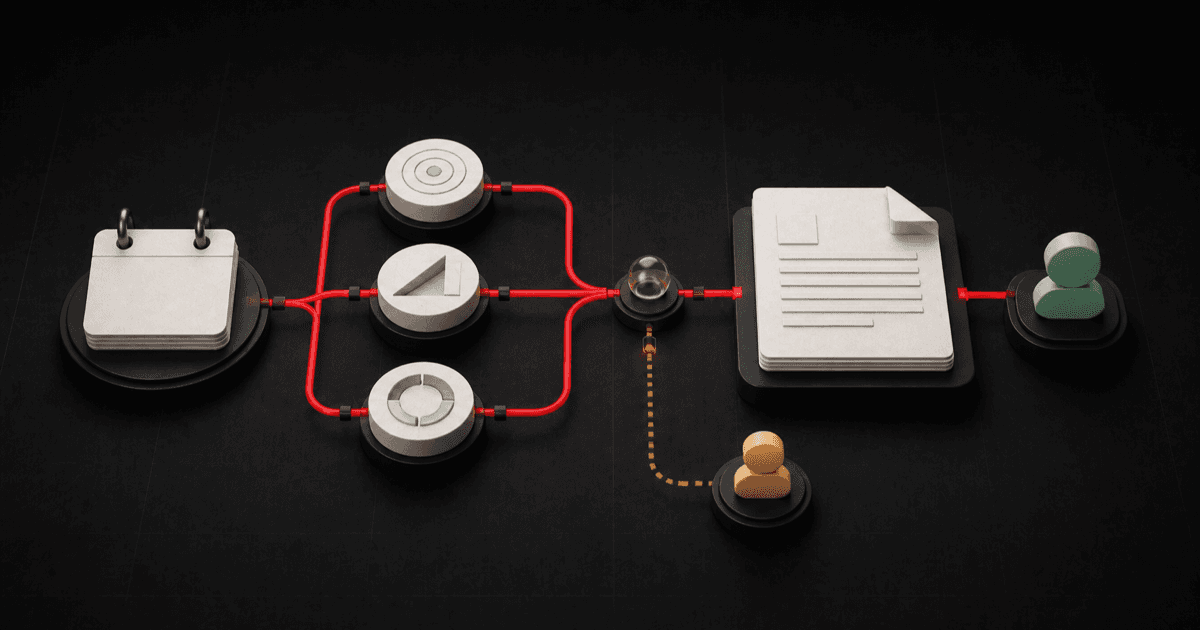
A booked discovery call is not automatically a prepared discovery call.
The calendar may know the person's name and meeting time while the coach still opens the call with, “So, tell me what is going on.” That forces the prospect to restart the story, wastes the most useful part of the appointment, and leaves the team with no consistent preparation standard.
The opposite mistake is a giant application attached to a short conversation. The prospect has to explain the business, goals, history, budget, team, symptoms, constraints, and life story before earning 30 minutes on the calendar.
There is a cleaner middle path: ask three questions that change how the call should begin, save the answers to the contact record, and turn them into one concise prep brief for the appointment owner.
Brent Attaway's Five Fortune Engines treats lead capture, follow-up, conversion, customer experience, and automation as connected systems. Permission and context should make the next step easier. Appointment preparation should be deliberate. Discovery should begin with listening and clarification. Automation should make a defined checklist consistent without taking human judgment away from the person leading the call.
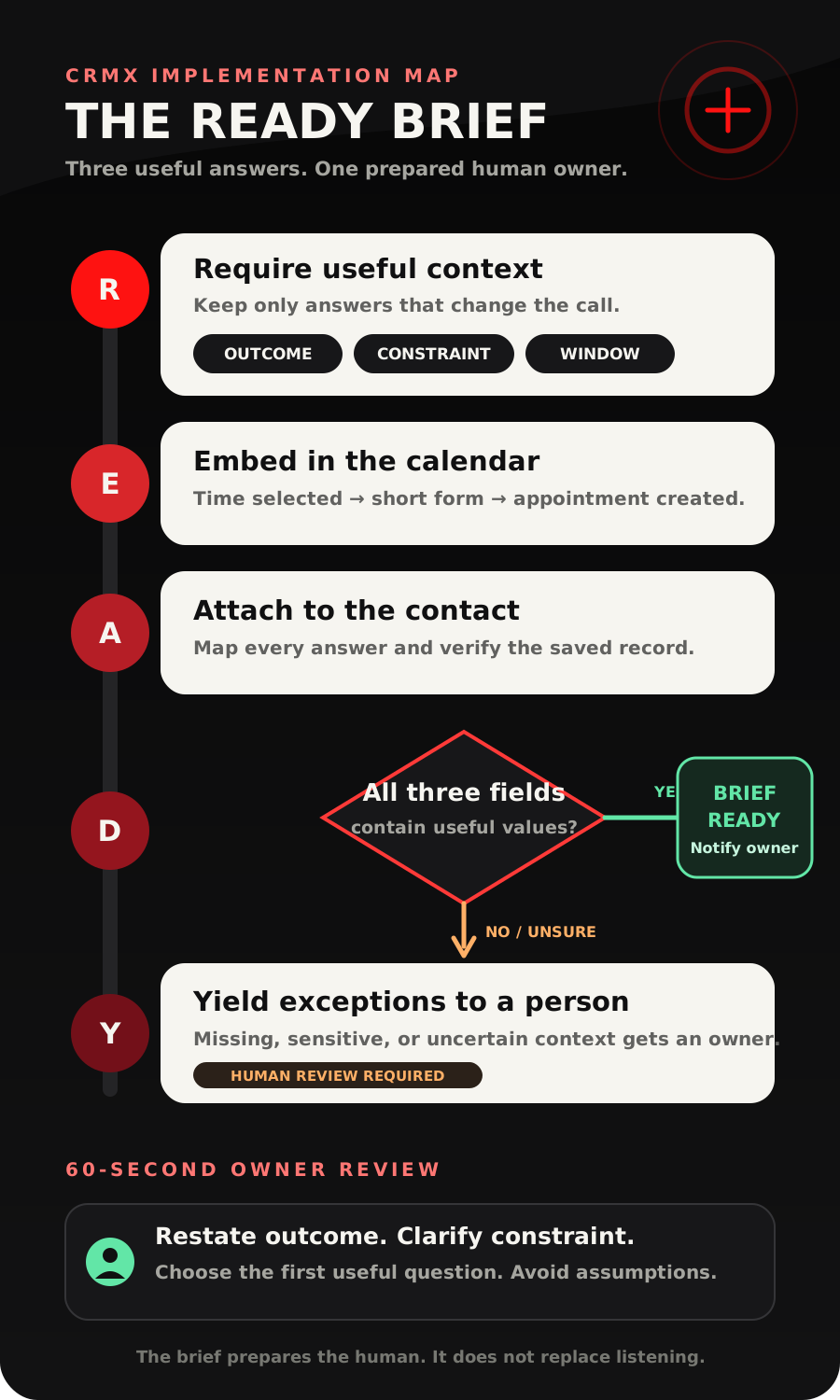
The CRMX READY Brief turns those principles into a practical discovery call intake form for coaches and consultants: Require only decision-changing context, Embed it in the booking path, Attach answers to the contact record, Deliver one human-readable brief, Yield exceptions to a person.
The tactic: three questions before the appointment is created
Use one short custom form inside the booking path. Ask:
- Desired outcome: What would make this conversation useful for you?
- Primary constraint: Which issue should we examine first?
- Action window: When do you expect to decide on a next step?
Those labels are starting points. The wording and choices should reflect the actual appointment.
The important rule is this:
Every question must change preparation, routing, or the first useful question on the call.
If an answer would merely be “interesting to know,” remove the field. If the answer belongs in delivery after a sale, move it to the client onboarding workflow. If the question asks for sensitive detail that the sales path does not need, do not collect it.
This is not a hidden qualification exam. It is a compact handoff from the person booking to the person preparing.
What the READY Brief fixes
Without a defined pre-call handoff, small inconsistencies compound:
- the form collects details nobody reviews;
- the appointment owner searches across notifications, notes, and messages;
- a team member asks the same question the prospect already answered;
- the opening question is generic because the context is not visible;
- a blank field is treated as a complete brief;
- automation sends a summary to everyone instead of naming one owner;
- confidential information is collected because “more data” sounded useful;
- a staff-booked appointment enters a workflow built only for self-booking.
The READY Brief gives the booking one visible state: Brief Ready or Human Review Required. It also gives the appointment one owner who knows what to review before the call.
R - Require only decision-changing context
Start with the call, not the form builder.
Write down the purpose of the appointment in one sentence:
This call helps [specific person] examine [specific problem] and decide [specific next step].
Then identify the minimum context the appointment owner needs to begin well.
For a business coach's growth review, that may be:
- the outcome the owner wants;
- the bottleneck they believe is most urgent;
- the window in which they expect to act.
For a leadership consultant's diagnostic, it may be:
- the decision or operating issue under review;
- where ownership is unclear;
- whether the desired next step is immediate, this quarter, later, or still exploratory.
Do not use a generic intake form to request medical history, legal strategy, financial account details, personnel allegations, relationship disclosures, passwords, or confidential client information. If the engagement legitimately requires protected or sensitive information, define the appropriate collection, access, retention, and human-review process separately before launch.
The three-question constraint protects both sides. The prospect can explain what matters without writing an essay. The appointment owner gets a consistent starting point without pretending the form has already diagnosed the problem.
E - Embed the questions in the booking path
The current official calendar form documentation explains that a custom form can appear after a person selects a time and before the appointment is created. When its fields are mapped correctly, the answers save to the contact record.
That placement matters. A disconnected form creates two unfinished actions: submit the questionnaire, then find and book the calendar. The embedded form keeps the context and appointment in one customer journey.
Build one form named Discovery Call READY Intake. Add the three questions after the standard contact details the calendar needs. Keep the instructions short:
Three quick questions help us prepare for the conversation. Please share only the business context needed for this call. Do not include private account credentials or sensitive personal information.
Use field types that match the answer:
- Desired Outcome: short or long text, with a clear response limit in the prompt;
- Primary Constraint: radio select or dropdown using the choices your business actually supports, plus an honest Other / Unsure route;
- Action Window: radio select such as Now, Within 30 days, This quarter, Later, or Exploring.
The documentation says one custom form can be attached to a calendar and that a form must be attached individually to every calendar that uses it. Do not assume changing one calendar updates the others. Test the exact public booking link for each appointment type.
A - Attach answers to the right record
Create the fields before building the form.
The current custom-field documentation distinguishes contact fields from opportunity fields. Contact fields can be used in forms and contact workflows. Opportunity fields belong to a specific deal.
For the first READY Brief, use contact fields in a folder named Discovery Call Prep:
| Field | Suggested type | Purpose |
|---|---|---|
| Call Outcome | Long text | What would make the conversation useful |
| Primary Constraint | Single-select | Which approved issue should be examined first |
| Action Window | Single-select | When the person expects to decide on a next step |
| Pre-Call Prep State | Single-select | Brief Ready, Human Review Required, Call Complete, or Closed |
Use person-level contact fields only when the information should remain attached to that person and be available to the booking workflow. If the same contact can have multiple simultaneous deals with different answers, decide whether the context belongs on an opportunity instead. Confirm that object choice before creating the field because the official documentation says a field's object cannot be switched later.
After attaching the form to the calendar, complete a real test booking. Open the test contact and confirm each answer saved in the expected field. A form that looks correct but writes to the wrong object is not ready.
D - Deliver one human-readable brief
The form is not the outcome. The brief is.
Create a workflow with the documented Customer Booked Appointment trigger. Filter it to the exact regular calendar used for this discovery call.
The official trigger applies when a customer independently books through a booking link or online calendar. Do not assume it covers a staff-created, imported, recurring, or externally synchronized appointment. Those entry paths need their own tested workflow or a named human review.
The workflow should:
- start from the correct self-booked calendar;
- use an If/Else action to check that Call Outcome, Primary Constraint, and Action Window contain values;
- set Pre-Call Prep State to Brief Ready when all three are present;
- send one internal brief to the appointment owner;
- set Pre-Call Prep State to Human Review Required when any value is missing or unexpected;
- notify the named owner of exactly what needs review;
- end without inventing a fit decision, diagnosis, recommendation, or offer.
The documented Update Contact Field action can write the operating state. The documented Internal Notification action can send dynamic contact data to selected users, roles, or teams.
Use the workflow's field picker to insert the saved values. Do not paste guessed custom-field keys from another account.
Copy-ready internal prep brief
Subject: Discovery call prep - [Contact name] - [Appointment date and time]
Body:
Appointment: [Calendar name] - [Appointment date and time]
Desired outcome: [Call Outcome field]
Primary constraint: [Primary Constraint field]
Action window: [Action Window field]
Prep state: [Pre-Call Prep State field]
Owner: [Assigned appointment owner]
Review before the call: Restate the desired outcome, clarify the constraint, and decide the first useful question. Do not treat these answers as a diagnosis or purchase commitment.
Send the brief to the person who owns the appointment. A summary broadcast to every administrator is not ownership.
Y - Yield exceptions to a person
Automation should make the normal path consistent and make the exception visible.
Route to Human Review Required when:
- one of the three fields is blank;
- the person chose Other / Unsure and the context needs interpretation;
- an answer contains sensitive or confidential information;
- the appointment was created outside the tested self-booking path;
- the selected calendar does not match the inquiry;
- the appointment has no clear owner;
- the person asks about scope, pricing, eligibility, or an exception the system is not approved to answer;
- the appointment is canceled or changed before the owner reviews the brief.
A trained CRMX AI employee can acknowledge a booking, answer approved logistical questions, or hand a routine conversation to the appointment owner with context attached. The AI employee should not decide whether a person is suitable for a program based on sensitive details, invent a diagnosis, promise a result, change approved scope, or conceal an uncertain answer.
The clean fallback is simple:
Thanks for sharing that context. I have attached it to your appointment and asked [Owner or Team] to review the part that needs a person. They will continue with you here if anything is needed before the call.
Only send that message when the handoff has actually been configured and tested.
Build the READY Brief in CRMX
Use CRMX calendars, contact records, workflows, notifications, conversations, and pipelines as one connected path.
1. Name the appointment around its useful outcome
Use Growth Constraint Review, Executive Alignment Diagnostic, or another truthful name that describes the conversation. Free Discovery Call tells the prospect almost nothing about what the time is for.
Write the calendar description so the person knows:
- who the call is for;
- what will be examined;
- what the call will not do;
- how long it takes;
- who should attend;
- what happens after the booking form is submitted.
2. Create the four contact fields
Build Call Outcome, Primary Constraint, Action Window, and Pre-Call Prep State under one folder. Add descriptions so future team members know what each field means.
Keep the constraint choices broad enough to remain useful and narrow enough to guide preparation. A business coach may use Attention, Lead Capture, Follow-Up, Conversion, Delivery, and Unsure. A leadership consultant needs a different vocabulary.
3. Build and attach the three-question form
Create one custom form and attach it to the intended calendar. Make the questions required only when the business has decided the appointment should not be created without them.
Preview on a phone. Long labels, vague choices, and giant text boxes turn three questions into a wall.
4. Build two branches, not one optimistic path
The complete branch creates Brief Ready and notifies the owner.
The fallback branch creates Human Review Required and says what is missing. The official If/Else documentation includes a fallback branch. Use it deliberately rather than letting an unknown state enter the strongest automated path.
5. Give the appointment owner a 60-second review
Before the call, the owner should be able to answer:
- What outcome did this person request?
- Which constraint did they name?
- How soon do they expect to act?
- What assumption must I avoid making?
- What is the first useful clarification question?
The brief does not replace listening. It gives listening a better starting point.
6. Record the call outcome separately
Do not leave Brief Ready as the final customer state. After the appointment, move the record into the business's defined held, follow-up, nurture, client, or closed process.
If the person misses the appointment, use a distinct consultation no-show recovery workflow. If the person becomes a client, move them into the client onboarding system. The booking intake should not keep running after the journey changes.
Use case 1: a business coach's growth review
A business coach offers a Growth Constraint Review to owners who have already completed a useful lead-magnet funnel.
The booking form asks:
- What business outcome would make this conversation useful?
- Which constraint should we examine first: attention, lead capture, follow-up, conversion, delivery, or unsure?
- When do you expect to act: now, within 30 days, this quarter, later, or exploring?
Maya chooses Follow-Up and Within 30 days. Her outcome says she wants to understand why inquiries stop responding after the first conversation.
The workflow does not label Maya qualified, promise a solution, or generate a proposal. It marks the brief ready and sends the appointment owner the three answers with the meeting details.
The coach begins with:
You said the useful outcome is understanding where inquiries stop responding, and you named follow-up as the first constraint. Before we map anything, where does the current process become inconsistent: the first response, the handoff, or the next scheduled step?
The form created a better first question. The person still owns the diagnosis.
Use case 2: a leadership consultant's decision diagnostic
A leadership consultant offers an Executive Alignment Diagnostic for founders and operating leaders.
The booking form asks:
- Which decision or operating outcome should this conversation help clarify?
- Where is the primary friction: priority, ownership, information, timing, or unsure?
- When does the team need a useful next decision: this week, this month, this quarter, later, or exploring?
Andre chooses Ownership and This month. His outcome says a cross-functional initiative has no clear accountable owner.
The internal brief tells the consultant what to prepare. It does not ask Andre to name employees, recount confidential disputes, or upload internal documents through a generic sales form.
The consultant begins with:
You want a clearer owner for one cross-functional initiative, and the decision matters this month. What decision currently has no single person authorized to make it?
If Andre had included confidential personnel details in the open field, the workflow would mark Human Review Required and limit the notification to the authorized appointment owner.
The READY state-and-owner decision aid
| Verified event or state | What CRMX should do | Owner |
|---|---|---|
| Correct self-booked appointment plus all three answers | Set Brief Ready and send the deterministic prep brief | Appointment owner |
| One or more prep fields missing | Set Human Review Required and identify the missing context | Appointment owner or scheduling team |
| Other / Unsure selected | Keep the answer truthful and prepare a clarifying question | Appointment owner |
| Sensitive or confidential detail appears | Stop broad automation and restrict the review to the approved person | Authorized human owner |
| Staff-booked or untested appointment source | Do not assume the self-booking trigger covered it | Scheduling owner |
| Appointment canceled or changed | Stop treating the old brief as current and review the new state | Appointment owner |
| Routine logistics question | Answer from approved information or route cleanly | Bounded AI employee or scheduling owner |
| Call held | End the prep state and record the actual next outcome | Appointment owner |
Launch checklist for a discovery call intake form
Form and field checks
- Confirm all three questions change preparation, routing, or the first useful question.
- Confirm every form field maps to the intended contact field.
- Confirm the contact versus opportunity object decision is correct.
- Include Other / Unsure where the available choices are not exhaustive.
- Remove fields that collect delivery details before a sale.
- Remove unnecessary sensitive or confidential questions.
- Review the public booking flow on mobile.
- Confirm the form is attached to every intended calendar individually.
Workflow and ownership checks
- Filter the booking trigger to the exact regular calendar.
- Test the complete branch with all three answers.
- Test each missing-field condition separately.
- Test the fallback branch with an unexpected value.
- Select dynamic fields through the workflow picker.
- Confirm the internal notification reaches the named appointment owner.
- Confirm the brief includes the appointment date, time, and calendar.
- Confirm no broad team notification exposes unnecessary context.
- Confirm staff-booked, recurring, imported, and synchronized appointments have a defined route.
- Confirm a canceled or changed appointment no longer appears ready without review.
Conversation checks
- Book with a non-customer test record.
- Verify the answers on the contact record.
- Verify the appointment owner can find the brief quickly on mobile.
- Ask a routine logistics question and verify the approved response.
- Enter an uncertain or sensitive answer and verify human ownership.
- Complete the call and verify the prep state hands off to the real outcome.
Frequently asked questions
How many questions should a discovery call intake form have?
Start with three questions that change preparation, routing, or the first useful question. Three is the READY Brief's design constraint, not a universal performance benchmark. Add a field only when the appointment owner can explain how the answer changes what happens next.
Do CRMX calendar form answers save to the contact record?
The current official documentation says mapped custom-form responses are saved to the contact record. Verify every mapping with a test booking in the exact calendar you plan to use.
Should the intake form qualify people automatically?
Not by default. The READY Brief prepares a conversation. If your business has approved qualification rules, build and test them as a separate decision system with truthful outcomes and a human exception path. Do not turn one open-text answer into an invisible rejection.
Can an AI employee summarize the intake?
The first implementation does not need AI summarization. A deterministic notification using the three saved fields is easier to inspect and test. A trained AI employee can handle approved logistics or handoffs, but sensitive context, fit decisions, diagnoses, exceptions, pricing, and scope remain within the boundaries your business has explicitly defined.
What if a team member books the appointment for the prospect?
The documented Customer Booked Appointment trigger is for a customer who independently books a regular appointment. Define and test a separate entry path for staff-created, recurring, imported, or synchronized appointments. Until that path is verified, route them to Human Review Required.
Does this replace a client onboarding form?
No. The discovery intake prepares the pre-sale conversation. A client onboarding form should collect the delivery information needed after a completed sale and should begin only after the customer reaches the approved onboarding state.
Make the call feel prepared before it begins
A useful discovery call intake form does not try to finish the sale before the appointment. It gives the prospect a small, respectful way to name the outcome, constraint, and timing. Then it puts that context in front of the person responsible for the conversation.
Build one calendar, three fields, two workflow branches, one prep brief, and one human owner. Test the normal path and the uncomfortable exceptions. That is enough to turn a blank appointment into a prepared handoff without turning the booking page into an interrogation.
Explore the complete CRMX path for coaches and consultants, audition Guy live, or see how CRMX implementation services can connect the form, calendar, workflow, AI employee, and human handoff into one tested system.
Sources and further reading
- HighLevel Support: Adding Custom Forms to Calendars
- HighLevel Support: How to Use Custom Fields
- HighLevel Support: Customer Booked Appointment workflow trigger
- HighLevel Support: If/Else workflow action
- HighLevel Support: Internal Notification workflow action
- HighLevel Support: Update Contact Field workflow action