
Webinar Follow-Up for Coaches: The CRMX AFTER Map
Build a webinar follow-up workflow that separates event truth, routes replies, offers the right next step, and records real lead outcomes.
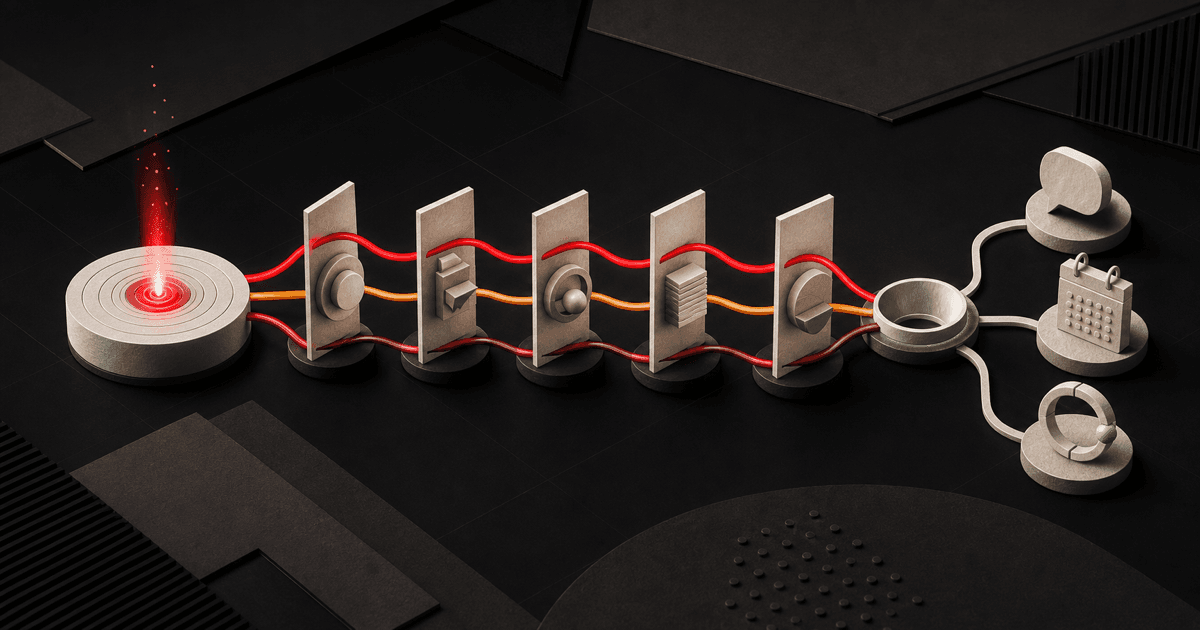
A webinar follow-up for coaches should not be one replay email sent to everyone who registered.
Registration, attendance, watch depth, a reply, and a booked consultation are different events. When the system collapses them into one list, the follow-up becomes vague: attendees receive reminders to watch what they already saw, absent registrants receive a pitch before they receive the promised value, and real questions wait behind scheduled messages.
Brent Attaway's Five Fortune Engines gives the sequence a cleaner job. Attention earns the event registration. Lead Capture records permission and context. Follow Up continues the promise. Conversion makes the next decision easier. Raving Fan improves the experience after delivery. Automation makes the defined handoffs happen consistently.
The CRMX AFTER Map turns that sequence into five operating moves: Anchor the event truth, Follow the right branch, Turn replies into owned conversations, Extend one next step, Record the outcome.
The strategy: follow the event that actually happened
A registration is useful. It is not proof that someone attended, watched, understood, wants a consultation, or fits the offer.
The current official webinar guide documents live and on-demand formats, registration and confirmation pages, CRM lead capture, reminders, follow-up, and workflow support. That gives a coach the infrastructure for an event path. It does not remove the need to define what each event means.
Use this rule:
Every follow-up message should begin with a state the system can prove and end with one next step that fits that state.
If your event setup can verify attendance or a configured on-demand engagement signal, use it. If it cannot, record Attendance Unknown and send a message that remains true either way. Never turn a page view, email open, or registration into a more valuable business event by renaming it.
Why the same sequence fails different people
Post-webinar follow-up usually breaks in the handoffs:
- The event promise disappears. The invitation teaches one useful idea, but the follow-up jumps directly to a sales call.
- Every registrant gets the same message. Attendance and engagement do not change the path.
- The replay becomes the strategy. A link is delivered, but nobody asks a useful question or owns the answer.
- The calendar appears too early or too late. Curious people feel pushed, while ready people search for a next step.
- Replies do not stop the sequence. A real conversation and a scheduled drip talk over each other.
- Reporting stops at registrations. The team cannot see conversations, qualified opportunities, bookings, or closed outcomes.
The AFTER Map gives each handoff a state, owner, and exit.
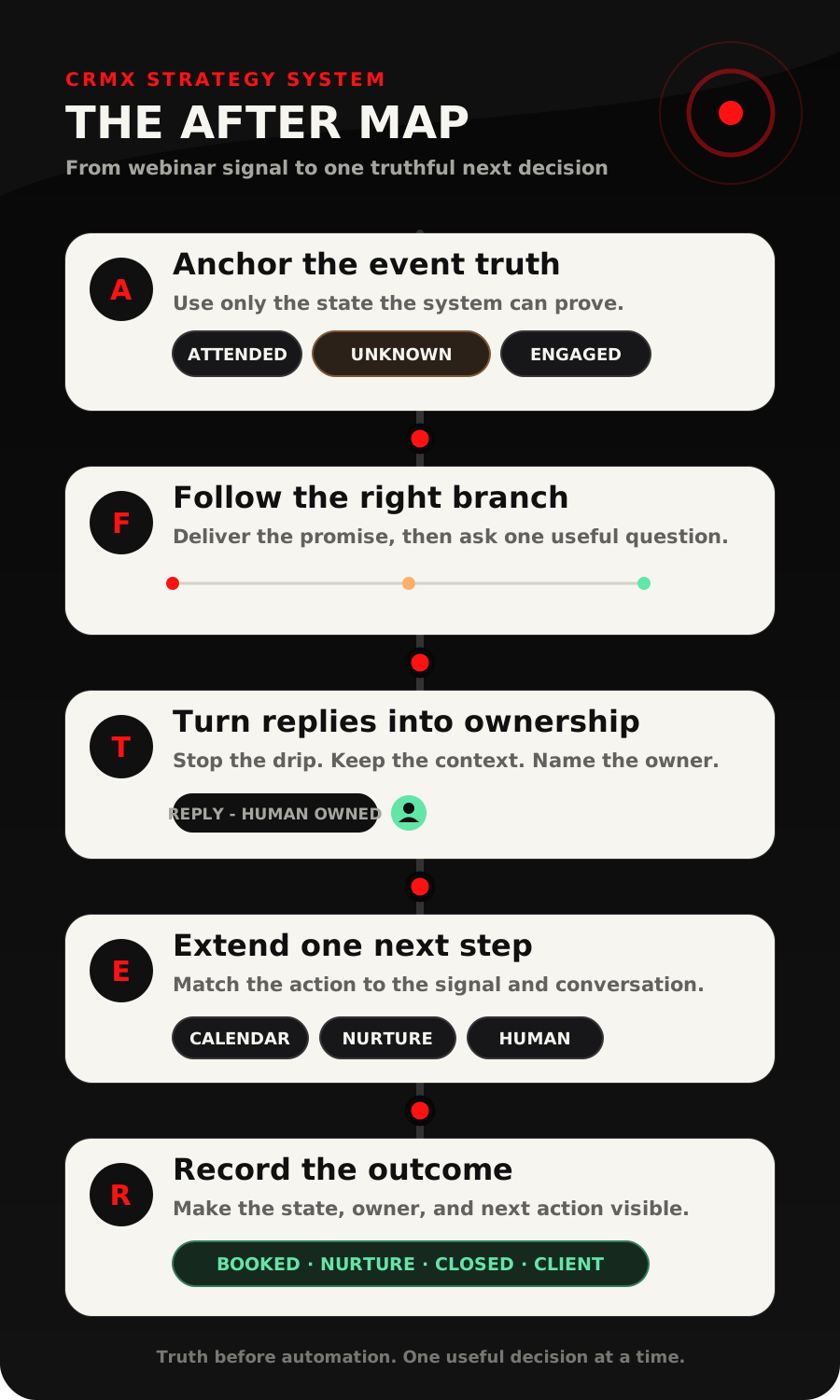
A - Anchor the event truth
Start with the event you can verify.
For a live webinar or workshop, useful states may include:
- Registered
- Attended
- Registration Recorded - Attendance Unknown
For an on-demand session, a tested implementation may add Engaged On Demand after a meaningful watch threshold. The current official webinar analytics documentation describes registration-versus-attendance reporting for live events and view, watch-time, completion, and drop-off information for on-demand events. It also documents a Video Tracking workflow trigger for a configured percentage threshold.
Treat that as a capability to verify on the exact webinar asset before using it in automation. Publish the registration path, confirm it feeds Contacts, test the event with non-customer records, and inspect the recorded state. If the signal is unavailable or uncertain, use the fallback branch.
The fallback is not a failure. Attendance Unknown is more useful than a confident fiction.
F - Follow the right branch
Each state needs a different first mission.
Attended or meaningfully engaged
Continue the idea that earned attention. Send the promised resource or summary, then ask one question tied to the event's decision.
Thanks for joining [Event Name]. Which part is the bigger constraint right now: [Choice A], [Choice B], or [Choice C]?
The goal is not to restate the entire webinar. It is to help the person apply one idea and reveal the next useful conversation.
Registered, attendance unknown
Use language that remains accurate:
Thanks for registering for [Event Name]. Here is the promised resource: [Link]. If you want help applying it, which question should we answer first?
Do not write Sorry we missed you unless the system can prove non-attendance. Do not write Thanks for attending when the system only knows the form was submitted.
Replied or asked for help
Stop the timed branch and move the message into an owned conversation. The person's words are now more useful than the planned sequence.
The current If/Else workflow documentation supports evaluating contact-specific data and routing contacts through matching branches. It also requires a fallback branch. Use that fallback deliberately instead of letting an unrecognized state fall into the strongest sales path.
T - Turn replies into owned conversations
A replay click is activity. A reply is context.
The documented Customer Replied trigger can start a workflow when a contact responds and can be filtered by channel, tag, phrase, intent type, or the workflow being answered. Use that event to:
- assign the conversation to a named owner;
- notify the right coach, consultant, or team member;
- update the event state to Reply - Human Owned;
- remove the contact from incompatible timed messages;
- preserve the event topic and prior question in the contact history.
A trained CRMX AI employee can acknowledge the reply, answer approved event logistics, reference the promised resource, and ask one clarifying question at a time. Guy should not decide program fit, invent pricing or scope, interpret sensitive details, or promise an exception. Those decisions remain human-owned.
Give Guy a one-sentence job:
Guy helps webinar registrants find the promised resource, clarifies which event topic they want to apply, offers the approved next step, and hands judgment or exceptions to a person with the event context attached.
That role is narrow enough to test and useful enough to protect momentum.
E - Extend one next step
The event should create a decision, not a pile of links.
Use the person's state and reply to choose one next step:
- Ready and within the defined fit: offer the correct consultation or assessment calendar.
- Relevant problem, not ready: send one matched resource and place the contact in a value-based nurture path.
- Question or unclear fit: keep the conversation human-owned until the question is resolved.
- No response after the small sequence: close the timed path and preserve an accurate future follow-up state.
- Outside fit or opted out: stop and record the outcome.
Do not add a lead magnet, replay, application, calendar, newsletter, and second offer to the same message. The Follow-Up Engine works when one touch has one mission. The Conversion Engine works when the next action matches the decision already in front of the person.
If a consultation is booked, stop the post-webinar invitation path and start the preparation sequence. If that consultation is later missed, use a separate consultation no-show recovery workflow instead of restarting webinar follow-up.
R - Record the outcome
The workflow is not complete because the emails sent. It is complete when the contact's current state, owner, and next action are visible.
Use a small event-state field and, when useful, a pipeline that describes the lead's decision:
| State | What the system knows | Owner | Next action |
|---|---|---|---|
| Registered | The event form was submitted | Workflow | Confirm and prepare |
| Attended or engaged | The configured event signal was verified | Workflow | Deliver value and ask one question |
| Attendance unknown | No reliable attendance state is available | Workflow | Use the truthful fallback message |
| Reply - Human Owned | The person responded | Named person or Guy within rules | Continue the real conversation |
| Call Booked | The correct calendar event exists | Appointment owner | Begin preparation and reminders |
| Nurture | The problem is relevant, but the next step is not a call | Workflow with a review point | Continue useful education |
| Closed | The person opted out, declined, is outside fit, or the path ended | None unless review is needed | Stop incompatible messages |
This state model also gives the Raving Fan Engine a clean handoff. Event questions can improve the next workshop. A new client should leave the webinar path and enter a separate client onboarding system. A client milestone, review, renewal, or referral request belongs to the client experience, not the lead follow-up sequence.
Build the AFTER workflow in CRMX
Use CRMX websites, webinars, conversations, workflows, pipelines, calendars, and reporting as one connected operating path.
1. Define the event promise
Write down:
- the specific problem the event addresses;
- the useful resource promised after it;
- the one decision a participant should be able to make;
- the approved next step for a ready person;
- the questions and exceptions that require a human.
If the event promise is broad, the follow-up will be broad. Tighten the topic before adding branches.
2. Connect registration to the contact record
Use one tested registration form for the first implementation. Confirm that a submission creates or updates the intended contact, records the event name and source, and starts the confirmation path once.
The registration event may set Event Status to Registered. It should not set Attended, Qualified, or Call Booked.
3. Verify the event signals
Create test contacts for:
- registered and attended;
- registered with attendance unknown;
- on-demand engagement when that signal is configured;
- replied;
- booked;
- no response;
- opt-out or closed.
Inspect what the exact event asset records. Document the verified fields, tags, or workflow events. Keep the fallback branch until every expected record reaches a truthful outcome.
4. Build three small workflows
Registration and preparation: confirm the event, state the time and timezone, deliver joining instructions, and send the business's tested reminders.
Post-event branching: wait until the event state is available, check it, deliver the matching resource and question, then end after a small defined sequence.
Reply ownership: listen for a reply, assign the conversation, stop incompatible automation, and preserve the next action.
Three narrow workflows are easier to test than one giant event machine.
5. Connect the right calendar and pipeline
Use one appointment type for the first event. Name it around the promised outcome, such as Growth Constraint Review or Executive Alignment Diagnostic, rather than a generic call.
A verified booking should move the opportunity to Call Booked, remove the contact from post-event invitations, and begin the matching preparation path. A cancellation, no-show, reply, or human takeover should also stop messages that are no longer true.
6. Measure movement beyond registration
Track:
- registrations;
- verified attendance or engagement where available;
- replies;
- human-owned conversations;
- qualified opportunities;
- calls booked;
- calls held;
- clients;
- nurture and closed outcomes.
Google Analytics' current lead acquisition documentation distinguishes new, qualified, and converted lead events. CRMX does not need to copy those names internally, and this article does not assume the events are configured automatically. The useful discipline is reconciliation: a registration is not a qualified lead, and a qualified lead is not a customer.
Use case 1: a business coach's growth workshop
A business coach runs Fix the Bottleneck: A 45-Minute Growth Workshop. Registration records the participant's selected constraint: attention, lead capture, follow-up, conversion, or client advocacy.
After the workshop:
- verified attendees receive the worksheet and one question tied to the selected constraint;
- attendance-unknown registrants receive the worksheet with neutral language and an invitation to name the first question;
- a reply about implementation moves into Conversations with the event topic and selected constraint attached;
- a ready owner can book a Growth Constraint Review;
- an owner still diagnosing the problem receives one matched article and a dated nurture review.
The workshop becomes the bridge from attention to a useful conversation, not an excuse to send the same calendar link to the whole list.
Use case 2: a leadership consultant's executive briefing
A leadership consultant hosts The 90-Day Decision Friction Briefing for founders and operating leaders. The registration form asks which friction is most visible: unclear priorities, slow decisions, weak ownership, or inconsistent follow-through.
After the event, a verified participant who selected slow decisions receives the briefing worksheet and one question:
Which decision has remained open the longest because ownership is unclear?
A confidential or sensitive answer routes directly to the consultant. A broad answer receives one short diagnostic resource. A leader who can name the decision, accountable sponsor, and desired review window may be offered an Executive Alignment Diagnostic calendar.
The same AFTER structure supports a different expertise business because the route follows verified state, problem context, and ownership.
Copy-ready post-webinar messages
Verified attendee or engaged viewer
Hi [First Name], thanks for joining [Event Name]. Here is the promised [Resource]: [Link]. Which part would be most useful to apply first: [Choice A], [Choice B], or [Choice C]?
Attendance-unknown fallback
Hi [First Name], thanks for registering for [Event Name]. Here is the promised [Resource]: [Link]. If you want help applying it, reply with the first question you want answered.
Reply acknowledgment
Thanks for the context. I have kept your event topic and question together. I can help with approved next steps here, or [Owner Name] can review anything involving fit, scope, or an exception.
Close the timed path
Hi [First Name], I am closing the short follow-up for [Event Name] for now. Your [Resource] is still here: [Link]. If the topic becomes timely later, reply to this conversation and tell us what changed.
Replace every bracketed field. Test the sender, link, reply route, calendar, stop rules, and mobile experience before activation.
The AFTER build-and-QA checklist
- The event teaches one useful idea to one intended audience.
- Registration records the event name, source, and promised resource.
- Registration does not automatically mean attended, engaged, qualified, or booked.
- Attendance or watch-depth signals are tested on the exact event asset.
- A truthful attendance-unknown fallback exists.
- Each branch sends the promised value before asking for another commitment.
- Each message has one mission and one next step.
- Replies appear in Conversations and reach a named owner.
- Guy's knowledge, booking rules, and human-handoff boundaries are tested.
- A reply, booking, opt-out, human takeover, or closed outcome stops incompatible messages.
- The correct calendar begins its own preparation path.
- Pipeline stages describe customer state rather than email activity.
- Reporting separates registrations, engagement, replies, qualification, bookings, held calls, and clients.
- Test records cover every branch, duplicate entry, late event data, missing owner, broken link, wrong calendar, and mobile layout.
Frequently asked questions
Should every webinar registrant receive a replay?
Deliver whatever the event promised and the business is prepared to support. The important part is not assuming that one replay link is a complete follow-up strategy. Pair the resource with a truthful state and one useful question.
What if CRMX cannot verify attendance for my setup?
Use Registration Recorded - Attendance Unknown. The fallback message can thank the person for registering, deliver the promised resource, and ask what they want help applying without pretending they attended or missed.
Should Guy offer the calendar immediately?
Only when the approved rules and conversation context support that next step. Guy can clarify the problem and offer the correct calendar, but human judgment should own unclear fit, sensitive context, pricing, scope, and exceptions.
How many follow-up messages should the first workflow send?
Start with the smallest complete path: deliver the resource, ask one useful question, send one close-the-loop message when appropriate, and stop. Add complexity only after the states show a real gap.
Make the event create one real next decision
Build one event, one verified state model, one useful question, one reply route, one calendar, and one clean ending. That is enough to connect the Attention, Lead Capture, Follow Up, Conversion, Raving Fan, and Automation engines without turning the webinar into another disconnected campaign.
Pair this workflow with the CRMX SIGNAL lead-magnet funnel, explore the complete system for coaches and consultants, or audition Guy live to hear how a trained AI employee handles one question at a time. If you want CRMX to map and build the path with your team, explore implementation services.